• You've discovered RedGuides, an EverQuest multi-boxing and scripting community 🧙‍♀️⚙️. We want you to play several EQ characters at once, come join us and say hello! 👋

  • A TLP without truebox has thawed (Very Vanilla ready)
    Frostreaver
Sic's Hotkeys

Guide - Sic's Hotkeys

I know I read it somewhere but this is all like reading and ancient Alien language for me. I mean what is an "Alias"? Anyway I am running a mini raid of 15 toons with 3 groups doing Hunter in 2 Zones. How do I get the 2 groups in the same zone to follow my MA? All toons are using CWTN plugins. I know the answer is somewhere here but I am getting "dear in a headlight" after reading all 7 pages. I am also using eqbcs because I could never figure out how to get Dannet working(thats another issue for later).
Make sure they are all in raid and then set a raid MA. From the raid MA toon execute (assuming you are using dannet);

/cwtnr raidmode true
/cwtnr mode 2
 
Last edited:
As I said in the post I am not using Dannet but thank you for the reply/info

I’d suggest you take a trip over to the Dannet resource, and get dannet working. If you get stuck or have Dannet specific questions post in that discussion thread and I’m sure someone can help you sort it out.

Not using eqbc or dannet is stifling a good chunk of the power and quality of life features of MQ.
 
As I said in the post I am not using Dannet but thank you for the reply/info
Yup, my bad...reading 101 right??

Did you check to make sure the entries below were in your macroquest.ini?

INI:
[Aliases]
/cwtn=/noparse /bcg //docommand /${Me.Class.ShortName}
/cwtna=/noparse /bcga //docommand /${Me.Class.ShortName}
/cwtnr=/noparse /bca //docommand /${Me.Class.ShortName}
/cwtnra=/noparse /bcaa //docommand /${Me.Class.ShortName}

Darkwynd is right when it comes to using dannet, it's worth the time to get it working.

If you have all 3 groups in a raid already and the aliases above, you should be able to execute the /cwtna raidmode true and /cwtna mode 2 from one of the toons in the group and zone with the raid MA group or sending the command via /bct toonname
 
I’d suggest you take a trip over to the Dannet resource, and get dannet working. If you get stuck or have Dannet specific questions post in that discussion thread and I’m sure someone can help you sort it out.

Not using eqbc or dannet is stifling a good chunk of the power and quality of life features of MQ.
I am attempting this now, so far I think I have slightly grasped it. Can I close out the EQBCS window/server thingy once I have dannet working?
 
Hi crew,

I just returned to EQ after a 2 years stop and am trying to set up my old commands (thanks SIC) from eqbc to DAN.

I did use the command you wrote in your guide.

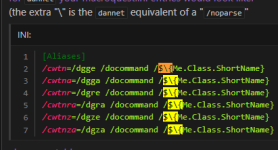
I found a first error that I had to correct (it was an incorrect alias definition in the ini file

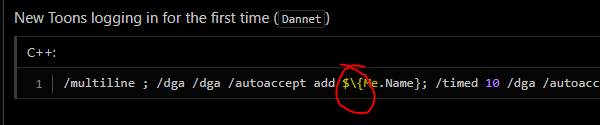
/cwtn=/dgge //docommand /$\{Me.Class.ShortName} <---- \ was missing
/cwtna=/dgaa //docommand /$\{Me.Class.ShortName} <------ same
/cwtnr=/dgre /docommand /$\{Me.Class.ShortName}
/cwtnra=/dgra /docommand /$\{Me.Class.ShortName}
/cwtnz=/dgze /docommand /$\{Me.Class.ShortName}
/cwtnza=/dgza /docommand /$\{Me.Class.ShortName}

So I did correct it and the error from my "driver" was corrected (solved)

issue.....
on the 5 other toons in the group, I have the following error
couldn't parse //docommand /${Me.Class.ShortName}

I restarted the PC to make sure the correction was loaded into memory

I'm more than probably missing something easy, but I can't figure out what it is

Can someone clean the shit I have in my eyes?

Tanks
 
We automatically make Dannet aliases if they don't exist. You don't need to create them.

If you're changing them to eqbc make sure to noparse and to use two forward slashes
 
I am attempting this now, so far I think I have slightly grasped it. Can I close out the EQBCS window/server thingy once I have dannet working?
That's dependent on what other things you have in terms of hotkeys, scripts, macro's, plugins etc. that may be reliant on, or configured to use eqbc.
 
Thanks Oldman66, this solves one of my problems.

I gained a level thanks to your PL, but now I'm struggling with the next issue.
it couldn't parse commands like
/pause on
and again thanks for the help

edit : It work on my driving toon but not on the group members
 
Last edited:
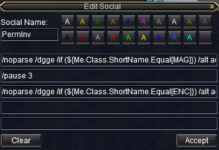
I haven't read every post here, but I wanted to throw in a DANNET that I use in my group in place of using a bard for Perma Double Invis if you are running two classes that can overlap Group Perfected Invisibility and Group Perfected Invisibility to Undead. I find this works pretty great when I'm paused and walk away to take care of something. I swap out my mage for a beastlord sometimes, but my tank is a Shadow Knight so I can swap that key out with a /dgga and check the if statement against my SHD class. I am sure someone with more C++ knowledge can multiline this, but this is my basic quick and dirty Social.

Social Key:
Name: PermInv
/noparse /dgge /if (${Me.Class.ShortName.Equal[MAG]}) /alt act 1210
/pause 3
/noparse /dgge /if (${Me.Class.ShortName.Equal[ENC]}) /alt act 280


1742055514968.png
 
Thanks Oldman66, this solves one of my problems.

I gained a level thanks to your PL, but now I'm struggling with the next issue.
it couldn't parse commands like
/pause on
and again thanks for the help

edit : It work on my driving toon but not on the group members
Gocus,

If you are using the aliases Sic has created try removing change /pause on to pause on. If using the alias PAUSE is a parameter / attribute and not a command / call out. normal command would be /CLR pause on and not /CLR /pause on
 
Not sure if this is the correct spot for this question... Is there a way to edit the "Come To Me" or "Follow Me" Default buttons? I would like to add a parameter to change modes to save on extra clicks.
 
Not sure if this is the correct spot for this question... Is there a way to edit the "Come To Me" or "Follow Me" Default buttons? I would like to add a parameter to change modes to save on extra clicks.
those keys are defined in the MQ2GroupInfo.ini in your MQ Config folder
 
Hey fellas... returning after some time off. Prior, I had the hotkeys setup learned from this post to make camp, etc. however, it seems they've been relocated, and they are made for us now? I'm not able to find where those are. I've been digging around, but i mostly find old info, prior to the notice in 2023.
 
Hey fellas... returning after some time off. Prior, I had the hotkeys setup learned from this post to make camp, etc. however, it seems they've been relocated, and they are made for us now? I'm not able to find where those are. I've been digging around, but i mostly find old info, prior to the notice in 2023.
for what?

if you're asking for the cwtn class plugins specifically - the aliases are made for you now

/cwtn
/cwtna
/cwtnr
/cwtnra
/cwtnz
/cwtnza

but we don't make any hotkeys for you - or mess with your bars or anything like that

Please see >>> Getting Started with CWTN plugins! (Movement, UI Window, Clickies, Pulling, ETC) Check Here First! <<< :)
 
I run my group using the premium plugins: MQ2Eskay, MQ2Druid etc.

I am trying to determine if there a way to issue a command from my main character (ex: my Druid) to another in my group (ex: my Shadowknight). My goal is to make him switch his MQ2Eskay mode from its current setting to Tank; I generally control my character from my Druid and am trying to create a macro so that when I my set my camp that just my Shadowknight alone switches the mode of his MQ2Plugin to Tank.

This is the current macro button I use on my Druid, which currently requires me to shift to the Shadowknight window and manually place him into Tank mode. I am trying to have this button from my Druid achieve this effect automatically so that I don't have to click into the SKs screen and switch his mode manually.

Current Set Camp macro:

/dgge camphere on
/docommand /${Me.Class.ShortName} mode 1
/cwtn mode 1
/docommand /${Me.Class.ShortName} resetcamp

I know that using the /cwtn (and similar /cwt commands) you can can issue these types of commands to your entire group (or your entire group minus yourself) to set the entire group to different modes; I have not been able to locate any information on if it is possible to issue similar commands to just one character, my Shadowknight.

Any help is very much appreciated. Thanks!
 
I run my group using the premium plugins: MQ2Eskay, MQ2Druid etc.

I am trying to determine if there a way to issue a command from my main character (ex: my Druid) to another in my group (ex: my Shadowknight). My goal is to make him switch his MQ2Eskay mode from its current setting to Tank; I generally control my character from my Druid and am trying to create a macro so that when I my set my camp that just my Shadowknight alone switches the mode of his MQ2Plugin to Tank.

This is the current macro button I use on my Druid, which currently requires me to shift to the Shadowknight window and manually place him into Tank mode. I am trying to have this button from my Druid achieve this effect automatically so that I don't have to click into the SKs screen and switch his mode manually.

Current Set Camp macro:

/dgge camphere on
/docommand /${Me.Class.ShortName} mode 1
/cwtn mode 1
/docommand /${Me.Class.ShortName} resetcamp

I know that using the /cwtn (and similar /cwt commands) you can can issue these types of commands to your entire group (or your entire group minus yourself) to set the entire group to different modes; I have not been able to locate any information on if it is possible to issue similar commands to just one character, my Shadowknight.

Any help is very much appreciated. Thanks!
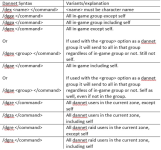
You can do a /dex toonname /whatevercommand. So like /noparse /dex skname /${Me.Class.ShortName} mode 4
if you were being super lazy and needed to something in a pinch without checking how to "correctly" do it you can also always do something like /dgae /shd mode 4 --- this would have everyone execute "/shd mode 4" and only shadowknights would do it.

i sometimes do something like that when i've got a bunch of teams setup like /dgex enc /enc mode 0 --- this would tell everyone in my group other than myself to do "/enc mode 0" which would only work on enchanters, for example

but yes, familirizing yourself with how dannet commands would work help you do that.

1762725110440.png

I merged this into my hotkey guide (rather than the dannet thread) since the question is specifically about cwtn stuff, but it is broader). I have some other examples in the overview that goes over some other examples - like how to get your bard to do stuff (by name) utillizing /dex name </command>

also, keep in mind your "camphere on" bit is only valid for things that utilize "camphere" like kissassist, and is not something that the cwtn plugins use

what you can also do is

/dex ${Group.MainTank} /multiline ; /shd mode 4; /timed 3 /cwtn mode 1; /timed 10 /shd resetcamp

this tells your Group assigned Main Tank to: go in mode 4 itself, tell the rest of your group to go in mode 1, and then for the shd to reset its camp
 
You can do a /dex toonname /whatevercommand. So like /noparse /dex skname /docommand /${Me.Class.ShortName} mode 4
This worked perfectly - thank you! I had tried a few times to get something like this to work, but I was using "/if (${Me.Class.ShortName.Equal[SHD]" and it wasn't working. Thanks again for the help!

if you were being super lazy and needed to something in a pinch without checking how to "correctly" do it you can also always do something like /dgae /shd mode 4 --- this would have everyone execute "/shd mode 4" and only shadowknights would do it.

i sometimes do something like that when i've got a bunch of teams setup like /dgex enc /enc mode 0 --- this would tell everyone in my group other than myself to do "/enc mode 0" which would only work on enchanters, for example

but yes, familirizing yourself with how dannet commands would work help you do that.

View attachment 72583

I merged this into my hotkey guide (rather than the dannet thread) since the question is specifically about cwtn stuff, but it is broader). I have some other examples in the overview that goes over some other examples - like how to get your bard to do stuff (by name) utillizing /dex name </command>

also, keep in mind your "camphere on" bit is only valid for things that utilize "camphere" like kissassist, and is not something that the cwtn plugins use

what you can also do is

/dex ${Group.MainTank} /multiline ; /shd mode 4; /timed 3 /cwtn mode 1; /timed 10 /shd resetcamp

this tells your Group assigned Main Tank to: go in mode 4 itself, tell the rest of your group to go in mode 1, and then for the shd to reset its camp
This was also super helpful and worked, thank you! I was not aware regarding "camphere on" being for kissassist. I do not use KA as I run 6 of the premium class plugins (that work great - thanks!). I see what you mean - I can remove the first line from my macro. Also was missing the "/multiline" command in my prior attempts to solve this unsuccessfully on my own. Thank you so much!
 
Wrong forum
Hotkey I am having issues . Running all team on CWTN ( Awesome Melee Group) The are only level 35's but only eat red meat with no problem.
Camp On Hotkey: I keep getting notification it is not recognizing something. Team Chases to new location . I hit Camp on - all members sit. If I pull manually and run back to the camp - works fine. Alternatively, after tagging mob and hit my gotocamp hotkey it runs back to an earlier camp.
/bcg //camphere on
/docommand /${Me.Class.Shortname} mode 7
/cwtn mode1
/docommand /${Me.Class.Shortname} reset camp

I guess I don't understand the last line . Why are you resetting a camp if you are creating a new camp.
 
That error is because that command is for kissassist. You should remove it

My hotkey guide explains that.


--- anyone not running the matching automation would get an error for the commands if you're using mixed automations
--- this means an SK using mq2eskay doing a /camphere on is going to get a red error message because they're not using kissassist
--- this is ok, you can ignore this.
 
Regarding the resetcamp, sometimes I have a camp already (like already in mode 7) setting myself in mode 7 while I'm already in mode 7 isn't going to adjust my camp, but the reset camp will
 
Docommand-Could'nt parse /bcg//docommand/${Me.Class.Shortname}mode 1--- Setting camp the team members were not going to mode 1 but staying in Mode 0 ..
 
Docommand-Could'nt parse /bcg//docommand/${Me.Class.Shortname}mode 1--- Setting camp the team members were not going to mode 1 but staying in Mode 0 ..
You should use the built in alias that uses dannet instead of the old eqbc long hotkey

/Cwtn mode 1
 
I am slow to get this but I will.

/dgge /camphere on
/docommand /${Me.Class.ShortName} mode 7
/cwtn mode 1
/docommand /${Me.Class.ShortName} resetcamp

So if you are only using the CWTN plugin- to set a camp. Clarify the wording camphere on and resetcamp are both kissassist terms?

/shd mode 7
/cwtn mode 1
 
Correct - /camphere is kissassist. CWTN mode determines whether camp is set or not. I believe reset camp is part of CWTN.

If you have the aliases setup for Sic's Hotkeys, then /cwtn mode 1 = /docommand /${Me.Class.ShortName} mode 1. /cwtna mode 1 = /noparse /bca //docommand /${Me.Class.ShortName} mode 1 (or /dga if using dannet version).

Also, consider that /noparse comes into play - if you just broadcast the docommand, it parses on your client that it is sent from, fo if that is a SHD - all clients get /SHD mode 1, rather than their own class short names. put a /noparse in front of the whole thing, then it parses on each individual client, giving the result you want. /noparse is already built into the aliases, so that does really make things easier.
 
Thanks for the explanation. First copied the dannet version into the macroquest ini. under aliases. Driver is shd
Campon
/cwtn mode 1 = all group members except driver are assist mode
/shd mode 7 = telling the shadowknight (sic mode)

These two lines will set a camp?

2.
/shd gotocamp per the video - this is no longer working; my driver(sk) runs to the last camp prior to setting this camp - would this be recognize the term "gotocamp" or is that a kissassist term. Note, this use to work with my warrior when I would drive nothing better than to hit one key and watch him run back to camp
 
Thanks for the explanation. First copied the dannet version into the macroquest ini. under aliases. Driver is shd
Campon
/cwtn mode 1 = all group members except driver are assist mode
/shd mode 7 = telling the shadowknight (sic mode)

These two lines will set a camp?

2.
/shd gotocamp per the video - this is no longer working; my driver(sk) runs to the last camp prior to setting this camp - would this be recognize the term "gotocamp" or is that a kissassist term. Note, this use to work with my warrior when I would drive nothing better than to hit one key and watch him run back to camp
Gotocamp returns you to your set camp. That is what it does and how it works
 
Guide - Sic's Hotkeys

Users who are viewing this thread

Back
Top
Cart