• You've discovered RedGuides, an EverQuest multi-boxing and scripting community 🧙‍♀️⚙️. We want you to play several EQ characters at once, come join us and say hello! 👋

  • A TLP without truebox has thawed (Very Vanilla ready)
    Frostreaver

Problem - Severs up! NoS Launch Dec 6 2022 reminder notes + bug thread

Sic

Administrator
Moderator
Joined
May 5, 2016
RedCents
49,476¢
Pronouns
He/Him
Don't forget with a new live patch comes new zones and content.

you will need/want:
new maps

you will want to ensure you have your meshes updated:
run the updater on the launcher

there are several updates to UIs in this patch, make sure your UI is updated

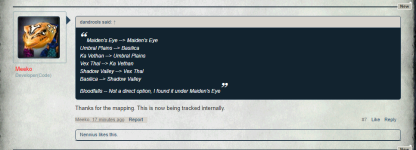
> Kaen/Sic's Zliz <


Known issues:
> CWTN plugin spell names < : updating now
luas like boxhud "permission denied" : will be fixed in next build pending
easyfind doors not working: still appears to be a wip
 
Last edited:
Having issues logging in. EQ just seizes up.
Can't log into Bazaar, Guild Hall, Guild Lobby, PoK. But characters in Cab East or Natimbi can.

Who knows.

A thread started on it by others:
 
I don't know what people plan on doing first in this xpac, but I suggest farming the Shadow Haven mission for the evolving cloak. (it's possible it drops from other missions as well)
Presumably works just like the TBL items, but probably requires achievements from this xpac to level it up.

It's possible the drop rate is a lot higher than it should be, and will be nerfed soon...
 
Last edited:
Doors seem broken atm. Usually an automatic thing, but right now I am having to manually click all doors.
 
I am having an issue with Auto-Login. Some of my characters login just fine, but some of them are completely stuck at Char Select. Can't manually select anything to login. Re-creatable, it is always the same toons that can't login properly.

Edit: Maybe this is an EQ-side thing? I can't log those characters in from a different PC without MQ running, either...click Load and it just sits at char select frozen.
 
I get to the screen where they are standing in area with candy canes, click on enter and nothing happens for a few minutes, then get you have been disconnected message and then it goes back to the login screen. Any ideas?
 
I get to the screen where they are standing in area with candy canes, click on enter and nothing happens for a few minutes, then get you have been disconnected message and then it goes back to the login screen. Any ideas?
It is server login issues, nothing VV related. Be patient.
 
Is anyone else seeing a problem with EQ hanging after selecting a character and clicking "enter world" since today's release? I'm seeing this issue with or without MQ running.

In the past I saw similar behavior when the antivirus was interfering, but I've even tried completely uninstalling the antivirus (exception rules didn't help), and problem persists. Any suggestions?
 
Yes, seems to be related to certain guilds. All no-guild toons log in fine, some guilds can log in fine. It sux, one of my guilds was hit and I can't log any of those toons in.
 
thanks, half of box group logged in the rest are in limbo
Are the ones logged in in a different guild than the ones not logging in?

What are the chances they put new restrictions on guild naming and the guild name happens to violate those restrictions?
 
ones logged in are in different guilds, those in limbo are in guild with the ones that made it in. Three different guilds.
 
Immediately upon zoning inside Grand Guild Hall, if you click "Come to Me", those toons will click the door leading outside to the neighborhood instead.
 
The servers are fucked right now.
Art Whatever GIF
 

EverQuest Official #announcements-and-news:

As part of our investigation into the login issues, we will need to reboot all servers. This process has already begun with a 5-minute in-game warning and should end in about 30 minutes (or less). We sincerely appreciate your patience during this time.
 
Where at? Not finding it in my searches.
1. You can disable automatic click doors in /nav ui
2. You can add
guildhalllrg_int.cfg
would be the cfg file
and you would put this inside it

/multiline ; /keypress forward hold ; /timed 15 /keypress forward
3. You can use my favorite hotkey.
/dgze /moveto loc ${Me.Y} ${Me.X} ${Me.Z}
 

EverQuest Official #announcements-and-news:

As part of our investigation into the login issues, we will need to reboot all servers. This process has already begun with a 5-minute in-game warning and should end in about 30 minutes (or less). We sincerely appreciate your patience during this time.
reset red death GIF
mad computer GIF
hard reset...

5 minutes later in forums/twitter....DBG Announces we'll be upgrading our servers...we apologize for the extended patch...
 
happy patch of the patch of the server reset of the ongoing issues day
 
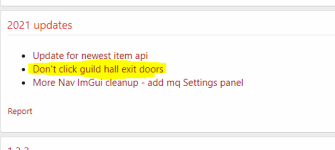
Braniac did a most excellent patch to MQ2NAV last year which stopped accidently clicking the Guild Exit door on zone in - so maybe that is just broken.

1670382543915.png
 
Few Dannet commands are no longer working for me? Looks like item casting so far...

For example, these item casts aren't working:
/dgga /casting "Fellowship Registration Insignia" item
/dgga /casting "Primary Transport Anchor Device" item

However, other /dgga commands are working perfectly:
/dgga /yes,
/dgga /alt act 481
 
Few Dannet commands are no longer working for me? Looks like item casting so far...

For example, these item casts aren't working:
/dgga /casting "Fellowship Registration Insignia" item
/dgga /casting "Primary Transport Anchor Device" item

However, other /dgga commands are working perfectly:
/dgga /yes,
/dgga /alt act 481
do you have mq2cast loaded, you have to use mq2cast to use /casting, otherwise just use /cast

but also

mq2relocate
 
Few Dannet commands are no longer working for me? Looks like item casting so far...

For example, these item casts aren't working:
/dgga /casting "Fellowship Registration Insignia" item
/dgga /casting "Primary Transport Anchor Device" item

However, other /dgga commands are working perfectly:
/dgga /yes,
/dgga /alt act 481
I always placed my fellowship insignia in a hotbar " - " and use /dgga /keypress -

not sure if /dgga /useitem "Fellowship Registration Insignia"
would work for you?
 
Problem - Severs up! NoS Launch Dec 6 2022 reminder notes + bug thread

Users who are viewing this thread

Back
Top
Cart