• You've discovered RedGuides, an EverQuest multi-boxing and scripting community 🧙‍♀️⚙️. We want you to play several EQ characters at once, come join us and say hello! 👋

  • A TLP without truebox has thawed (Very Vanilla ready)
    Frostreaver

Lua - resupply.lua (requires mqnext and mq2lua)

Joined
Dec 22, 2017
RedCents
585¢
I wrote a little Lua script to resupply my TLP characters in POK.

Just drop the resupply.Lua and the resupply dir into your Lua directory and then run `/Lua run resupply`

I dont have all the supplies configured but it will at least buy food and water for your minions otherwise.
 

Attachments

Thanks for this Klompr!, I've modded is slightly to do cheese and bottles of milk from Chef Denrun for the stacks to 1k
 
This is great. My only suggestion would be to make your functions local instead of Global.

[CODE lang="cpp" title="Just prepend local in front of the keyword "function"" highlight="1"]local function navToVendor(vendor)
local vendorID = mq.TLO.Spawn(vendor).ID()
mq.cmd.nav('id', vendorID)
local vendorDist = mq.TLO.Spawn('ID ' .. vendorID).Distance3D()
while mq.TLO.Spawn('ID ' .. vendorID).Distance3D() > 19 do
mq.delay(50) -- delay 50ms
end
mq.cmd.nav('stop')
mq.cmd.target('id', vendorID)
mq.cmd.face()
end[/CODE]
 
Make sure to rotate vendors periodically, in an attempt to be more "lifelike."

Some supplies may not be available on many, but those that are might want to be randomly looked at.

Great work!
 
I changed it to 900 water and loafs of bread instead of rations. Added it to all melee would get cloudy potions except rog. Awesome work!
 
Nice work. If you'd like to see more of the supplies so you don't have to look them up, check out lazysupplies.mac on here. I put in most of the reagents needed by the different classes.
 
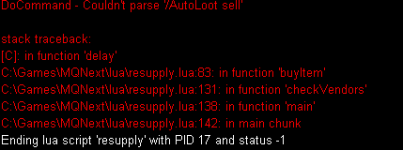
Only additional thing that would be awesome addition is the ability for it to /autoloot sell before or after it was done doing its resupply. If I get time later this week I'll see if its something I can swing but I've never even looked at Lua so...
 
I added /autoloot sell as Brian requested. Also made all functions local. I am not playing EQ lately so i can't test lmk if there are any issues.
EDITED:0.0.2 broken and removed.
 
Last edited:
Nice work with script. I like to purchase more than 20 rations and 20 water at a time (100). Even when you change the total it would only buy a stack of 20 then move to the next vendor. Minor adjustment to buy as many as you want. :)
[CODE highlight="29-38"]local function buyItem(item, vendor)

if not needItem(item) then
print('I don\'t need any ' .. item)
return
end
local desired = getDesiredCount(item)
local current = getCurrentCount(item)
local need = desired - current
print('i need ' .. need .. ' ' .. item .. ' from ' .. vendor)

navToVendor(vendor)

mq.TLO.Merchant.OpenWindow()
while not mq.TLO.Merchant.Open() and not mq.TLO.Merchant.ItemsReceived() do
mq.delay(1000) -- delay 1000ms
mq.TLO.Merchant.OpenWindow()
end

if not mq.TLO.Merchant.Item('=' .. item) then
print(item .. ' was not found on ' .. vendor)
return
end

while mq.TLO.Merchant.SelectedItem() ~= item do
mq.TLO.Merchant.SelectItem('=' .. item)
mq.delay(1000) -- delay 1000ms
end
::loop::
mq.TLO.Merchant.Buy(need)
mq.delay(1000)
if desired - mq.TLO.FindItemCount(item)() <= 0 then
return
end
if desired - mq.TLO.FindItemCount(item)() > 0 then
need = desired - mq.TLO.FindItemCount(item)()
goto loop
end

mq.delay(2000)

if need > getCurrentCount(item) then
print('Successfully bought ' .. need .. ' ' .. item)
end
end[/CODE]
 
Last edited:
First, I would like to thank @klompr for this great little utility. I don't think I would have come up with as elegant a solution.

That said, I did run into a few issues with navigation and purchasing errors (insufficient funds, no space). So I spent some time making some adjustments (including Cannonball's suggestion). I also added more items and vendors for PoK and Guid Lobby. It may still need some tweaks, but has worked pretty well for me in testing.

The updated ZIP file is attached. @klompr - I would be happy to add this as a resource, or let you create one for this nice little tool.
 

Attachments

In hindsight, I think a few instructions might be worthwhile...

1) Extract the ZIP file to your Lua folder (MQNext\Lua).
2) You should run this Lua (/Lua run resupply) only in PoK or Guild Lobby.
3) You should modify the file 'resupply/config.Lua' to select the items and quantities you want.
a) You can change the quantities in the '_M.Items' section if you want more or less of the item.
b) You add or remove the item itself in the 'items' section for each class in '_M.class'.
c) You can use a different quantity via the 'custom' section for the class. In the provided file, ['Pearl']=1 is used to make the NEC and SHD only buy 1 pearl (it is not consumed).

!!!Make sure to change the Axe component for the correct level for your BER - they can get expensive!!!

You don't need to worry about the '_M.vendors' or '_M.zones' sections of 'config.Lua' unless you want to add your own stuff.

Note that this program does not currently use an .ini file, so if you re-install it will overwrite your 'config.Lua'. So create a backup.
 
In hindsight, I think a few instructions might be worthwhile...

1) Extract the ZIP file to your Lua folder (MQNext\Lua).
2) You should run this Lua (/lua run resupply) only in PoK or Guild Lobby.
3) You should modify the file 'resupply/config.lua' to select the items and quantities you want.
a) You can change the quantities in the '_M.Items' section if you want more or less of the item.
b) You add or remove the item itself in the 'items' section for each class in '_M.class'.
c) You can use a different quantity via the 'custom' section for the class. In the provided file, ['Pearl']=1 is used to make the NEC and SHD only buy 1 pearl (it is not consumed).

!!!Make sure to change the Axe component for the correct level for your BER - they can get expensive!!!

You don't need to worry about the '_M.vendors' or '_M.zones' sections of 'config.lua' unless you want to add your own stuff.

Note that this program does not currently use an .ini file, so if you re-install it will overwrite your 'config.lua'. So create a backup.
How do i create a resource? Happy to create one just don't really know how, and thanks for the patches! Sorry i've been fairly inactive in eq/mq lately :)
 
How do i create a resource? Happy to create one just don't really know how, and thanks for the patches! Sorry i've been fairly inactive in eq/mq lately :)
You can create one from the Resources page. The ZIP file format is perfect - just upload it there and people will be able to watch it, you can post updates, etc.
 
Do you have the resupply folder in your lua folder with supply.config in it? You can try this one.
No offence, but don't use that one. That's the original 0.0.2. Besides some other issues, has some spelling mistakes (jaid instead of jade). I am sure that the issue you had was with MQ2autoloot.

P.S. Adding GS merchant is a good idea.
 
I just came back a bit ago from a 7 month break. This is no longer working for me. I launch and it ends. No error no nothing. I've even redownloaded the newest zip and exported. I'm at a loss here. Any help would be appreciated

@klompr @vandersl
 
Last edited:
I just came back a bit ago from a 7 month break. This is no longer working for me. I launch and it ends. No error no nothing. I've even redownloaded the newest zip and exported. I'm at a loss here. Any help would be appreciated

@klompr @vandersl
Sorry bud but i don't have EQ, VV or anything installed anymore so unfortunately I wont be able to help/troubleshoot
 
I just came back a bit ago from a 7 month break. This is no longer working for me. I launch and it ends. No error no nothing. I've even redownloaded the newest zip and exported. I'm at a loss here. Any help would be appreciated

@klompr @vandersl
This is my current copy. I added in
Lua:
    mq.cmd.AutoLoot('sell')
    while mq.TLO.AutoLoot.SellActive() do
        mq.delay(1000) -- delay 1000ms
    end
so that it will sell trash items marked with MQ2AutoLoot before buying items you need. This helps make sure you have bag space for the items you need as well as cash :). I just semi came back from a long break, so I have not extensively tested this.
There are instances when it will close the vendor window before its actually finished buying / selling. I'm working on fixing that and open to suggestions. The fix is to just open the vendor window again and it will continue on.
 

Attachments

Last edited:
@BrianGragg - I pulled your version down and when I try to run it, I get Please travel to the Plane of Knowledge and try again. But I am standing in PoK already.
 
Here is the update for now, until I can get it up as a resource.

If you don't want the food/drink that I have in the config file, you can change there, as well as the axe components.

Also in this, at the top of each file are the changes that I have made, commented out, as well as the Version number, and adding the others that have contributed to the script.
 

Attachments

I never used a config file before. How do I add a travelto option based upon the config file?
if item needed = configfile.zone then /travelto(zone)
 
Lua - resupply.lua (requires mqnext and mq2lua)

Users who are viewing this thread

Back
Top
Cart