its say it might be a syncing issue. Like one drive. One drive is not running. Can it still sync if its not running? How can I turn it off?

-
 Hail, we're RedGuides. We want you to play six (yes, 6!) EverQuest characters at once. We have scripts and a friendly community to help, please join our playstyle and say hello! 👋
You are using an out of date browser. It may not display this or other websites correctly.
You should upgrade or use an alternative browser.
You should upgrade or use an alternative browser.

RedGuides Launcher (4 Viewers) 1.1.0
- Thread starter r1pt1de
- Start date
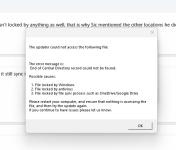
It is not giveing me a specific file name at all.

what file does it say is locked?its say it might be a syncing issue. Like one drive. One drive is not running. Can it still sync if its not running? How can I turn it off?
please show that image
please snip that error window in its entirety.It is not giveing me a specific file name at all.
but yeah, it means *something* is running. could be eqbcs, could be a ghost eq instance (if you didn't reboot when you said you did), but more than likely it is something holding files hostage like file syncing (one drive) or file scanning/quarantine like antivirus.
These are the other ,essages
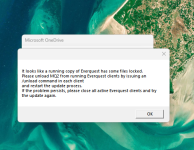
that appears to show a "One Drive" window in the background - you said it wasn't running right?
would be worth doing the following
- turn off onedrive
- turn off antivirus for mq/rg/eq folders and subfolders
- check anything that has already been quarantined by your antivirus
- restart pc
No my fault that was me when I was checking if one drive is running. It told me if I want to run OneDrive I need to sign in.
OK it updated. I ran OneDrive and sync all my files. Quite OneDrive. Turn of anti virus. Restarting my comp. Ran RG update .. Updated. Turned my and Turned on mu

MQ will not load
I can open the launcher, go to Very Vanilla tab, then click Launch MQ button.
It opens the EQBCS window, but does not load MQ on the chars in game.
I tried loading MQ and then logging in the chars (same result).
The MQ icon shows in the system tray but disappears instantly when you try to click it with the mouse.
I am not getting the message of "you already have mq running" when you click the Launch MQ button.
.
What I have tried:
- updating window
- reload/repair the launcher.
- uninstalled Red Guides Launcher and reinstalled it.
- a lot of cursing words.
still does not load.
any ideas?
I can open the launcher, go to Very Vanilla tab, then click Launch MQ button.
It opens the EQBCS window, but does not load MQ on the chars in game.
I tried loading MQ and then logging in the chars (same result).
The MQ icon shows in the system tray but disappears instantly when you try to click it with the mouse.
I am not getting the message of "you already have mq running" when you click the Launch MQ button.
.
What I have tried:
- updating window
- reload/repair the launcher.
- uninstalled Red Guides Launcher and reinstalled it.
- a lot of cursing words.
still does not load.
any ideas?
Am I missing something? I am seeing that it says update for test patch on Nov 20th, but also says patch day unavailable. I cannot for the life of me figure out how to fix it, or if I'm just missing something and there is no update available. I am trying to play on the test server. I have tried before with the same issue, and sometime later tried again and it was working. Played for about a week at the beginning of Nov with no issue until the last patch.
Attachments
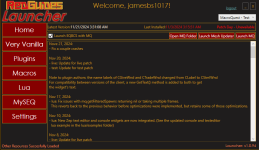
They patched test again todayAm I missing something? I am seeing that it says update for test patch on Nov 20th, but also says patch day unavailable. I cannot for the life of me figure out how to fix it, or if I'm just missing something and there is no update available. I am trying to play on the test server. I have tried before with the same issue, and sometime later tried again and it was working. Played for about a week at the beginning of Nov with no issue until the last patch.

Well, I have been having the issue for about a week now. That is why I assume I'm just doing something wrong.They patched test again today

MQ for Test had a extended rebuild time due to the amount of changes Brainiac had to do. It was up for 36 hours, and Test was patched again, so right back down.Well, I have been having the issue for about a week now. That is why I assume I'm just doing something wrong.


That tracks. MQ was updated for the scheduled patch just yesterday, and the unscheduled test update this afternoon took it down again.Well, I have been having the issue for about a week now. That is why I assume I'm just doing something wrong.
Ok thanks guys, I guess I just caught the down time at the right moment every time.  Just assumed I was not doing something right. Thanks for the help.
Just assumed I was not doing something right. Thanks for the help.I used to only play on the Test Server with MQ, but then for the past month or so I was unable to play effectively. After launching MQ, it pulls up that first window that used to just disappear. Now it shows a half page of errors. (I don't recall them since it's being patched.) As long as I keep it open, I can play but it crashes unexpectantly about a dozen times. MQ works perfectly on the Live server. I tried reloading and doing reinstalls of both MQ and EQ. Nothing seems to work. When I tried another computer, MQ works well with the Live server, but it continually reads an error between versions on the Test server even though both have the latest installs. Thus, I've been playing on Live more. lol
This sounds like you should wait for MQ for test to be updated (you can watch the resource HERE to get notified) and post specifics and maybe some text/images of errors that are displayed. This almost sounds like you may be loading the wrong MQ version for the wrong server, but I am having issues following, so I'm really not sure.I used to only play on the Test Server with MQ, but then for the past month or so I was unable to play effectively. After launching MQ, it pulls up that first window that used to just disappear. Now it shows a half page of errors. (I don't recall them since it's being patched.) As long as I keep it open, I can play but it crashes unexpectantly about a dozen times. MQ works perfectly on the Live server. I tried reloading and doing reinstalls of both MQ and EQ. Nothing seems to work. When I tried another computer, MQ works well with the Live server, but it continually reads an error between versions on the Test server even though both have the latest installs. Thus, I've been playing on Live more. lol
Last edited:

Just installed it for the first time and having an issue with the launcher shutting down after clicking the login button. I don't even see anything in task manager. I have tried setting default browser to Edge, Chrome, and Firefox. I have had all 3 open alone and logged into RG, no luck. I even opened all 3 browsers with RG logged in and nada.
The only thing I have done that someone else had an issue with was a password reset. I don't know. Just updated (by force) to Windows 11, so my troubleshooting is strained.
Any ideas? Thanks in advance.
The only thing I have done that someone else had an issue with was a password reset. I don't know. Just updated (by force) to Windows 11, so my troubleshooting is strained.
Any ideas? Thanks in advance.

Well I sent the PM anyway. I also added testrunner.exe to my exclusion list. Still not working.Oh, I think you can ignore me if you're talking about the RG launcher and not the MQ launcher, heh.
Thanks for all the help so far.

Each resource on RG has an Overview / Discussion Thread and either a link to their wiki or tabs with FAQ, Commands, Etc.
Please make sure to post in the respective discussion thread, and check the FAQ/Commands/Wiki for information before posting.
Is this the RG launcher or.mq?
Please make sure to post in the respective discussion thread, and check the FAQ/Commands/Wiki for information before posting.
Is this the RG launcher or.mq?
Yes I am having this issue with the Red Guides Launcher.Each resource on RG has an Overview / Discussion Thread and either a link to their wiki or tabs with FAQ, Commands, Etc.
Please make sure to post in the respective discussion thread, and check the FAQ/Commands/Wiki for information before posting.
Is this the RG launcher or.mq?
I would check your antivirus for any filescanning / locking / quarantining on whatever directory you installed and are running the RG launcher in.Yes I am having this issue with the Red Guides Launcher.
if it isn't AV, then it sounds like a windows permission issue - and ime, the easiest way for you to fix that, is just install the rg launcher into somewhere other than the default location like c:\RedGuidesLauncher
I uninstalled the AV to remove it from the problem pool. I also uninstalled the launcher and reinstalled it to c:\games\redguides\. Then I added all three .exe files in the folder to the defender exclusions. Still doesn't work, even if I run testrunner.exe as admin. I swear I miss DOS.I would check your antivirus for any filescanning / locking / quarantining on whatever directory you installed and are running the RG launcher in.
if it isn't AV, then it sounds like a windows permission issue - and ime, the easiest way for you to fix that, is just install the rg launcher into somewhere other than the default location like c:\RedGuidesLauncher
https://www.redguides.com/community/resources/redfetch.3177/ here try this thenI uninstalled the AV to remove it from the problem pool. I also uninstalled the launcher and reinstalled it to c:\games\redguides\. Then I added all three .exe files in the folder to the defender exclusions. Still doesn't work, even if I run testrunner.exe as admin. I swear I miss DOS.
Sounds like you need to restart your pcI have this same issue on one computer but not the other. I cannot figure out how to fix it either. I would do complete reinstall but my autologin is all set and it wipes it and hard to get it all back in again. There has to be a file it is looking at for last install?
I downloaded the redguides launcher, logged in and updated.
I then added all my accounts to mq2, but when i launch the profile, all the 6 windows stop at the first login window.
When i manually hit login, enter account details and select server and log in to the game then there is no mq window or anything. Just a standalone unmanaged instance of eq.
Its like mq2 loses contact with the eqgame client after it starts it.
The redfetch one works as it should. Redguides launcher isnt.
Any ideas?
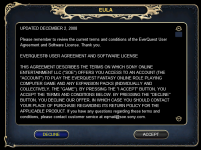
This is where it stops:
I then added all my accounts to mq2, but when i launch the profile, all the 6 windows stop at the first login window.
When i manually hit login, enter account details and select server and log in to the game then there is no mq window or anything. Just a standalone unmanaged instance of eq.
Its like mq2 loses contact with the eqgame client after it starts it.
The redfetch one works as it should. Redguides launcher isnt.
Any ideas?
This is where it stops:
You say rg launcher, but other than where you're installing it, and the permissions it has, the RG launcher and red fetch aren't using a different version of mqI downloaded the redguides launcher, logged in and updated.
I then added all my accounts to mq2, but when i launch the profile, all the 6 windows stop at the first login window.
When i manually hit login, enter account details and select server and log in to the game then there is no mq window or anything. Just a standalone unmanaged instance of eq.
Its like mq2 loses contact with the eqgame client after it starts it.
The redfetch one works as it should. Redguides launcher isnt.
Any ideas?
This is where it stops:
View attachment 67232
You can turn on debug console for mq by right clicking the MQ icon and selecting that option. It'll tell you instances found and it trying to connect.
Red fetch vs launcher doesn't actually run MQ differently at all, I suspect wherever you installed with the RG launcher you have a windows permission problem. Or you are running with something as elevated - you don't need MQ or EQ elevated (and shouldn't do that)

Lightbringer
Member
I've been using autologin with the same profile. Now in the last week i cannot load the 6th char. Any help is welcomed.

what happens when you load the 6th character?I've been using autologin with the same profile. Now in the last week i cannot load the 6th char. Any help is welcomed.
there has been a ban wave thise week, are you sure that toon did nto get suspended or banned?
Lightbringer
Member
I can log off another toon and that one will log in. It seems to be stuck on 5 toons max.
Users who are viewing this thread
Total: 5 (members: 0, guests: 5)
Share: