
-
 Hail, we're RedGuides. We want you to play six (yes, 6!) EverQuest characters at once. We have scripts and a friendly community to help, please join our playstyle and say hello! 👋
You are using an out of date browser. It may not display this or other websites correctly.
You should upgrade or use an alternative browser.
You should upgrade or use an alternative browser.

RedGuides Launcher (5 Viewers) 1.1.0
- Thread starter r1pt1de
- Start date

Try againI had the problem today where I had to "reinstall" it was thinking I didn't have Mq2 installed, even though the path loaded fine. But now when I try to update CWTN plugins it tells me that I am not authorized? My licenses are definitely still active. Any suggestions?
MQ2Eskay, MQ2Monk, MQ2Shaman, MQ2Enchanter and MQ2Mage plugins are working great on Live severs, but trying test now. I switched the Launcher to MacroQuest - Test. I installed to the general MQ2 folder first, but then reinstalled it to MQ2\Live\Release. MQ2 generally works on test now, but I have no plugins in my launcher. When I go to the Plugins tab, no plugins are there and it says: All available plugins for the Test, Emu, and Beta servers are currently contained in the Very Vanilla for Test/Emu/Beta Server installations and cannot be managed from this utility.
Any idea where I go to get them added to my launcher? Thanks!
Any idea where I go to get them added to my launcher? Thanks!
you only see plugins on the plugin tab for anything that is "premium" that you have a license for.MQ2Eskay, MQ2Monk, MQ2Shaman, MQ2Enchanter and MQ2Mage plugins are working great on Live severs, but trying test now. I switched the Launcher to MacroQuest - Test. I installed to the general MQ2 folder first, but then reinstalled it to MQ2\Live\Release. MQ2 generally works on test now, but I have no plugins in my launcher. When I go to the Plugins tab, no plugins are there and it says: All available plugins for the Test, Emu, and Beta servers are currently contained in the Very Vanilla for Test/Emu/Beta Server installations and cannot be managed from this utility.
Any idea where I go to get them added to my launcher? Thanks!
anything included does not show on your plugin tab, because they are already included and downloaded. as the message says.
so the cwtn plugins for emu/test will automatically be part of the download, and there is nothing to manage on the plugin tab
Zacalexander
New member
hey guys,
as soon as i load the rg launcher all my eq windows close and if rg is running i cant load eq at all, any ideas or have i missed something, or you cant use RG anymore?
thanks in advance guys.
Dan
as soon as i load the rg launcher all my eq windows close and if rg is running i cant load eq at all, any ideas or have i missed something, or you cant use RG anymore?
thanks in advance guys.
Dan
That doesnt sound normal....although after I have patched and launched MQ - i usually close the Launcher anyway.
Does it Patch with the latest Launcher etc..does all that look fine?
Are you running Next on Live or Test (Currently Patch Day on Test)
Did it just start happening? ie was it ok yesterday?
Does it Patch with the latest Launcher etc..does all that look fine?
Are you running Next on Live or Test (Currently Patch Day on Test)
Did it just start happening? ie was it ok yesterday?
Zacalexander
New member
Does it Patch with the latest Launcher etc..does all that look fine? everything looks fine to me
Are you running Next on Live or Test (Currently Patch Day on Test) . Hmmmm doesnt offer me Next, just Macroquest and legacy for live and test.
Did it just start happening? ie was it ok yesterday? haven't played in a month just got back today
Thanks but it might be that im not running the right patcher or something.
Are you running Next on Live or Test (Currently Patch Day on Test) . Hmmmm doesnt offer me Next, just Macroquest and legacy for live and test.
Did it just start happening? ie was it ok yesterday? haven't played in a month just got back today
Thanks but it might be that im not running the right patcher or something.

Zacalexander
New member
FV


Make sure you check your launcher version. As mentioned if you still see legacy options, it means your launcher version is out of date.Does it Patch with the latest Launcher etc..does all that look fine? everything looks fine to me
Are you running Next on Live or Test (Currently Patch Day on Test) . Hmmmm doesnt offer me Next, just Macroquest and legacy for live and test.
Did it just start happening? ie was it ok yesterday? haven't played in a month just got back today
Thanks but it might be that im not running the right patcher or something.
We will likely have another launcher update in the next following days with some enhancements and updates, but you will definitely want to update regardless.
Hit that settings tab and update
Last edited:
Zacalexander
New member
Thanks legends, seems to be working now after a clean install.

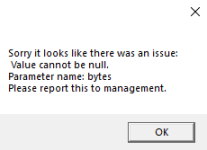
Try restarting your PC firstGot this one today when trying to update from 14.13.31 to 17.41.26
View attachment 38816
I suppose I should try to reinstall the launcher or is this to be expected currently?
Nickabrick
Member
I tried this several times and I'm still having issues with Launcher crashing, any other suggestions?If what redbot suggested doesn't work, look a couple posts back in this thread for longer instructions/steps.
Sometimes just using a different default windows browser will fix the open and instantly close issue, sometimes you need to take more steps
1 - delete your AppData - paste this in windows explorer search window (any folder) %LocalAppData%\RedGuides and %LocalAppData%\RGResourceManager and then delete the contents in that folders
1b - Did you skip step 1? if you did, go back and do step 1
2 - then go to add/remove programs, and remove the redguide's launcher
3 - reinstall the launcher
4 - open launcher
5 - point the re-install to your existing mq2 directory
6 - boom - back in business
7 - get a snack/drink - you earned it!

I got it to work after rebooting my PC, thx for the help!I tried this several times and I'm still having issues with Launcher crashing, any other suggestions?
Yw happy to help. Sorry for launcher woesI tried this several times and I'm still having issues with Launcher crashing, any other suggestions?
I got it to work after rebooting my PC, thx for the help!

please restart your computer and try again - also you don't appear to be level 2.My last install was 3/10 and the latest version is 3/19/22. The moment I try to update very vanilla the launcher crashes.
you need level 2 to patch
Just wanted to give everyone a quick update:
- Last install dates wrong or missing. The last update we released effectively negated the data we had stored for the last install dates. While this should be a one time thing, I have put in some coding that should help ensure that it doesn't happen again. Unfortunately, there is nothing I can do with code to restore the dates. The only way to correct it is going to be to click Install on each one of the items again.
- Crashing issues. I have located a few unhandled exception cases and corrected them. This will likely not fix all the crashing issues but should grab a good majority of them.
- The Very Vanilla tab will now notify you when your level 2 access has expired and allow you a quick way to reach the re-subscription page.
allopatric14
New member
When I attempt to update the latest version via the launcher it just closes everything out and doesn't update.
Let me know if anyone has any ideas on how to update so I can use MQ!?
Thanks
Let me know if anyone has any ideas on how to update so I can use MQ!?
Thanks
Re
Should fix you up
Restart your computer, then launch launcher.When I attempt to update the latest version via the launcher it just closes everything out and doesn't update.
Let me know if anyone has any ideas on how to update so I can use MQ!?
Thanks
Should fix you up
DietCoke52
Well-known member
Hit you with level 2, or at least I think I did that right lol. You gotta be level 2 for it to patch.My last install was 3/10 and the latest version is 3/19/22. The moment I try to update very vanilla the launcher crashes.
r1pt1de updated RedGuides Launcher with a new update entry:
Minor bug fixes and Level 2 stuff
Read the rest of this update entry...
Minor bug fixes and Level 2 stuff
- Add abillity to hide Nahimic Warning
- Added some more in depth exception handling when unpacking files which should help alleviate some crashing
- Modified Very Vanilla page to be aware of the status of Level 2 subscriptions. It will no longer allow you to attempt to install/update if you do not currently have Level 2. It all also warn you and give you an option to quickly get to the subscription page.
Read the rest of this update entry...
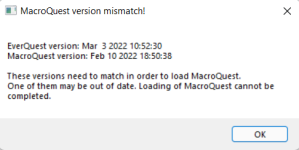

Yup like Mr. P says, the image says mq is out of date.When launching redguide, I got a version mismatch:
View attachment 38936
Tryed to reinstall, tryed to restart computer.
Any ideas?
Run the RG launcher, make sure to install if need be, and make sure to start with a computer restart
Add abillity to hide Nahimic Warning
Many thanks
Every time I hit the update button on the Launcher it closes. Any suggestions or fixes most appreciated. It is the newest launcher. It is also not picking up all of my "Watched" macros. Such as the Overseer mac.
try restarting your computerEvery time I hit the update button on the Launcher it closes. Any suggestions or fixes most appreciated. It is the newest launcher. It is also not picking up all of my "Watched" macros. Such as the Overseer mac.

Thanks...will let you know if that works for me.try restarting your computer
Wierd ...but it worked. Thanks but it is still not picking up all of my Watched Macros!!try restarting your computer

Many thanks
Every time I hit the update button on the Launcher it closes. Any suggestions or fixes most appreciated. It is the newest launcher. It is also not picking up all of my "Watched" macros. Such as the Overseer mac.
if its closing before an update plz find this in settings

then send me the logs....I Am goanna organize them and send them to rip so he can figure out wtf is really going on lol
but also make sure you have updated the RG launcher

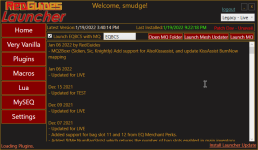

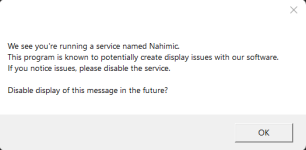
I hoped aswering this question once with OK would result in hiding this Box for future starts of the launcher. Whatelse do I have to do to get rid of this MessageBox?

- Commits
- 191
In the bottom right corner it's showing you have a launcher update. There is no "Legacy" anymore, it's been decommisioned. You'll need to install the update to the launcher, and then get Macroquest - Live
It is OFFICIAL! MacroQuest is the version of MacroQuest that we offer here at RedGuides.Learned how to multibox in december idk what im doing wrong here halp. just trying to bond with my older stepbro hes badass only uses one at a time i wanted to prove him wrong. i know iom not level 2 but what am i missing here?
View attachment 38988
You will see this with "MacroQuest - Live" or "MacroQuest - Test" in the RG Launcher.
Please, check out this link: >>> Functions & Features Demo + Migration to the new MacroQuest<<<
There are a couple of small, yet important changes with MacroQuest:
1. mq2map click is Control+Shift+Click
2. new easyfind self travel is Control+Click (reminder in find window title bar)
3. new easyfind group travel is Control+Shift+Click
4. If you selected a destination in your zone guide and want to activate it you /travelto activate
5. /yes and /no are now aliases
6. your ini configuration files (like for kissassist) now reside in your "Config" folder and not your "Macro" folder
You also need to hit the update button on your launcher. Legacy isn't even an option.
You also need to be level 2, which the new launcher would tell you, but you might need lvl 2 to update to it.
Users who are viewing this thread
Total: 6 (members: 0, guests: 6)
Share: