
-
 Hail, we're RedGuides. We want you to play six (yes, 6!) EverQuest characters at once. We have scripts and a friendly community to help, please join our playstyle and say hello! 👋
You are using an out of date browser. It may not display this or other websites correctly.
You should upgrade or use an alternative browser.
You should upgrade or use an alternative browser.

RedGuides Launcher (1 Viewer) 1.1.0
- Thread starter r1pt1de
- Start date

what goes "do you wish to let this program" are you saying your windows UAC is asking you?still cant get launcher to even load loaded in the morning then it goes to do you wish to let this program make changes i click yes then nothing
It almost sounds like windows added it to your compat layers.
you will need to check your registry and see if it did, in which case windows might be preventing it from running
Code:
HKEY_CURRENT_USER\Software\Microsoft\WindowsNT\CurrentVersion\AppCompatFlags\Layers
and
HKEY_LOCAL_MACHINE\Software\Microsoft\WindowsNT\CurrentVersion\AppCompatFlags\Layers
sometimes you need to delete and reinstall the app entirely
Code:
1 - delete your AppData - paste this in windows explorer search window (any folder) %LocalAppData%\RedGuides and %LocalAppData%\RGResourceManager and then delete the contents in that folders
1b - Did you skip step 1? if you did, go back and do step 1 :)
2 - then go to add/remove programs, and remove the redguide's launcher
3 - reinstall the launcher
4 - open launcher
5 - point the re-install to your existing mq2 directory
6 - boom - back in business
7 - get a snack/drink - you earned it!The instructions explainApp data is that a file name
follow those step by step instructions i sharedok I see a local and roaming files in there do I just delete them entire files I'm not good with computers at all

I was having some serious login issues with EQ and had to do a fresh install. So, now I am trying to reinstall the Launcher and MQ2 again but the launcher installs but will not run. It opens for a brief second and then disappears. I tried to uninstall it and reinstall it but it keeps doing the same thing. Help would be most appreciated. FYI ...I disabled my Firewall just in case that was the issue. Thanks in advance for your assistance.

If what redbot suggested doesn't work, look a couple posts back in this thread for longer instructions/steps.I was having some serious login issues with EQ and had to do a fresh install. So, now I am trying to reinstall the Launcher and MQ2 again but the launcher installs but will not run. It opens for a brief second and then disappears. I tried to uninstall it and reinstall it but it keeps doing the same thing. Help would be most appreciated. FYI ...I disabled my Firewall just in case that was the issue. Thanks in advance for your assistance.
Sometimes just using a different default windows browser will fix the open and instantly close issue, sometimes you need to take more steps
1 - delete your AppData - paste this in windows explorer search window (any folder) %LocalAppData%\RedGuides and %LocalAppData%\RGResourceManager and then delete the contents in that folders
1b - Did you skip step 1? if you did, go back and do step 1

2 - then go to add/remove programs, and remove the redguide's launcher
3 - reinstall the launcher
4 - open launcher
5 - point the re-install to your existing mq2 directory
6 - boom - back in business
7 - get a snack/drink - you earned it!
well. do you have any feedback from the instructions i provided? did everything go as expected?did all this patcher still won't load but i can load toons from mq2 I don't know what the problem is
because if you're saying that you followed the steps, removed the program and deleted the two appdata locations as instructed, and you checked your registry for any compat layer issues that your windows is still not allowing you to run the launcher - I would suggest re checking your antivirus and ensure nothing eq or mq related (including the rg launcher) is being quarantined or held hostage.
Yes, sorry for the delay!!! I was having an issue finding %LocalApp% but it is done and the launcher is up and stays up ...now I need to see what everything else I need to do to get everything back the way it was in game. Thank you for your assistance as always and I will let you know if there are any other issues that I can't figure out. Thank you Redbot as well.well. do you have any feedback from the instructions i provided? did everything go as expected?
because if you're saying that you followed the steps, removed the program and deleted the two appdata locations as instructed, and you checked your registry for any compat layer issues that your windows is still not allowing you to run the launcher - I would suggest re checking your antivirus and ensure nothing eq or mq related (including the rg launcher) is being quarantined or held hostage.
Thank you for your help!!!If the launcher had worked before but is now crashing on startup, open file explorer and go to %LocalAppData%\RedGuides and delete the folder ResourceManager
Yes, just got it done ....thanks that seems to have resolved the immediate problems ...now to get all my config files moved back to the new install of EQ so I don't have to re-setup all that too. Thanks again!!!well. do you have any feedback from the instructions i provided? did everything go as expected?
because if you're saying that you followed the steps, removed the program and deleted the two appdata locations as instructed, and you checked your registry for any compat layer issues that your windows is still not allowing you to run the launcher - I would suggest re checking your antivirus and ensure nothing eq or mq related (including the rg launcher) is being quarantined or held hostage.
the feedback question was for the person i quoted, taedaar, not you =pYes, sorry for the delay!!! I was having an issue finding %LocalApp% but it is done and the launcher is up and stays up ...now I need to see what everything else I need to do to get everything back the way it was in game. Thank you for your assistance as always and I will let you know if there are any other issues that I can't figure out. Thank you Redbot as well.
Thank you for your help!!!
What is the best way to get all my NAV Meshes back for all the zones?well. do you have any feedback from the instructions i provided? did everything go as expected?
because if you're saying that you followed the steps, removed the program and deleted the two appdata locations as instructed, and you checked your registry for any compat layer issues that your windows is still not allowing you to run the launcher - I would suggest re checking your antivirus and ensure nothing eq or mq related (including the rg launcher) is being quarantined or held hostage.
a: run the mesh updater from the RG launcherWhat is the best way to get all my NAV Meshes back for all the zones?
b: migrate them from your previous install with the migration utility
c: download them from > MQMesh < and place them in your release -> resources -> MQ2nav folder
What is the best way to get all my NAV Meshes back for all the zones?
Now I am right back to the same problem I had that caused me to have to reinstall EQ in the first place and that is when I load a character, the character screen comes up and as soon as I hit enter world ...it just unable to connect to server and then you have been disconnected. It goes right back to the Server Select screen rinse and repeat. It was working fine until I just put MQ2 back in the mix???If what redbot suggested doesn't work, look a couple posts back in this thread for longer instructions/steps.
Sometimes just using a different default windows browser will fix the open and instantly close issue, sometimes you need to take more steps
1 - delete your AppData - paste this in windows explorer search window (any folder) %LocalAppData%\RedGuides and %LocalAppData%\RGResourceManager and then delete the contents in that folders
1b - Did you skip step 1? if you did, go back and do step 1
2 - then go to add/remove programs, and remove the redguide's launcher
3 - reinstall the launcher
4 - open launcher
5 - point the re-install to your existing mq2 directory
6 - boom - back in business
7 - get a snack/drink - you earned it!
unable to connect to server sounds like an eq problem and not an mq problem.Now I am right back to the same problem I had that caused me to have to reinstall EQ in the first place and that is when I load a character, the character screen comes up and as soon as I hit enter world ...it just unable to connect to server and then you have been disconnected. It goes right back to the Server Select screen rinse and repeat. It was working fine until I just put MQ2 back in the mix???
I agree, and that is why I did a clean install of EQ and it was working fine. Logged straight in every time. So, then I started to re-install MQ, with your assistance, and now it is doing the can't connect to server problem again. I don't get it.unable to connect to server sounds like an eq problem and not an mq problem.
Redbot updated RedGuides Launcher with a new update entry:
mesh updater fix
Read the rest of this update entry...
mesh updater fix
Mesh updater fixed as well as some other issues. Thank you CWTN
Read the rest of this update entry...

ShadowPanda
Member
I know this is likely a me problem, but could use some help for sure.
Yesterday I started the launcher and said there was a new version (v1.0.85), so I clicked yes to update. After the update, the Last Installed section is blank and the install button is back. When I click install, the launcher crashes.

I can still launch MQ from the Launch MQ button and it opens the correct folder when I click Open MQ Folder.
Thoughts, suggestions, buy a new pc?
Yesterday I started the launcher and said there was a new version (v1.0.85), so I clicked yes to update. After the update, the Last Installed section is blank and the install button is back. When I click install, the launcher crashes.
I can still launch MQ from the Launch MQ button and it opens the correct folder when I click Open MQ Folder.
Thoughts, suggestions, buy a new pc?
i had the same issue.I know this is likely a me problem, but could use some help for sure.
Yesterday I started the launcher and said there was a new version (v1.0.85), so I clicked yes to update. After the update, the Last Installed section is blank and the install button is back. When I click install, the launcher crashes.
View attachment 38558
I can still launch MQ from the Launch MQ button and it opens the correct folder when I click Open MQ Folder.
Thoughts, suggestions, buy a new pc?
restart your pc and should be good to go
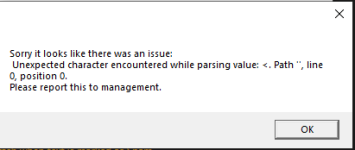
hrm that's a new one.
Definitely give yourself a computer restart, and make sure that in your settings tab you have a location set
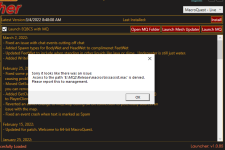
That usually means something has your file locked. Like it is open in an editor, or you have antivirus or similar holding the file hostage/quarantine.Any idea how I can fix this? I unwatched kissassist and still getting this error. Tried reboot a few times for good measure.
View attachment 38563
You should exit all editors, and consider whitelisting any file scanning or syncing of your mq or eq folders.
Also make sure you reboot your pc.
Kiss is an included macro, so you don't need to watch it.
ShadowPanda
Member
Yep that did it, thanks Sici had the same issue.
restart your pc and should be good to go
I tried to patch it under safe mode with network. The file should've not been held up by anything. This only started happening when I decided to watch kissassist a week or so ago. Not sure what the correlation is.That usually means something has your file locked. Like it is open in an editor, or you have antivirus or similar holding the file hostage/quarantine.
You should exit all editors, and consider whitelisting any file scanning or syncing of your mq or eq folders.
Also make sure you reboot your pc.
Kiss is an included macro, so you don't need to watch it.

TaTaige
Member
Despite the error, all seemed to be working normally with the exception of the Last Installed field being blank, and the dynamic button saying Install. I was able to click that button, and everything seemed to do what it was supposed to. At this point, no errors and no problems to report. It either fixed itself or someone did something on the back end.
Ninjapickle
Seasoned veteran member
This just started a couple of days ago. I can login fine with chrome. It acts like it logs in fine with brave, but it just goes back to asking me to login again.
would recommend ensuring your brave is up to date, you don't have anything preventing scripts from running, and possibly clear out your cookie/cacheThis just started a couple of days ago. I can login fine with chrome. It acts like it logs in fine with brave, but it just goes back to asking me to login again.
i use brave on a few pcs with the launcher so it isn't an inherent issue with launcher/brave
Ninjapickle
Seasoned veteran member
No luck with any of those. Thanks though.would recommend ensuring your brave is up to date, you don't have anything preventing scripts from running, and possibly clear out your cookie/cache
i use brave on a few pcs with the launcher so it isn't an inherent issue with launcher/brave
Its not letting me update the Launcher so we caant use MQ??That usually means something has your file locked. Like it is open in an editor, or you have antivirus or similar holding the file hostage/quarantine.
You should exit all editors, and consider whitelisting any file scanning or syncing of your mq or eq folders.
Also make sure you reboot your pc.
Kiss is an included macro, so you don't need to watch it.
it is a patch day today.Its not letting me update the Launcher so we caant use MQ??
I already responded to your other post about that.

every time i hit the update button the loader poofs
you probably need a computer restartevery time i hit the update button the loader poofs
Nihkasilma
Well-known member
thats interesting, mine isn't allowing me to log in and apparently I have updated to the latest:

Although I must admit - where it says last installed - I had to click "Reinstall" because following the last Redguides update - it removed the date and time of last install and didn't offer an update button. Am now receiving the following message:
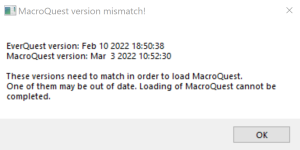
Judging by this I am assuming that the Dev's are still hard at work or am I mistaken?
Thank you
Although I must admit - where it says last installed - I had to click "Reinstall" because following the last Redguides update - it removed the date and time of last install and didn't offer an update button. Am now receiving the following message:
Judging by this I am assuming that the Dev's are still hard at work or am I mistaken?
Thank you
That reads to me like you haven’t patched EQ.thats interesting, mine isn't allowing me to log in and apparently I have updated to the latest:
View attachment 38620
Although I must admit - where it says last installed - I had to click "Reinstall" because following the last Redguides update - it removed the date and time of last install and didn't offer an update button. Am now receiving the following message:
View attachment 38621
Judging by this I am assuming that the Dev's are still hard at work or am I mistaken?
Thank you
Nihkasilma
Well-known member
Damnit, I'm sorry again everyone for being an idiot.
I never open the patcher and therefore the error is mine. Thank you Armyboxer99 will give you a cent when my daily renewal comes up.
I never open the patcher and therefore the error is mine. Thank you Armyboxer99 will give you a cent when my daily renewal comes up.
Users who are viewing this thread
Total: 2 (members: 0, guests: 2)
Share: