• You've discovered RedGuides, an EverQuest multi-boxing and scripting community 🧙‍♀️⚙️. We want you to play several EQ characters at once, come join us and say hello! 👋

  • A TLP without truebox has thawed (Very Vanilla ready)
    Frostreaver
RedGuides Launcher

RedGuides Launcher (2 Viewers) 1.1.0

No permission to download
As one can see, the way a message is brought over is able to make it appear aggressive.
Just to be clear: as long as I dont see negative effects, I don't like to put my finger on a running system and change someting.
I feel you want me to force to disinstall something, because in some configurations it created trouble.
I don't like to be forced into something.
it can and will cause crashes, which is why it is there. so when you start having crashes, be warned that you were notified ahead of time


you are asking for a popup. the popup is a confirmation.

we're not uninstalling anything.

we're telling you to consider disabling it.

what you're asking for is literally what it does. pop up and notify you that you have some software that is known to cause conflicts and crashes.


if you click ok, the popup box goes away as "you had a chance to read it" and not "it just randomly disappeared without you reading it"
 
A "Don't show me this again" box/button would be fine as well.
I am not shure, to know the right terms.
There are Message-boxes, which require to klick a button like "ok" or "cancle".
But there are as well notification-boxes or popup-boxes or however there right name is, which will disapear after a set time, like 5 seconds, by themself.

This message box, requiring a confirmation by clicking "ok" at any single time I start the launcher, for my feeling is bad style.

I got the message and understood it!
Please allow me to disable the need to confirm it any single time I start the launcher.


You see, the repetition of the same Information doesn't help anyone.
It is useless and may start to create bad feelings.
 
The service in question is sound software usually installed by your motherboard. It is usually something like 3d sound or the such or sound radar for FPS type games. Disabling the service will offer no Ill effects to your experience or gaming. Leaving it on the other hand can.
 
I got the message and understood it!
Please allow me to disable the need to confirm it any single time I start the launcher.
ok bud.

thanks for screaming like a child.

it might be something that get's adjusted to a "remind me later" scenario. but it likely won't be something that is just "ignore this forever". many folks who would just continue to run things that would crash them, would end up not remembering that they clicked off a box 6 months previously about something they don't remember.

the popup isn't there because of one of the developers having beef with the software. it is there because it causes known crashes and issues - those crashes and issues don't go away when you click the ignore button.

I opened an issue on our issue tracker > here <
 
Last edited:
A "remind me later" once a week would be much better, than the acutal state.

Most programming Environment have the possibillity to create a notification box shown at any startup which doesn't need a explizite confirmation by pushing "yes" button.
Important informations are usually shown with such a timer-controlled box.

Many thanks to consider to change it.
what about integrating the Information from this message boxe into the welcome screen in the lower aerea after the first confirmation:
1643311609229.png

In that manner it would be always present at start without requesting a confirmation at any single time you start the launcher. A link to the thread with the information how to disable it could be added as well, same like the link there is already.


I got a moderators warning already at the second time, I repeated my message so will stop posting.
It was never meant as "screaming like a child".
My intension was to show, that a message, send in an unsusual manner, can reach the receiver in an unintended way.

You understood "screaming like a child" because of the changed size of the text.
I understood "wants to piss me off until I let me force to chance my systems configuration", by creating a messagebox which needs to be confirmed at any single time I start the program.

A message box at a start of a program with an information that must be confirmed at any single start of the program is unusual, for my feeling at least as unusual as writing in big sized letters in a forum.
 
I'm at a loss on what else to delete and reinstall guys.
Tried to uninstall everything on the legacy version and do a clean install for MQ2.
When I hit launch I get AutoLogin Profile Editor: MQ.exe - Sys Error message.
The program can't start because api-ms-win-core-path-|1-1-0.dll is missing from your computer. Try reinstalling the program to fix this problem.

I then get Could not load MQ2Main.dll or one of its dependencies, MacroQuest will now exit.

- I've uninstalled and reinstalled 3 times now
- I've deleted everything that I can think of that actively uses MQ2

Any suggestions on what I should do?
- Yes I am using the MacroQuest - Live drop down
- Yes I've tried the updaters and reinstallers
 
yes thank you
I'm at a loss on what else to delete and reinstall guys.
Tried to uninstall everything on the legacy version and do a clean install for MQ2.
When I hit launch I get AutoLogin Profile Editor: MQ.exe - Sys Error message.
The program can't start because api-ms-win-core-path-|1-1-0.dll is missing from your computer. Try reinstalling the program to fix this problem.

- I've uninstalled and reinstalled 3 times now
- I've deleted everything that I can think of that actively uses MQ2

Any suggestions on what I should do?
- Yes I am using the MacroQuest - Live drop down
- Yes I've tried the updaters and reinstallers
are you on an old version of windows? as in not windows 10+?

MacroQuest isn't going to work on windows 7 - Microsoft ended support for it quite some time ago and it is very out of date

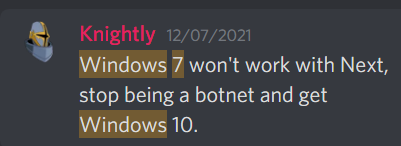
Here is @Knightly's thoughts on windows 7

1643601249062.png
 
yes thank you

yes thank you

are you on an old version of windows? as in not windows 10+?

MacroQuest isn't going to work on windows 7 - Microsoft ended support for it quite some time ago and it is very out of date

Here is @Knightly's thoughts on windows 7

View attachment 37489
Thank you Sic, I have corrected the issue and I'm no longer a bot. New version is working as intended!
 
yeah none of that helped. i just turned on the computer today and wont let me run the launcher. i checked the antivirus stuff not showing anything there
I downloaded the launcher and the Microsoft Store page tried to warn me off - I hit 'install anyway' and nothing happened. Zero result yet...
 
I downloaded the launcher and the Microsoft Store page tried to warn me off - I hit 'install anyway' and nothing happened. Zero result yet...
you msg'd me the same thing.

it is very difficult to have the same conversation in multiple places at once, so let us please keep it here.

I'm not super sure what your question is - if it is about your microsoft store? which doesn't make sense - do you mean your windows defender? or antivurus? windows *store* i don't think would msg you anything.

check out the RG Starter videos and it will have you running in a pretty short order

 
But I just downloaded the launcher and joined Redguides yesterday (mostly for the artisan prize macro- it is amazing). So I need to install something new? Also, I saw the account suspended/banned thing... Is there something I should be doing to avoid that? (I dont AFK, as I know that is the main one). Lastly, what does the LDR tag at the end my everquest characters name mean now... It wasnt there before.
 
But I just downloaded the launcher and joined Redguides yesterday (mostly for the artisan prize macro- it is amazing). So I need to install something new? Also, I saw the account suspended/banned thing... Is there something I should be doing to avoid that? (I dont AFK, as I know that is the main one). Lastly, what does the LDR tag at the end my everquest characters name mean now... It wasnt there before.
ldr means you're the group leader - it is part of the captions in your macroquest.ini - you could edit that to remove it if you needed.

re: the other stuff - as long as you're using "MacroQuest - Live" on the launcher you are good to go

re: suspensions - you'll want to just take precations like not afking, running things like mq2say and/or mq2posse to ensure you can have your attention gained when you need it to be gained - not hogging camps/spoawns/nameds and just in general not being a jerk.

unfortunately any MQ usage is against eq's ToS, so there is a risk there, the best you can do is minimize your exposure to other people who may report you.
 
gotcha. ok, I had the launcher set to legacy live versus macroquest live... didn't understand that part when I first tried it out yesterday. Is there going to be any difference to the client?

Do I watch/download mq2say or mq2posse to use them or are they part of very vanilla?
 
gotcha. ok, I had the launcher set to legacy live versus macroquest live... didn't understand that part when I first tried it out yesterday. Is there going to be any difference to the client?

Do I watch/download mq2say or mq2posse to use them or are they part of very vanilla?
those are part of VV

"legacy" is gone for live/test as of today - EQ changed to a 64 bit client, MacroQuest is what you want
 
Hey, I know there is a ton of confusion going on right now but thought you should know of a situation I am running into. When I went to start "Redguides Launcher" I got a dialog box saying that there was a newer version of the launcher and would I like to update. I clicked yes and nothing happened other than the dialog box disappearing. I tried reopening and nothing. I restarted the computer and tried again, still nothing. So I downloaded the launcher again and clicked on the setup file. I clicked to "repair". The status bar moved a bit then stopped with the message "The file 'LuaModule' cannot be installed because the file cannot be found in the cabinet file 'program.cab'. This could indicate a network error, an error reading from the CD-ROM, or a problem with this package."

I wasn't sure how to proceed so leaving things as they are for the moment. Unless you feel I should delete and try to reinstall the launcher.

Thanks for all you guys are doing and best of luck, AnotherJohn
 
There seems to be a minor flaw / inconvenience in the launcher. If it is open and running and you are on the VV tab. It shows the latest version that was available during start up of the launcher. That date will not refresh if a new version is released.

I recommend it poll the server once in a while to look for a update if running. That way the client is always going to be aware the latest release, with out having to close and relaunch. One other idea could be to add a refresh button that manually polls at users request.
 
I run across this in search. I as well just have been using Legacy Live. I see you said we should be using MacroQuest Live. When I launch it nothing works in game. Like MQ2 melee and so on. It just says cant parse so and so command. What do I need to type in to get started and is there a list of commands. I do not see this on the beginners starter video. Ty
 
For some reason, the Launcher isn't "launching". I unistalled and reinstalled, but it gives me the normal popup window to allow. I click yes, but then no launcher window. Am I the only one with this issue at the moment?
 
For some reason, the Launcher isn't "launching". I unistalled and reinstalled, but it gives me the normal popup window to allow. I click yes, but then no launcher window. Am I the only one with this issue at the moment?
well looks like you were running fine yesterday, so would assume it is a "you" thing since the launcher wasn't changed.

I'd suggest rebooting your pc and trying again
 
yes, yesterday it would pop up and i could get it running, but then all the screens would crash shortly after login. I'll keep at it and see what's up. Thanks for the reply. Good to know others aren't having the issue :)
 
well looks like you were running fine yesterday, so would assume it is a "you" thing since the launcher wasn't changed.

I'd suggest rebooting your pc and trying again

Hey Sic,

I am having the same problem. The launcher never did work for me. Here is what I posted yesterday:

Hey, I know there is a ton of confusion going on right now but thought you should know of a situation I am running into. When I went to start "Redguides Launcher" I got a dialog box saying that there was a newer version of the launcher and would I like to update. I clicked yes and nothing happened other than the dialog box disappearing. I tried reopening and nothing. I restarted the computer and tried again, still nothing. So I downloaded the launcher again and clicked on the setup file. I clicked to "repair". The status bar moved a bit then stopped with the message "The file 'LuaModule' cannot be installed because the file cannot be found in the cabinet file 'program.cab'. This could indicate a network error, an error reading from the CD-ROM, or a problem with this package."

I tried everything again this morning. The launcher still wont launch and the repair still stalls out at the same point with the same message. I have not tried deleting and reinstalling yet as I have been a little afraid of making things worse. Anyway, just FYI at this point with all the problems going on just wanted you to know it wasnt just Twisted having the problem. Thanks for all the work you all are doing to get this working for the rest of us.
 
Hey Sic,

I am having the same problem. The launcher never did work for me. Here is what I posted yesterday:


I tried everything again this morning. The launcher still wont launch and the repair still stalls out at the same point with the same message. I have not tried deleting and reinstalling yet as I have been a little afraid of making things worse. Anyway, just FYI at this point with all the problems going on just wanted you to know it wasnt just Twisted having the problem. Thanks for all the work you all are doing to get this working for the rest of us.
are you running up to date windows? as in not windows 7?
 
are you running up to date windows? as in not windows 7?

Wow that was fast. I am running Windows 10 Home Version 10.0.19043 Build 19043. I do all the updates when prompted so think it up to date. I havent gone with Windows 11 yet, should I?
 
Wow that was fast. I am running Windows 10 Home Version 10.0.19043 Build 19043. I do all the updates when prompted so think it up to date. I havent gone with Windows 11 yet, should I?
that is personal choice - i'm still windows 10 on all my desktops, win 11 on my laptop - as long as you're not windows 7 you're ok :) (or an old windows 10 32 bit - which isn't available any more)

it might be worth fully removing the old launcher (uninstalling and deleting the files) and then redoing it


1 - delete your AppData - paste this in windows explorer search window (any folder) %LocalAppData%\RedGuides and then delete the contents in that folder
1b - Did you skip step 1? if you did, go back and do step 1 :)
2 - then go to add/remove programs, and remove the redguide's launcher
3 - reinstall the launcher
4 - open launcher
5 - point the re-install to your existing mq directory
6 - boom - back in business
7 - get a snack/drink - you earned it!
 
that is personal choice - i'm still windows 10 on all my desktops, win 11 on my laptop - as long as you're not windows 7 you're ok :) (or an old windows 10 32 bit - which isn't available any more)

it might be worth fully removing the old launcher (uninstalling and deleting the files) and then redoing it


1 - delete your AppData - paste this in windows explorer search window (any folder) %LocalAppData%\RedGuides and then delete the contents in that folder
1b - Did you skip step 1? if you did, go back and do step 1 :)
2 - then go to add/remove programs, and remove the redguide's launcher
3 - reinstall the launcher
4 - open launcher
5 - point the re-install to your existing mq directory
6 - boom - back in business
7 - get a snack/drink - you earned it!

Got to step 4 and launcher wont open. Under Users/John/AppData/Local/Redguides was a folder labeled "Resource Manager" that is what I deleted. I removed the launcher using the remove programs app. I downloaded a new install launcher file (just to make sure the one I downloaded yesterday was not the problem. I installed it using the default settings. This all went fine, just when I click to open it does nothing. I dont get any errors or anything, just does not open. This is very disappointing as I was really looking forward to step #7 :)

If you have any other ideas and the time to share them I will follow up with them, thanks.

More info: I have continued to keep working on the problem. I have done various versions of installing/deleting and restarting the computer but that didnt seem to have effect. I also have tried running as administrator no luck there either. In looking in RedGuides Launcher properties under Compatibility I noticed the that compatibility mode is checked and Windows 8 is selected. I am assuming this is ok as I tried unchecking the box and checking the box with the other options in the drop down menu. None of which worked.
 
Last edited:
Experiencing crashes as expected based on the banner, my question is this? Are .dmp files copied from our pc's and sent to Redguides if so when does this occur? If not should we be sending our .dmp files somewhere?
 
Experiencing crashes as expected based on the banner, my question is this? Are .dmp files copied from our pc's and sent to Redguides if so when does this occur? If not should we be sending our .dmp files somewhere?
They are automatically uploaded, no need to send them anywhere.

Keep checking the launcher for updates
 
Got to step 4 and launcher wont open. Under Users/John/AppData/Local/Redguides was a folder labeled "Resource Manager" that is what I deleted. I removed the launcher using the remove programs app. I downloaded a new install launcher file (just to make sure the one I downloaded yesterday was not the problem. I installed it using the default settings. This all went fine, just when I click to open it does nothing. I dont get any errors or anything, just does not open. This is very disappointing as I was really looking forward to step #7 :)

If you have any other ideas and the time to share them I will follow up with them, thanks.

More info: I have continued to keep working on the problem. I have done various versions of installing/deleting and restarting the computer but that didnt seem to have effect. I also have tried running as administrator no luck there either. In looking in RedGuides Launcher properties under Compatibility I noticed the that compatibility mode is checked and Windows 8 is selected. I am assuming this is ok as I tried unchecking the box and checking the box with the other options in the drop down menu. None of which worked.
Exact same thing is happening to me all of the sudden. I did all your steps like AnotherJohn did, and still stuck on step 4, "4 - open launcher". When I click on the icon, nothing pops up at all. I doubled checked the appdata folder and it's still empty
 
Exact same thing is happening to me all of the sudden. I did all your steps like AnotherJohn did, and still stuck on step 4, "4 - open launcher". When I click on the icon, nothing pops up at all. I doubled checked the appdata folder and it's still empty


Still have not figured out what to do to get it to work. If I stumble on something I will post. Sorry it is happening to you but kind of glad its not just something I screwed up.
 
Still have not figured out what to do to get it to work. If I stumble on something I will post. Sorry it is happening to you but kind of glad its not just something I screwed up.
So I got it to work finally. I deleted the %LocalAppData%\RGResourceManager folder and repaired using the download.

Once that was done, you need to "install" again by pointing at your MQnext install, but rest of it worked
 
So I got it to work finally. I deleted the %LocalAppData%\RGResourceManager folder and repaired using the download.

Once that was done, you need to "install" again by pointing at your MQnext install, but rest of it worked


Great info badbard, thank you. Following what you did I got the splash screen to finally pop up. I am glad you mentioned that you need to "install" after setting up your MQ2Next file location. I was expecting a button to say "update" so I would have be thrown a bit without you mentioning that. Now I am going to log in my crew and see how it goes. Thanks so much for posting the fix.
 
that is personal choice - i'm still windows 10 on all my desktops, win 11 on my laptop - as long as you're not windows 7 you're ok :) (or an old windows 10 32 bit - which isn't available any more)

it might be worth fully removing the old launcher (uninstalling and deleting the files) and then redoing it


1 - delete your AppData - paste this in windows explorer search window (any folder) %LocalAppData%\RedGuides and then delete the contents in that folder
1b - Did you skip step 1? if you did, go back and do step 1 :)
2 - then go to add/remove programs, and remove the redguide's launcher
3 - reinstall the launcher
4 - open launcher
5 - point the re-install to your existing mq directory
6 - boom - back in business
7 - get a snack/drink - you earned it!


Was playing just fine earlier today, turned off after a raid and came back, and launcher wont open, followed all steps except 5 & 6, althought i did do 7, and still not actually launching. As assistance is appreciated.
 
Was playing just fine earlier today, turned off after a raid and came back, and launcher wont open, followed all steps except 5 & 6, althought i did do 7, and still not actually launching. As assistance is appreciated.
restart your computer
 
Seems to be having an issue installing update.

Says latest version 2/25/2022 6:56:43 PM and at the bottom it says Installing Macroquest2: Downloading the latest version

but it is either really really slow , or not really doing anything. Launcher ver 1.0.77


Update : It finally updated. Took about 22 minutes but all is well
 
Last edited:
cannot get red guides patcher to load worked in the morning but won't load now? even trying to run as administrator it wont load
 
RedGuides Launcher

Users who are viewing this thread

Back
Top
Cart