
that is mq2eqbc the client plugin, these folks are asking about the eqbc SERVERI am fairly new and still feeling my way around... but my eqbc launches when I start mq2.
Looking at the MacroQuest.ini file (right click MQ2 and select "INI File" I see the setting mq2eqbc=1 I think this is the switch to auto launch it.

-
 Hail, we're RedGuides. We want you to play six (yes, 6!) EverQuest characters at once. We have scripts and a friendly community to help, please join our playstyle and say hello! 👋
You are using an out of date browser. It may not display this or other websites correctly.
You should upgrade or use an alternative browser.
You should upgrade or use an alternative browser.

RedGuides Launcher (3 Viewers) 1.1.0
- Thread starter r1pt1de
- Start date

Dragonator
Active member
Ah okay. Thanks.
Under MQ2 I did the install eqbc server as a service.
I am guessing it is the MQ2EQBCS that is the server service ...
Looks like Windows is handling the startup of the server service.
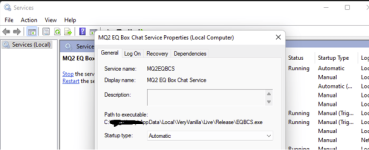
It also looks like it is launching the MQ2eqbcs and not the Next service....or at least not out of the Next directory... does that matter ? Seems to be working fine..
Under MQ2 I did the install eqbc server as a service.
I am guessing it is the MQ2EQBCS that is the server service ...
Looks like Windows is handling the startup of the server service.
It also looks like it is launching the MQ2eqbcs and not the Next service....or at least not out of the Next directory... does that matter ? Seems to be working fine..
this means you had the launcher install the old version as a windows service. you can even see the path is going to your old mq2 install.Ah okay. Thanks.
Under MQ2 I did the install eqbc server as a service.
I am guessing it is the MQ2EQBCS that is the server service ...
Looks like Windows is handling the startup of the server service.
View attachment 36313
It also looks like it is launching the MQ2eqbcs and not the Next service....or at least not out of the Next directory... does that matter ? Seems to be working fine..
you should either a: update that to the new eqbcs in your next install, or just remove that
r1pt1de updated RedGuides Launcher with a new update entry:
MacroQuest is now primary
Read the rest of this update entry...
MacroQuest is now primary
- MacroQuest and MacroQuest_Test are now the defaults on a new install. Legacy is still available at this time
- Added support for running the MQ2 to MacroQuest Migrator from within the launcher
- Fixed several issues related to launching eqbcs and the mesh updater
- Other various bug fixes
Read the rest of this update entry...
MQNext is no longer a server type?

IRL - - MacroQuest release party!
RedGuides is proud to announce the official release of MacroQuest, which we're now using as the base for Very Vanilla. Instructions on downloading the new MacroQuest are here, and migration to the new MQ is discussed here. A few years ago, the most experienced developers in our community got...
 www.redguides.com
MacroQuest - Live is our official macroquest version
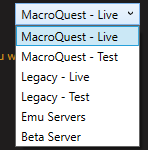
(Sorry ahead if this is in the wrong area)
I know on the test server they are running on 64 bit already and I tried using the launcher to load legacy test. MQ test is still listed as patch day. Whats weird to me is that the EQ window I had open on a character select screen automatically shut down and exited me. Is this part of RG programming or is this potentially something on the EQ side?
I know on the test server they are running on 64 bit already and I tried using the launcher to load legacy test. MQ test is still listed as patch day. Whats weird to me is that the EQ window I had open on a character select screen automatically shut down and exited me. Is this part of RG programming or is this potentially something on the EQ side?
I'm not familiar with behavior to do that(Sorry ahead if this is in the wrong area)
I know on the test server they are running on 64 bit already and I tried using the launcher to load legacy test. MQ test is still listed as patch day. Whats weird to me is that the EQ window I had open on a character select screen automatically shut down and exited me. Is this part of RG programming or is this potentially something on the EQ side?
@Knightly might have some thoughts?
but yeah, test update is gonna be a while.
- Fixed several issues related to launching eqbcs and the mesh updater
# gethostbyname error
Edit: looks like the installed service has gone.... now works if you open eqbcs.exe and leave the cmd window open (that's a bit annoying)
would make sure to a: restart your computer, b: ensure you're only trying to run 1 eqbcs version (the launcher won't try and run one if you have one already running) - definitely make sure you're using/running the new eqbcs.exe in your next - and not something like an old version set as a windows serviceAfter updating launcher, EQBCS now no longer connects for me, error in game is
- Fixed several issues related to launching eqbcs and the mesh updater
# gethostbyname error
The old installed service was disabled, but have uninstalled it now and rebooted.would make sure to a: restart your computer, b: ensure you're only trying to run 1 eqbcs version (the launcher won't try and run one if you have one already running) - definitely make sure you're using/running the new eqbcs.exe in your next - and not something like an old version set as a windows service
When launching MQ with the eqbcs box ticked, I just get a cmd window... it works, but if that window is closed it disconnects.
Manually launching the eqbcs.exe in MQNext folder does the same, no option to install it as a service like the old one?
yes, that window is the eqbc server, it needs to be running for you to connected to itThe old installed service was disabled, but have uninstalled it now and rebooted.
When launching MQ with the eqbcs box ticked, I just get a cmd window... it works, but if that window is closed it disconnects.
Manually launching the eqbcs.exe in MQNext folder does the same, no option to install it as a service like the old one?
I get that, but is there a way to install it as a service so that this window doesn't need to be open? like the old one didyes, that window is the eqbc server, it needs to be running for you to connected to it
yup, windows allows you to set anything as a windows service to automatically run - the launcher doesn't have that atm, howeverI get that, but is there a way to install it as a service so that this window doesn't need to be open? like the old one did
> i believe this is a good link to describe how <
personally i just put the eqbc on a remote desktop window
Lovely, cheers Sicyup, windows allows you to set anything as a windows service to automatically run - the launcher doesn't have that atm, however
> i believe this is a good link to describe how <
personally i just put the eqbc on a remote desktop window
This appears to be related to the 64/32 bit thing when you use legacy and it tries to inject into the 32-bit process. MacroQuest Test doesn't cause the eqgame process to crash, but it doesn't really matter anyway, we just have to wait for the work to be done. There is no solution to using any version of MQ on Test right now.Whats weird to me is that the EQ window I had open on a character select screen automatically shut down and exited me.

FWIW this works for me:I get that, but is there a way to install it as a service so that this window doesn't need to be open? like the old one did

sc.exe create
Reference article for the sc.exe create command, which creates a subkey and entries for a service in the registry and in the Service Control Manager database.
docs.microsoft.com
1) Open Command Prompt as Administrator
2) run: sc.exe create SERVICENAME start= auto binpath= "PATH_TO_eqbcs.exe", ie:
sc.exe create MQ2EQBCS start= auto binpath= "c:\ProgramData\RedGuides\VeryVanillaMQ2\EQBCS.exe"
3) Reboot
4) Run services.msc and check that your service is present and running.
Thank you - have run that, rebooted and the service is present but it won't run "Error 1053: The service did not respond to the start or control request in a timely fashion"FWIW this works for me:
sc.exe create
Reference article for the sc.exe create command, which creates a subkey and entries for a service in the registry and in the Service Control Manager database.docs.microsoft.com
1) Open Command Prompt as Administrator
2) run: sc.exe create SERVICENAME start= auto binpath= "PATH_TO_eqbcs.exe", ie:
sc.exe create MQ2EQBCS start= auto binpath= "c:\ProgramData\RedGuides\VeryVanillaMQ2\EQBCS.exe"
3) Reboot
4) Run services.msc and check that your service is present and running.

I'm disabling it anyways ran into another problem. by creating a system service it's holding files open when the patcher runs so if you try to apply an update you get a warning that 'Everquest still has files open' when its actually the eqbcs server running. Guess I'll kill the service and go back to it opening a cmd window when I launch MQ. Hopefully this can be hidden in a future release.Thank you - have run that, rebooted and the service is present but it won't run "Error 1053: The service did not respond to the start or control request in a timely fashion"
Fair enough - I've realised what Sic was referring to with virtual desktop - that solution is great (Windows Key + Tab, open a new Desktop and just drag the cmd window into that)I'm disabling it anyways ran into another problem. by creating a system service it's holding files open when the patcher runs so if you try to apply an update you get a warning that 'Everquest still has files open' when its actually the eqbcs server running. Guess I'll kill the service and go back to it opening a cmd window when I launch MQ. Hopefully this can be hidden in a future release.

- Commits
- 191
If you hit
Once the window is open you can run the eqbc on that "desktop"
Then switch back to the one you play EQ on and it would be hidden.
That's what I do when taskbar space is needed.

WindowsKey + Tab you can "open a new desktop" at the very top of the screen. Once the window is open you can run the eqbc on that "desktop"
Then switch back to the one you play EQ on and it would be hidden.
That's what I do when taskbar space is needed.
Averystrange9
Member
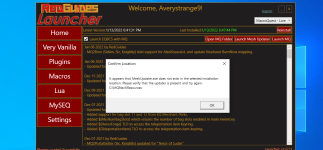
the mesh updater is a known thing.Somebody broke something?
the console and frame limiter is gone also, before update they would just come up after login.
this is in the works
the console and frame limiter are built in to mq - there is no way to make them go away.
your title post is kinda sad man. a lot of people are working real hard to bring good stuff, don't need to trash on their efforts.
plus i merged it into the launcher thread since you are asking about the mesh updater on the launcher.

Somebody broke something?
the console and frame limiter is gone also, before update they would just come up after login.
We have a fix for the meshupdater in about 30 minutes
- Commits
- 191
Somebody broke something?
the console and frame limiter is gone also, before update they would just come up after login.
CTRL + `will open your console, that's the key left of your 1 on the keyboard in case it's hard to see.
Framelimiter is available in /mqsettings
Averystrange9
Member
i want them back, not for them to go away... they are not their no longer?the mesh updater is a known thing.
this is in the works
the console and frame limiter are built in to mq - there is no way to make them go away.
your title post is kinda sad man. a lot of people are working real hard to bring good stuff, don't need to trash on their efforts.
plus i merged it into the launcher thread since you are asking about the mesh updater on the launcher.
Thanks!CTRL + `
will open your console, that's the key left of your 1 on the keyboard in case it's hard to see.
Framelimiter is available in /mqsettings
r1pt1de updated RedGuides Launcher with a new update entry:
Various fixes for MacroQuest
Read the rest of this update entry...
Various fixes for MacroQuest
- fixed plugin install location for macroquest
- mesh generator button now launches from the correct file location
- other various background changes
Read the rest of this update entry...

eqsubi15
Ultimate seasoned veteran member
With the recent change to MQNext being the new default and the launcher being updated, all of my plugins are now showing "install" instead of "update". So far they seem to be working, but I'm afraid of breaking them if I select "install" on any of those. Has anyone else come across this issue?
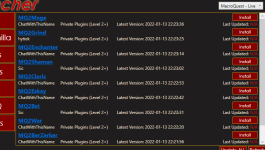
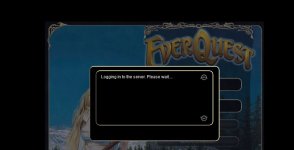
Is something up with new launcher v1.0.74? it just upgraded and now it gets to server login screen and just sits there waiting to connect to EQ server? Just started with todays update for me. If i login with just EQ launcher by itself, it logs in but if i stop that and run MQ - live, it just sits there waiting for server just fyi.
Thanks, Tshadow
Thanks, Tshadow
Nope RedGuides launcher is working finedid you actually run macroquest?Is something up with new launcher v1.0.74? it just upgraded and now it gets to server login screen and just sits there waiting to connect to EQ server? Just started with todays update for me.
Thanks, Tshadow
Did you already do the migration so all your files are migrated including your login?
It is OFFICIAL! MacroQuest is the version of MacroQuest that we offer here at RedGuides.
>>> Migration guide to MacroQuest<<<
Yes, been running it for months. Was working yesterday and today it is stuck at the login to Server screen. I put in wrong password and that came back after a very long time. Login clean also tries to do autologin so not sure what happened.
Attachments
Last edited:

It is OFFICIAL! MacroQuest is the version of MacroQuest that we offer here at RedGuides.Hello i updated my Launcher today and i seen it went back to Mq2live and Mq2next is gone from my lil drop down menu .. did something go wrong or is this right ?
You will see this with "MacroQuest - Live" in the RG Launcher.
Please, check out this link: >>> Functions & Features Demo + Migration to the new MacroQuest<<<
mental notes:
1. mq2map click is Control+Shift+Click
2. new easyfind self travel is Control+Click (reminder in find window title bar)
3. new easyfind group travel is Control+Shift+Click
4. If you selected a destination in your zone guide and want to activate it you /travelto activate
5. /yes and /no are now aliases, there is no mq2yes plugin

did something go wrong or is this right ?
There is nothing wrong with your television.
Do not attempt to adjust the picture.
We are now controlling the transmission........
You are about to experience the awe and mystery which reaches from the deepest inner mind to the outer limits.
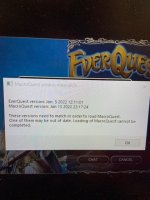
Following today's 1-19-22 EQ patch I'm unable to launch toons through MQ but get this message instead.
I've tried re-patching through the EQ Dashboard repeatedly, checked all my files to be sure they are up to date and still I cannot launch my toons through MQNext.
Any suggestions as to what might be wrong and what I can do about it?
Thanks.
I've tried re-patching through the EQ Dashboard repeatedly, checked all my files to be sure they are up to date and still I cannot launch my toons through MQNext.
Any suggestions as to what might be wrong and what I can do about it?
Thanks.

Goatse Moneyshot
BANNED
Macroquest2 from the last 10 years is now called Legacy in the patcher 
Users who are viewing this thread
Total: 4 (members: 0, guests: 4)
Share: