
-
 Hail, we're RedGuides. We want you to play six (yes, 6!) EverQuest characters at once. We have scripts and a friendly community to help, please join our playstyle and say hello! 👋
You are using an out of date browser. It may not display this or other websites correctly.
You should upgrade or use an alternative browser.
You should upgrade or use an alternative browser.

RedGuides Launcher (5 Viewers) 1.1.0
- Thread starter r1pt1de
- Start date

howdy squirrely,View attachment 35189
Not really sure I am even logged in . From watching the newbie videos under which type of server playing on it should come back as only update once logged in . However, mine is showing reinstall. (see screen shot). Next , how to do I get pass Reinstall.
you're not doing anything wrong.
you don't get past reinstall - reinstall will always be there if you are up to date in case you wanted to reinstall.
if you want to launch mq2, hit the launch button. the reinstall is just "i would like to redownload everything"
obligatory "you should consider checking out mq 'next'" soon it will be "the" version
very vanilla is just the "flavor" of macroquest we have here at redguides.just did a restore on my computer do i have to install the VV or do i just start over with next ?
if you uninstalled the RG launcher, yes you need to install it - if you deleted your mq and/or mq2 installations, then you'll need to redownload those.
you don't *have* to have mq2 to install next, but it makes it easier so you can migrate stuff over like meshes unless you manually run the meshupdater or download maps from mqmesh.com
Thanks. only bad thing i didn't back up my profiles so i have to redo those lolvery vanilla is just the "flavor" of macroquest we have here at redguides.
if you uninstalled the RG launcher, yes you need to install it - if you deleted your mq and/or mq2 installations, then you'll need to redownload those.
you don't *have* to have mq2 to install next, but it makes it easier so you can migrate stuff over like meshes unless you manually run the meshupdater or download maps from mqmesh.com
Grpsmashin
Ranger Tank
Hello all. Currently running Next and was wondering if i missed the plugin for EQBC? Does the program not autoload for next? had to manual click in from the MQ button to load it.
Let me know!
Thanks
Let me know!
Thanks

Right now the current build of the launcher does not have that button on it yet. So what I did is went to the dir for macroquest and made a shortcut to the desktop and then I just click that when I get read to launch. This will load up EQBCS and your all set to hit the launch button for MQNext.
Zeb
Zeb
Grpsmashin
Ranger Tank
Right now the current build of the launcher does not have that button on it yet. So what I did is went to the dir for macroquest and made a shortcut to the desktop and then I just click that when I get read to launch. This will load up EQBCS and your all set to hit the launch button for MQNext.
Zeb
Thank you! I figured id have to do it that way. Now its time to start messing around with it.
check > this < out, it explains the launcher and some of the other stuffThank you! I figured id have to do it that way. Now its time to start messing around with it.
Grpsmashin
Ranger Tank
check > this < out, it explains the launcher and some of the other stuff
Thanks man. I'll check it out tonight!

I'm not sure where to put this question so if this isn't the right place let me know. After attempting to install MQNext the launcher wouldn't update to the new version and I get messages that say something like "resource not located on this server"
I can't uninstall the launcher as I get the same message.
I can't uninstall the launcher as I get the same message.
I'm not sure where to put this question so if this isn't the right place let me know. After attempting to install MQNext the launcher wouldn't update to the new version and I get messages that say something like "resource not located on this server"
I can't uninstall the launcher as I get the same message.
hrm that's a new one, try a computer restart and see where you're atI'm not sure where to put this question so if this isn't the right place let me know. After attempting to install MQNext the launcher wouldn't update to the new version and I get messages that say something like "resource not located on this server"
I can't uninstall the launcher as I get the same message.
well apparently Dropbox took control of my downloads and the launcher was being installed off of the computer. Very weird, I'm still getting it sorted outhrm that's a new one, try a computer restart and see where you're at
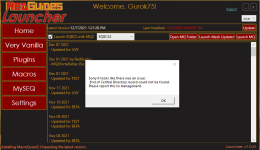
howdy gurok,The program will not complete its update for some reason. I am getting the following message.
View attachment 35531
I moved your launcher question out of the kissassist support section and moved it to the launcher section.
that issue is often a: bad internet, b: something like antivirus scanning your files and/or holding them hostage, or c: just need a computer reboot.
try rebooting and then patch again and see if that fixes you up. You will also want to ensure your antivirus isn't holding any files hostage.
Thank you Sic.howdy gurok,
I moved your launcher question out of the kissassist support section and moved it to the launcher section.
that issue is often a: bad internet, b: something like antivirus scanning your files and/or holding them hostage, or c: just need a computer reboot.
try rebooting and then patch again and see if that fixes you up. You will also want to ensure your antivirus isn't holding any files hostage.

Sinickal
Well-known member
Not sure if this is a problem; I can still use VV/Next and everything appears to be working well.
When I start up the Launcher I see:
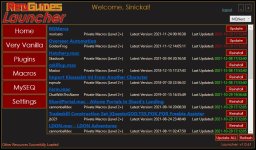
Only RGMercs and Overseer Automation are ever like this, but haven been this way for a couple of weeks. All I have done is Update/Update All and then continued.
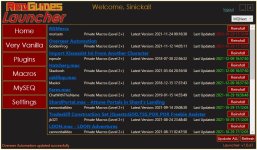
But those two Macros are not going "green" so always need updating.
Just curious if anyone else is seeing this, or if I need to do something to the Launcher to correct this?
Thank you for any help.
When I start up the Launcher I see:
Only RGMercs and Overseer Automation are ever like this, but haven been this way for a couple of weeks. All I have done is Update/Update All and then continued.
But those two Macros are not going "green" so always need updating.
Just curious if anyone else is seeing this, or if I need to do something to the Launcher to correct this?
Thank you for any help.
yup current bug with the launcher, a fix is in the worksNot sure if this is a problem; I can still use VV/Next and everything appears to be working well.
When I start up the Launcher I see:
View attachment 35596
Only RGMercs and Overseer Automation are ever like this, but haven been this way for a couple of weeks. All I have done is Update/Update All and then continued.
View attachment 35597
But those two Macros are not going "green" so always need updating.
Just curious if anyone else is seeing this, or if I need to do something to the Launcher to correct this?
Thank you for any help.

- Commits
- 191
MQ has to be patched just like EQ patches. If they don't have matching dates then they aren't synced with each other and things don't work. So I'm afraid there is no way to use them when they are out of sync with each other.
if you didn't exit the game and run the launcher, you could continue playing. it was an optional patchIs there anyway to continue playing when patch out of date with the older version of Vanilla?
I was logged in and all working., logged out and then cant get back in with it on.
if you patched your eqgame.exe you have to wait for a new build.
mq "Next" is already rebuilt. > GUIDE <


I restarted my computer a few hours ago and autologin worked fine. Maybe something with EQ?
Windows 10 patched. Perhaps that. Yes it was that. Everything is working correctly and much much faster. I've never seen a windows patch do something like this before. /cheersI restarted my computer a few hours ago and autologin worked fine. Maybe something with EQ?
Last edited:

they actually do get updated, the launcher just doesn't reflect it with the green/red. I talk about this in the functions/features vid@Sinickal
The fix for this issue is to update MQ2 in the launcher. Then swap back to Next in the launcher and they will be updated.
If you have macros that will not update on Next, swap to vanilla MQ2 and update the macros there. After you swap the launcher back to next all is well again.

sorry this is causing you woes.
As mentioned a few times in several places it is a known thing that will be fixed when next moves to the primary "stable" version of redguides.
in the meantime right click this badboy:

then left click "Start EQBC Server"

Ant no body got time for that!they actually do get updated, the launcher just doesn't reflect it with the green/red. I talk about this in the functions/features vid


soonI'm sure this has been talked about, but when do you all plan on releasing LUA in the Launcher for MQNext?


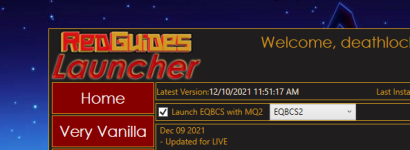
you can't atm with the launcher.In the old RG Launcher there was a check box to autolaunch EQBC with MQ. With MQNext that box seems to be gone. Is there another way to autolaunch EQBC when you launch MQNext?
it will in a future version
please see other responses to the same qusetion > here <

Dragonator
Active member
I am fairly new and still feeling my way around... but my eqbc launches when I start mq2.
Looking at the MacroQuest.ini file (right click MQ2 and select "INI File" I see the setting mq2eqbc=1 I think this is the switch to auto launch it.
Looking at the MacroQuest.ini file (right click MQ2 and select "INI File" I see the setting mq2eqbc=1 I think this is the switch to auto launch it.
Users who are viewing this thread
Total: 6 (members: 0, guests: 6)
Share: