
try using a different default browser for windows and/or clearing your cache.I start the launcher, and before I can login, the launcher goes away. Have tried adjusting my firewall, have reinstalled the launcher (3 times, 2 repairs) Still same affect.

-
 Hail, we're RedGuides. We want you to play six (yes, 6!) EverQuest characters at once. We have scripts and a friendly community to help, please join our playstyle and say hello! 👋
You are using an out of date browser. It may not display this or other websites correctly.
You should upgrade or use an alternative browser.
You should upgrade or use an alternative browser.

RedGuides Launcher (4 Viewers) 1.1.0
- Thread starter r1pt1de
- Start date
yes, that is correctWith the Launcher set to MQNext, the MySEQ panel indicates it's not available for that server type. Just to confirm, this is a cosmetic issue, correct? It's my understanding there's really no difference in terms of MySEQ operation whether running VV or Next.

jimbo30217
Active member
Trying to install MQ2 on a new secondary computer. End of central directory not found, please report to manage keeps popping up after Ive hit install and waited.....not sure if its something I may have screwed up, or if my connection is just slow and Im timing out today. Any Ideas on how I can fix this? Thanks!
howdy jimbo,Trying to install MQ2 on a new secondary computer. End of central directory not found, please report to manage keeps popping up after Ive hit install and waited.....not sure if its something I may have screwed up, or if my connection is just slow and Im timing out today. Any Ideas on how I can fix this? Thanks!
this is almost always either a: a slow internet connection or something server-side causing the download to have issues, or b: something on your end like antivirus holding files up and not being able to install/modify/use them as it is trying to do its business.
a slow download speed or intermittent download hiccups can definitely cause issues
if you don't currently have your VV/MQ2 install exempt from your antivirus, you might consider that
the launcher itself? nahDoes the RG Launcher have a source repo available to pull from? Searches aren't showing any results that stand out as the source for it.
Okies, prolly me pulling a dumb here, but i am getting an error trying to update the current version to the one released on the 16th. What i get is the following in a popup window :
Sorry, looks like there has been an issue:
End of Central Directory record could not be found.
Please report this to management.
- any ideas anyone?
**EDIT**
Okies, been trying this over and hour, resetting and stuff, deleting .inis and nothing seemed to work, posted the above, staring at teh screen wondering why it wouldn't wqork, thought "wth" and hit update again - it worked...
Aplogies on the post, at least you can all laugh at my ineptitude /fml !!
Sorry, looks like there has been an issue:
End of Central Directory record could not be found.
Please report this to management.
- any ideas anyone?
**EDIT**
Okies, been trying this over and hour, resetting and stuff, deleting .inis and nothing seemed to work, posted the above, staring at teh screen wondering why it wouldn't wqork, thought "wth" and hit update again - it worked...
Aplogies on the post, at least you can all laugh at my ineptitude /fml !!
Last edited:
i moved your launcher question to the launcher thread.Okies, prolly me pulling a dumb here, but i am getting an error trying to update the current version to the one released on the 16th. What i get is the following in a popup window :
Sorry, looks like there has been an issue:
End of Central Directory record could not be found.
Please report this to management.
- any ideas anyone?
**EDIT**
Okies, been trying this over and hour, resetting and stuff, deleting .inis and nothing seemed to work, posted the above, staring at teh screen wondering why it wouldn't wqork, thought "wth" and hit update again - it worked...
Aplogies on the post, at least you can all laugh at my ineptitude /fml !!
that is often times an issue due to slow internet connection, server load, or most frequently due to something like antivirus or similar scanning the files and/or holding them hostage. it might be worth adding your mq2/eq directory(ies) to being exempt from that
glad you're all fixed up
Feature request new Button: Resync plugin-licenses / plugin now
Learned that it can take upto 4 ours before a purchased plugin may be installed.
If that's to hard to implement maybe visualize the timer when next sync will occur?
Learned that it can take upto 4 ours before a purchased plugin may be installed.
If that's to hard to implement maybe visualize the timer when next sync will occur?
howdy again Dragon,Feature request new Button: Resync plugin-licenses / plugin now
Learned that it can take upto 4 ours before a purchased plugin may be installed.
If that's to hard to implement maybe visualize the timer when next sync will occur?
yes, currently the server auto-syncs every 4 hours for next licenses for "premium" purchased resources.
eventually, this will be unnecessary because there will only be 1 version of MQ that is supported.
for a while CWTN and i were doing them manually, now it is auto sync'd 6 times a day, once every 4 hours.
soon, there will just be "Next" and there will be no syncing necessary as that will be the only license.
it is definitely less than ideal, but cwtn and i were manually adding licenses daily, and this means even if we're sleeping, or dead, that they will get sync'd up.
Sorry for the troubles - they should be short-lived.
Last edited:
Ohh, wasn't aware that this sync-thing is just temporary during the transition-period. No need to waste time on this, if it's going to be solved by design after the transition.

howdy again Dragon,
yes, currently the server auto-syncs every 4 hours for next licenses for "premium" purchased resources.
eventually, this will be unnecessary because there will only be 1 version of MQ that is supported.
for a while CWTN and i were doing them manually, now it is auto sync'd 6 times a day, once every 4 hours.
soon, there will just be "Next" and there will be no syncing necessary as that will be the only license.
it is definitely less than ideal, but cwtn and i were manually adding licenses daily, and this means even if we're sleeping, or dead, that they will get sync'd up.
Sorry for the troubles - they should be short-lived.
Hmm, if your asleep..its excuseable, if your dead..No excuse..zombify yourself, we need you posting round the clock ! ☠☠☠


I just posted this because I just bought MQ2Mage and came looking for the reason it was not showing in (in the launcher)Next. I'm about to try Next out, happy to know you guys are aware and can give us a simple ease of mind answer.
Hit that updater!Hmm, if your asleep..its excuseable, if your dead..No excuse..zombify yourself, we need you posting round the clock ! ☠☠☠
I just posted this because I just bought MQ2Mage and came looking for the reason it was not showing in (in the launcher)Next. I'm about to try Next out, happy to know you guys are aware and can give us a simple ease of mind answer.

no, not at this timeDoes the Launch Mesh Updater button appear on the MQNext RedGuides Launcher? I have it on the Live Launcher but no button under the MQNext one.
Thanks

howdy cmey, I don't know the answer as far as .net specifically, but the launcher is a 32bit applicationI'm trying to run the RedGuides Launcher in wine.
What kind of dependencies does it have?
one dependency I'm fairly certain is needed is .NET, am I right? which version?
Does it run in 32 bits mode?
Thanks!
@r1pt1de or @Knightly might have an answer as far as the .net goes

Ninjapickle
Seasoned veteran member
I have a new computer and things went wonky when I tried to copy and paste my mq2 from my other computer to this one. I want to uninstall then reinstall, but I don't see an uninstall option. I uninstalled through windows task manager and no go. I deleted the folder as well, but still no go. Any help from you awesome folks?
you can just reinstall or delete existing folder and then tell the launcher to install to a new location or whatnot in your "settings" tab of the launcherI have a new computer and things went wonky when I tried to copy and paste my mq2 from my other computer to this one. I want to uninstall then reinstall, but I don't see an uninstall option. I uninstalled through windows task manager and no go. I deleted the folder as well, but still no go. Any help from you awesome folks?
reinstall button:
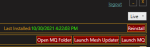
settings tab location

I would suggest to take this opportunity to instead install MacroQuest "Next" instead of the old MQ2

Attos123
Active member
Hi all. Taking @Sic 's advice, I made the switch from live, to next. The only issue I have run into, is I can not find a mesh updater button on the launcher on the next tab. On the live tab, it is conveniently located between the launch Mq2 and open root folder buttons. I finally just copy/pasted the nav files from the VV nav folder to the new next folder. Is there a way to set up auto downloads? Or am I just missing the button?
Thanks again, as always.
Attos
Thanks again, as always.
Attos

- Commits
- 191
This is a know thing. The meshes from the updater work on both builds, so you can safely copy your meshes over to Next.
In next they go in MQ2Folder\resources\MQ2Nav\
They would located in legacy in the MQ2Folder\MQ2Nav
So if you have an existing legacy build with meshes you can just move or copy them from it to the location above for Next.
In next they go in MQ2Folder\resources\MQ2Nav\
They would located in legacy in the MQ2Folder\MQ2Nav
So if you have an existing legacy build with meshes you can just move or copy them from it to the location above for Next.


Hi all. Taking @Sic 's advice, I made the switch from live, to next. The only issue I have run into, is I can not find a mesh updater button on the launcher on the next tab. On the live tab, it is conveniently located between the launch Mq2 and open root folder buttons. I finally just copy/pasted the nav files from the VV nav folder to the new next folder. Is there a way to set up auto downloads? Or am I just missing the button?
Thanks again, as always.
Attos
Was asking for a similar question a few days ago. One of the admin told me to download the meshupdater program and to paste it in the ressource folder of mqnext. So when you run it, it update the mesh in the subfolder, mqnav.
yup mentioned in the information videoI believe that button among other things we are used to working on the Legacy live side of the Launcher will all be working on the final MQ (Next) build of the launcher when it will be only MQ. Patience

- Commits
- 36
I'm trying to update MQNext to the 11/17 version but it hangs indefinitely.

Edit:
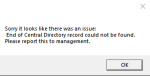
I restarted the launcher, it got past the version, it says downloaded, but then abruptly ended, and gives me this:

But, MQNext is still not updated.

And more... after some time:
Edit:
I restarted the launcher, it got past the version, it says downloaded, but then abruptly ended, and gives me this:
But, MQNext is still not updated.
And more... after some time:
Last edited:
i moved your thread to the launcher thread.i run redguides launcher today and it starts logs in and all the sudden closes i can't get it to run any idea ?
couple things to start with
1st, I would reboot your computer always good to have a fresh start when things aren't going as planned.
2nd, I would ensure you don't have any antivirus or anything else holding files hostage or causing other issues with your eq or VV directories.
3rd, if those don't shake it loose, i would try changing your windows default browser to another browser (like if you use firefox, try chrome, of if you use edge, try chrome, etc)
and you tried changing your default browser as mentioned for step 3? sometimes folk's brower goes a bit sideways either being out of date or some unspecified conflict/issue, and they need to swap to a different default browser for it to talk to the forums. if you skipped this step, you should definitely not.yeah none of that helped. i just turned on the computer today and wont let me run the launcher. i checked the antivirus stuff not showing anything there
yesand you tried changing your default browser as mentioned for step 3?
ok, because that is important if you didn't.
it is possbile (but unlikely) you had a compat layer issue
Need to check if windows added something to your compat layer?
Check these locations in your registry for anything eq/mq/mq2/VV/RG related and delete.
Code:
HKEY_CURRENT_USER\Software\Microsoft\WindowsNT\CurrentVersion\AppCompatFlags\Layers and HKEY_LOCAL_MACHINE\Software\Microsoft\WindowsNT\CurrentVersion\AppCompatFlags\LayersI haven't had to suggest anyone reinstall the launcher in quite some time, but here are the steps to do just that. if the above doesn't work
Launcher problems?
 Sorry to hear that.
Sometimes the Launcher gets a little confused and will close automatically - when this happens you need to reinstall the launcher after deleting your APPDATA and here are some steps to help you do tha
1 - delete your AppData - paste this in windows explorer search window (any folder) %LocalAppData%\RedGuides and then delete the contents in that folder
1b - Did you skip step 1? if you did, go back and do step 1
2 - then go to add/remove programs, and remove the redguide's launcher
3 - reinstall the launcher
4 - open launcher
5 - point the re-install to your existing mq/mq2 directory
6 - boom - back in business
7 - get a snack/drink - you earned it!
Here is the link to re-download the launcher https://www.redguides.com/community/resources/redguides-launcher.1255/download
registry was clean. both areas you said. deleted the files in localappdata did uninstall reinstalled lauched reguides and did the same thingok, because that is important if you didn't.
it is possbile (but unlikely) you had a compat layer issue
Need to check if windows added something to your compat layer?
Check these locations in your registry for anything eq/mq/mq2/VV/RG related and delete.
Code:HKEY_CURRENT_USER\Software\Microsoft\WindowsNT\CurrentVersion\AppCompatFlags\Layers and HKEY_LOCAL_MACHINE\Software\Microsoft\WindowsNT\CurrentVersion\AppCompatFlags\Layers
I haven't had to suggest anyone reinstall the launcher in quite some time, but here are the steps to do just that. if the above doesn't work
Launcher problems?
Sometimes the Launcher gets a little confused and will close automatically - when this happens you need to reinstall the launcher after deleting your APPDATA and here are some steps to help you do tha
1 - delete your AppData - paste this in windows explorer search window (any folder) %LocalAppData%\RedGuides and then delete the contents in that folder
1b - Did you skip step 1? if you did, go back and do step 1
2 - then go to add/remove programs, and remove the redguide's launcher
3 - reinstall the launcher
4 - open launcher
5 - point the re-install to your existing mq/mq2 directory
6 - boom - back in business
7 - get a snack/drink - you earned it!
Here is the link to re-download the launcher https://www.redguides.com/community/resources/redguides-launcher.1255/download
Users who are viewing this thread
Total: 5 (members: 0, guests: 5)
Share: