
If you're receiving the "MQ2 expected eqgame Date and Time to be" then that MQ2 is not updated.I am looking and do not see multiples. Also, I open the latest file and it still gives me that error=(

-
 Hail, we're RedGuides. We want you to play six (yes, 6!) EverQuest characters at once. We have scripts and a friendly community to help, please join our playstyle and say hello! 👋
You are using an out of date browser. It may not display this or other websites correctly.
You should upgrade or use an alternative browser.
You should upgrade or use an alternative browser.

RedGuides Launcher (2 Viewers) 1.1.0
- Thread starter r1pt1de
- Start date
I did that and that is where I am getting the issue from
I did that and that is where I am getting the issue from
Did you ever find the logout button on your launcher?
I did and that didnt fix it either.
You can skip the launcher, and manually download & extract the update.
Be careful to not overwrite your .ini files
Be careful to not overwrite your .ini files
Had to reformat and reinstall windows to fix it. Tried everything else and nothing anyone suggested helped, nor did any of the videos.

there was a patch to the launcher, you need to ensure you accept the update, and log out and back in on the launcheri cant get the launchpad of redguides to work there was an update i didnt it and now says EQtime is wrong?
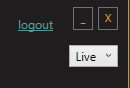

Having issues updating. No logout button on my launcher  .
.
.hrm - i would check your Settings tab and ensure you're updated to 1.0.59Having issues updating. No logout button on my launcher

Deleted and reinstalled launcher. Things seem to work now.
r1pt1de updated RedGuides Launcher with a new update entry:
Added plugin support for MQ Next
Read the rest of this update entry...
Added plugin support for MQ Next
- Plugin support added for MacroQuest Next
Read the rest of this update entry...

from time to time I get a Incorrect Function error when updating Very Vanilla. I reinstalled Chrome and it seemed to fix my first issue. It worked for more than a month and it just happened again. i tried to reload redguide choosing the repair function and it said there was a Cab issue. This is over my head and I am not sure how to fix this problem.
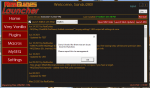
I believe that happens when it is un zipping files - you can see you're at 74% unpacking something and something is failing.from time to time I get a Incorrect Function error when updating Very Vanilla. I reinstalled Chrome and it seemed to fix my first issue. It worked for more than a month and it just happened again. i tried to reload redguide choosing the repair function and it said there was a Cab issue. This is over my head and I am not sure how to fix this problem.
View attachment 31463
Is it possible you're having internet issues? we saw a similar thing before.
the "incorrect function" is an exception that is getting kicked back, which is curious. There are a few places where that same message gets reported, with the exception error in the middle - a couple of them are on the launcher, and a couple of them are via the website - I can't tell the distinction if this is a launcher or a website issue. Maybe r1p can help.
@r1pt1de any thoughts?
I can take a look and see what I can find. @Sandu280 if you are still having the issue, can you go into the settings tab and set the log level to full, let it hit the error and then send me the log file? It will be in the logs folder where you installed the launcher. The settings tab will also show you where the launcher is installed
My launcher seems to be permanently fucked. Tried reinstalling, reinstalling elsewhere, launching as admin, rebooting, logout/login, and various other things.
Here's what I see:

This seems to be having 2important effects:
1, and most importantly, it will not recognize that I subscribe to CWTN plugins for MQNext and list them under the plugins section. Perhaps related to the fact that (as you notice in the bottom left) it seems to just stop making progress when 'pluginsmodule' tries to do anything.
2, as you can see- the buttons and some text are totally fucked up and zoomed to weird sizes.
I hope there's something I can do to fix this.
ty gentlemen
Here's what I see:
This seems to be having 2important effects:
1, and most importantly, it will not recognize that I subscribe to CWTN plugins for MQNext and list them under the plugins section. Perhaps related to the fact that (as you notice in the bottom left) it seems to just stop making progress when 'pluginsmodule' tries to do anything.
2, as you can see- the buttons and some text are totally fucked up and zoomed to weird sizes.
I hope there's something I can do to fix this.
ty gentlemen
Last edited by a moderator:
My launcher seems to be permanently fucked. Tried reinstalling, reinstalling elsewhere, launching as admin, rebooting, logout/login, and various other things.
Here's what I see:
This seems to be having 2important effects:
1, and most importantly, it will not recognize that I subscribe to CWTN plugins for MQNext and list them under the plugins section. Perhaps related to the fact that (as you notice in the bottom left) it seems to just stop making progress when 'pluginsmodule' tries to do anything.
2, as you can see- the buttons and some text are totally fucked up and zoomed to weird sizes.
I hope there's something I can do to fix this.
ty gentlemen
1. you already msg'd me about this, and i already added the licenses for next, which i replied to you about.
2.
2. I was having this issue last week - what fixed it for me was to check for windows updates, install any available updates and restart. Not sure how/why that worked, but seemed to do the trick for me and I haven't had the issue since.My launcher seems to be permanently fucked. Tried reinstalling, reinstalling elsewhere, launching as admin, rebooting, logout/login, and various other things.
Here's what I see:
View attachment 31570
This seems to be having 2important effects:
1, and most importantly, it will not recognize that I subscribe to CWTN plugins for MQNext and list them under the plugins section. Perhaps related to the fact that (as you notice in the bottom left) it seems to just stop making progress when 'pluginsmodule' tries to do anything.
2, as you can see- the buttons and some text are totally fucked up and zoomed to weird sizes.
I hope there's something I can do to fix this.
ty gentlemen
@Sic
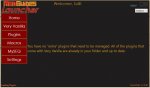
Finally making the migration to Next, and making sure I am not overlooking something. I used @Knightly migration tool, and everything copied (and much cleaner looking btw). But I can't see any of the 4 CWTN plugins I have a license too on the launcher, so unsure if I have access to them ingame, or if they will require manual updates.
Thanks
Finally making the migration to Next, and making sure I am not overlooking something. I used @Knightly migration tool, and everything copied (and much cleaner looking btw). But I can't see any of the 4 CWTN plugins I have a license too on the launcher, so unsure if I have access to them ingame, or if they will require manual updates.
Thanks
Attachments
https://www.redguides.com/community/threads/cwtn-and-next.77503/post-474616@Sic
Finally making the migration to Next, and making sure I am not overlooking something. I used @Knightly migration tool, and everything copied (and much cleaner looking btw). But I can't see any of the 4 CWTN plugins I have a license too on the launcher, so unsure if I have access to them ingame, or if they will require manual updates.
Thanks
if you purchased a cwtn plugin or renewed one after june 28th you have to msg cwtn or myself to have them added as the stickied post called "CWTN and Next" in the cwtn section
Doingbigthings
Active member
I did a brief search to see if I could find an answer to this mysterious issue. Not sure how else to explain it... I tried to do a fresh install of the redguides launcher but the problem is still present.
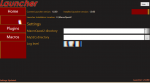
when I hover over the current blank spots sometimes it will correct itself other times you get this as a result. Any help would be sweet I dont think this actually affects MQ2 at all but a bit annoying I must say
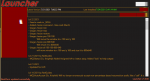
when I hover over the current blank spots sometimes it will correct itself other times you get this as a result. Any help would be sweet I dont think this actually affects MQ2 at all but a bit annoying I must say
Last edited by a moderator:
this is an issue @r1pt1de is looking into. I would try as Xannman suggests as that seems to be a possible commonality - a windows update issue.I did a brief search to see if I could find an answer to this mysterious issue. Not sure how else to explain it... I tried to do a fresh install of the redguides launcher but the problem is still present.
View attachment 31765
when I hover over the current blank spots sometimes it will correct itself other times you get this as a result. Any help would be sweet I dont think this actually affects MQ2 at all but a bit annoying I must say
View attachment 31767

I have the same issue. Updates all applied. Latest video driver as well. It’s a minor annoyance and just graphical glitch. The app still works correctly even with the graphic glitches.
This is what I was asking about in discord the other day.
Riptide if you need anything like logs or anything to test with feel free to PM me.
This is what I was asking about in discord the other day.
Riptide if you need anything like logs or anything to test with feel free to PM me.

sorry to hear about the troubles medicmanI keep getting an error message with updating Plugins and Macros that says,
Sorry it looks like there was an issue:
End of Central Directory record could not be found.
Please report this to management.
What do I need to do if anything at all.
@r1pt1de was looking to expand the debug on that to give us more information soon.
the end of central directory is usually either a: an issue with the download - like it got corrupt on connection issue, or b: something is holding it up - like antivirus
in the meantime, i would just give your comp a fresh reboot and re-start the updater.
I double-checked that its not just "broken for everyone" at everything appears working here - tho you are not the only person who has recently had this issue, so there's *something* that is happening for sure.

It looks like an updated version of MQ2Bst was recently posted. If I try to download MQ2Bst I only get the .ini file


I am now getting the MQ2Bst .dll file Thanks 
Last edited:
I'm assuming you're microburn1971 on discord? talking to you at the same time in two different places is very challenging.I am not getting the MQ2Bst .dll file Thanks
the ini thing was my fault, try again and that is corrected

Hey guys,
I am aware of the display issues some of you are seeing. I am working on them as best I can. If you are having the issue and dont mind sending me some info please shoot me a PM with the following:
1. When did it start? This doesnt have to be exact, just a guestimate.
2. Did it ever work correctly?
3. What version of windows? Would prefer to have the actual build number, not just 7/8/10 etc.
4. Latest version of .Net installed.
Thanks
I am aware of the display issues some of you are seeing. I am working on them as best I can. If you are having the issue and dont mind sending me some info please shoot me a PM with the following:
1. When did it start? This doesnt have to be exact, just a guestimate.
2. Did it ever work correctly?
3. What version of windows? Would prefer to have the actual build number, not just 7/8/10 etc.
4. Latest version of .Net installed.
Thanks
r1pt1de updated RedGuides Launcher with a new update entry:
Fix for display issues on some PCs
Read the rest of this update entry...
Fix for display issues on some PCs
- The display issues some people were seeing should now be resolved.
Read the rest of this update entry...
Awesome work. Resolved my issue!!r1pt1de updated RedGuides Launcher with a new update entry:
Fix for display issues on some PCs
Read the rest of this update entry...

Some minutes ago I noticed, that 2 macros wheren't up to date.
I tried "Reinstall" and "Update all".
what shows in the bottom left of your launcher window?View attachment 32542
Some minutes ago I noticed, that 2 macros wheren't up to date.
I tried "Reinstall" and "Update all".
if you click reinstall on one of them it should say:


often times something not auto downloading means a hiccup in your internet, or the download server, or you might have antivirus abusing your files etc
i'm curious what it says on the bottom right when you click the reinstall button

shows the right messages but remains read
tried multiple times, closed launcher, reopened launcher, reinstalled again .... keeps stating : old stuff

- Commits
- 1
I've seen too.
It is updating the macro but if you want to clear the red:
Update the macro in Next
Switch to Live Update the macro in Live
Switch back to Next and the macro will show as updated.
It appears to be a cosmetic issue.
It is updating the macro but if you want to clear the red:
Update the macro in Next
Switch to Live Update the macro in Live
Switch back to Next and the macro will show as updated.
It appears to be a cosmetic issue.
I've seen too.
It is updating the macro but if you want to clear the red:
Update the macro in Next
Switch to Live Update the macro in Live
Switch back to Next and the macro will show as updated.
It appears to be a cosmetic issue.
That worked for me as well.
The question is: if the display of the version of the macros is pointing to the path of the "life" version of mq, does the update-service of mqnext really update the files in the mqnext-folder?
The file named: TSC.mac in MQNext/macros says "|TSC.mac 8/22/2021 jb321 3.72b"
So likely the code checking and visualizing the versions of the macros is pointing to the life-version of mq even for mqnext
Last edited:
fruitbeans
New member
Hey new user here. I just installed the Redguides Launcher and logged in successfully but now when I go to install Very Vanilla it gives me the error message
"Sorry it looks like something went wrong! Method not found:
'System.IO.Compression.ZipArchive
System.IO.Compression.ZipFile.OpenRead(System.String)'
I don't know what is going on with it or how to fix it. I have tried uninstalling the launcher, logging in and out and a few other things. Multiple computer restarts as well.
Any help would be greatly appreciated.
"Sorry it looks like something went wrong! Method not found:
'System.IO.Compression.ZipArchive
System.IO.Compression.ZipFile.OpenRead(System.String)'
I don't know what is going on with it or how to fix it. I have tried uninstalling the launcher, logging in and out and a few other things. Multiple computer restarts as well.
Any help would be greatly appreciated.
Last edited:
this likely means something is damaged with the download - like bad internet connection, or something is holding up the opening of the zip file - could your antivirus be doing that? might be worth exempting your mq2 folderHey new user here. I just installed the Redguides Launcher and logged in successfully but now when I go to install Very Vanilla it gives me the error message
"Sorry it looks like something went wrong! Method not found:
'System.IO.Compression.ZipArchive
System.IO.Compression.ZipFile.OpenRead(System.String)'
I don't know what is going on with it or how to fix it. I have tried uninstalling the launcher, logging in and out and a few other things. Multiple computer restarts as well.
Any help would be greatly appreciated.
Users who are viewing this thread
Total: 3 (members: 0, guests: 3)
Share: