
-
 Hail, we're RedGuides. We want you to play six (yes, 6!) EverQuest characters at once. We have scripts and a friendly community to help, please join our playstyle and say hello! 👋
You are using an out of date browser. It may not display this or other websites correctly.
You should upgrade or use an alternative browser.
You should upgrade or use an alternative browser.

RedGuides Launcher (4 Viewers) 1.1.0
- Thread starter r1pt1de
- Start date

mrsmithie
New member
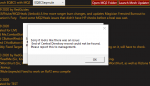
what am i doing wrong im new to the site just a month old newbie and dont understand what i did wrong this happens after i try to update mq2al;ways one poster with a witty response to folks.... nothing wrong with people reporting a issue....no one was crying and moaning.

View attachment 23815
what am i doing wrong im new to the site just a month old newbie and dont understand what i did wrong this happens after i try to update mq2
Open file explorer and go to %LocalAppData%\RedGuides and delete the folder ResourceManager
Hello all, Having issues actually patching current on the launcher. Receiving this error and it says to contact management.
Sorry looks there was an issue: End of Central Directory could not be found.
Also it was giving me some errior about something can't be null or something. but this was a different message.
I have tried to repair, delete and reinstall the patcher even deleting the Vvanilla folder to see if i could do a full reinstall but I cant seem to make sense of it. It will always just says update and cant get it to the install button again.
Any help would be great cause im frustrated for sure =) ill update errors on this post if i find them.
Sorry looks there was an issue: End of Central Directory could not be found.
Also it was giving me some errior about something can't be null or something. but this was a different message.
I have tried to repair, delete and reinstall the patcher even deleting the Vvanilla folder to see if i could do a full reinstall but I cant seem to make sense of it. It will always just says update and cant get it to the install button again.
Any help would be great cause im frustrated for sure =) ill update errors on this post if i find them.

Open file explorer and go to %LocalAppData%\RedGuides and delete the folder ResourceManagerHello all, Having issues actually patching current on the launcher. Receiving this error and it says to contact management.
Sorry looks there was an issue: End of Central Directory could not be found.
Also it was giving me some errior about something can't be null or something. but this was a different message.
I have tried to repair, delete and reinstall the patcher even deleting the Vvanilla folder to see if i could do a full reinstall but I cant seem to make sense of it. It will always just says update and cant get it to the install button again.
Any help would be great cause im frustrated for sure =) ill update errors on this post if i find them.
Same problem as the user above, now that I have time to think, I believe "end of central directory" is a bad download. Hit reinstall and try again.Hello all, Having issues actually patching current on the launcher. Receiving this error and it says to contact management.
Sorry looks there was an issue: End of Central Directory could not be found.
Also it was giving me some errior about something can't be null or something. but this was a different message.
I have tried to repair, delete and reinstall the patcher even deleting the Vvanilla folder to see if i could do a full reinstall but I cant seem to make sense of it. It will always just says update and cant get it to the install button again.
Any help would be great cause im frustrated for sure =) ill update errors on this post if i find them.
SUCCESS!
Thanks Redbot and SIC excellent response time , I was confused at first till I just literally copy/paste %LocalAppData%\RedGuides into windows 10 search bar. Popped right up after that.
While I got the two best minds how do you stop the dang Berserker from constantly leg cutting for no reason even when I set him to do it at 30%?
Thanks Redbot and SIC excellent response time , I was confused at first till I just literally copy/paste %LocalAppData%\RedGuides into windows 10 search bar. Popped right up after that.
While I got the two best minds how do you stop the dang Berserker from constantly leg cutting for no reason even when I set him to do it at 30%?
Zerkers need to hurt themselves to use their abilities, i. Guessing that's what you're asking.SUCCESS!
Thanks Redbot and SIC excellent response time , I was confused at first till I just literally copy/paste %LocalAppData%\RedGuides into windows 10 search bar. Popped right up after that.
While I got the two best minds how do you stop the dang Berserker from constantly leg cutting for no reason even when I set him to do it at 30%?
I would post that question to the appropriate section (kiss, muleassist, rgmercs, cwtn etc) and reference your ini.
@AnotherJohn this is the thread for the launcher - if you scroll up to a few of the previous posts you will see other folks who have had similar issues and resovled it with clearing appdata

Having in-game issues? Please use the appropriate discussion thread (not this one):
Live, Test, Emu
This is a discussion thread for the RedGuides Launcher.
You can read about the launcher here
It is just not doing anything at all. I was not playing for quite awhile, came back, and the launcher gets to the GUI, but then none of the buttons work. It's like it does not exist. Do I have to do the full uninstall then reinstall again or something similar?
you should delete your %APPDATA% folder and reinstall the launcher - it has had several updates likely since the last time you used itIt is just not doing anything at all. I was not playing for quite awhile, came back, and the launcher gets to the GUI, but then none of the buttons work. It's like it does not exist. Do I have to do the full uninstall then reinstall again or something similar?
Open file explorer and go to %LocalAppData%\RedGuides and delete the folder ResourceManager
and then reinstall it

Ok, I am at a loss on where to go from here to get my Launcher to work. Things I have done:
1. Checked Anti Virus (Norton) to make sure RedGuides launcher was a trusted program.
2. Shut down Norton and tried to run the launcher.
3. Placed %LocalAppData%\RedGuides in windows 10 search box and deleted ResourceManager folder. I now get "No results found for %LocalAppData%\RedGuides".
4. Deleted everything in the DesktopUtility folder except MQ2 folder.
5. Restarted the computer after doing all the above.
6. Downloaded the Launcher from this page and ran the installer.
7. Have changed the default browser from Edge to Chrome (found an old post where this solved this problem).
8. Have checked my TaskManager to see if the app showed the process there (maybe it was stalled or something). Does not show there.
9. I have tried using the "repair" option in the installer at various points in the above attempts to fix.
10. I also used the "Uninstall" option in the installer various times.
All to no avail. MQ2 will launch manually from the folder and I can play the game as normal. The problem seems to be just in getting the Launcher to open. If I attempt to open the Launcher either from the shortcut or from the DesktopUtility folder I get to the permission screen. Once I click to allow the program to make changes the process just stops. The launcher worked just fine the first day after the last patch and I used it to update everything. I shut the computer down for the night and on day 2 after the patch when I tried to use the launcher (I always start MQ2 with the Launcher just to make sure everything is as up to date as it can be) is when the problem started. Any next steps to try would be appreciated, AnotherJohn
1. Checked Anti Virus (Norton) to make sure RedGuides launcher was a trusted program.
2. Shut down Norton and tried to run the launcher.
3. Placed %LocalAppData%\RedGuides in windows 10 search box and deleted ResourceManager folder. I now get "No results found for %LocalAppData%\RedGuides".
4. Deleted everything in the DesktopUtility folder except MQ2 folder.
5. Restarted the computer after doing all the above.
6. Downloaded the Launcher from this page and ran the installer.
7. Have changed the default browser from Edge to Chrome (found an old post where this solved this problem).
8. Have checked my TaskManager to see if the app showed the process there (maybe it was stalled or something). Does not show there.
9. I have tried using the "repair" option in the installer at various points in the above attempts to fix.
10. I also used the "Uninstall" option in the installer various times.
All to no avail. MQ2 will launch manually from the folder and I can play the game as normal. The problem seems to be just in getting the Launcher to open. If I attempt to open the Launcher either from the shortcut or from the DesktopUtility folder I get to the permission screen. Once I click to allow the program to make changes the process just stops. The launcher worked just fine the first day after the last patch and I used it to update everything. I shut the computer down for the night and on day 2 after the patch when I tried to use the launcher (I always start MQ2 with the Launcher just to make sure everything is as up to date as it can be) is when the problem started. Any next steps to try would be appreciated, AnotherJohn
is there a time totday/this afternoon that you would be available, and i can remote in and see if we can get you sorted out? PM me if you want to coordinate a time and see if we can get you fixed upOk, I am at a loss on where to go from here to get my Launcher to work. Things I have done:
1. Checked Anti Virus (Norton) to make sure RedGuides launcher was a trusted program.
2. Shut down Norton and tried to run the launcher.
3. Placed %LocalAppData%\RedGuides in windows 10 search box and deleted ResourceManager folder. I now get "No results found for %LocalAppData%\RedGuides".
4. Deleted everything in the DesktopUtility folder except MQ2 folder.
5. Restarted the computer after doing all the above.
6. Downloaded the Launcher from this page and ran the installer.
7. Have changed the default browser from Edge to Chrome (found an old post where this solved this problem).
8. Have checked my TaskManager to see if the app showed the process there (maybe it was stalled or something). Does not show there.
9. I have tried using the "repair" option in the installer at various points in the above attempts to fix.
10. I also used the "Uninstall" option in the installer various times.
All to no avail. MQ2 will launch manually from the folder and I can play the game as normal. The problem seems to be just in getting the Launcher to open. If I attempt to open the Launcher either from the shortcut or from the DesktopUtility folder I get to the permission screen. Once I click to allow the program to make changes the process just stops. The launcher worked just fine the first day after the last patch and I used it to update everything. I shut the computer down for the night and on day 2 after the patch when I tried to use the launcher (I always start MQ2 with the Launcher just to make sure everything is as up to date as it can be) is when the problem started. Any next steps to try would be appreciated, AnotherJohn
All sorted - have a nice day @AnotherJohn
Thanks Sic,
Just for anyone who has this problem in the future. Looks like Sic moved MQ2 from my C: drive to my D: drive and installed the Launcher there and it all is working perfectly. Something I never would have thought of doing no matter how long I worked on this problem. So thanks once again to the MAN for bailing me out. AnotherJohn
Sic's comments which may help someone else in the same boat: "yeah after the appdata thing it needed to be uninstalled via the add/remove thing and then reinstalled - so i figured we'd move the location it was installed to try and eliminate the issue in the future"
Again, I cant thank Sic enough. He has gotten me back on track more than once.
Just for anyone who has this problem in the future. Looks like Sic moved MQ2 from my C: drive to my D: drive and installed the Launcher there and it all is working perfectly. Something I never would have thought of doing no matter how long I worked on this problem. So thanks once again to the MAN for bailing me out. AnotherJohn
Sic's comments which may help someone else in the same boat: "yeah after the appdata thing it needed to be uninstalled via the add/remove thing and then reinstalled - so i figured we'd move the location it was installed to try and eliminate the issue in the future"
Again, I cant thank Sic enough. He has gotten me back on track more than once.
You're welcome anotherJohn
the actual fix was removing the appdata (which you did) and then also doing the add/remove to uninstall the redguide's launcher and then reinstall it (removing the appdata doesn't remove it fully). Then since we were already doing stuff, we just moved mq2 to an easy-to-find non-default location.
should be good to go - pm me if you have any issues
the actual fix was removing the appdata (which you did) and then also doing the add/remove to uninstall the redguide's launcher and then reinstall it (removing the appdata doesn't remove it fully). Then since we were already doing stuff, we just moved mq2 to an easy-to-find non-default location.
should be good to go - pm me if you have any issues

Two things to try:Cant get the launcher to load up. So does this mean I have to re install the whole thing again?
1: try changing your default browser in windows and see if it starts working.
or
2: Follow these steps
Code:
Delete  your appdata - paste this in windows explorer search window (any folder) %LocalAppData%\RedGuides  and then delete the contents in that folder
then go to add/remove programs, and remove the redguide's launcher
reinstall the launcher
open launcher
point the re-install to your existing mq2 directory
boom - back in businessOk Thank youTwo things to try:
1: try changing your default browser in windows and see if it starts working.
or
2: Follow these steps
Code:Delete your appdata - paste this in windows explorer search window (any folder) %LocalAppData%\RedGuides and then delete the contents in that folder then go to add/remove programs, and remove the redguide's launcher reinstall the launcher open launcher point the re-install to your existing mq2 directory boom - back in business
Nearly every time an update drops my launcher refuses to update. Gives me an error that says something about "failure to find end directory blah blah blah, please report this to management". No clue why this is an issue, and frequently find myself completely removing MQ2 and starting from scratch. Usually works. Not this time around. I use the launcher installer to remove the entire launcher, then delete the folder containing my MQ2's. Instead of going back to the Install, which works, I get the update back, and it remembers the install location for my directory. Will have to find where the logs are stored for now, but anyone else have this issue? Really frustrating, and don't get to play very much on patch days as a result. Thanks in advance.
Two things to try:Nearly every time an update drops my launcher refuses to update. Gives me an error that says something about "failure to find end directory blah blah blah, please report this to management". No clue why this is an issue, and frequently find myself completely removing MQ2 and starting from scratch. Usually works. Not this time around. I use the launcher installer to remove the entire launcher, then delete the folder containing my MQ2's. Instead of going back to the Install, which works, I get the update back, and it remembers the install location for my directory. Will have to find where the logs are stored for now, but anyone else have this issue? Really frustrating, and don't get to play very much on patch days as a result. Thanks in advance.
1: try changing your default browser in windows and see if it starts working.
or
2: Follow these steps
Code:
Delete  your appdata - paste this in windows explorer search window (any folder) %LocalAppData%\RedGuides  and then delete the contents in that folder
then go to add/remove programs, and remove the redguide's launcher
reinstall the launcher
open launcher
point the re-install to your existing mq2 directory
boom - back in businessI believe the end of directory issue is implying there was an issue with the download - so the appdata thing might not fix up your issue.
do you have intermittent internet issues?
I believe the end of directory issue is implying there was an issue with the download - so the appdata thing might not fix up your issue.
do you have intermittent internet issues?
I have extraordinarily slow wifi (hopefully nobody here ever has to suffer through hughe's net(only provider out in the boonies here)), yes. I almost exclusively use my lightening fast hotspot on my cell, which used to work fine. Switched over to my ordinary wifi, however, and it downloaded in like ten seconds. Just for a point of reference, my wifi pings 1200-1800 in game, whereas my hotspot pings 70-90. pretty sad, when I lived in town ten years ago my ping never went higher than 40. Either way, problem resolved. Normally, however, my wifi will not work either.
Alright thank you. When I went to open it up, I guess it was asking me which version of a browser I wanted to use. I didn't realize that it was doing that. It was probably working fine, and I didn't realize what it was doing.you should delete your %APPDATA% folder and reinstall the launcher - it has had several updates likely since the last time you used it
Open file explorer and go to %LocalAppData%\RedGuides and delete the folder ResourceManager
and then reinstall it
Newbie Question:
Trying to install RG Launcher: Get to the part where it says to click the install button and click "Yes" then says complete but is never complete. Never get the update button that the tutorial speaks of. Try opening the MQ2 Folder and doesn't exist. Any help is appreciated.
Using this video:
Trying to install RG Launcher: Get to the part where it says to click the install button and click "Yes" then says complete but is never complete. Never get the update button that the tutorial speaks of. Try opening the MQ2 Folder and doesn't exist. Any help is appreciated.
Using this video:
Newbie Question:
Trying to install RG Launcher: Get to the part where it says to click the install button and click "Yes" then says complete but is never complete. Never get the update button that the tutorial speaks of. Try opening the MQ2 Folder and doesn't exist. Any help is appreciated.
Using this video:
@lansorith sorry to hear about your troubles.
have you tried changing your default browser? if you're never getting to the part where it opens your browser to authenticate your user, then likely have an issue at that point. if you try changing your default windows browser, sometimes that fixes it
JohnnyRecon
New member
Hello,
My first time posting. I have been using MQ and Kissassist for a month so far. Everything worked great until now. My computer needed to do and system update. I also updated my computer and the Red Guide client version. Now my client launcher will not work. I click on it and it will no load the client that doe not open the Redguides launcher. I tried to repair the client, and also uninstall program and re installed client. Still no load. Anyone have a fix for this?
My first time posting. I have been using MQ and Kissassist for a month so far. Everything worked great until now. My computer needed to do and system update. I also updated my computer and the Red Guide client version. Now my client launcher will not work. I click on it and it will no load the client that doe not open the Redguides launcher. I tried to repair the client, and also uninstall program and re installed client. Still no load. Anyone have a fix for this?
howdy @JohnnyRecon sorry to hear about your woes.Hello,
My first time posting. I have been using MQ and Kissassist for a month so far. Everything worked great until now. My computer needed to do and system update. I also updated my computer and the Red Guide client version. Now my client launcher will not work. I click on it and it will no load the client that doe not open the Redguides launcher. I tried to repair the client, and also uninstall program and re installed client. Still no load. Anyone have a fix for this?
this happens to folks sometimes if they disconnect/lose power / restart unexpectedly and the launcher isn't able to close out cleanly. this sounds like it might be the case here.
Since you already did a reinstall of the launcher I would recommend 1 of 2 things to try
1st - try changing your default windows browser and relaunch it - sometimes a browser will get bugged and it won't do the authorization it needs to
2nd - my suspicion is that #1 won't be the fix and you will need to do another re-install of the launcher - but importantly you will want to follow these steps
Code:
Delete  your appdata - paste this in windows explorer search window (any folder) %LocalAppData%\RedGuides  and then delete the contents in that folder
then go to add/remove programs, and remove the redguide's launcher
reinstall the launcher
open launcher
point the re-install to your existing mq2 directory
boom - back in business
treat yourself, you have earned it!JohnnyRecon
New member
I tried what you said, and still won't load. Prompt do you want to load app. Then the browser never pops up or shows it as a running client.

Are you logged in to RG on The browser that is set as default browser?I tried what you said, and still won't load. Prompt do you want to load app. Then the browser never pops up or shows it as a running client.
JohnnyRecon
New member
yes, i double checked. Tripled checked. It just does not load

ElectricalProblems
Member
I originally posted this in the Very Vanilla MQ2 (Live servers) sub forum:
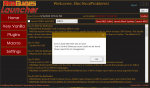
This is my first update using MQ2 and I am receiving this message while MQ2 is updating.
***
I think it is more appropriately posted here. I have since tried to do what Sic suggested in post #654 and I was very hopeful it would work, but I received the same message while installing MQ2 this time.
This is my first update using MQ2 and I am receiving this message while MQ2 is updating.
***
I think it is more appropriately posted here. I have since tried to do what Sic suggested in post #654 and I was very hopeful it would work, but I received the same message while installing MQ2 this time.
the end of directory message is sometimes due to a bad download - do you have spotty internet connection?I originally posted this in the Very Vanilla MQ2 (Live servers) sub forum:
View attachment 24371
This is my first update using MQ2 and I am receiving this message while MQ2 is updating.
***
I think it is more appropriately posted here. I have since tried to do what Sic suggested in post #654 and I was very hopeful it would work, but I received the same message while installing MQ2 this time.
perhaps try a reboot of your computer (and maybe restart router) and give it another try
ElectricalProblems
Member
I managed to get it to work, I cleared %LocalAppData%\RedGuides again and reinstalled the launcher. Another observation I made was I had 2 other PC's using quite a bit of bandwidth I took them offline when I did this install. Thanks for pointing out the potential issues with internet connection @Sic .
Im stil having issues with the launcher. Still getting an "End of Central Directory" error, ive deleted the resource manager folder, uninstalled, rebooted and reinstalled. Still cant get it to work. One thing that is weird is that it didnt even say update before the uninstall. It just says install no matter what and won't patch for me at all.
this is from getting a bad download - do you have bad internet/spotty connection?Im stil having issues with the launcher. Still getting an "End of Central Directory" error, ive deleted the resource manager folder, uninstalled, rebooted and reinstalled. Still cant get it to work. One thing that is weird is that it didnt even say update before the uninstall. It just says install no matter what and won't patch for me at all.
you can always download the .zip direct > here <
that zip is just the mq2 vv live zip - the one that the launcher would download and then unzip direcltyis this zip the launcher with the newest update already in it? if so where exactly will i release the ZIP into. or is just the launcher with no chance of packet loss?
roger so what folder would this need to be actually dumped into?
Thanks for all the help btw sic, last question would be is there a spot on the website that has these zips after every patch? I see what yall were saying with bad internet connections. cause its failed twice BUT at least it saves progress so i can always resume during blips.
Thanks for all the help btw sic, last question would be is there a spot on the website that has these zips after every patch? I see what yall were saying with bad internet connections. cause its failed twice BUT at least it saves progress so i can always resume during blips.
Last edited:
Users who are viewing this thread
Total: 5 (members: 0, guests: 5)
Share: