
-
 Hail, we're RedGuides. We want you to play six (yes, 6!) EverQuest characters at once. We have scripts and a friendly community to help, please join our playstyle and say hello! 👋
You are using an out of date browser. It may not display this or other websites correctly.
You should upgrade or use an alternative browser.
You should upgrade or use an alternative browser.

RedGuides Launcher (3 Viewers) 1.1.0
- Thread starter r1pt1de
- Start date
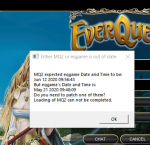

this means you need to patch mq2 and/or everquest.


Robban
Ultimate seasoned veteran member
The most common screenshot on RG forums, hihi
Robban
Ultimate seasoned veteran member
As it actually says in the picturethis means you need to patch mq2 and/or everquest.

Been working well for months. I was using it yesterday and this morning the launcher won't load. I tried deleting and reinstalling but when I double click it doesn't pop up at all. Any other suggestions? Tried deleting resources first. Open as admin etc as well.
Thanks in advance, love you guys.
Thanks in advance, love you guys.
My computer turned off due to a power outage, in the middle of updating the mq2laucher.
After re starting the computer, I am getting this message:
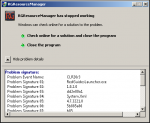
I have uninstalled the mq2launcher, re-started my computer and reinstalled the mq2laucher. When I try to run the mq2laucher I am still getting the same error.
Please help me diagnose this problem
PS
Here is the complete problem signature:
Problem Event Name: CLR20r3
Problem Signature 01: RedGuidesLauncher.exe
Problem Signature 02: 1.0.2.0
Problem Signature 03: dd2e80a1
Problem Signature 04: System.Xml
Problem Signature 05: 4.7.3221.0
Problem Signature 06: 5b885a86
Problem Signature 07: b85
Problem Signature 08: 27
Problem Signature 09: IOIBMURHYNRXKW0ZXKYRVFN0BOYYUFOW
OS Version: 6.1.7601.2.1.0.256.1
Locale ID: 1033
Additional Information 1: 0a9e
Additional Information 2: 0a9e372d3b4ad19135b953a78882e789
Additional Information 3: 0a9e
Additional Information 4: 0a9e372d3b4ad19135b953a78882e789
After re starting the computer, I am getting this message:
I have uninstalled the mq2launcher, re-started my computer and reinstalled the mq2laucher. When I try to run the mq2laucher I am still getting the same error.
Please help me diagnose this problem
PS
Here is the complete problem signature:
Problem Event Name: CLR20r3
Problem Signature 01: RedGuidesLauncher.exe
Problem Signature 02: 1.0.2.0
Problem Signature 03: dd2e80a1
Problem Signature 04: System.Xml
Problem Signature 05: 4.7.3221.0
Problem Signature 06: 5b885a86
Problem Signature 07: b85
Problem Signature 08: 27
Problem Signature 09: IOIBMURHYNRXKW0ZXKYRVFN0BOYYUFOW
OS Version: 6.1.7601.2.1.0.256.1
Locale ID: 1033
Additional Information 1: 0a9e
Additional Information 2: 0a9e372d3b4ad19135b953a78882e789
Additional Information 3: 0a9e
Additional Information 4: 0a9e372d3b4ad19135b953a78882e789
This is a new one for me, maybe @wired420 or @r1pt1de might have some insight.My computer turned off due to a power outage, in the middle of updating the mq2laucher.
After re starting the computer, I am getting this message:
View attachment 22591
I have uninstalled the mq2launcher, re-started my computer and reinstalled the mq2laucher. When I try to run the mq2laucher I am still getting the same error.
Please help me diagnose this problem
PS
Here is the complete problem signature:
Problem Event Name: CLR20r3
Problem Signature 01: RedGuidesLauncher.exe
Problem Signature 02: 1.0.2.0
Problem Signature 03: dd2e80a1
Problem Signature 04: System.Xml
Problem Signature 05: 4.7.3221.0
Problem Signature 06: 5b885a86
Problem Signature 07: b85
Problem Signature 08: 27
Problem Signature 09: IOIBMURHYNRXKW0ZXKYRVFN0BOYYUFOW
OS Version: 6.1.7601.2.1.0.256.1
Locale ID: 1033
Additional Information 1: 0a9e
Additional Information 2: 0a9e372d3b4ad19135b953a78882e789
Additional Information 3: 0a9e
Additional Information 4: 0a9e372d3b4ad19135b953a78882e789
is this windows 7? guessing so by the os version 6.1.7 etc
In the mean-time, if you're in a pinch to get updated you can always download the zip directly from the respective resource pages below:
Live
Test
Emu
top right side of the resource page


hrm if deleting the resource folder didn't work, I'm not sure.Been working well for months. I was using it yesterday and this morning the launcher won't load. I tried deleting and reinstalling but when I double click it doesn't pop up at all. Any other suggestions? Tried deleting resources first. Open as admin etc as well.
Thanks in advance, love you guys.
My computer turned off due to a power outage, in the middle of updating the mq2laucher.
After re starting the computer, I am getting this message:
View attachment 22591
I have uninstalled the mq2launcher, re-started my computer and reinstalled the mq2laucher. When I try to run the mq2laucher I am still getting the same error.
Please help me diagnose this problem
PS
Here is the complete problem signature:
Problem Event Name: CLR20r3
Problem Signature 01: RedGuidesLauncher.exe
Problem Signature 02: 1.0.2.0
Problem Signature 03: dd2e80a1
Problem Signature 04: System.Xml
Problem Signature 05: 4.7.3221.0
Problem Signature 06: 5b885a86
Problem Signature 07: b85
Problem Signature 08: 27
Problem Signature 09: IOIBMURHYNRXKW0ZXKYRVFN0BOYYUFOW
OS Version: 6.1.7601.2.1.0.256.1
Locale ID: 1033
Additional Information 1: 0a9e
Additional Information 2: 0a9e372d3b4ad19135b953a78882e789
Additional Information 3: 0a9e
Additional Information 4: 0a9e372d3b4ad19135b953a78882e789
If the launcher had worked before but is now crashing on startup, open file explorer and go to %LocalAppData%\RedGuides and delete the folder ResourceManager
Yes it is windows 7 x64is this windows 7? guessing so by the os version 6.1.7 etc
I did delete that folder, still getting the same errorIf the launcher had worked before but is now crashing on startup, open file explorer and go to %LocalAppData%\RedGuides and delete the folder ResourceManager

Goto your redguides install folder where Macroquest2.exe is and delete RedGuidesLauncher.exe.config. Then rerun it. Your settings file got toasted. Is only XML it verifies and loads, and you're getting an XML error. You'll have to log back in and set your directories again in the launcher.Yes it is windows 7 x64
I did delete that folder, still getting the same error
Edit: If you have a more advanced directory setup that file may be located where you put RedGuidesLauncher.exe
Would be my first guess anyways. I don't think it even uses a majority of the settings in there anyways anymore unless you have it installed in a more advanced fashion to manage multiple installs. So if you're installed like me logging back in may be your only inconvenience.
Last edited:
Was it previously installed? Go toInstalled this on one of my laptops.
I when trying to run the RedGuidesLauncher.exe nothing happen, i have reinstall and everything.
But dosent wanna start and dosent give any info in log file, since its empty
%LocalAppData%\RedGuides and delete the folder ResourceManager Make sure you have .NET runtime, Windows is up to date, and if you have third-party AV try disabling temporarily.

 dotnet.microsoft.com
Download .NET 10.0 Runtime
The .NET 10.0 Runtime includes everything you need to run existing .NET and ASP.NET Core applications.
dotnet.microsoft.com
aaah, thank you for finding a bug! I'll tag @r1pt1deFound the problem.
Its not possible to install it on C driver in a custom folder.
Only default path on C works.
Tried install it in
C:\Övrigt\RedLauncher <--- In this folder it dident wanna launch or anything.
Tried C:\Övrigt\Red\Launcher <--- Same with this
Then i tried install it in default path and it runs now.
Seems to be a bug where it dosent wanna install in custom folder or if its because i use Ö
Edit2: cant use ÅÄÖ in folder name, if i use that it wont start

personally don't recommend having mq2 installed ni your programdata folder (this is the default,. however).Hi All:
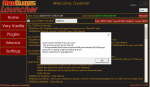
Was downloading the July 7th MQ2 update and got this error message:
View attachment 23025
Cheers,
Dysanor
but this means you're computer is accessing that stuff - like you are still in game with the plugin loaded etc.
log out of game, reboot your pc, run updater, log back in game - win
Hi All:
Was downloading the July 7th MQ2 update and got this error message:
View attachment 23025
Cheers,
Dysanor
Do you have anti-virus/windows defender/browser protection etc, running? This means that something is still locking the zip file (normally an antivirus scan) even though the download completed successfully. I can put a test in to make sure that nothing is locking the downloads once they are complete.
Fuelforfire
New member
Goto your redguides install folder where Macroquest2.exe is and delete RedGuidesLauncher.exe.config. Then rerun it. Your settings file got toasted. Is only XML it verifies and loads, and you're getting an XML error. You'll have to log back in and set your directories again in the launcher.
Edit: If you have a more advanced directory setup that file may be located where you put RedGuidesLauncher.exe
Would be my first guess anyways. I don't think it even uses a majority of the settings in there anyways anymore unless you have it installed in a more advanced fashion to manage multiple installs. So if you're installed like me logging back in may be your only inconvenience.
This worked for me. I had to reinstall and point the file location back to C: after the removal of the file.

Its patch day and my auncher will not let me update, it just tells me its unavailable. Last month it worked fine on patch day, and its only my second month, still a noob trying to learn.
on patch days its usually around 8pm est that the "stable build" is up on the launcher and ready to go
you should see a giant banner on the top of the forums that says that too

you can > CLICK HERE < to get notified of when its up and ready to rumble
MQ2 Down 
It's an EverQuest patch day and Very Vanilla needs to be updated, but we're still working on things. Patches are usually released around 8pm EST. Here's how to be alerted when an update is ready,
VeryVanilla LIVE: Use this URL to get notified: https://www.redguides.com/community/resources/very-vanilla-mq2-live-servers.61/watch
VeryVanilla TEST: Use this URL to get notified: https://www.redguides.com/community/resources/very-vanilla-mq2-test-server.59/watch
Consider donating to the developers!
It's an EverQuest patch day and Very Vanilla needs to be updated, but we're still working on things. Patches are usually released around 8pm EST. Here's how to be alerted when an update is ready,
VeryVanilla LIVE: Use this URL to get notified: https://www.redguides.com/community/resources/very-vanilla-mq2-live-servers.61/watch
VeryVanilla TEST: Use this URL to get notified: https://www.redguides.com/community/resources/very-vanilla-mq2-test-server.59/watch
Consider donating to the developers!
one of the computers i installed rg launcher and mq2 on has always acted weird with it. it closes the launcher when i tell it to launch mq2 and it will never open a bcs server when it launches mq2 so i always just launched the bcs server right from mq2. well now i need to update mq2 and it will not let me press the update button it just closes the launcher. the open mq2 folder and launch mesh updater buttons both work. the reinstall / update button closes the launcher with out doing anything and the launch mq2 button just closes the launcher.
one of the computers i installed rg launcher and mq2 on has always acted weird with it. it closes the launcher when i tell it to launch mq2 and it will never open a bcs server when it launches mq2 so i always just launched the bcs server right from mq2. well now i need to update mq2 and it will not let me press the update button it just closes the launcher. the open mq2 folder and launch mesh updater buttons both work. the reinstall / update button closes the launcher with out doing anything and the launch mq2 button just closes the launcher.
What antivirus, what OS?
Very strange, I'm not sure what the problem is.no av i just use win defender and win10
open file explorer and go tocant figure it out either i reinstalled and repaired rg launcher.
%LocalAppData%\RedGuides and delete the folder ResourceManager i got it to update by doing a fresh install of mq2 and rg launcher but its doing it again. ill delete that folder now.
i deleted it and it still does it but i did narrow it down. when i uncheck launch mq2 with eqbcs it doesnt do it. so its basically fixed since i can still launch eqbc from the mq tab in the dash tray.
i deleted it and it still does it but i did narrow it down. when i uncheck launch mq2 with eqbcs it doesnt do it. so its basically fixed since i can still launch eqbc from the mq tab in the dash tray.
So i've loaded and unloaded MQ2 launcher and all the MQ2 files a couple of times but still getting the message that "MQ2 expected eqgame date and time is to be: Jul 13 2020 14:18:57 But eqgame's date and time is: ______________
Do you need to patch one of them?.......... Loading MQ2 can not be completed.
Now i have updated both EQ game itself and the MQ2 but still get this message. The directory when i reinstalled complete let it go to it's own directory default but still never allowed MQ2 to load.
Do you need to patch one of them?.......... Loading MQ2 can not be completed.
Now i have updated both EQ game itself and the MQ2 but still get this message. The directory when i reinstalled complete let it go to it's own directory default but still never allowed MQ2 to load.
Attachments
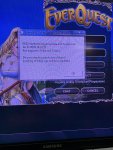
It is likely that the location you patched mq2 and the location that you are launching mq2 from are not the sameSo i've loaded and unloaded MQ2 launcher and all the MQ2 files a couple of times but still getting the message that "MQ2 expected eqgame date and time is to be: Jul 13 2020 14:18:57 But eqgame's date and time is: ______________
Do you need to patch one of them?.......... Loading MQ2 can not be completed.
Now i have updated both EQ game itself and the MQ2 but still get this message. The directory when i reinstalled complete let it go to it's own directory default but still never allowed MQ2 to load.
If you open your VV launcher and go to the settings tab - what do you see for MacroQuest2 Directory?
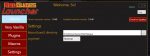
Can you confirm that the directory it has listed is the location that you are launching mq2 from?
holllywoooood
Member
im having the same problem.

launcher is in maintenance right now
if you already had it updated in last few days you can just launch mq2 directly
or if you cant wait you can download the zip
if you already had it updated in last few days you can just launch mq2 directly
or if you cant wait you can download the zip
Sykologikal
New member
I have tried several things like reinstall the cmd prompt and still not able to login. Have restarted PC...tried ending the app in the task manager. Any assistance would be greatly appreciated
Users who are viewing this thread
Total: 4 (members: 0, guests: 4)
Share: