• You've discovered RedGuides, an EverQuest multi-boxing and scripting community 🧙‍♀️⚙️. We want you to play several EQ characters at once, come join us and say hello! 👋

  • A TLP without truebox has thawed (Very Vanilla ready)
    Frostreaver
RedGuides Launcher

RedGuides Launcher 1.1.0

No permission to download
Just noticed the update was completed for the patch so I open the launcher and click update... says completed but does not update the date. When i go in I get the dates out of wack error. Tryed several times and it would not update. So i think launcher is new maybe I got to download that again, so i do and gives the option to update launcher. So i do and now it looks like a fresh install. I berify it's pointing to the release directory in the setting, and I click install. Runs to 100 percents, and says completed, but does not update the install date, and does not work.

I fooking hate this launcher, can I just get a download to MQ2.
 
Just noticed the update was completed for the patch so I open the launcher and click update... says completed but does not update the date. When i go in I get the dates out of wack error. Tryed several times and it would not update. So i think launcher is new maybe I got to download that again, so i do and gives the option to update launcher. So i do and now it looks like a fresh install. I berify it's pointing to the release directory in the setting, and I click install. Runs to 100 percents, and says completed, but does not update the install date, and does not work.

I fooking hate this launcher, can I just get a download to MQ2.
Please pm me, I can run through a screenshare with you to troubleshoot.

If you could install discord or skype for screensharing that would be a big help
 
Just noticed the update was completed for the patch so I open the launcher and click update... says completed but does not update the date. When i go in I get the dates out of wack error. Tryed several times and it would not update. So i think launcher is new maybe I got to download that again, so i do and gives the option to update launcher. So i do and now it looks like a fresh install. I berify it's pointing to the release directory in the setting, and I click install. Runs to 100 percents, and says completed, but does not update the install date, and does not work.

I fooking hate this launcher, can I just get a download to MQ2.
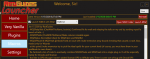
I just replied to your other thread but i think you deleted it?
looks like redbot has you taken care of but hollar if you needhelp - i suspect you need to exit the launcher and restart it
 
keeps saying MQ2 can not update cause its still set in 2019 and I cant use it ,,, keeps saying ever quest game is up to date but Mq is not still set in 2019 I used the updater but no luck please help me ,,, and I am not very computer savvy
 
keeps saying MQ2 can not update cause its still set in 2019 and I cant use it ,,, keeps saying ever quest game is up to date but Mq is not still set in 2019 I used the updater but no luck please help me ,,, and I am not very computer savvy
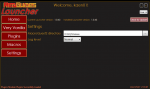
try and exit your red guides launcher and restart it - then you should be able to hit the "Update" button on the top right hand side where you see "Reinstall" in my image

1579141616360.png
 
Finally got it to actually update after Another system reboot, It was updating but not completing earlier (didn't get the Green Date/Time in the Last Installed line until after reboot)
 
Redbot got me all fixed up. I uninstalled launcher through windows apps and re-installed it and it worked fine. Very helpful, and much appreciated.
 
OK I tried the update says its up to date with today's date but when I load MQ2 I am still getting the message MQ2 expected eqgame Date and time to be dec 19 2019 15:04:34 but eqgaME DATE AND TIME IS jAN 9 2020 13:39:57 DO U NEED TO REPATCH ONE OF THEM ,, mQ2 CAN NOT BE LOADED
 
howdy sohagman I can help you get sorted out can you PM me on Discord? Sic#9008

We likely just need to restart your launcher and click that update button - but hollar at me on discord and i can help you in PM
 
hit the reinstall button and give it about 15 min.....server is getting hard right now with everyone wanting to get the newest mq2
 
I followed the videos but when I get to the install part, I get about 18% and it pops up a window saying, "Sorry it looks like there is an issue, Access to the path C: Users/soandso/desktop/mq2/release/macros/kissassist.mac is denied Please report this to management.
Im getting very frustrated,
 
Hey sorry to post about the same thing as most are but I am only a month into Very Vanilla. I am getting the same error after I hit update on the launcher then load MQ2 and EQ telling me my date and time are wrong. Are the Devs still working on the update 11pm est.
 
Hey sorry to post about the same thing as most are but I am only a month into Very Vanilla. I am getting the same error after I hit update on the launcher then load MQ2 and EQ telling me my date and time are wrong. Are the Devs still working on the update 11pm est.

When you go to the Very Vanilla tab on the launcher, what does it say next to "last installed"
 
I followed the videos but when I get to the install part, I get about 18% and it pops up a window saying, "Sorry it looks like there is an issue, Access to the path C: Users/soandso/desktop/mq2/release/macros/kissassist.mac is denied Please report this to management.
Im getting very frustrated,

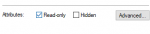
go to Users/soandso/desktop/mq2/release/macros/ in your file explorer, find kissassist.mac and either delete it, or right-click -> properties ->

1579147900588.png

uncheck "read only"
 
Can't seem to get mq2 to load because its " out of patch" and when I go to release folder my updater is missing, which has never happened before? am I supposed to be using this new updater? kind of lost and frustrated
 
Red I think I got it. my shortcut Icon was dated for Decemeber like 19th. went and Ran mq2 threw the Launcher and it worked!
ok, that means you have two different MQ2 folders on your hard drive. You may get confused when editing .ini's and other files over which folder you're in.

I recommend deleting one of the folders to avoid confusion, follow this video to set the launcher to the folder you know best:

 
I'm having the same issues, MQ2 is out of date.... and the updater is missing from my release folder, sigh, oh well
 
Can't seem to get mq2 to load because its " out of patch" and when I go to release folder my updater is missing, which has never happened before? am I supposed to be using this new updater? kind of lost and frustrated

Use the launcher and watch this video closely. You need to be VERY CAREFUL and set your MQ2 folder correctly.

 
Thanks red, its amazing how you can drag a person who doesn't understand much about this software easily through it, Thanks again!
 
ok, that means you have two different MQ2 folders on your hard drive. You may get confused when editing .ini's and other files over which folder you're in.

I recommend deleting one of the folders to avoid confusion, follow this video to set the launcher to the folder you know best:


Red thank you for the info. I do have 2 folders as you stated not sure how that has happened inless the new update did was not directed to the correct folder.. Going to transfer my .ini files to the new one and fix that issue and see if that works. This maybe was why my mq2nav was screwed up and not running my the mesh files.
 
Red thank you for the info. I do have 2 folders as you stated not sure how that has happened inless the new update did was not directed to the correct folder.. Going to transfer my .ini files to the new one and fix that issue and see if that works. This maybe was why my mq2nav was screwed up and not running my the mesh files.
I'd just go to Settings in the launcher and change the folder there, but if copying works for you go for it :)
 
I am in the same boat as Boden. I believe we play on the same server. I submitted a full debug dump to eqmule a couple of days ago. I don't know if it is any help or not, but there should be a few downloads left on FireFox Send.

 
with new Launcher as soon as I hit update it crashes no idea how to get it to update to yesterdays patch, files are all linked to my mq2 release folder
 
does it crash when you open the program or when you click update? if its the first you need to write to @Redbot or @r1pt1de who build the launcher, if its the second, dont update it, go click settings and take a screen and paste it here.
 
RedGuides Launcher

Users who are viewing this thread

Back
Top
Cart