• You've discovered RedGuides, an EverQuest multi-boxing and scripting community 🧙‍♀️⚙️. We want you to play several EQ characters at once, come join us and say hello! 👋

  • A TLP without truebox has thawed (Very Vanilla ready)
    Frostreaver
RedGuides Launcher

RedGuides Launcher (8 Viewers) 1.1.0

No permission to download
When I updated this , I un checked the button for giving access to change my account settings... is there a way to reset the authorization ?

Also am I missing where I can go and check and uncheck all the VV /Mq2 settings like Autoforage etc? I really liked that feature.
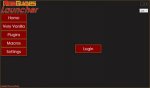
 
I still can't get it to do anything but show the login button and when I click any button inside the app it just clicks and does nothing. I have made sure all of my antivirus is off and all the firewalls are off. Very frustrating as I know this is gonna be an awesome app and I am sure I am doing somethinf stupid, but I am too stupid to figure out what stupid thing I am doing wrong...lol.
 
You should get a browser pop that wants you to be logged into red guides and then authorize the app access to your account...something like that .. then it will give you a message to go back to the app.

Try logging into red guides in a browser first and then hit the login button on the app...that worked for me, but watch the browser window in case it asks you to authorize access...
 
Last edited:
Hi All,

I am a new user (a month or so) and today I received a message saying update.exe was deprecated and this launcher is now required. That's fine, but I don't think this software is ready for launch. For starters, my plugins are not listed and I have to manually add macros to the update list when update.exe did this for us already. Did I mention the plugins section on the launcher is blank and I am sure I have plugins installed? And why must I grant permission between the website and the launcher? Heck, I am not sure I did that correctly, but the launcher shows I am logged in but it doesn't give me any confidence that it's correct since my plugin section is blank. I think it's right since I am now watching Kissassist and it eventually showed up in the macros section.

How do add AutoForage and every other plugin and macro that came with my subscription to Redguides?
Where can I find a full list of plugins and macros to watch or otherwise list on this launcher?
Does the launch EQBCS checkbox now mean every time I run VV it'll automatically start too? If so, I am not seeing the expected behavior.
I've had the launcher running for 20 minutes and it still says "loading plugins" in the bottom left; is this a known issue?

I am sure I'll have more questions and maybe it's only me, but the expected behavior of a Launcher app is not what I am experiencing here.

Thank you
 
Hi All,

I am a new user (a month or so) and today I received a message saying update.exe was deprecated and this launcher is now required. That's fine, but I don't think this software is ready for launch. For starters, my plugins are not listed and I have to manually add macros to the update list when update.exe did this for us already. Did I mention the plugins section on the launcher is blank and I am sure I have plugins installed? And why must I grant permission between the website and the launcher? Heck, I am not sure I did that correctly, but the launcher shows I am logged in but it doesn't give me any confidence that it's correct since my plugin section is blank. I think it's right since I am now watching Kissassist and it eventually showed up in the macros section.

How do add AutoForage and every other plugin and macro that came with my subscription to Redguides?
Where can I find a full list of plugins and macros to watch or otherwise list on this launcher?
Does the launch EQBCS checkbox now mean every time I run VV it'll automatically start too? If so, I am not seeing the expected behavior.
I've had the launcher running for 20 minutes and it still says "loading plugins" in the bottom left; is this a known issue?

I am sure I'll have more questions and maybe it's only me, but the expected behavior of a Launcher app is not what I am experiencing here.

Thank you

I have seen same issues...with loading plugins etc. I think the loading plugins is suppose to show you what plugins you can update and since the list is empty based on your installed plugins and you already patched, there are none to update so that would explain maybe why the list is empty. The instructions a the top of this page mention how to watch a macro for update which once it watched I suppose the launcher will show it if there are updates outside a standard patch. Overall I agree the interface is not very intuitive with respect to what you should see in those windows and the loading plug-ins does seem to hang some times. I also had to unload MQ2 because the launcher was complaining about it having locked some files so try that and see if you get any better results.
 
Ok found another issue. It forces a new shortcut onto the desktop every time I run the app. Why? I do not want a shortcut on my desktop and being forced is not a good user experience.
 
Sorry, but the VV tab and the latest version and last installed statements are not intuitive. Instead shouldn't it inform the user they have the latest version installed and only offer the update capability when an update is available? Can anyone tell me if the plugins and macros that are packaged with VV are automatically updated from this app section/tab or do I need too "watch" them individually?

Thanks
 
Oh yea and still no luck on getting the launcher to work. Thinking it is just not meant to be for me.
 
Sorry, but the VV tab and the latest version and last installed statements are not intuitive. Instead shouldn't it inform the user they have the latest version installed and only offer the update capability when an update is available? Can anyone tell me if the plugins and macros that are packaged with VV are automatically updated from this app section/tab or do I need too "watch" them individually?

Thanks

Some people break things in their folder and want a clean start, so they can hit update again.

Yes, the plugins and macros traditionally packaged with VV are contained in the launcher.
 
@Redbot not a huge issue by any means, but forcing a desktop icon is not nice. :) There are more pressing issues I know you and others are working on with this app and VV.
 
@ Redbot, when I did the update, I deselected giving the API permissions to update etc.. do I need to somehow go back and say yes ? Would this effect anything?
 
This has not been rolled out well. Now when I /mac kissassist all I get is nothing defined in this section.
 
It didn't update to latest version so I updated manually and doing so deleted my profiles, maybe more.
 
It didn't update to latest version so I updated manually and doing so deleted my profiles, maybe more.
hi @Gator double check that it actually deleted and you didn't accidentally point the install to a different directory instead of the mq2 directory
 
I didn't install I copied and pasted manually. I had the profiles and mostly everything backed up. I did/do have everything pointed to correct directory. Profiles are not worked worth a darn despite having settings correct. Some work, some don't work.
 
Last edited:
Hi guys, I have not seen any reply on if plugins are supposed to show or not. In my macros, on;y Eq2Wire shows. Another possible issue is I do not see the MQ2 window within game that shows me what all the characters are doing. For me it normally loads in the upper left corner of my screen right under where the FPS EQ indicator shows. It also usually shows in the same place on the character slect screen, which currently is not showing in game or at char select. Seems to be running VV fine though. Will update later :) oh and Thank you for the work. I think this is/will become great/greater.
 
I really have to say since this launcher has came out for redguides there has been alot of downs , and today i cant get anything to work this is really starting to make me want to punch a hole in my computer or swap to the other guys : ( sadly have to say that. i dont understand nothing was broke before why try to fix it : ( ugh im just old school. i guess.
 
Hi guys, I have not seen any reply on if plugins are supposed to show or not. In my macros, on;y Eq2Wire shows. Another possible issue is I do not see the MQ2 window within game that shows me what all the characters are doing. For me it normally loads in the upper left corner of my screen right under where the FPS EQ indicator shows. It also usually shows in the same place on the character slect screen, which currently is not showing in game or at char select. Seems to be running VV fine though. Will update later :) oh and Thank you for the work. I think this is/will become great/greater.
only macros that you are "watching" will show - and only paid plugins that you have will show in there

the mq2 window is an eqgame issue atm - but you can do /mqchat reset and it will reset your window
 
I really have to say since this launcher has came out for redguides there has been alot of downs , and today i cant get anything to work this is really starting to make me want to punch a hole in my computer or swap to the other guys : ( sadly have to say that. i dont understand nothing was broke before why try to fix it : ( ugh im just old school. i guess.
msg me on discord if you want me to remote in and try and help you, i've helped a few folks that way tonight.

Sorry for the problems (this new patcher actually does fix some broken stuff)
 
only macros that you are "watching" will show - and only paid plugins that you have will show in there

the mq2 window is an eqgame issue atm - but you can do /mqchat reset and it will reset your window
Thanks for the answer Sic, Hope it helps others with similar issues. The MQ window is back now with the reset. appreciate the help, I gotta get on Discord to chat with you guys.
 
Woot changing to firefox fixed the issues! These forums are the absolute best. Thank you all for all your great suggextions and patience!!
 
Helped quite a few folks tonight with the new launcher

here is a quick "Sic's guide to the new RedGuide's launcher"
 
Is anyone else having trouble with profiles? I figured out what's going on. Even though I did the "import" the imported information is not reloaded correctly. I just need to go through all the profiles and click "edit" and "save" on each account.
 
Last edited:
Is anyone else having trouble with profiles?
if your profiles are missing you likely didn't point the updater to the correct folder - check the video i posted in the reply before your post
 
Sic,

I have followed you tutorial step by step and it all looks good to me. It does not list macros and plugins. I have reconfigured, reinstalled, and changed directories. Regardless of what I do I cannot get plugin's and macros to dispal in the launcher. Any thoughts on how to resolve ?

1576941514536.png
this is on the plugins tab and as we can see it states that all plugins are loaded. I dont have many past what comes in the defualt installation but I have pocketfarm and rare tracker. I would assume that they should be displayed.


EDIT: I have noticed that in the updater it states the version is 12/21/2019 yet when I mouse over mq2 in my task bar it states 12/19/2019. Could this be part of the cause ?
 
Last edited:
@Killertoxin The Plugins tab will only list plugins that you have access to that are NOT part of Very Vanilla. Right now the only plugins that are not included in Very Vanilla are the paid plugins, MQ2EQWire, MQ2SlotColors, MQ2Berzerker, etc. If you havent purchased any of the paid plugins, you can ignore the plugins tab, everything is already managed for you. For the Macros tab, you have to "Watch" the macro on the forums for it to show up in the launcher. There are just to many macros to try and show everything in the app.

As for the dates. The date shown in the Launcher is the date that the Very Vanilla resource was updated. The date you see in the task bar when hovering over the MQ2 icon is the datestamp for the version of eqgame.exe that MQ2 is compatible with.
 
@Killertoxin The Plugins tab will only list plugins that you have access to that are NOT part of Very Vanilla. Right now the only plugins that are not included in Very Vanilla are the paid plugins, MQ2EQWire, MQ2SlotColors, MQ2Berzerker, etc. If you havent purchased any of the paid plugins, you can ignore the plugins tab, everything is already managed for you. For the Macros tab, you have to "Watch" the macro on the forums for it to show up in the launcher. There are just to many macros to try and show everything in the app.

As for the dates. The date shown in the Launcher is the date that the Very Vanilla resource was updated. The date you see in the task bar when hovering over the MQ2 icon is the datestamp for the version of eqgame.exe that MQ2 is compatible with.
Fantastic, thanks for clearing that up. much appreciated.
 
The Plugins tab will only list plugins that you have access to that are NOT part of Very Vanilla. Right now the only plugins that are not included in Very Vanilla are the paid plugins, MQ2EQWire, MQ2SlotColors, MQ2Berzerker, etc. If you havent purchased any of the paid plugins, you can ignore the plugins tab, everything is already managed for you. For the Macros tab, you have to "Watch" the macro on the forums for it to show up in the launcher. There are just to many macros to try and show everything in the app.

As for the dates. The date shown in the Launcher is the date that the Very Vanilla resource was updated. The date you see in the task bar when hovering over the MQ2 icon is the datestamp for the version of eqgame.exe that MQ2 is compatible with.

Thank you, this answered my question, I think. How can I use the launcher to load/unload a plug in. For example, I want to use the launcher to load dpsadv rather than doing it in game.
 
How can I use the launcher to load/unload a plug in. For example, I want to use the launcher to load dpsadv rather than doing it in game.

We dropped that feature, but we could return it if there's demand.

In the meantime, would an in-game plugin manager suit your needs?

/plugin mq2pluginmanager

 
Thank you, Redbot :) I will look at that. I admit I get overwhelmed with all the options, which is why I don't mess with vanilla too much.

ETA: Redbot, the Plugin Manager is great. Thank you again for pointing me to it.
 
Last edited:
My plugins folder has disappeared using this and now there is no MQ or MQBC window showing. Any help?
two things

first. ensure you "set" your correct mq2 folder like i show HERE

and if you are patched, the missing window thing should be fixed - but otherwise do a /mqchat reset
 
two things

first. ensure you "set" your correct mq2 folder like i show HERE

and if you are patched, the missing window thing should be fixed - but otherwise do a /mqchat reset

Thank you. /mqchat reset got the MQ window back. Is there a command for EQBC window?
 
RedGuides Launcher

Users who are viewing this thread

Back
Top
Cart