• You've discovered RedGuides, an EverQuest multi-boxing and scripting community 🧙‍♀️⚙️. We want you to play several EQ characters at once, come join us and say hello! 👋

  • A TLP without truebox has thawed (Very Vanilla ready)
    Frostreaver
redfetch

💾Software redfetch 1.4.3

Download
Installing this updated version does make launching via Redfetch.exe work for me (instead of having to start via a command prompt).

Aside from using the "Easy Update" button each time, is there a way to make the "Very Vanilla MQ" executable button in the "Shortcuts" pane launch EQBCS at the same time, the same as the RG Launcher?
 
Installing this updated version does make launching via Redfetch.exe work for me (instead of having to start via a command prompt).

Aside from using the "Easy Update" button each time, is there a way to make the "Very Vanilla MQ" executable button in the "Shortcuts" pane launch EQBCS at the same time, the same as the RG Launcher?
yup! check the bottom of the settings tab

edit: oh, I misread. No, nothing is tied to the shortcut button. programs only auto launch post-update. i can add an eqbcs shortcut
 
I just came back to the game, seen redfetch was a thing now, had a hard time getting it running.
I had the issue where running the redfetch.exe in windows just opens a cmd window and immediately closes it.
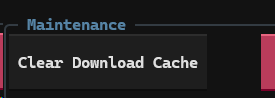
Read through threads, used the search, couldent find solution. Eventually found solution was to delete UserName\AppData\Local\pyapp\cache
I must have interrupted its initial install and it got stuck. Just wanted to stick this here to add it to search results for whoever else might have same issue.
 
I am a returning player to EverQuest live. I used MQ2 in the past.
I am lost with this Redfetch. I need help. Is there a guide somewhere that shows a newbie how to set it up so that it can be used with a six box setup?
Everywhere I have looked is 5 or 6 year old information, no current info.
Please help and advise. I just want to play my 6 toons like I used to.
 
I am a returning player to EverQuest live. I used MQ2 in the past.
I am lost with this Redfetch. I need help. Is there a guide somewhere that shows a newbie how to set it up so that it can be used with a six box setup?
Everywhere I have looked is 5 or 6 year old information, no current info.
Please help and advise. I just want to play my 6 toons like I used to.
welcome back,

Figuring out > where to look / post < is a good place to start just to get a "lay of the land" for the website

Here is the > redfetch guide < this will get you from nothing -> in game fighting
 
design change, i set that to only run when MQ itself is updated. I'll re-think some "start mq" options, any ideas?
Update: I cleared the Cache and ran it full and it opened the MQ button. Adding image in Settings in case it happens to anyone else ! <3
1783271919921.png
 
well yeah you clear the cache you'll re-download everything!

you can go to shortcuts if you just want to start mq
 
well yeah you clear the cache you'll re-download everything!

you can go to shortcuts if you just want to start mq
That caught a lot of people out, I had people calling me to troubleshoot why it had not started.

Maybe an option to only start MQ on Update as well as the standard option to Start MQ Post-Update. Not sure how to word the other option, but it is a QOL improvement. I can get past it by adding the launch to my start.bat file, but less sophisticated users will have issues.
 
That caught a lot of people out, I had people calling me to troubleshoot why it had not started.

Maybe an option to only start MQ on Update as well as the standard option to Start MQ Post-Update. Not sure how to word the other option, but it is a QOL improvement. I can get past it by adding the launch to my start.bat file, but less sophisticated users will have issues.
Reverting it now, sorry bad idea!
 
Redbot updated redfetch with a new update entry:

1.4.1

Changed​

  • The update button once again doubles as a launch MQ button, even when no update occurs.

Added​

  • redfetch run and redfetch open CLI commands act as shortcuts, for example redfetch run eqgame will start EQgame.exe, redfetch open eqhost will open the eqhost.txt file, etc. These mirror the TUI shortcuts.

Read the rest of this update entry...
 
some very old quotes here but I'm finally catching up.

For clarification.
The old launcher gave you the option to 'install' a resource you are watching. I could watch 50-60 different resources and not actually download and 'install' them.

The website is a good enough UI for resource management and selection. You can watch/unwatch for downloads, and if you want to keep tabs on a resource without downloading, you can use the bookmark feature. For selective downloads, you can run the RG interface (ctrl + r) and download resources while browsing.

It doesn't exactly replicate the old launcher, but it's good enough.

Moved my VV installation to a new computer by simply copying my c:\pdq folder to the new computer. Didn't bother with the old patcher stuff.

Had problems with Redfetch wanting to create an extensive secondary set of nested folders.

Found the settings tab and changed VV to point to C:\PDQ and things got better. But it still insists on creating an empty C:\PDQ\Downloads\VanillaMQ_Live and a C:\PDQ\VanillaMQ_Live folder.

I feel very uncomfortable having a folder named something so obviously MQ related. It would be super simple for Daybroke to scan your hard drive for that hard coded folder name.

Also, it would be nice if the installer explicitly mentioned where to find redfetch.exe after it's finished installing itself. Some of us like to clean the downloads folder on a regular basis.

Sorry if this sounds harsh, it's not intended, just offering my observations. It's working great once I learned how to use it properly.

I forgot when we changed this, but it will not try to make a VanillaMQ_LIVE folder if you have a custom path specified. It will always create a Downloads folder though, sorry.

My initial install got interrupted, now when i click redfetch, the prompt window opens for a second then closes before it can do anything. Have tried deleting and redownloading and running as admin. Any ideas?

Thanks!

I have a fix coming out to address this. redfetch will run a self-heal for PyApp-managed python environment installations that were interrupted or broken. (only affects .exe users)
 
💾Software redfetch

Users who are viewing this thread

Back
Top
Cart