


---------------------------
redfetch
---------------------------
Tip: Press Ctrl+C to copy this error report.
ValidationError: Path 'VanillaMQ_LIVE' or its parent contains eqgame.exe
Traceback (most recent call last):
File "C:\Users\Bill\AppData\Local\pyapp\data\redfetch\4791037221231039064\1.2.0\Lib\site-packages\redfetch\main.py", line 632, in main
run_tui()
~~~~~~~^^
File "C:\Users\Bill\AppData\Local\pyapp\data\redfetch\4791037221231039064\1.2.0\Lib\site-packages\redfetch\main.py", line 269, in run_tui
_initialize_auth()
~~~~~~~~~~~~~~~~^^
File "C:\Users\Bill\AppData\Local\pyapp\data\redfetch\4791037221231039064\1.2.0\Lib\site-packages\redfetch\main.py", line 59, in _initialize_auth
auth.authorize()
~~~~~~~~~~~~~~^^
File "C:\Users\Bill\AppData\Local\pyapp\data\redfetch\4791037221231039064\1.2.0\Lib\site-packages\redfetch\auth.py", line 263, in authorize
client_id = _get_setting("OAUTH_CLIENT_ID")
File "C:\Users\Bill\AppData\Local\pyapp\data\redfetch\4791037221231039064\1.2.0\Lib\site-packages\redfetch\auth.py", line 51, in _get_setting
val = config.settings.get(key, default)
^^^^^^^^^^^^^^^^^^^
File "C:\Users\Bill\AppData\Local\pyapp\data\redfetch\4791037221231039064\1.2.0\Lib\site-packages\dynaconf\base.py", line 121, in __getattr__
self._setup()
~~~~~~~~~~~^^
File "C:\Users\Bill\AppData\Local\pyapp\data\redfetch\4791037221231039064\1.2.0\Lib\site-packages\dynaconf\base.py", line 180, in _setup
self._wrapped = self._wrapper_class(
~~~~~~~~~~~~~~~~~~~^
settings_module=settings_module, **self._kwargs
^^^^^^^^^^^^^^^^^^^^^^^^^^^^^^^^^^^^^^^^^^^^^^^
)
^
File "C:\Users\Bill\AppData\Local\pyapp\data\redfetch\4791037221231039064\1.2.0\Lib\site-packages\dynaconf\base.py", line 273, in __init__
self.validators.validate(
~~~~~~~~~~~~~~~~~~~~~~~~^
only=self._validate_only,
^^^^^^^^^^^^^^^^^^^^^^^^^
exclude=self._validate_exclude,
^^^^^^^^^^^^^^^^^^^^^^^^^^^^^^^
only_current_env=self._validate_only_current_env,
^^^^^^^^^^^^^^^^^^^^^^^^^^^^^^^^^^^^^^^^^^^^^^^^^
)
^
File "C:\Users\Bill\AppData\Local\pyapp\data\redfetch\4791037221231039064\1.2.0\Lib\site-packages\dynaconf\validator.py", line 510, in validate
validator.validate(
~~~~~~~~~~~~~~~~~~^
self.settings,
^^^^^^^^^^^^^^
...<2 lines>...
only_current_env=only_current_env,
^^^^^^^^^^^^^^^^^^^^^^^^^^^^^^^^^^
)
^
File "C:\Users\Bill\AppData\Local\pyapp\data\redfetch\4791037221231039064\1.2.0\Lib\site-packages\dynaconf\validator.py", line 233, in validate
self._validate_items(
~~~~~~~~~~~~~~~~~~~~^
settings, settings.current_env, only=only, exclude=exclude
^^^^^^^^^^^^^^^^^^^^^^^^^^^^^^^^^^^^^^^^^^^^^^^^^^^^^^^^^^
)
^
File "C:\Users\Bill\AppData\Local\pyapp\data\redfetch\4791037221231039064\1.2.0\Lib\site-packages\dynaconf\validator.py", line 311, in _validate_items
value = self.cast(settings.get(name))
File "C:\Users\Bill\AppData\Local\pyapp\data\redfetch\4791037221231039064\1.2.0\Lib\site-packages\redfetch\config.py", line 102, in normalize_paths_in_dict
normalize_paths_in_dict(value, parent_key=key)
~~~~~~~~~~~~~~~~~~~~~~~^^^^^^^^^^^^^^^^^^^^^^^
File "C:\Users\Bill\AppData\Local\pyapp\data\redfetch\4791037221231039064\1.2.0\Lib\site-packages\redfetch\config.py", line 110, in normalize_paths_in_dict
validate_no_eqgame(normalized_value)
~~~~~~~~~~~~~~~~~~^^^^^^^^^^^^^^^^^^
File "C:\Users\Bill\AppData\Local\pyapp\data\redfetch\4791037221231039064\1.2.0\Lib\site-packages\redfetch\config.py", line 60, in validate_no_eqgame
raise ValidationError(f"Path '{path}' or its parent contains eqgame.exe")
dynaconf.validator.ValidationError: Path 'VanillaMQ_LIVE' or its parent contains eqgame.exe
---------------------------
OK
---------------------------
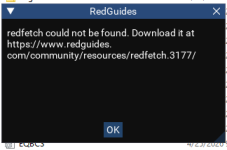
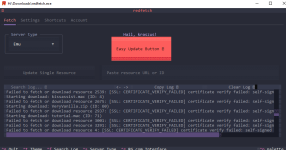
get this error, no luck installing
redfetch
---------------------------
Tip: Press Ctrl+C to copy this error report.
ValidationError: Path 'VanillaMQ_LIVE' or its parent contains eqgame.exe
Traceback (most recent call last):
File "C:\Users\Bill\AppData\Local\pyapp\data\redfetch\4791037221231039064\1.2.0\Lib\site-packages\redfetch\main.py", line 632, in main
run_tui()
~~~~~~~^^
File "C:\Users\Bill\AppData\Local\pyapp\data\redfetch\4791037221231039064\1.2.0\Lib\site-packages\redfetch\main.py", line 269, in run_tui
_initialize_auth()
~~~~~~~~~~~~~~~~^^
File "C:\Users\Bill\AppData\Local\pyapp\data\redfetch\4791037221231039064\1.2.0\Lib\site-packages\redfetch\main.py", line 59, in _initialize_auth
auth.authorize()
~~~~~~~~~~~~~~^^
File "C:\Users\Bill\AppData\Local\pyapp\data\redfetch\4791037221231039064\1.2.0\Lib\site-packages\redfetch\auth.py", line 263, in authorize
client_id = _get_setting("OAUTH_CLIENT_ID")
File "C:\Users\Bill\AppData\Local\pyapp\data\redfetch\4791037221231039064\1.2.0\Lib\site-packages\redfetch\auth.py", line 51, in _get_setting
val = config.settings.get(key, default)
^^^^^^^^^^^^^^^^^^^
File "C:\Users\Bill\AppData\Local\pyapp\data\redfetch\4791037221231039064\1.2.0\Lib\site-packages\dynaconf\base.py", line 121, in __getattr__
self._setup()
~~~~~~~~~~~^^
File "C:\Users\Bill\AppData\Local\pyapp\data\redfetch\4791037221231039064\1.2.0\Lib\site-packages\dynaconf\base.py", line 180, in _setup
self._wrapped = self._wrapper_class(
~~~~~~~~~~~~~~~~~~~^
settings_module=settings_module, **self._kwargs
^^^^^^^^^^^^^^^^^^^^^^^^^^^^^^^^^^^^^^^^^^^^^^^
)
^
File "C:\Users\Bill\AppData\Local\pyapp\data\redfetch\4791037221231039064\1.2.0\Lib\site-packages\dynaconf\base.py", line 273, in __init__
self.validators.validate(
~~~~~~~~~~~~~~~~~~~~~~~~^
only=self._validate_only,
^^^^^^^^^^^^^^^^^^^^^^^^^
exclude=self._validate_exclude,
^^^^^^^^^^^^^^^^^^^^^^^^^^^^^^^
only_current_env=self._validate_only_current_env,
^^^^^^^^^^^^^^^^^^^^^^^^^^^^^^^^^^^^^^^^^^^^^^^^^
)
^
File "C:\Users\Bill\AppData\Local\pyapp\data\redfetch\4791037221231039064\1.2.0\Lib\site-packages\dynaconf\validator.py", line 510, in validate
validator.validate(
~~~~~~~~~~~~~~~~~~^
self.settings,
^^^^^^^^^^^^^^
...<2 lines>...
only_current_env=only_current_env,
^^^^^^^^^^^^^^^^^^^^^^^^^^^^^^^^^^
)
^
File "C:\Users\Bill\AppData\Local\pyapp\data\redfetch\4791037221231039064\1.2.0\Lib\site-packages\dynaconf\validator.py", line 233, in validate
self._validate_items(
~~~~~~~~~~~~~~~~~~~~^
settings, settings.current_env, only=only, exclude=exclude
^^^^^^^^^^^^^^^^^^^^^^^^^^^^^^^^^^^^^^^^^^^^^^^^^^^^^^^^^^
)
^
File "C:\Users\Bill\AppData\Local\pyapp\data\redfetch\4791037221231039064\1.2.0\Lib\site-packages\dynaconf\validator.py", line 311, in _validate_items
value = self.cast(settings.get(name))
File "C:\Users\Bill\AppData\Local\pyapp\data\redfetch\4791037221231039064\1.2.0\Lib\site-packages\redfetch\config.py", line 102, in normalize_paths_in_dict
normalize_paths_in_dict(value, parent_key=key)
~~~~~~~~~~~~~~~~~~~~~~~^^^^^^^^^^^^^^^^^^^^^^^
File "C:\Users\Bill\AppData\Local\pyapp\data\redfetch\4791037221231039064\1.2.0\Lib\site-packages\redfetch\config.py", line 110, in normalize_paths_in_dict
validate_no_eqgame(normalized_value)
~~~~~~~~~~~~~~~~~~^^^^^^^^^^^^^^^^^^
File "C:\Users\Bill\AppData\Local\pyapp\data\redfetch\4791037221231039064\1.2.0\Lib\site-packages\redfetch\config.py", line 60, in validate_no_eqgame
raise ValidationError(f"Path '{path}' or its parent contains eqgame.exe")
dynaconf.validator.ValidationError: Path 'VanillaMQ_LIVE' or its parent contains eqgame.exe
---------------------------
OK
---------------------------
get this error, no luck installing





 .
.




 .
.