• Hail, we're RedGuides. We want you to play six (yes, 6!) EverQuest characters at once. We have scripts and a friendly community to help, please join our playstyle and say hello! 👋
  • We've added LLM sections to our Terms & Rules and Resource Rules, for everyone's sanity & in-game safety.
    Read more
    a. Do not replace your voice with an LLM. This goes for your posts and your scripts. Drafting and editing with a tool is fine, but don't take you out of what you share.
    b. Do not replace your EQ character's voice with an LLM. We don't want scripts that speak over /ooc, /shout or other public channels. This has been an unwritten rule that's kept casino scripts off the site for decades, but we're now compelled to make it clear: keep automated communication private.

    Why Does RG Review Scripts?
    Nearly every LLM-written Lua script we see is making your character do impossible things, and rarely in a way that's beneficial to you. We've seen heavy server hammering, /target over impossible distances when /nav spawn would passively accomplish the same thing, a spawn search that fires 20+ times per second, and other pointless actions that are likely annoying GMs.

    You are welcome to use LLMs as a tool to structure, draft, and edit your work, but please read critically before hitting /lua run

Tip - Quick Look Gear Spreadsheet

Just thought I'd share a spreadsheet (Toon Names removed) I use for keeping track of gear of 54 toons in a really quick manner. I can easily decide who needs what in a matter of seconds when looting a chest - conditional formatting changes colors of gear automatically.

I only worry about the HP of the item - because I realized after a while - Nothing else Matters. - Good name for a song!
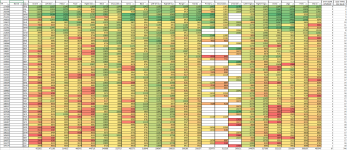

1657524465798.png
 

Attachments

I might be in trouble. My first thought was "Hmm, this would do nicely in a Google sheet". Primarily because sharing the link and allowing others to make copies would be easy. And then my mind went to "I wonder what it would take to write a Lua to maintain it?". Now I'm deep into research on just that.
 
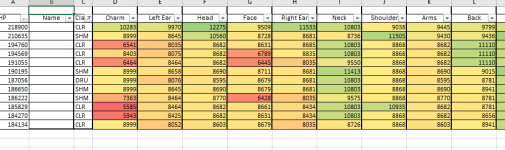
Just thought I'd share a spreadsheet (Toon Names removed) I use for keeping track of gear of 54 toons in a really quick manner. I can easily decide who needs what in a matter of seconds when looting a chest - conditional formatting changes colors of gear automatically.

I only worry about the HP of the item - because I realized after a while - Nothing else Matters. - Good name for a song!


View attachment 40777
Thanks for sharing. Have you thought about just coding based on class instead of all the eye straining yellow red?

EX: Tank Classes (Grey), Heal Classes (Pink...yea sense of humor!), CC (Teal...because sense of humor!), and DPS Caster & DPS Melee...

Just a thought...that way you can fill each bucket first. EX: Tanks get geared first, healers second, cc third, then dps...or whatever rule set you'd like to follow
 
Have you thought about just coding based on class instead of all the eye straining yellow red?
Yeah - I tried Many Many different color combo's - but always came back to the Green - Yellow - Red Gradient fill that Excel has as its standard.

I can Filter by class very easily - and I find the Red - is an instant Shout - to upgrade those items.

Tanks are Solid - Priest classes - I have some clerics who desperately need to get some good charm's.
1657581909073.png

1657581947947.png

Here is a macro to get All your gear for all your toons written to a Gear.ini file. Save it as a .mac file and run it on ALL toons...


Gear Macro
Code:
Sub Main
    /declare Tag string outer
    /if (${Param0.Length}) /varset Tag ${Param0}
    /echo Outputting gear and stats to Gear.ini [${Tag}Gear]


/ini "Gear.ini" "${Tag}Gear" "${Me}","${InvSlot[0].Item.HP}","${InvSlot[1].Item.HP}","${InvSlot[2].Item.HP}","${InvSlot[3].Item.HP}","${InvSlot[4].Item.HP}","${InvSlot[5].Item.HP}","${InvSlot[6].Item.HP}","${InvSlot[7].Item.HP}","${InvSlot[8].Item.HP}","${InvSlot[9].Item.HP}","${InvSlot[10].Item.HP}","${InvSlot[11].Item.HP}","${InvSlot[12].Item.HP}","${InvSlot[13].Item.HP}","${InvSlot[14].Item.HP}","${InvSlot[15].Item.HP}","${InvSlot[16].Item.HP}","${InvSlot[17].Item.HP}","${InvSlot[18].Item.HP}","${InvSlot[19].Item.HP}","${InvSlot[20].Item.HP}"
    
/return

Oh..Wait - you will still need to do your 2hander.
 
I might be in trouble. My first thought was "Hmm, this would do nicely in a Google sheet". Primarily because sharing the link and allowing others to make copies would be easy. And then my mind went to "I wonder what it would take to write a Lua to maintain it?". Now I'm deep into research on just that.
A table that is shown in the UI for only group leader/raid leader/set specific toon. Have that toon who displays the the table to user create observers on other toons to observe their gear, or if that is too cumbersome then just query the gear every minute or a button that once pressed queries all toons for gear in raid/group. Initially doesn't sound like the hardest thing to implement.
 
Last edited:
A table that is shown in the UI for only group leader/raid leader/set specific toon. Have that toon who displays the the table to user create observers on other toons to observe their gear, or if that is too cumbersome then just query the gear every minute or a button that once pressed queries all toons for gear in raid/group. Initially doesn't sound like the hardest thing to implement.

The in-game stuff isn't the issue I was thinking about. Updating the sheet based on that data is where the issue will be. Thankfully I've done other work with the Google API.
 
The in-game stuff isn't the issue I was thinking about. Updating the sheet based on that data is where the issue will be. Thankfully I've done other work with the Google API.
Oh I think I misunderstood you then. I was thinking about having a table view written in Lua that would ingame show the gear and values for all toons and you could make decision based on that.
 
Oh I think I misunderstood you then. I was thinking about having a table view written in Lua that would ingame show the gear and values for all toons and you could make decision based on that.

That would be simpler from a data storage perspective. Recreating all the spreadsheet logic wouldn't be terribly difficult either. But yeah, my mind went to meshing Lua with Google Sheets.
 
Is there a way to extract Augment data, similar to Inventory slot data?

example: "${InvSlot[0].Item.HP}" ... but for augments?

Having a hard time finding the augment slot codes similar to Inventory slots 0-20.

Closest I have gotten by digging through .macs on the site is "${InvSlot[0].Item.AugSlot[0].Item.HP}, but that isn't spitting out Augment HP. Likely because there are so many different augment slots?

thanks!
 
Last edited:
There are a few other gear logging macros. It looks at augs and adds them to the gear - but it doesnt just show augs.
https://www.redguides.com/community/resources/gear-mac.1975/

Code:
        |Add Aug Stuffz
        /for j 0 to 5
            /if (!${Me.Inventory[${i}].AugSlot[${j}].Empty}) {
                /varcalc itemHP ${itemHP} + ${Me.Inventory[${i}].AugSlot[${j}].Item.HP}
                /varcalc itemAC ${itemAC} + ${Me.Inventory[${i}].AugSlot[${j}].Item.AC}
                /varcalc itemMana ${itemMana} + ${Me.Inventory[${i}].AugSlot[${j}].Item.Mana}
                /varcalc itemPurity ${itemPurity} + ${Me.Inventory[${i}].AugSlot[${j}].Item.Purity}
            }
        /next j

And there is another one called gearlog which apparently doesnt work.

I havent seen any Lua scripts which are doing it.

HINT: How I keep track of my augs:

I have one column in my spreadsheet which lists my toons Worst Aug. Ie if its a tank - i might just have an AC Value 70

Then if an Aug drops I can quickly reference this column to tell which toon I should be looting on. It is such a pain to keep track of augs - a full time job on your raiding toons.
 
Interesting, i'd like a better system myself
For aug's I just /output inventory at login/logout and manual do it in raidloot.com

For gear I just look at Focus's and make sure I have the best, then everything else is just hp which I dont really track

1680716334792.png
1680716379324.png
 
Tip - Quick Look Gear Spreadsheet

Users who are viewing this thread

Back
Top
Cart