• Hail, we're RedGuides. We want you to play six (yes, 6!) EverQuest characters at once. We have scripts and a friendly community to help, please join our playstyle and say hello! 👋
  • We've added LLM sections to our Terms & Rules and Resource Rules, for everyone's sanity & in-game safety.
    Read more
    a. Do not replace your voice with an LLM. This goes for your posts and your scripts. Drafting and editing with a tool is fine, but don't take you out of what you share.
    b. Do not replace your EQ character's voice with an LLM. We don't want scripts that speak over /ooc, /shout or other public channels. This has been an unwritten rule that's kept casino scripts off the site for decades, but we're now compelled to make it clear: keep automated communication private.

    Why Does RG Review Scripts?
    Nearly every LLM-written Lua script we see is making your character do impossible things, and rarely in a way that's beneficial to you. We've seen heavy server hammering, /target over impossible distances when /nav spawn would passively accomplish the same thing, a spawn search that fires 20+ times per second, and other pointless actions that are likely annoying GMs.

    You are welcome to use LLMs as a tool to structure, draft, and edit your work, but please read critically before hitting /lua run
Player Targ

Release Player Targ v2.04

Download
Grim, what do you use for your casting bar (to see the spells being cast)? As I'm changing to use more of your UI elements, its something I noticed I do not see now. This is likely due to my old Vert UI having a Target window and casting bar with spell name showing under it. Since I'm covering it with Player Targ, I'm not sure where to bring a casting bar up.
 
Out of curiousity, any idea why some of this text is blurry (target name,etc) and some is clearer (target hp%, player level, its sharper than the screenshot shows)? Is it a windows scaling thing? Thanks !

View attachment 62883
I was reading about imgui, and it being implemented in other apps (as a general x-plat ui choice), and folks were saying that the default font for it has terrible anti-aliasing which makes it look blurry, I wonder if it was related to that? They suggested changing the font to a proper windows font since then the proper windows handling can kick in, or something.
 
Grim, what do you use for your casting bar (to see the spells being cast)? As I'm changing to use more of your UI elements, its something I noticed I do not see now. This is likely due to my old Vert UI having a Target window and casting bar with spell name showing under it. Since I'm covering it with Player Targ, I'm not sure where to bring a casting bar up.
currently i haven't written one but i could whip one up pretty fast. =)
 
I was reading about imgui, and it being implemented in other apps (as a general x-plat ui choice), and folks were saying that the default font for it has terrible anti-aliasing which makes it look blurry, I wonder if it was related to that? They suggested changing the font to a proper windows font since then the proper windows handling can kick in, or something.
there is a way to change all imgui fonts, from mqconsole --> windows --> imgui demo --> tools --> StyleEditor
they have to be prebuilt first. if i can figure out how to just change one window's i will attempt to add it.
Thanks for chiming in, this actually solves the issue and I have no problem changing fonts in other windows off the top of my head. Going to play around with it.
 
Well I am starting to setup my boxing using more of ImGui interfaces after watching your vid (Lazarus).
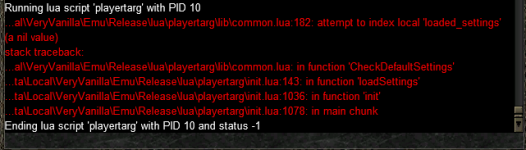
I am running into trouble with PlayerTarg, it is crashing right off the start.

Screenshot 2024-08-04 085734.png

I checked the settingss that were created (not having run this before) and confirmed that there was a value for iconSize.

Settings.lua
Lua:
return {
    ['PlayerTarg'] = {
        ['Scale'] = 1,
        ['LoadTheme'] = 'Default',
        ['locked'] = false,
        ['SplitTarget'] = false,
        ['showXtar'] = false,
        ['ColorHPMax'] = {
            [1] = 0.992,
            [2] = 0.138,
            [3] = 0.138,
            [4] = 1,
        },
        ['ColorHPMin'] = {
            [1] = 0.551,
            [2] = 0.207,
            [3] = 0.962,
            [4] = 1,
        },
        ['ColorMPMax'] = {
            [1] = 0.231,
            [2] = 0.707,
            [3] = 0.938,
            [4] = 1,
        },
        ['ColorMPMin'] = {
            [1] = 0.6,
            [2] = 0.231,
            [3] = 0.938,
            [4] = 1,
        },
        ['ColorBreathMin'] = {
            [1] = 0.6,
            [2] = 0.231,
            [3] = 0.938,
            [4] = 1,
        },
        ['ColorBreathMax'] = {
            [1] = 0.231,
            [2] = 0.707,
            [3] = 0.938,
            [4] = 1,
        },
        ['BreathLocked'] = false,
        ['ShowTitleBreath'] = false,
        ['EnableBreathBar'] = false,
        ['DynamicHP'] = false,
        ['DynamicMP'] = false,
        ['FlashBorder'] = true,
        ['MouseOver'] = false,
        ['WinTransparency'] = 1,
        ['ProgressSize'] = 10,
        ['pulseSpeed'] = 5,
        ['combatPulseSpeed'] = 10,
        ['iconSize'] = 26,
        ['ProgressSizeTarget'] = 30,
        ['doPulse'] = true,
    },
}

I've confirmed that all player windows are open, stopped any running Lua/mac, and tested with default UI.
After that, I'm at a loss.

I could use your help as I figure it's something with my setup (or you would have heard before now). 🤭

Thank you in advance and great VID on the Lazarus server. It's my fav emu.

- M
 
Well I am starting to setup my boxing using more of ImGui interfaces after watching your vid (Lazarus).
I am running into trouble with PlayerTarg, it is crashing right off the start.

View attachment 63812

I checked the settingss that were created (not having run this before) and confirmed that there was a value for iconSize.

Settings.lua
Lua:
return {
    ['PlayerTarg'] = {
        ['Scale'] = 1,
        ['LoadTheme'] = 'Default',
        ['locked'] = false,
        ['SplitTarget'] = false,
        ['showXtar'] = false,
        ['ColorHPMax'] = {
            [1] = 0.992,
            [2] = 0.138,
            [3] = 0.138,
            [4] = 1,
        },
        ['ColorHPMin'] = {
            [1] = 0.551,
            [2] = 0.207,
            [3] = 0.962,
            [4] = 1,
        },
        ['ColorMPMax'] = {
            [1] = 0.231,
            [2] = 0.707,
            [3] = 0.938,
            [4] = 1,
        },
        ['ColorMPMin'] = {
            [1] = 0.6,
            [2] = 0.231,
            [3] = 0.938,
            [4] = 1,
        },
        ['ColorBreathMin'] = {
            [1] = 0.6,
            [2] = 0.231,
            [3] = 0.938,
            [4] = 1,
        },
        ['ColorBreathMax'] = {
            [1] = 0.231,
            [2] = 0.707,
            [3] = 0.938,
            [4] = 1,
        },
        ['BreathLocked'] = false,
        ['ShowTitleBreath'] = false,
        ['EnableBreathBar'] = false,
        ['DynamicHP'] = false,
        ['DynamicMP'] = false,
        ['FlashBorder'] = true,
        ['MouseOver'] = false,
        ['WinTransparency'] = 1,
        ['ProgressSize'] = 10,
        ['pulseSpeed'] = 5,
        ['combatPulseSpeed'] = 10,
        ['iconSize'] = 26,
        ['ProgressSizeTarget'] = 30,
        ['doPulse'] = true,
    },
}

I've confirmed that all player windows are open, stopped any running lua/mac, and tested with default UI.
After that, I'm at a loss.

I could use your help as I figure it's something with my setup (or you would have heard before now). 🤭

Thank you in advance and great VID on the Lazarus server. It's my fav emu.

- M
Ack I'm out camping till tomorrow. I will dig into that when I get home and have my laptop.
 
Try this. At line 173 I. The init.Lua

Change
Old line 173
Code:
iconSize = settings[script].IconSize
To this

Newcode
Code:
iconSize = settings[script].iconSize

Looks like I had a capital I instead of a lowercase.

You could also change the variable in the settings to be a capital I instead as well. Either should work.
 
Grimmier - loving the evolution of your UI components. After 25 years of playing this game, I'm finally evolving with as a result of your Lua packages.

Question: On the playertarg - is there a way to make it show Current HP as a # out of Max HP? E.g., 500,000 / 650,000? I realize this requires more constant info pulls, and I'm not sure if it's possible. If not, is it possible to add in a "max hp" on there?

If YES - is it possible with the Lua script to show a MAX hp that exceeds the RoF2 player info cap? (e.g., on an emu server that exceeds 1mm hps? I wouldn't even know if that's possible, just thought I'd ask!

Loving the work my friend!
 
Great Lua, thank you for your time you have put into it.

Where is the location at that stores where the window is located? I am having problems with the location resetting when I log back in. It does not happen on every character just a few of them.
 
Release Player Targ

Users who are viewing this thread

Back
Top
Cart