
-
 Hail, we're RedGuides. We want you to play six (yes, 6!) EverQuest characters at once. We have scripts and a friendly community to help, please join our playstyle and say hello! 👋
You are using an out of date browser. It may not display this or other websites correctly.
You should upgrade or use an alternative browser.
You should upgrade or use an alternative browser.
Resource icon
Release Overseer 04/27/2026
- Thread starter GoldenFrog
- Start date
This morning 3 out of 7 accounts dissappeared during overseer. I moved all chars far out of the way to avoid catching a modrod or something else on the cursor while running overseer.
After relaunching the 3 accounts i rerun 2 of the 3 a second time, which at this time overseer run throught. The third I run manually as this char still has to reach lvl 120, whereas the other 2 I woult have skipped if overseer caused a second crash.
After relaunching the 3 accounts i rerun 2 of the 3 a second time, which at this time overseer run throught. The third I run manually as this char still has to reach lvl 120, whereas the other 2 I woult have skipped if overseer caused a second crash.

I was watching the action this morning and all my accounts went poof just as the Lua finished accepting rewards. The focus switched back to the Active Quests window in Overseer and the EQ sessions just went away on all 6 chars I had loaded.
Edited to add that I only thought the account had finished accepting rewards. It turned out there was still one mission to accept the reward and once the Lua did that it blew the character out again. Could this have something to do with the mq2rewards plugin?
Edited to add that I ran 4 more accounts but took all the rewards manually, then started the Lua and had no problems with them.
Also edited to add that I manually added the following 6 Feast of Giving special quests...
Specific Quests Section of Overseer_character.lua
Edited to add that I only thought the account had finished accepting rewards. It turned out there was still one mission to accept the reward and once the Lua did that it blew the character out again. Could this have something to do with the mq2rewards plugin?
Edited to add that I ran 4 more accounts but took all the rewards manually, then started the Lua and had no problems with them.
Also edited to add that I manually added the following 6 Feast of Giving special quests...
Specific Quests Section of Overseer_character.lua
Lua:
    ["SpecificQuests"] = {
        [1] = "Feast For No One";
        [2] = "These Walls Have Ears";
        [3] = "Feast Fit For A Festival";
        [4] = "Need For A Feast";
        [5] = "Recruit the Avatar of Rodcet Nife";
        [6] = "Feast For the Deceased";
        ["index"] = 6;
    };
Last edited:

I had the same thing happen to me today, accounts without rewards pending didn't crash out, but all those that had rewards pending CTD with no error log or anything.I was watching the action this morning and all my accounts went poof just as the Lua finished accepting rewards. The focus switched back to the Active Quests window in Overseer and the EQ sessions just went away on all 6 chars I had loaded.
Edited to add that I only thought the account had finished accepting rewards. It turned out there was still one mission to accept the reward and once the Lua did that it blew the character out again. Could this have something to do with the mq2rewards plugin?
Edited to add that I ran 4 more accounts but took all the rewards manually, then started the Lua and had no problems with them.
Also edited to add that I manually added the following 6 Feast of Giving special quests...
Specific Quests Section of Overseer_character.lua
Lua:["SpecificQuests"] = { [1] = "Feast For No One"; [2] = "These Walls Have Ears"; [3] = "Feast Fit For A Festival"; [4] = "Need For A Feast"; [5] = "Recruit the Avatar of Rodcet Nife"; [6] = "Feast For the Deceased"; ["index"] = 6; };
I also had the "ghost controller" happen, where one toon died (level 83) and I had forgotten to exclude them from a /dgga /Lua run overseer. That toon as soon as it hit the Lobby just took off, running all over and targeting the corpse summoners. As soon as I unloaded overseer on him, he stopped and acted just fine. (enchanter with MQ2Enchanter turned on).
- Commits
- 6
Missed this discussion, sorry. I haven't seen crashes myself but will also help look into things here.I had the same thing happen to me today, accounts without rewards pending didn't crash out, but all those that had rewards pending CTD with no error log or anything.
I also had the "ghost controller" happen, where one toon died (level 83) and I had forgotten to exclude them from a /dgga /lua run overseer. That toon as soon as it hit the Lobby just took off, running all over and targeting the corpse summoners. As soon as I unloaded overseer on him, he stopped and acted just fine. (enchanter with MQ2Enchanter turned on).
EDIT: I'm seeing some folks discussing reward claiming.
As an initial note, you can instruct the script to not claim rewards:
["claimRewards"] = false;
Last edited:
I can confirm, thar disabling „claim rewards“ stopped my accounts from closing eq.
- Commits
- 6
GoldenFrog updated Overseer with a new update entry:
3.42: Correct Crash When Done Claiming Rewards
Read the rest of this update entry...
3.42: Correct Crash When Done Claiming Rewards
Previously, if the script had to load the MQ2Rewards plugin, the plugin would be unloaded when done.
- Corrected crash when done claiming rewards
That was causing a conflict.
This logic has been removed - so MQ2Rewards will be loaded and left loaded whenever rewards must be claimed
Read the rest of this update entry...

tyvm for updating it. Can't wait to test/get it back in action tonight. Sure makes you appreciate it when you have to do it manually on 12 LOL.GoldenFrog updated Overseer with a new update entry:
3.42: Correct Crash When Done Claiming Rewards
Read the rest of this update entry...
pepsipepsi
Well-known member
Was able to run it with no crashes. Thanks for the quick update.
Just a view ours you got aware, you have the update ready. Many thanks 
This maked me again aware of what a big level of comfort your tool offers.
This maked me again aware of what a big level of comfort your tool offers.

Xavierix
Member
Hello,
So I have Lua overseer configured to use the global configuration for all my toons (14). I have 3 groups set up. I check to make sure everyone is online by having them all send me a tell of stats.
My issue is randomly one of them will get this message
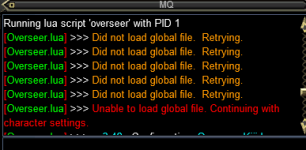
So it ends up creating a character ini for that one. But of course the character ini goes back to all the default settings. I fix it and the next day it happens again for some other toon.
This has happened since I started back up Thursday. Anyone else having this happen?
Sorry if I missed this if already mentioned.
So I have Lua overseer configured to use the global configuration for all my toons (14). I have 3 groups set up. I check to make sure everyone is online by having them all send me a tell of stats.
My issue is randomly one of them will get this message
So it ends up creating a character ini for that one. But of course the character ini goes back to all the default settings. I fix it and the next day it happens again for some other toon.
This has happened since I started back up Thursday. Anyone else having this happen?
Sorry if I missed this if already mentioned.
Attachments
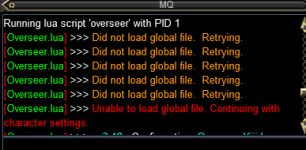
- Commits
- 6
Hello,
So I have lua overseer configured to use the global configuration for all my toons (14). I have 3 groups set up. I check to make sure everyone is online by having them all send me a tell of stats.
My issue is randomly one of them will get this message
View attachment 52981
So it ends up creating a character ini for that one. But of course the character ini goes back to all the default settings. I fix it and the next day it happens again for some other toon.
This has happened since I started back up Thursday. Anyone else having this happen?
Sorry if I missed this if already mentioned.
The "Retrying" logic went in only a month or two ago due to this very issue. I hadn't heard of anyone still having a problem, and my load tests seemed happier.
The delay is a simple 1/2 second for 5 tries. Gives up after 2 seconds.
I will try a few things before pushing something that may address but you can make a change locally to see if it helps you.
File: .\overseer\overseer_settings.Lua
Line 434:
local retryLeft = 5Change the 5 to a 10. Or even 20.
I'll try to come up with something better.
Hello,
So I have lua overseer configured to use the global configuration for all my toons (14).
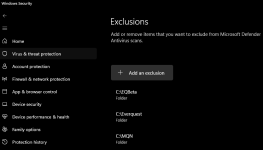
Just to confirm you've disabled your anti-virus from monitoring your entire MQ folder? There is a small chance your AV product could delay opening the file occasionally. Because in theory your OS should be able to offer up the configuration file in microseconds after the first access. And Lua is operating in milliseconds so the OS is much faster. Another caveat would be if your machine is extremely busy doing some other disk intensive operation like you're hosting a database server?
Xavierix
Member
Just to confirm you've disabled your anti-virus from monitoring your entire MQ folder? There is a small chance your AV product could delay opening the file occasionally. Because in theory your OS should be able to offer up the configuration file in microseconds after the first access. And Lua is operating in milliseconds so the OS is much faster. Another caveat would be if your machine is extremely busy doing some other disk intensive operation like you're hosting a database server?
No, the release folder is not set as an exception but I can try that for a few days and see if it helps. I do not do hosting's or even video editing for that matter. My pc is probably more low to mid tier by now being about 7 yrs old (Alienware i-7 8700 @3.2g / 32 ram GTX 1080 regular sata drives)
No, the release folder is not set as an exception but I can try that for a few days and see if it helps. I do not do hosting's or even video editing for that matter. My pc is probably more low to mid tier by now being about 7 yrs old (Alienware i-7 8700 @3.2g / 32 ram GTX 1080 regular sata drives)
If you exclude the parent folder then the release folder will be excluded by default...
Xavierix
Member
Ok I made the change to 20. I noticed the highest hit was 9 attempts between 3 toons. ThanksThe "Retrying" logic went in only a month or two ago due to this very issue. I hadn't heard of anyone still having a problem, and my load tests seemed happier.
The delay is a simple 1/2 second for 5 tries. Gives up after 2 seconds.
I will try a few things before pushing something that may address but you can make a change locally to see if it helps you.
File: .\overseer\overseer_settings.lua
Line 434:local retryLeft = 5
Change the 5 to a 10. Or even 20.
I'll try to come up with something better.

It looks like my guys aren't picking up the thanksgiving tasks unless it naturally falls in due to level/type.
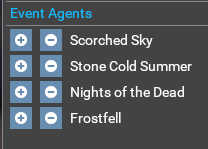
Yep, these need added in!
Here is my new section:
I was watching the action this morning and all my accounts went poof just as the Lua finished accepting rewards. The focus switched back to the Active Quests window in Overseer and the EQ sessions just went away on all 6 chars I had loaded.
Edited to add that I only thought the account had finished accepting rewards. It turned out there was still one mission to accept the reward and once the Lua did that it blew the character out again. Could this have something to do with the mq2rewards plugin?
Edited to add that I ran 4 more accounts but took all the rewards manually, then started the Lua and had no problems with them.
Also edited to add that I manually added the following 6 Feast of Giving special quests...
Specific Quests Section of Overseer_character.lua
Lua:["SpecificQuests"] = { [1] = "Feast For No One"; [2] = "These Walls Have Ears"; [3] = "Feast Fit For A Festival"; [4] = "Need For A Feast"; [5] = "Recruit the Avatar of Rodcet Nife"; [6] = "Feast For the Deceased"; ["index"] = 6; };
Yep, these need added in!
Here is my new section:
Code:
    ["SpecificQuests"] = {
        [1] = "Plunder the Plane of Fire";
        [2] = "Divine Intervention";
        [3] = "Deepwater Symbol Research";
        [4] = "A Devotee's Quest";
        [5] = "Groundwater Rising";
        [6] = "Season of Flame";
        [7] = "Quenching the Steel";
        [8] = "Recruit the Avatar of War";
        [9] = "Lost Alaran Metallurgy";
        [10] = "General Recruiting";
        [11] = "Lend Me Your Ears";
        [12] = "Cranium Conundrum";
        [13] = "Not Our Festival";
        [14] = "Fear Itself";
        [15] = "Bakes and Shakes";
        [16] = "Ways of the Wicked";
        [17] = "Tricks and Treats";
        [18] = "Season of Dread";
        [19] = "Return of the Music";
        [20] = "A Wonderful Awful Idea";
        [21] = "Silent Night";
        [22] = "Avarice Never Ends";
        [23] = "Snug in Their Beds";
        [24] = "A True Friend";
        [25] = "Feast For No One";
        [26] = "These Walls Have Ears";
        [27] = "Feast Fit For A Festival";
        [28] = "Need For A Feast";
        [29] = "Recruit the Avatar of Rodcet Nife";
        [30] = "Feast For the Deceased";
        ["index"] = 30;
};- Commits
- 6
GoldenFrog updated Overseer with a new update entry:
3.42: Feast of Giving & Some Cleanup
Read the rest of this update entry...
3.42: Feast of Giving & Some Cleanup
Read the rest of this update entry...
pepsipepsi
Well-known member
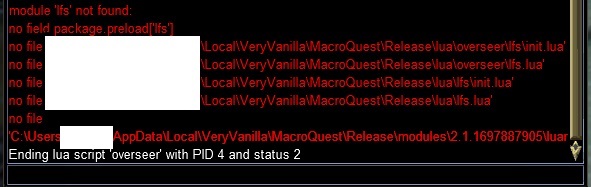
Getting a bunch of 'file not found' error message this morning with the latest release. I double checked the files existed.

wizman1
Active member
sameGetting a bunch of 'file not found' error message this morning with the latest release. I double checked the files existed.

DEADCiTiES
Well-known member
Samesies

- Commits
- 2
I think the fix for Overseer might be to change io_utils.Lua file in the overseer/utils folder from
local lfs = require("lfs")
to
local PackageMan = require("mq/PackageMan")
local lfs = PackageMan.Require("luafilesystem", "lfs")
or possibly update your Lua modules folder with 2.1.1697887905.
local lfs = require("lfs")
to
local PackageMan = require("mq/PackageMan")
local lfs = PackageMan.Require("luafilesystem", "lfs")
or possibly update your Lua modules folder with 2.1.1697887905.
Attachments
- Commits
- 6
GoldenFrog updated Overseer with a new update entry:
3.44: Temporarily Revert IO Improvement
Read the rest of this update entry...
3.44: Temporarily Revert IO Improvement
* Due to not playing nicely with recent changes, temporarily reverted IO improvement
Read the rest of this update entry...

Hmm, still not working, just did a /Lua run overseer and instant ctd.
When in doubt, you can always rename the Overseer_[CharName].ini to Overseer_[CharNameOLD].ini and then run it again and let it create a new one and reconfigure.Hmm, still not working, just did a /lua run overseer and instant ctd.
I did it a few times when one or two of 13 were not working and the others were. Told me it had something to do with my files and not the Lua.
- Commits
- 6
If you have INI files that cause CTD, I'd be very curious to see them.When in doubt, you can always rename the Overseer_[CharName].ini to Overseer_[CharNameOLD].ini and then run it again and let it create a new one and reconfigure.
I did it a few times when one or two of 13 were not working and the others were. Told me it had something to do with my files and not the lua.
Redact the char name and message them to me directly.
Nope, no ctd here except for that recent time earlier this month that was resolved already with the update you did.If you have INI files that cause CTD, I'd be very curious to see them.
Redact the char name and message them to me directly.
I was referring to a possible option to help virtuoso diagnose their ctd issue.

Rare Spawn
Well-known member
Sharing a feature idea, but admittedly niche: to help get a day 1 XP bump on expansion release, it would be nice have a full queue of rewards to be claimed, that are all high XP.
A filter to the "claim rewards" feature, to not claim the highest X number of slots of rewards with XP, and have the script automatically keep the HIGHEST XP rewards in those slots, and claim the ones that don't have better XP%. So as it runs quests, if XP is a reward option, it will not claim it (park it) until the setting for X slots has been reached, then will start claiming on the 7th XP bearing quest with the lowest %XP reward. In a perfect world, one might be able to start the new expansion with 10 rewards ready to claim, all critical successful elite 24h quests bearing 4% XP each.
Too late for this years expansion, but might be a cool trick for next year!
A filter to the "claim rewards" feature, to not claim the highest X number of slots of rewards with XP, and have the script automatically keep the HIGHEST XP rewards in those slots, and claim the ones that don't have better XP%. So as it runs quests, if XP is a reward option, it will not claim it (park it) until the setting for X slots has been reached, then will start claiming on the 7th XP bearing quest with the lowest %XP reward. In a perfect world, one might be able to start the new expansion with 10 rewards ready to claim, all critical successful elite 24h quests bearing 4% XP each.
Too late for this years expansion, but might be a cool trick for next year!
- Commits
- 6
GoldenFrog updated Overseer with a new update entry:
3.45: Track Overseer Achievements, Honor Max Level, Minor Cleanup
Read the rest of this update entry...
3.45: Track Overseer Achievements, Honor Max Level, Minor Cleanup
- Minor cleanup of some logging and logic
- Honor Characters Maximum Level
- Track Overseer Achievements
Maximum Level
Enhances option to "Claim Overseer EXP up to a certain level" do be dynamic for level, rather than specified by user.
Benefits:
On next run, if set to 120 previously, will enable "Follow Max...
- Follows LS Level Bump to 125
- F2P will cap at 115
- TLP, etc.. will cap at current max level per expansion unlocked
Read the rest of this update entry...
Amazing upgrades, thank you for putting in the time and effort. The new Achievement specific tab is super clean and easy to work with and the new exp level reward is very convenient.GoldenFrog updated Overseer with a new update entry:
3.45: Track Overseer Achievements, Honor Max Level, Minor Cleanup
Read the rest of this update entry...
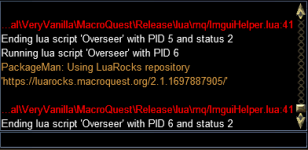
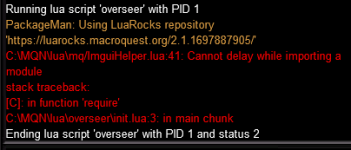
I'm getting this after latest update.
Me too!

Users who are viewing this thread
Total: 1 (members: 0, guests: 1)
Share: