• You've discovered RedGuides, an EverQuest multi-boxing and scripting community 🧙‍♀️⚙️. We want you to play several EQ characters at once, come join us and say hello! 👋

  • A TLP without truebox has thawed (Very Vanilla ready)
    Frostreaver
Resource icon

Release Overseer (1 Viewer) 04/27/2026

No permission to download
Hmm, sounds like a good place to start tbh. My knowledge of programming is minimal to say a lot and this sounds like one of the more simplistic ones to start with. I may just give this a shot, thanks!

Of course until Goldenfrog pops in and says it's been incorporated into the app before I get it done :)
Hah. This actually wasn't a thought. I am conflicted as I appreciate it fires off while we're just holding a named camp for hours.
But if I'm actively playing, running around, missions/quests - I don't have it active.

Not sure what rule you could come up with to satisfactorily determine when we'd want it running versus not. I'm game to hear suggestions.
 
I did to get two rares that I could then try to combine again for an elite I didn’t have. Once I had them all, I then did it to level up my overseer on the missions I rarely used (crafting, harvesting, etc.).

Now I just them stack up. Maybe use for experience sometime in the future.
Retire is basically the same as "Conversion" quests for the lower-tiers, just not through quests.

There is no benefit to having a dozen of any specific agent. Therefore this is an avenue to get something for it. Basic rewards or the, probably best, "Multiple Rares"
 
GoldenFrog

So let me get this straight, Retire is basically a conversion quest for Elites? So just click that Retire button on the stats tab?

Vrak
 
GoldenFrog

So let me get this straight, Retire is basically a conversion quest for Elites? So just click that Retire button on the stats tab?

Vrak
Conceptually, yes. But different in details.

tldr;
Normal Conversions (Common/Uncommon/Rare) reward you with 2 higher level agents.

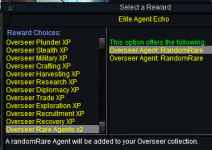
Elite Retire rewards you with your choice of either
  • 2 random rare agents
  • Overseer XP in the category of your choice
    • 1688314574191.png

The main MQ Overseer description outlines some options offered for helping with this phase. Search for 'Elite' or 'Elite Agent Echo' for details.

However at this time it isn't tied directly into the "Automatic Cycle" routine. Given how slowly elites build up, an intentional click of the button every week or four is more than enough.


But to highlight one of my favorite features -
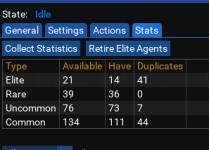
In the Lua MQ Overseer, go to [Stats] tab & click [Collect Statistics]

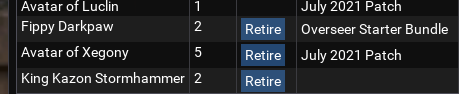
This will show full breakdown of all agents you currently have, per-level.

From here, any agent with more than 1 will present a [Retire] button
1688314349287.png
 
GoldenFrog updated Overseer with a new update entry:

3.34 Prevent Execution on Level < 84 Characters; Honor character changes

Note: The following features have been in the script for quite some time but apparently broke along at some point

  • Script will abort if launched on a character under level 85
  • Automatic running of a full cycle will be paused it:
    • Character is switched to an < 85
    • Character is switched to an 85+ but Settings > General >...

Read the rest of this update entry...
 
Ok, So I screwed up I am certain.

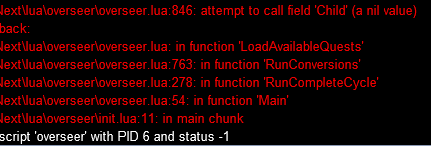
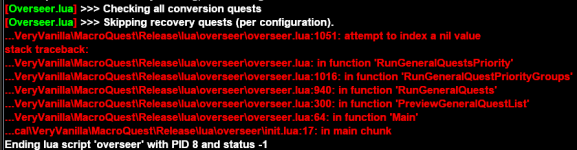
I have Overseer.mac and decided to try the LUA so I blew away Overseer.mac and all associated ini files... Now when I try to "/lua run Overseer" I receive the below screenshot, literally the whole attempt is shown.
Files are in "C:\RG\lua\overseer\" ...

View attachment 49379

I don't know what it wants, I woulda been a coder if I hated my hair and wanted to yank it out all the time. Instead I became a SysEng lol.
Hey guys, didn't get any help the first time I asked for it, so I will try again. Would someone be so kind as to help me fix what I am pretty sure was my mistake in the first place???
 
Hey guys, didn't get any help the first time I asked for it, so I will try again. Would someone be so kind as to help me fix what I am pretty sure was my mistake in the first place???

Your error line is the first in the script merely referencing MQ main Lua itself:
local mq = require('mq')

This sounds like a much more fundamental issue than overseer. As if the folder structure is off or other files are missing (such as Lua\mq\)

1. Are you able to run any other Lua script? e.g.
/lua run guildclicky
If not, I'd suggest reinstalling MQ, or at least the Lua structure

2. Double-check that Lua/overseer/ folder and /Lua/mq/ folders exist
Delete any Lua\overseer.Lua to make sure there is no confusion which is running
 
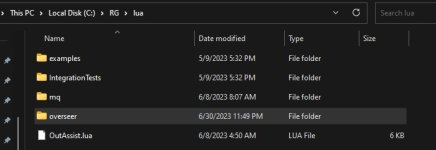
Both MQ Lua and Overseer Lua folders are in the same directory.
MQ_LUA_Folder_Structure.jpg
These are the only items in the Lua folder.

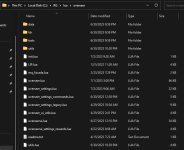
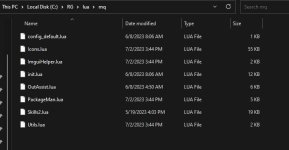
Below is a snip of the files within the Overseer "RG->Lua->Overseer" folder.
Overseer_folder_content.jpg

These are the items within the Lua\mq folder.
LUA_MQFolder_Contents.jpg

I admit that I have not manually used many LUAs but I believe I got everything right with the exception of removing overseer.mac and the INIs prior to installing overseer.Lua.

Yes, I am able to run Skills2.Lua, worked on 12 characters so far.
 
Last edited:
I admit that I have not manually used many LUAs but I believe I got everything right with the exception of removing overseer.mac and the INIs prior to installing overseer.lua.

The overseer.mac won't interfere with this.

However I'm seeing a couple files in your screen shot (folder contents) that shouldn't be there. Specifically LIP.Lua and utils.Lua. I don't recall if those used to be in that location then moved/removed - but checked the current published script ZIP and they aren't there.

I'd strongly recommend deleting your entire Overseer folder and re-downloading and re-installing. If not already done so, [Watch] the Overseer script on the overview page to more easily stay up to date.
 
Last edited:
Conceptually, yes. But different in details.

tldr;
Normal Conversions (Common/Uncommon/Rare) reward you with 2 higher level agents.

Elite Retire rewards you with your choice of either

The main MQ Overseer description outlines some options offered for helping with this phase. Search for 'Elite' or 'Elite Agent Echo' for details.

However at this time it isn't tied directly into the "Automatic Cycle" routine. Given how slowly elites build up, an intentional click of the button every week or four is more than enough.


But to highlight one of my favorite features -
In the LUA MQ Overseer, go to [Stats] tab & click [Collect Statistics]

This will show full breakdown of all agents you currently have, per-level.

From here, any agent with more than 1 will present a [Retire] button
View attachment 49394

Can you add the Retire option to Uncommon and Rare agents too?

If you are trying to pad out a /ach based on the other agents, being able to retire these agents would be helpful too (you can retire any but common agents)

Also, conversion tasks are not running for me. Just killed off the ini file for a toon and they dont run

Has 21 common duplicate agents
 
Can you add the Retire option to Uncommon and Rare agents too?

If you are trying to pad out a /ach based on the other agents, being able to retire these agents would be helpful too (you can retire any but common agents)

Also, conversion tasks are not running for me. Just killed off the ini file for a toon and they dont run

Has 21 common duplicate agents

On Conversion - can you verify the option to ignore is not checked:
1690036050142.png
or in the global or character ini ("Overseer_{char}.Lua")
["ignoreConversionQuests"] = false;

---------
As far as retiring. It generally seemed to me that running normal with Recruit quests would fill agents out in fairly short order.
But talking it out, seems this would need to be an either/or operation. Conceptually:
  • Do Agent Converts
    • Yes/No
  • Agent Convert Mechanism
    • Conversion
    • Retire

Same concept as current for conversion, but cap via retire instead. One builds up higher tiers of rarity, the other builds up lower tiers of rarity.
 
@GoldenFrog love the Lua. Two of my guys are still stuck at 3 missions even after a krono. Think it might take one more to get them to silver. Anyways I keep getting a error when I don’t have a high enough agent for a quest (quest requires a 4 explorer and I don’t have one). The Lua crashes and I have to restart. Not sure if that has anything to do with my guys not being silver. I’ll quote the error next time I’m on.

Secondly, on my newer guys I like to convert all of my common agents trying to increase my uncommon, rares, and elites as quick as possible. I feel like it used to be an option to put a 0 in the conversion field which would convert all available agents. But with a recent change that went away. I might be misremembering that ability but it would be nice to have. But I’m sure someone will complain that the Lua converted all of the commons at some point.
 
@GoldenFrog love the LUA. Two of my guys are still stuck at 3 missions even after a krono. Think it might take one more to get them to silver. Anyways I keep getting a error when I don’t have a high enough agent for a quest (quest requires a 4 explorer and I don’t have one). The lua crashes and I have to restart. Not sure if that has anything to do with my guys not being silver. I’ll quote the error next time I’m on.

Secondly, on my newer guys I like to convert all of my common agents trying to increase my uncommon, rares, and elites as quick as possible. I feel like it used to be an option to put a 0 in the conversion field which would convert all available agents. But with a recent change that went away. I might be misremembering that ability but it would be nice to have. But I’m sure someone will complain that the LUA converted all of the commons at some point.
For the last part, you are right. A change a few months ago enforced "1" as the minimum. Had never heard or considered someone wanting to convert every one of them.

There's one way you can work around this until an update allows it:
Change the Lua config file manually to 0.
Code:
       ["agentCountForConversionCommon"] = 0;
        ["agentCountForConversionUncommon"] = 4;
        ["agentCountForConversionRare"] = 4;
        ["agentCountForConversionElite"] = 3;

The UI will show 1, but as long as you don't click the + or -, things don't reset
1690057055699.png


For your first item, not sure I understand what exactly is happening with "stuck at 3 missions". Silver isn't an issue (or shouldn't be). I have one account that way.
If you can grab that crash text/screen shot - send it on over.
 
For the last part, you are right. A change a few months ago enforced "1" as the minimum. Had never heard or considered someone wanting to convert every one of them.

There's one way you can work around this until an update allows it:
Change the LUA config file manually to 0.
Code:
       ["agentCountForConversionCommon"] = 0;
        ["agentCountForConversionUncommon"] = 4;
        ["agentCountForConversionRare"] = 4;
        ["agentCountForConversionElite"] = 3;

The UI will show 1, but as long as you don't click the + or -, things don't reset
View attachment 49996


For your first item, not sure I understand what exactly is happening with "stuck at 3 missions". Silver isn't an issue (or shouldn't be). I have one account that way.
If you can grab that crash text/screen shot - send it on over.
1690073014381.png
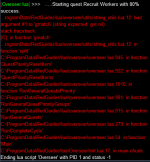
Now that i'm looking, i'm not sure what is causing the error. Thought it was because I didint' have a high enough agent but that isn't true. It usually starts recruiting and then crashes.
 
On Conversion - can you verify the option to ignore is not checked:
View attachment 49983
or in the global or character ini ("Overseer_{char}.lua")
["ignoreConversionQuests"] = false;

---------
As far as retiring. It generally seemed to me that running normal with Recruit quests would fill agents out in fairly short order.
But talking it out, seems this would need to be an either/or operation. Conceptually:
  • Do Agent Converts
    • Yes/No
  • Agent Convert Mechanism
    • Conversion
    • Retire

Same concept as current for conversion, but cap via retire instead. One builds up higher tiers of rarity, the other builds up lower tiers of rarity.

The IgnoreConversion is not set in UI or in the INI file

Thanks for the Convert / Retire option it will help.
Am chasing the last of a couple of agents, and being able to retire and then redo conversion helps
 
Now that i'm looking, i'm not sure what is causing the error. Thought it was because I didint' have a high enough agent but that isn't true. It usually starts recruiting and then crashes.

Can you share your full config file with me? Overseer_{charName}.Lua

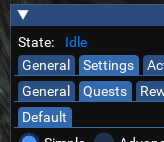
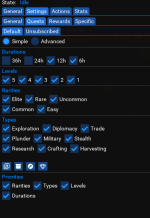
Looks like you're set up with "Priority Groups". I'm guessing you have an additional tab next to 'Default'
1690121628250.png

There's a legacy functionality in the script to set up multiple different configurations for one character to run when Gold, Silver, or even to cycle between several.

Guessing that wasn't your intention - but share the config and we'll get that fixed.
 
Can you share your full config file with me? Overseer_{charName}.lua

Looks like you're set up with "Priority Groups". I'm guessing you have an additional tab next to 'Default'
View attachment 50003

There's a legacy functionality in the script to set up multiple different configurations for one character to run when Gold, Silver, or even to cycle between several.

Guessing that wasn't your intention - but share the config and we'll get that fixed.
-- Persistent Data
local multiRefObjects = {

} -- multiRefObjects
local obj1 = {
["QuestPriority"] = {
["Durations"] = "";
["Levels"] = "5|4|3|2|1";
["Priorities"] = "Rarities|Types|Levels|Duration";
["Rarities"] = "Elite|Rare|Uncommon|Common|Easy";
["Types"] = "Trade|Exploration|Research|Diplomacy|Miltary|Stealth|Plunder|Crafting|Harvesting";
};
["General"] = {
["minimumSuccessPercent"] = 0;
["ignoreRecruitmentQuests"] = false;
["version"] = 6;
["maxLevelForClaimingExpReward"] = 120;
["claimAgentPacks"] = true;
["agentCountForConversionUncommon"] = 1;
["maxLevelPctForClaimingExpReward"] = 95;
["claimEliteAgentEchos"] = false;
["agentCountForConversionCommon"] = 1;
["claimRewards"] = true;
["agentCountForConversionRare"] = 1;
["showUi"] = true;
["ignoreConversionQuests"] = false;
["claimCollectionFragments"] = false;
["runFullCycleOnStartup"] = true;
["logLevel"] = 1;
["convertEliteAgents"] = false;
["agentCountForConversionElite"] = 99;
["autoRestartEachCycle"] = true;
["claimTetradrachmPacks"] = true;
["pauseOnCharacterChange"] = true;
};
["Rewards"] = {
[1] = "Collection Item Dispenser";
[2] = "Ring of Scale";
[3] = "Character Experience";
[4] = "Overseer Tetradrachm";
["index"] = 4;
["eliteAgentEchoReward"] = "";
};
["Display"] = {
["showDetailed"] = true;
};
["Debug"] = {
["allowTestMode"] = false;
["doNotFindAgents"] = false;
["doNotRunQuests"] = false;
};
}
return obj1
 
Can you share your full config file with me? Overseer_{charName}.lua

Looks like you're set up with "Priority Groups". I'm guessing you have an additional tab next to 'Default'
View attachment 50003

There's a legacy functionality in the script to set up multiple different configurations for one character to run when Gold, Silver, or even to cycle between several.

Guessing that wasn't your intention - but share the config and we'll get that fixed.
Any update?
 
Feature Request: more "doability" within the loops, or alike
Motivation: when logging in, first I do is one cycle of overseer. Sometimes I am a litte late for my usually evening group. When someone wnats to trade me a clicky or the usual groupleader invites me to join the group, I have no chance to react, as no mouseclick is handled, while overseer is running.
In order to be able to throw a "good evening" or do anything else while overseer is running, I think a "doablility" here and there will help to be able to do so.

Or is it just me experiencing the complete unresponsiveness of the UI while overseer is running?
 
I resubbed to RG yesterday and got everything updated. I logged my group in yesterday morning and the Lua overseer script ran, then logged off. I checked last night but the missions had not completed yet. Didn't think much of it, so I logged off. This morning I logged in and the same thing as last night. I looked and I only have one quest running out of the five available to run. 1/10 max completed. I ran the script again and it did not start additional missions. Six of my seven are showing the same thing. The one character that is working normally is a 96 berserker. The others are 120 and one 112. I started the additional four missions manually on the six characters with no errors. I attached the missions settings and agent count.

Not sure what is happening but thought I just would let y'all know. I had no issues when I was playing EQ earlier this year and using it (Feb-April ish).

Thanks for all your awesome work!
 

Attachments

  • image.png
    image.png
    41.7 KB · Views: 4
  • image2.png
    image2.png
    20.5 KB · Views: 4
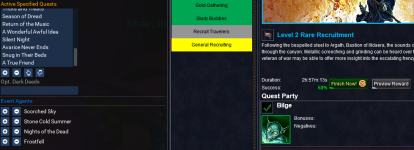
SCS quests are being skipped and need added. This level 2 recruitment is one of them.

1692973906881.png


Might also need to add 3h to the list:

1692979581839.png
 
Last edited:
SCS quests have a very low calculated success percentage. I see 60 or 61% a lot. This then causes the Lua script to skip them because it's lower than the hidden general configuration item of

["minimumSuccessPercent"] = 66;

I just used VSCode and did a global search and replace and set it to 55% for now in all my overseer config files.

Edit to add: I just saw the Recruit Avatar of War with a calculated success rate of only 51%! /sadface
 
Last edited:
Great utility, I use it multiple times daily. Recently I made a change to add the SCS quests to the priority list. I get this error on the second run within a 12 hour quest cycle, after the SCS quest is no longer in the list. Not sure if that's the only factor, just what this layman observed.

1693174384285.png
 
I'm having a strange problem. I've been running this for months successfully with "useCharacterConfigurations" = true. I recently decided that I was doing too much work making all of my files look the same so I decided to switch over to one shared configuration. I purged my config\overseer folder completely, but left just one overseer.Lua, which has my desired configuration settings, along with useCharacterConfigurations=false.

Now when I run the overseer (and I generally do this on about 12 characters at a time) for a handful of those character it will build default custom config files for them, but for others it won't. It isn't always consistent who has the custom config files created. I purge them and they keep showing back up.

A few times my overseer.ini file got wiped out and replaced with a file with the only entry being the useCharacterConfigurations=true.

So I decided to do a little bit of debugging. I added some print statements in overseer_settings.Lua, right above this line:
if Settings == nil or Settings.General == nil or Settings.General.useCharacterConfigurations == nil then
I added a print statement to indicate which of the things above were false. It turns out that Settings is nil for the characters that created their own .ini file and was fine for those that didn't. Again this is all in one "/dgae /Lua run overseer" command running at the same time on about 12 characters.

It almost feels like there is a file locking issue that is preventing one instance of Lua from opening the file when the other has it open, but that makes little to no sense.

Any ideas what may be happening? I think my only choice at this point is to switch back to per-character configurations.
 
I'm having a strange problem. I've been running this for months successfully with "useCharacterConfigurations" = true. I recently decided that I was doing too much work making all of my files look the same so I decided to switch over to one shared configuration. I purged my config\overseer folder completely, but left just one overseer.lua, which has my desired configuration settings, along with useCharacterConfigurations=false.

Now when I run the overseer (and I generally do this on about 12 characters at a time) for a handful of those character it will build default custom config files for them, but for others it won't. It isn't always consistent who has the custom config files created. I purge them and they keep showing back up.

A few times my overseer.ini file got wiped out and replaced with a file with the only entry being the useCharacterConfigurations=true.

So I decided to do a little bit of debugging. I added some print statements in overseer_settings.lua, right above this line:
if Settings == nil or Settings.General == nil or Settings.General.useCharacterConfigurations == nil then
I added a print statement to indicate which of the things above were false. It turns out that Settings is nil for the characters that created their own .ini file and was fine for those that didn't. Again this is all in one "/dgae /lua run overseer" command running at the same time on about 12 characters.

It almost feels like there is a file locking issue that is preventing one instance of Lua from opening the file when the other has it open, but that makes little to no sense.

Any ideas what may be happening? I think my only choice at this point is to switch back to per-character configurations.
I have to start every char individually if I want the non-character specific config. If I start 6+ at the same time, half or more starts with character configs.
 
I'm having a strange problem. I've been running this for months successfully with "useCharacterConfigurations" = true. I recently decided that I was doing too much work making all of my files look the same so I decided to switch over to one shared configuration. I purged my config\overseer folder completely, but left just one overseer.lua, which has my desired configuration settings, along with useCharacterConfigurations=false.

Now when I run the overseer (and I generally do this on about 12 characters at a time) for a handful of those character it will build default custom config files for them, but for others it won't. It isn't always consistent who has the custom config files created. I purge them and they keep showing back up.

A few times my overseer.ini file got wiped out and replaced with a file with the only entry being the useCharacterConfigurations=true.

So I decided to do a little bit of debugging. I added some print statements in overseer_settings.lua, right above this line:
if Settings == nil or Settings.General == nil or Settings.General.useCharacterConfigurations == nil then
I added a print statement to indicate which of the things above were false. It turns out that Settings is nil for the characters that created their own .ini file and was fine for those that didn't. Again this is all in one "/dgae /lua run overseer" command running at the same time on about 12 characters.

It almost feels like there is a file locking issue that is preventing one instance of Lua from opening the file when the other has it open, but that makes little to no sense.

Any ideas what may be happening? I think my only choice at this point is to switch back to per-character configurations.
It's worth looking at if u right click on your overseer folder an make sure that the files are not read only
 
It almost feels like there is a file locking issue that is preventing one instance of Lua from opening the file when the other has it open, but that makes little to no sense.

Any ideas what may be happening? I think my only choice at this point is to switch back to per-character configurations.

I briefly studied this a bit just now and I don't claim any expert insight. But, it would appear that Lua scripts have no mechanism to ensure the Windows filestream API opens the file in non-exclusive mode. I actually found conflicting information on whether Lua can actually specify this non-exclusive mode. This requires code at the C, C++, or DotNet level. So Windows may in fact, be locking the single configuration file for the duration of the time it takes each Lua process to open and read that file. If you staggered each Overseer process by a few milliseconds it would probably(?) be enough to clear the problem. Although it may never be completely error-free.
 
Thanks @Robban (and others). I generally just launch from my ingame.cfg, so I'm at the mercy of the auto-login script for the timing. Anyway, I guess my answer is that I'll move back to per-character files. It is a little annoying to maintain, but better than what I'm experiencing now which is about a 25% to 50% chance per character that they'll create their own personal .Lua file and revert to the default settings for that run (i.e. not claim rewards, so generally do nothing).

Sorry: In my original post I had said Overseer.ini file, however I meant Overseer.Lua file.

Thanks again for the help. Also, thanks for such an amazing script. It may sound like I'm complaining, but I really am not--just trying to get to the bottom of this issue I'm experiencing.
 
Can you share your full config file with me? Overseer_{charName}.lua

Looks like you're set up with "Priority Groups". I'm guessing you have an additional tab next to 'Default'
View attachment 50003

There's a legacy functionality in the script to set up multiple different configurations for one character to run when Gold, Silver, or even to cycle between several.

Guessing that wasn't your intention - but share the config and we'll get that fixed.
All resolved. Just had to delete the Lua config and restart. Sorry to bug you without doing the first troubleshooting step.
 
Is there a way to specific the config from the commandline? something like /Lua overseer config my_fragments_config.Lua

I want to get away from managing a config per character.
 
Is there a way to specific the config from the commandline? something like /lua overseer config my_fragments_config.lua

I want to get away from managing a config per character.


You cannot currently specify it on the command line, but there is this option.

"Overseer.Lua" is the general configuration file.
["useCharacterConfigurations"] = false;

By specifying "false" here, then all characters will use the configurations in this file rather than their own.

Copy one of your characters into here, or rebuild from scratch. But should do what you are looking for.
 
You cannot currently specify it on the command line, but there is this option.

"Overseer.lua" is the general configuration file.
["useCharacterConfigurations"] = false;

By specifying "false" here, then all characters will use the configurations in this file rather than their own.

Copy one of your characters into here, or rebuild from scratch. But should do what you are looking for.
But you need to be really careful with this (see my post in this forum thread on Sep 16th). It works fine if you launch overseer separately, however, if you launch multiples at the same time (either via like /dgga /Lua run overseer, or doing it from ingame.cfg) then it will quite often ignore your overseer.Lua, create a default one for that character and use it instead.
 
Release Overseer

Users who are viewing this thread

Back
Top
Cart