
-
 Hail, we're RedGuides. We want you to play six (yes, 6!) EverQuest characters at once. We have scripts and a friendly community to help, please join our playstyle and say hello! 👋
You are using an out of date browser. It may not display this or other websites correctly.
You should upgrade or use an alternative browser.
You should upgrade or use an alternative browser.

Release Overseer Automation (1 Viewer) 1.9
- Thread starter GoldenFrog
- Start date

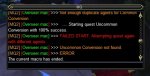
Dude. Just /loadsk default (or whatever your UI is named). That works for me every time. If my character crashes as a result, then it was already broken and needed a refresh of the EQ client anyhow. My character was having a critical problem (not clicking OK on overseer/ress/etc boxes, /advloot window not functioning, sometimes my items/AAs not clicking, etc). It either fixes your EverQuest UI problems, or forces you to reload because you were critically broken anyhow. I crash about 10% of the time when camping because the EQ UI causes severe memory leaks.So since /reload crashes my toons do I need to unload VV, then /reload, and finally reload VV? How long will that work for since you said it is a common problem? I am using the standard UI that comes with EQ, nothing fancy. CWTN MQ2 stuf, mq2autoloot, and of course this awesome macro. Nothing else that doesn't load with VV as standard.
- Commits
- 6
Yeah once in common agent set it assumes all is common, bit weird that he is at the bottom.
The "once common is set it assumes all is common" was a great performance boost to not count when we already knew. But if that's not always true, we can change that behavior.
novadude17
Member
I can't get any of my toons running this macro to do the Conversion quests. Any idea why the macro won't engage?
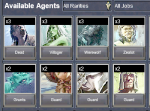
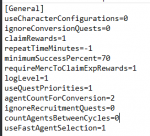
your Ini seems short of lot of parameters ... maybe an old version?
I can't find: ignoreConversionQuests=0
if you have an old version ... at the very first page at overview you can find:
*** ( If you have an older INI file , delete it and re-run mac to build new INI File ) ***
this is one of mine:
ini
I can't find: ignoreConversionQuests=0
if you have an old version ... at the very first page at overview you can find:
*** ( If you have an older INI file , delete it and re-run mac to build new INI File ) ***
this is one of mine:
ini
INI:
[General]
claimRewards=0
repeatTimeMinutes=-1
minimumSuccessPercent=0
requireMercToClaimExpRewards=0
logLevel=2
useQuestPriorities=1
agentCountForConversion=2
ignoreConversionQuests=0
ignoreRecruitmentQuests=0
countAgentsBetweenCycles=0
useFastAgentSelection=1
[QuestPriority]
Priorities=Levels|Durations|Rarities|Types
Durations=6h|12h
Rarities=Elite|Rare|Uncommon|Common
Types=Any
Levels=5|4|3|2|1
[QuestPriority_Unsubscribed]
Priorities=Levels|Durations|Rarities|Types
Durations=12h|6h
Rarities=Elite|Rare|Uncommon|Common
Types=Any
Levels=5|4|3|2|1
[Rewards]
index=0
1=Overseer Tetradrachm
2=Character Experience
3=Mercenary Experiencenovadude17
Member
I only screenshotted the relevant section and the 2nd line of mine is ignoreConversionQuests=0
I figured out what was wrong. When I had 5 active quests and restarted the macro after toggling ignoreConversionQuests from 1 to 0, it wouldn't pickup on there being agents ready to convert. I came home though and the agents were converted, so it must have picked up on it after one of the quests completed.
I figured out what was wrong. When I had 5 active quests and restarted the macro after toggling ignoreConversionQuests from 1 to 0, it wouldn't pickup on there being agents ready to convert. I came home though and the agents were converted, so it must have picked up on it after one of the quests completed.

- Commits
- 1
This is a great macro, one minor thought: exit before launching overseer if the toon is below level 85.
I know it will die if overseer is unable to launch, that’s why I say minor thought.
I know it will die if overseer is unable to launch, that’s why I say minor thought.
- Commits
- 6
I have that problem when the window shows I have more duplicate agents than I actually do when looking in the list. I've been doing conversions manually on the accounts I find with this issue.
I haven't seen these issues myself so difficult to work with the macro.
You are saying that EQ Overseer reports incorrect listing of agents in some cases - which causes the macro headaches.
However manually you can resolve it by using smart Human thinking?
novadude17
Member
I noted several weeks/months? back that if you have over a certain number of agents, it was causing the macro to crash. That crashing seems to have been resolved when they last changed the Overseer system, but maybe the conversion issue you're having is because you have some number of agents that the system can't handle. Try getting your agent total count down to ~250 and seeing if the auto-conversion can take it from there.I have that problem when the window shows I have more duplicate agents than I actually do when looking in the list. I've been doing conversions manually on the accounts I find with this issue.
I noted several weeks/months? back that if you have over a certain number of agents, it was causing the macro to crash. That crashing seems to have been resolved when they last changed the Overseer system, but maybe the conversion issue you're having is because you have some number of agents that the system can't handle. Try getting your agent total count down to ~250 and seeing if the auto-conversion can take it from there.
My agent count isn't even close to that high. I physically see the macro break on conversions and when I go into the conversion and click on the tile it shows me 4 duplicates of the same agent but when I go look at the list I have 2. That's what is breaking conversion not the total number of agents.
I have 162 agents and it still crashes on conversions. Try again.I noted several weeks/months? back that if you have over a certain number of agents, it was causing the macro to crash. That crashing seems to have been resolved when they last changed the Overseer system, but maybe the conversion issue you're having is because you have some number of agents that the system can't handle. Try getting your agent total count down to ~250 and seeing if the auto-conversion can take it from there.

- Commits
- 2
- Commits
- 2
- Commits
- 6
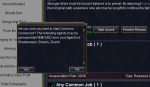
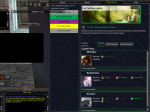
I just started getting this on one toon. This window pops up and then goes away and macro ends.
This is the classic "Problem exists in core MQ2" issue. That basic confirmation dialog sometimes gets in a bad state (not really accurate but close enough). When this happens, only way to fix is log out/in or restart EQ.
Wish there was more to say but unfortunately nothing at the macro level we can do to address.
- Commits
- 6
Got this on another toon, keeps going through the rotation to claim, but gives an error in the chat window.
EQ itself only allows 5 active at a time and 10 completed in a given 10 day period. However this limit doesn't apply to Conversions.
The macro doesn't abort when this situation exists; but does the full cycle, checking if conversions exist.
Sounds like what you saw is what I would expect. If it's not, let me know more clearly what you think would be different.


Is there a way to have this macro stop automatically breaking out my mercs?
Yes, in your ini. Change the following line from 1 to 0
requireMercToClaimExpRewards=0I think I misunderstood the question.
Do you have automatically claim rewards on and are selecting the option for characters experience?
Do you have automatically claim rewards on and are selecting the option for characters experience?

eqmzr06
Well-known member
Yes, in your ini. Change the following line from 1 to 0
requireMercToClaimExpRewards=0
Heyo. I'm running into this issue, and I have "requireMerc..." set to "0" and am automatically claiming exp for characters set to 1, tetra set to 2, and deleted merc exp, so there is no 3.
However, the mercs keep breaking out automatically.
Here is a copy of my INI, if you happen to spot anything:
INI:
[General]
claimRewards=1
repeatTimeMinutes=-1
minimumSuccessPercent=0
requireMercToClaimExpRewards=0
logLevel=2
useQuestPriorities=1
agentCountForConversion=2
ignoreConversionQuests=0
ignoreRecruitmentQuests=0
countAgentsBetweenCycles=0
useFastAgentSelection=1
[QuestPriority]
Priorities=Levels|Durations|Rarities|Types
Durations=6h|12h
Rarities=Elite|Rare|Uncommon|Common
Types=Any
Levels=5|4|3|2|1
[QuestPriority_Unsubscribed]
Priorities=Levels|Durations|Rarities|Types
Durations=12h|6h
Rarities=Elite|Rare|Uncommon|Common
Types=Any
Levels=5|4|3|2|1
[Rewards]
index=0
1=Character Experience
2=Overseer Tetradrachm- Commits
- 6
Heyo. I'm running into this issue, and I have "requireMerc..." set to "0" and am automatically claiming exp for characters set to 1, tetra set to 2, and deleted merc exp, so there is no 3.
INI:[General] [Rewards] index=0 1=Character Experience 2=Overseer Tetradrachm
tl;dr: Reviewing the logic, there's not a flag to stop unsuspending mercenaries.
Quick History #1: This may have changed but originally, mercenaries received experience from "Mercenary Experience" whether suspended or not.
They did not receive benefit of "Character Experience" unless unsuspended. And "Character Experience" gave more rewards than Mercenary.
So existing logic is:
If claiming "Character Experience", pop mercenary if we can (if room, if not dead, etc...)
If we cannot, *and* requireMercToClaimExpRewards flag is set, then don't claim "Character Experience" reward until we can.
What you are looking for (understandably) is a different flag called: "Leave the Bloody Merc Alone!!! Please!!!!" We can add this.
Until we can get that in, if you just don't want the merc to ever pop, you can add a line after 'Sub PopMercIfApplicable' around line 1215.
INI:
Sub PopMercIfApplicable
    /return FALSE
(I know self-editing sucks but it's a quick option 'til something official in place)
whatsaname
Active member
I havent been able to get toons to select Character experience, so i made the following change
This worked, for collecting Character Experience, however it popped mercs each time too, even with
Any thoughts? Suggestions?
INI:
[Rewards]
index=0
1=Character Experience
2=Overseer Tetradachm
3=Mercenary Experience
This worked, for collecting Character Experience, however it popped mercs each time too, even with
INI:
requireMercToClaimExpRewards=0Any thoughts? Suggestions?

Any thoughts? Suggestions?INI:[Rewards] index=0 1=Character Experience 2=Overseer Tetradachm 3=Mercenary Experience
Shouldn't
index=3???whatsaname
Active member
Shouldn'tindex=3???
Dunno - it defaults to index=0 and i've not changed it
That is why it is not choosing char xp, set it to 1 and it shouldDunno - it defaults to index=0 and i've not changed it
Index is used to indicate how many reward options there are that you would like to check. Default on install is to not automatically choose anything
Last edited:
eqmzr06
Well-known member
I havent been able to get toons to select Character experience, so i made the following change
INI:[Rewards] index=0 1=Character Experience 2=Overseer Tetradachm 3=Mercenary Experience
This worked, for collecting Character Experience, however it popped mercs each time too, even with
INI:requireMercToClaimExpRewards=0
Any thoughts? Suggestions?
I don't mind editing code, as I am a programmer, too. I just hadn't had the time to dive into the macro line by line, so providing me with the line # was much appreciated.
- Commits
- 1
Possible issue. Sorry don’t have a lot of details so this post is probably to remind me to pay more attention.
Today I saw some errors regarding unable to access log file. My guess it was because I ran the macro on several toons at once, so file locking issues. Maybe the log files can append the characters name to ifs file name.
/shrug
Today I saw some errors regarding unable to access log file. My guess it was because I ran the macro on several toons at once, so file locking issues. Maybe the log files can append the characters name to ifs file name.
/shrug
- Commits
- 6
Possible issue. Sorry don’t have a lot of details so this post is probably to remind me to pay more attention.
Today I saw some errors regarding unable to access log file. My guess it was because I ran the macro on several toons at once, so file locking issues. Maybe the log files can append the characters name to ifs file name.
You are correct. I recall a reason initially this wasn't done but no reason not to now.
In the meantime you can change the configuration to disable logging if you care, however this impacts both Console window and log file at present:
INI:
[General]
logLevel=0I have a suggestion if I may. And I apologise if this has been brought up previous but, I’ve noticed that when I manually do quests that (with a well developed Collection of agents) the first choice on the agents list when choosing each agent almost always covers all or most of the requirements.
My suggestion is: add a fast mode that follows all the previous checks for level, quest type etc, but instead of going through the process of scrolling through all available agents, just chooses the first one. This will streamline the use of overseer.
I don’t know what would be involved code wise for this, but it would be brilliant if it’s doable.
My suggestion is: add a fast mode that follows all the previous checks for level, quest type etc, but instead of going through the process of scrolling through all available agents, just chooses the first one. This will streamline the use of overseer.
I don’t know what would be involved code wise for this, but it would be brilliant if it’s doable.

it does?I have a suggestion if I may. And I apologise if this has been brought up previous but, I’ve noticed that when I manually do quests that (with a well developed Collection of agents) the first choice on the agents list when choosing each agent almost always covers all or most of the requirements.
My suggestion is: add a fast mode that follows all the previous checks for level, quest type etc, but instead of going through the process of scrolling through all available agents, just chooses the first one. This will streamline the use of overseer.
I don’t know what would be involved code wise for this, but it would be brilliant if it’s doable.
it does?
youre gonna have to clarify your question. im not sure what youre asking
sorry for thatyoure gonna have to clarify your question. im not sure what youre asking
Doesnt it do what you asked already?. Choosing the first one?
useFastAgentSelection=1
or am I missunderstanding your suggestion?
- Commits
- 6
sorry for that
Doesnt it do what you asked already?. Choosing the first one?
useFastAgentSelection=1
or am I missunderstanding your suggestion?
If I'm understanding your question as well, Sungazer, it does do this. As Robban hinted, 'useFastAgentSelection' was added several weeks ago when this Overseer change went live.
sorry for that
Doesnt it do what you asked already?. Choosing the first one?
useFastAgentSelection=1
or am I missunderstanding your suggestion?
Ahh brilliant, I wasent aware of this. Thank you


This is excellent! Any chance this can be made into a plugin that just does these automatically every X number of hours? I would definitely donate to that cause
novadude17
Member
Once a character has maxed out Overseer XP in all the quest Categories, and has one of every Agent, is there any reason to continue doing Recruitment quests ?
Maybe a buffer of Agents for future conversion use in case they add more higher level Agents?
Maybe a buffer of Agents for future conversion use in case they add more higher level Agents?
Last edited:
Users who are viewing this thread
Total: 2 (members: 0, guests: 2)
Share: