My shaman doesnt have this issue... only my wizard :/ My shaman has an issue with having 3 rewards I cant claim cause they give AA and I don't need anymore AA until the next expansion.You're stumbling across all the things I can't do anything aboutThere's an issue in MQ2 where a confirmation box isn't "the one" that we can see. As with the previous answer this is going to take a plug-in or core change to address and work past.
At this time, the only thing to do is camp that character out/in.
(Sorry to keep giving blechy answers)

-
 Hail, we're RedGuides. We want you to play six (yes, 6!) EverQuest characters at once. We have scripts and a friendly community to help, please join our playstyle and say hello! 👋
You are using an out of date browser. It may not display this or other websites correctly.
You should upgrade or use an alternative browser.
You should upgrade or use an alternative browser.

Release Overseer Automation (1 Viewer) 1.9
- Thread starter GoldenFrog
- Start date
Right now, it's hard-coded to always run Conversions first. Then Recruitments. You don't have to add those to the INI. Can't even turn that off in config - nobody's asked to.
So not sure I'm 100% clear on what you're asking about. The snippet below - from your post above, will run them in the following rough order:
* Exploration - Any rarity/Level/duration
* Diplomacy - Any rarity/level/duration
* Trade - any rarity level duration
* Military - any rarity/level/duration
* Stealth - any rarity/level/duration
What more specifically would you like it to order by?
Also - if you run /mac overseer generalListFast ---- if anything is not the order you want, you can use that to help here (screen shot) pointing out a bit more specifically..
[QuestPriority]
Priorities=Types|Rarities|Levels|Durations
Durations=24h|12h|6h
Rarities=Elite|Rare|Uncommon|Common
Types=Conversion|Recruitment|Exploration|Diplomacy|Trade|Military|Stealth
Levels=5|4|3|2|1
I am asking to sort group 1, which is Conversion|Recruitment|Exploration|Diplomacy|Trade then move to |Military|Stealth only if the first group is completely empty. Currently I can only sort by level or rarity or type and it completely misses high level of stuff in the middle or bottom of the list cause I gotta work through all the level 1-5 exploration first. I'd rather pick a level 5 diplomacy or trade than a level 1 exploration, but i dont want military or stealth unless every single other one has been exhausted. They are the absolute last option until I am done with collectibles.
The only way to do this would be to let me make certain types or to make it just pick a random task if there's no desired overseer quests left. Or to make sorting groups. Which may be possible if you just switch your values for sort list after you work through the first one and run the code all over again with the new parameters.
Last edited:

Should do the jobCode:[General] claimRewards=1 repeatTimeMinutes=0 minimumSuccessPercent=0 requireMercToClaimExpRewards=1 logLevel=0 useQuestPriorities=1 agentCountForConversion=2 [QuestPriority] Priorities=Types|Durations|Levels|Rarities Durations=12h|24h|6h Rarities=Elite|Rare|Uncommon|Common Types=Exploration|Diplomacy|Trade|Crafting|Harvesting|Military|Stealth|Plunder Levels=5|4|3|2|1 [QuestPriority_Unsubscribed] Priorities=Types|Durations|Levels|Rarities Durations=12h|24h|6h Rarities=Elite|Rare|Uncommon|Common Types=Exploration|Diplomacy|Trade|Crafting|Harvesting|Military|Stealth|Plunder Levels=5|4|3|2|1 [Rewards] index=2 1=Collection Item Dispenser 2=Character Experience
Thanks Jande this seems to be working a treat, much appreciated
- Commits
- 6
I am asking to sort group 1, which is Conversion|Recruitment|Exploration|Diplomacy|Trade then move to |Military|Stealth only if the first group is completely empty. Currently I can only sort by level or rarity or type and it completely misses high level of stuff in the middle or bottom of the list cause I gotta work through all the level 1-5 exploration first. I'd rather pick a level 5 diplomacy or trade than a level 1 exploration, but i dont want military or stealth unless every single other one has been exhausted. They are the absolute last option until I am done with collectibles.
The only way to do this would be to let me make certain types or to make it just pick a random task if there's no desired overseer quests left. Or to make sorting groups. Which may be possible if you just switch your values for sort list after you work through the first one and run the code all over again with the new parameters.
I understand. And yes you calling it "group 1" makes sense. Let me see if there's an easy way to slip something like that in there.
As he said previously jumping to a different reward window pop up is currently outside of the macro's control without something in the core code of mq2 to deal better with the rewards window. My advice waste the aa as they come quick every expansion anyway.
Also @GoldenFrog thank you for this macro it has made me actually do overseer
Also @GoldenFrog thank you for this macro it has made me actually do overseer
- Commits
- 6
GoldenFrog updated Overseer Automation with a new update entry:
1.23 - Priority Groups
Read the rest of this update entry...
1.23 - Priority Groups
This will be documented on front page more fully when finalized.
- Added ability to specify Priority "Groups".
Optional configuration below. If not included or if blank, macro runs as it always has:
[General]
useQuestPriorityGroups=Group1|Group2|Group3
This will run
1. [QuestPriority_Group1]
2. [QuestPriority_Group2]
3. [QuestPriority_Group3]
(Or [QuestPriority_Unsubscribed_GroupX] if not Gold).
To test, run "/mac overseer generalListFast" to see how this results in...
Read the rest of this update entry...
- Commits
- 6
I am asking to sort group 1
See if the current 1.23 update works as you were looking for. Seems to be processing for my tests.
Where you do create the priority groups?See if the current 1.23 update works as you were looking for. Seems to be processing for my tests.
- Commits
- 6
Where you do create the priority groups?
INI file for the character(s) desired.
The example below will do all Exploration, Diplomacy, and Trade first following the rules outlined in _Group1.
Then it'll go back and do Military, Stealth for all the rules outlined in _Group2.
INI:
[General]
useQuestPriorityGroups=Group1|Group2

[QuestPriority_Group1]
Priorities=Types|Levels|Durations|Rarities
Durations=24h|12h|6h
Rarities=Elite|Rare|Uncommon|Common
Types=Exploration|Diplomacy|Trade
Levels=5|4|3|2|1

[QuestPriority_Group2]
Priorities=Types|Levels|Durations|Rarities
Durations=24h|12h|6h
Rarities=Elite|Rare|Uncommon|Common
Types=Military|Stealth
Levels=5|4|3|2|1INI file for the character(s) desired.
The example below will do all Exploration, Diplomacy, and Trade first following the rules outlined in _Group1.
Then it'll go back and do Military, Stealth for all the rules outlined in _Group2.
INI:[General] useQuestPriorityGroups=Group1|Group2 [QuestPriority_Group1] Priorities=Types|Levels|Durations|Rarities Durations=24h|12h|6h Rarities=Elite|Rare|Uncommon|Common Types=Exploration|Diplomacy|Trade Levels=5|4|3|2|1 [QuestPriority_Group2] Priorities=Types|Levels|Durations|Rarities Durations=24h|12h|6h Rarities=Elite|Rare|Uncommon|Common Types=Military|Stealth Levels=5|4|3|2|1
is this a complete INI file or just stuff I need to add to my current one?
is this a complete INI file or just stuff I need to add to my current one?
INI:
[General]
claimRewards=1
repeatTimeMinutes=-1
minimumSuccessPercent=60
requireMercToClaimExpRewards=1
logLevel=2
useQuestPriorities=1
agentCountForConversion=2
useQuestPriorityGroups=Group1|Group2

[QuestPriority_Group1]
Priorities=Levels|Durations|Rarities|Types
Durations=24h|12h|6h
Rarities=Elite|Rare|Uncommon|Common
Types=Recruitment|Exploration|Diplomacy|Trade
Levels=5|4|3|2|1

[QuestPriority_Group2]
Priorities=Levels|Durations|Rarities|Types
Durations=24h|12h|6h
Rarities=Elite|Rare|Uncommon|Common
Types=Military|Stealth
Levels=5|4|3|2|1

[QuestPriority_Unsubscribed]
Priorities=Levels|Durations|Rarities|Types
Durations=24h|12h|6h
Rarities=Elite|Rare|Uncommon|Common
Types=Conversion|Recruitment|Exploration|Diplomacy|Trade|Military|Stealth
Levels=5|4|3|2|1

[Rewards]
index=3
1=Collection Item Dispenser
2=Mercenary Experience
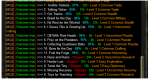
3=Overseer Tetradrachmso, running general list with the settings above, I got these results, which seem weird. Like, I get the skips, but why are they even considering plunder and putting it so high on the list along with stealth when there's exploration and diplomacy ones to do?
Attachments
- Commits
- 6
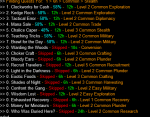
Running your exact INI - I get what I'd expect, which is different than your results. Only exploration, diplomacy, trade, stealth, and military considered.so, running general list with the settings above, I got these results, which seem weird. Like, I get the skips, but why are they even considering plunder and putting it so high on the list along with stealth when there's exploration and diplomacy ones to do?
Is the account you are running on subscribed (Gold) or not?
Trying to run with the option 'runTutorial' fails on 'The First Conversion' with the console showing: 'ignoring excluded agent Lorist' 'ignoring excluded agent Bandit' 'ignoring excluded agent Lorist' 'ignoring excluded agent Bandit' 'Not enough appropriate agents to run quest. Shouldn't happen in tutorial.'
- Commits
- 6
Trying to run with the option 'runTutorial' fails on 'The First Conversion' with the console showing: 'ignoring excluded agent Lorist' 'ignoring excluded agent Bandit' 'ignoring excluded agent Lorist' 'ignoring excluded agent Bandit' 'Not enough appropriate agents to run quest. Shouldn't happen in tutorial.'
This worked on all my test/heroic chars when released. Let me figure out how to "reset" an account to test again and see what might be up.
This worked on all my test/heroic chars when released. Let me figure out how to "reset" an account to test again and see what might be up.
If I had to guess I would probably think it has something to do with the minimum number of agents before a conversation quest can be run. Maybe override that if the runTutorial option is specified? I was going to try that later (if runTutorial = varset minimum to 1).
- Commits
- 6
If I had to guess I would probably think it has something to do with the minimum number of agents before a conversation quest can be run. Maybe override that if the runTutorial option is specified? I was going to try that later (if runTutorial = varset minimum to 1).
Actually (and I'm busy with work right now so am not able to give this much time yet) - the "Ignoring excluded" has to do with a relatively new EQ bug where agents can't be added to a quest.
I actually am betting you are seeing yellow EQ text with the fragment: "...has failed to start. Please verify your...".
Our macro keys off of that - as it means "EQ has something jacked up" so let's try again with different agents.
This would mean you can't MANUALLY start the quest either (if that's the case).
EDIT: I haven't figured out how to get into "Need Tutorial" mode again. Tried test copies, etc. So unless I get another heroic, I can't test this further.
Last edited:
Yes, I am a paying member.Running your exact INI - I get what I'd expect, which is different than your results. Only exploration, diplomacy, trade, stealth, and military considered.
Is the account you are running on subscribed (Gold) or not?
View attachment 22955
This would mean you can't MANUALLY start the quest either (if that's the case).
EDIT: I haven't figured out how to get into "Need Tutorial" mode again. Tried test copies, etc. So unless I get another heroic, I can't test this further.
It has to be something else then as I was able to go ahead and add both lorist and bandit and start/complete the quest by hand after it failed. I did that and then followed up by running it again without runTutorial and it went ahead and worked normally after that.
- Commits
- 6
Okay, thanks Multi. I'll try to see if there's a way to reset. That error is supposed to only happen when EQ gives the "Can't start" message. I'll eye-ball any possible other bug.It has to be something else then as I was able to go ahead and add both lorist and bandit and start/complete the quest by hand after it failed. I did that and then followed up by running it again without runTutorial and it went ahead and worked normally after that.

This Overseer......
Couldnt start conversions on a char today. Was skipping agents like crazy. Relogged to char select, suddenly 2 quests in active quests. Finnished them. Still couldnt do conversions. Quit EQ and started again, another quest in active quests. Finnished it and suddenly I could do my conversions.
Must be a pain trying to get find bugs and tuning a mac when the program(EQ/Overseer) itself isnt even close to 100%
Great job anyway @GoldenFrog
Couldnt start conversions on a char today. Was skipping agents like crazy. Relogged to char select, suddenly 2 quests in active quests. Finnished them. Still couldnt do conversions. Quit EQ and started again, another quest in active quests. Finnished it and suddenly I could do my conversions.
Must be a pain trying to get find bugs and tuning a mac when the program(EQ/Overseer) itself isnt even close to 100%
Great job anyway @GoldenFrog

Must be a pain trying to get find bugs and tuning a mac when the program(EQ/Overseer) itself isnt even close to 100%
Great job anyway @GoldenFrog
Exactly so! I have so many odd things happen with Overseer. Like you, I find that if I log out completely and end EQ, then things work again when I log back in. It seems to matter a lot how busy the servers are when you run this too. Overseer always seems to glitch for me when the servers have a lot of people on them.
I'm just sitting here watching Overseer.mac run on my accounts. I'm sort of thinking out loud here so please don't beat me up if I'm way out in left field. For example I do not have any idea what data is actually accessible in MQ2 when using the overseer window.
With that in mind I was musing whether it would it be possible to build a table in memory of each agent and their bonus categories? Then rather than iterate on-line (contending with the communication lag), iterate the internal table specifically among the agents that possess the desired traits. Add those specific agents to an internal array, then iterate just that array in the on-line mode to check for the highest completion percentage.
I was thinking that would make things go a lot quicker for the people that have many agents. No reply necessary as you're likely to just tell me I'm an idiot!
With that in mind I was musing whether it would it be possible to build a table in memory of each agent and their bonus categories? Then rather than iterate on-line (contending with the communication lag), iterate the internal table specifically among the agents that possess the desired traits. Add those specific agents to an internal array, then iterate just that array in the on-line mode to check for the highest completion percentage.
I was thinking that would make things go a lot quicker for the people that have many agents. No reply necessary as you're likely to just tell me I'm an idiot!
- Commits
- 6
I'm just sitting here watching Overseer.mac run on my accounts. I'm sort of thinking out loud here so please don't beat me up if I'm way out in left field. For example I do not have any idea what data is actually accessible in MQ2 when using the overseer window.
With that in mind I was musing whether it would it be possible to build a table in memory of each agent and their bonus categories? Then rather than iterate on-line (contending with the communication lag), iterate the internal table specifically among the agents that possess the desired traits. Add those specific agents to an internal array, then iterate just that array in the on-line mode to check for the highest completion percentage.
I was thinking that would make things go a lot quicker for the people that have many agents. No reply necessary as you're likely to just tell me I'm an idiot!
No idiot. Never bad to ask. And the questions are rarely simple.
The basic point is: "Macro's generally have access to the same stuff you do via the UI. What you can see/click/access." Plugins can go a level deeper.
So in this case the macro doesn't know what quests there are 'til we open window and look. Don't know what agents are available 'til we click and "see".
The macro could definitely have a large table of every agent and it's statistics. We'd click, "see" what agents were available, but can internally calculate which agent(s) would be the highest success without manually clicking each to see.
#1 IF we had the right calculation of what stats/levels give what success boosts. *I* don't know that. Maybe someone does.
#2 (and maybe more important) the macro wouldn't be in sync with EQ code. So any changes to agent stats or success calculations - would be wrong in the macro 'til we identified it and reacted.
It's far from a stupid suggestion to throw out there - but I don't think it's practical. And even if we had a plug-in with insights into the core memory, it really wouldn't help here I don't think.
You're right that the time to click/test each agent is BY far the longest part. When the script was first written, I was only level 1 on each. Quick. Now level 5 on each it takes FOREVER. Might be worth exploring options.
No idiot. Never bad to ask. And the questions are rarely simple.
The basic point is: "Macro's generally have access to the same stuff you do via the UI. What you can see/click/access." Plugins can go a level deeper.
So in this case the macro doesn't know what quests there are 'til we open window and look. Don't know what agents are available 'til we click and "see".
The macro could definitely have a large table of every agent and it's statistics. We'd click, "see" what agents were available, but can internally calculate which agent(s) would be the highest success without manually clicking each to see.
#1 IF we had the right calculation of what stats/levels give what success boosts. *I* don't know that. Maybe someone does.
#2 (and maybe more important) the macro wouldn't be in sync with EQ code. So any changes to agent stats or success calculations - would be wrong in the macro 'til we identified it and reacted.
It's far from a stupid suggestion to throw out there - but I don't think it's practical. And even if we had a plug-in with insights into the core memory, it really wouldn't help here I don't think.
You're right that the time to click/test each agent is BY far the longest part. When the script was first written, I was only level 1 on each. Quick. Now level 5 on each it takes FOREVER. Might be worth exploring options.
In terms of speeding things up, is there a way of knowing when the agent has all the mission bonus characteristics? If so you could cut a bit shorter by selecting the first agent it gets to that has all the correct bonuses.
@GoldenFrog I am wondering if you have looked at using
MQ2Yes for pressing the quest acceptance button? It may make quest acceptance more stable.

 www.redguides.com
You may need to add the button for your dialog to the acceptance.
I just ran a quest manually and tried /yes, and it worked FYI.
I have not tried your newest patch, so I am not sure if it works better since I last updated.
MQ2Yes for pressing the quest acceptance button? It may make quest acceptance more stable.
Unmaintained - MQ2Yes
This has been replaced by an alias, which you can see here: https://www.redguides.com/docs/projects/macroquest/reference/commands/yes/ Have recently updated this plugin as a project to learn to compile and such, and now its working as...
www.redguides.com
You may need to add the button for your dialog to the acceptance.
I just ran a quest manually and tried /yes, and it worked FYI.
I have not tried your newest patch, so I am not sure if it works better since I last updated.
- Commits
- 6
In terms of speeding things up, is there a way of knowing when the agent has all the mission bonus characteristics? If so you could cut a bit shorter by selecting the first agent it gets to that has all the correct bonuses.
It does. Or I'm assuming it can. ....might actually be a few hiccups on the macro level. Might be easier with or require a plug-in helper but let's not side-track on that yet.
Talk out the logic us humans would use here. We "see" the bonuses on the agent in question:
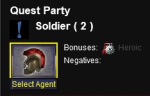


For the first, the first character that has "Heroic" is the one we go with.
For the second, the first that has "Elemental" but not a negative.
- Remember any with bonus and negatives and fall back on them?
For the third, the first that has BOTH bonuses.
- Remember the first that had ONE bonus and fall back to it.
In all cases, if one isn't found - be tracking Success % and use the highest.
That would work. Assuming we can "see" the bonus. Will try to see what's possible.
EDIT: Initial tests are mixed.
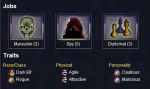
122 ~ 1.1.1.1.2.1.1.17.2.7.1.2.2.2 ~ TRUE ~ TRUE ~ FALSE ~ Cautious ~ OW_ALL_MinionAttributeLabels ~ Label
125 ~ 1.1.1.1.2.1.1.17.2.7.1.2.3.2 ~ TRUE ~ TRUE ~ FALSE ~ Shaman ~ OW_ALL_MinionAttributeLabels ~ Label

/echo ${Window[OverseerWnd].Child[OW_ALL_MinionInfoArea].FirstChild.Next.Child[OW_ALL_MinionsBonusAttributes].FirstChild.Next.Child[OW_ALL_MinionAttributeLabels].Text}
/echo ${Window[OverseerWnd].Child[OW_ALL_MinionInfoArea].FirstChild.Next.Child[OW_ALL_MinionsBonusAttributes].FirstChild.Next.Next.Child[OW_ALL_MinionAttributeLabels].Text}
This outputs "Cautious" and "Shaman".
However we can't tell the difference between Active, Enabled, Green, Grey, anything.
So! We can build the list of the bonuses and negatives. But not know when a certain agent has applied to it.
Where to go from here:
- Plugin support to help. Definitely possible.
- Hard-coded list of agents/bonuses. Can be done but requires keeping in sync with EQ
- Dynamically updated list of agents/bonuses. Can walk the [Agents] tab periodically, on-demand, or on each change --- and extract the list of agents and their abilities
My day is nearing to a close - but given there's not much more to this silly "game" - might as well look deeper into this.
Last edited:
- Commits
- 6
@GoldenFrog I am wondering if you have looked at using
MQ2Yes for pressing the quest acceptance button? It may make quest acceptance more stable.
Unmaintained - MQ2Yes
This has been replaced by an alias, which you can see here: https://www.redguides.com/docs/projects/macroquest/reference/commands/yes/ Have recently updated this plugin as a project to learn to compile and such, and now its working as...
I wasn't aware of that one. Let me ping the devs and see if the current MQ2 problem is still one for MQ2Yes. I bet it is.
The problem is there's actually two confirmation dialog boxes in memory - but MQ2 only has visibility to the first.
I'll test with it but unfortunately the error situation isn't predictable so would really need to see it happen - then try MQ2Yes on it.
Thanks, Freeferli - I'd love any option to resolve this. Will look into it.

"My shaman doesnt have this issue... only my wizard :/ My shaman has an issue with having 3 rewards I cant claim cause they give AA and I don't need anymore AA until the next expansion. "
I would buy fireworks and shoot them or some sort of glyph to clear the reward window.
just my thoughts
Edit: i dont know how Quote works
I would buy fireworks and shoot them or some sort of glyph to clear the reward window.
just my thoughts
Edit: i dont know how Quote works

So the mercenary xp with character xp is not intended. Not being fixed in July patch
Overseer Quests not giving Mercenary experience | EverQuest Forums
I've been running Overseer quests that offer a character experience reward along with a mercenary reward. The character experience reward is being granted...
forums.daybreakgames.com
- Commits
- 6
Well, that's good and bad news. Means we don't have to bother unpacking a merc for "Character Exp" rewards. Simplify everything there.
But here's to hoping they bump the Merc AA percent 'cuz it's lower than I'd like.
But here's to hoping they bump the Merc AA percent 'cuz it's lower than I'd like.
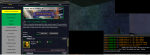
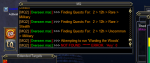
so, Im having a weird issue where one of my three characters is prompting me to accept overseer quests, but the other two characters are not. If I'm not sitting next to my computer when it runs it crashes the macro. Also, same character it tries to run a 6th overseer mission and aborts the entire macro.
My other character will often just not rerun the macro, generally there's 12 hours between runs, I am not sure if other macros tend to influence the running of concurrent macros or if its just a hazard of the system.
My other character will often just not rerun the macro, generally there's 12 hours between runs, I am not sure if other macros tend to influence the running of concurrent macros or if its just a hazard of the system.
- Commits
- 6
Can you share your INI for that character?
Can you share your INI for that character?
I use the same INI for all my characters. I just rename it.
INI:
[General]
claimRewards=1
repeatTimeMinutes=-1
minimumSuccessPercent=60
requireMercToClaimExpRewards=1
logLevel=2
useQuestPriorities=1
agentCountForConversion=2
useQuestPriorityGroups=Group1|Group2

[QuestPriority_Group1]
Priorities=Levels|Durations|Rarities|Types
Durations=24h|12h|6h
Rarities=Elite|Rare|Uncommon|Common
Types=Recruitment|Exploration|Diplomacy|Trade
Levels=5|4|3|2|1

[QuestPriority_Group2]
Priorities=Levels|Durations|Rarities|Types
Durations=24h|12h|6h
Rarities=Elite|Rare|Uncommon|Common
Types=Military|Stealth
Levels=5|4|3|2|1

[QuestPriority_Unsubscribed]
Priorities=Levels|Durations|Rarities|Types
Durations=24h|12h|6h
Rarities=Elite|Rare|Uncommon|Common
Types=Conversion|Recruitment|Exploration|Diplomacy|Trade|Military|Stealth
Levels=5|4|3|2|1

[Rewards]
index=3
1=Collection Item Dispenser
2=Mercenary Experience
3=Overseer Tetradrachm
[QuestPriority]
Priorities=Levels|Durations|Rarities|Types
Durations=6h|12h
Rarities=Elite|Rare|Uncommon|Common
Types=Any
Levels=5|4|3|2|1It's almost like the loop is running to 5 instead of subtracting the number of quests you have running already.Can you share your INI for that character?
Okay, thanks Multi. I'll try to see if there's a way to reset. That error is supposed to only happen when EQ gives the "Can't start" message. I'll eye-ball any possible other bug.
So, I tried running it on another character that had tutorial coming up, and here's what it did: Failed with the same error. Tried again, failed with the same error. Then I changed this line of code:
/if (${amount} >= ${AgentCountForConversion} ) {
to
/if (${amount} >= ${AgentCountForConversion} || 1) {
Reran it, and it completed the tutorial successfully.
- Commits
- 6
So, I tried running it on another character that had tutorial coming up, and here's what it did: Failed with the same error. Tried again, failed with the same error. Then I changed this line of code:
/if (${amount} >= ${AgentCountForConversion} ) {
to
/if (${amount} >= ${AgentCountForConversion} || 1) {
Reran it, and it completed the tutorial successfully.
I can see that - and I'll make the change to not do that logic under tutorial. Thanks for that, Multi.
- Commits
- 6
It's almost like the loop is running to 5 instead of subtracting the number of quests you have running already.
It does look that way on yours though what's interesting is I can't see that on the 6 chars I use to test on - and haven't heard anyone else report something similar.
Are you using any special skin or other for Overseer window?
Users who are viewing this thread
Total: 2 (members: 0, guests: 2)
Share: