• You've discovered RedGuides, an EverQuest multi-boxing and scripting community 🧙‍♀️⚙️. We want you to play several EQ characters at once, come join us and say hello! 👋

  • A TLP without truebox has thawed (Very Vanilla ready)
    Frostreaver
Overseer Automation

Release Overseer Automation (1 Viewer) 1.9

No permission to download
means it will ALLOW a quest to take that long to complete without erroring out
Sweet, thank you for the response. ;)

I am so thankful for this macro. I will log all my characters in with autologin, and then do a /bcaa //mac overseer, and walk away to get a drink, while the macro does its thing. I was literally giving myself migraines after 2-3 characters worth of overseer, due to the terrible Windows 95 - looking buttons and layout they made.
 
It's broken for some reason. :(

1592580401037.png

It sits at an empty Active Quests tab and won't proceed. I tried running it multiple times.

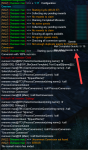
It goes through the available quests, and then I see this message in the chat window:
1592580563634.png


Just an FYI, I'll try resolving on my side.


Edit: Okay, so I was able to manually start up a Recruit quest.

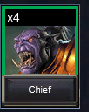
I think converting is stuck on this guy:
1592580968210.png

I tried manually converting 3x of him, and received that failed message.
I tired doing another quest with 1x chief in it (despite not getting bonuses) and it failed out. My Chief is bugged!

I hope the error message above in the screenshot are useful to you.
 
Last edited:
I had this happen once. What I did was log out the character to desktop and then log back in. Then I ran the Overseer.mac and that seemed to work.
 
Also had one stuck and iirc was the same guy. Even manually trying to convert him (to Bertox) did not work. New bug since last EQ patch
Yep, threw him into a random quest and it failed as well.

I camped out / back in and that didn't resolve it. I'll try the desktop / close client method next. Thanks for the tips guys!
 
Yep, threw him into a random quest and it failed as well.

I camped out / back in and that didn't resolve it. I'll try the desktop / close client method next. Thanks for the tips guys!

Okay I haven't seen this yet - and was curious when the new patch notes would come into play: "A message would appear if you can't start a mission". Previously they blocked you before that point.

If it is fixed in EQ by logging out/in, then not sure the best way to handle in script except to try and catch (Event handler) and display: "There's a problem. Go away and come back and try again!"
 
Okay I haven't seen this yet - and was curious when the new patch notes would come into play: "A message would appear if you can't start a mission". Previously they blocked you before that point.

If it is fixed in EQ by logging out/in, then not sure the best way to handle in script except to try and catch (Event handler) and display: "There's a problem. Go away and come back and try again!"
So far only seen it on the conversion, could catch that event handler and just skip conversion.

Yep, threw him into a random quest and it failed as well.
Well sugar. Now what do we do, abandon ship ! ?

Just had it happen again on an uncommon conversion, did notice that one of the allowed agents had an exclamation mark (questing). Have 3 of him.
Unfortunately do not have another duplicate to replace him with to see if he is the problem.
 
Last edited:
I think flagging the guy as problematic and skipping him in quests this cycle would be the patch-fix, if that message tends to come across. Or if you see that message, skip all guys that are involved in the quest and continue on without them. I dunno. I'd rather process through and get 92% success rates, then try for 95+% rates and not be able to start any because the macro is held up trying to bring the best possible guy in.
 
I think flagging the guy as problematic and skipping him in quests this cycle would be the patch-fix, if that message tends to come across. Or if you see that message, skip all guys that are involved in the quest and continue on without them. I dunno. I'd rather process through and get 92% success rates, then try for 95+% rates and not be able to start any because the macro is held up trying to bring the best possible guy in.
Different guy this time. Something is broken at DB side again.
Only solution I see is to flag all the agents in the quest a problematic and redo selection without them

Your Overseer quest Uncommon Conversion has failed to start. Please verify your selected agents and wait a moment before attempting to start it again.
Text that it spits out on error.
 
Last edited:
Different guy this time. Something is broken at DB side again.
Only solution I see is to flag all the agents in the quest a problematic and redo selection without them


Text that it spits out on error.

The concern with that is... is that the "right" answer, just ignore and move on, or to abort and let the human handle it.

Do you want to commit to these 6, 12, 24 hour quests based on faulty details?

Odd phrasing. Guess there's no choice. I haven't seen this yet but will start putting something in place to work around it.
 
Well done GoldenFrog for writing this really great time saving macro.
What I have noticed recently, with my FTP toons in the guild hall on live, is the macro ending just after it has started a quest with the statement "No pending quests."
The offending quest always makes it 5/5 quests started, it's as if the macro skips the "minutes until next quest" routine.
 
Well done GoldenFrog for writing this really great time saving macro.
What I have noticed recently, with my FTP toons in the guild hall on live, is the macro ending just after it has started a quest with the statement "No pending quests."
The offending quest always makes it 5/5 quests started, it's as if the macro skips the "minutes until next quest" routine.
Thanks, Yabba (dabba). I actually did notice that just a day or two ago. Looks like I'm going over several issues that've cropped up lately. I'll see what I can see.
 
The concern with that is... is that the "right" answer, just ignore and move on, or to abort and let the human handle it.
Do you want to commit to these 6, 12, 24 hour quests based on faulty details?
Odd phrasing. Guess there's no choice. I haven't seen this yet but will start putting something in place to work around it.
I would rather it move on and do another quest, find it painful to fill it in by hand. Noticing something odd with todays run not finding any problems so far with a fresh restart, when I do find a problem it seems to be after the client has being running a while, Need confirmation on this.
 
Editing this. I finally got a char with the error. Will start with the suggested fix, then feels like this should be dug deeper into to see what's going on. But "make it work for now" is the plan.
 
Last edited:
This thread is to discuss the "Overseer Automation" macro.

Read the overview here:
Thank yo ufor this, will try it today.
 
Sorry Kraw not fully understanding. Is this to address one of the problems or something different?
I think he wants the flexibility to not convert agents when he has just 2 of them, but rather if he has 3 of them, to convert down to 2. I get this, because I was keeping 2 of all agents before your macro came around. Having two, especially when you don't have a lot of agents, is wise and adds flexibility on which quests you can start.
 
Same here @BlankStare , I kept saving them until I have qty 2, THEN convert. Allows me to do more quests. On my first time using Overseer I converted as soon as I could and found I barely had any agents to do much of anything with.
 
@GoldenFrog think this is what Red wants, should probably put it in as a config value I convert any >=2, line 16,33,43-48
Code:
Sub SelectNextDuplicateAgent(minionstr)
    /declare amountText string
    /declare amount int

    /if (!${${MinionSelectionScreen}.Next}) {
        /return NULL
    }

    /declare NODE ${MinionSelectionScreenFirstMinion}
:nextAgent
    /if (${${NODE}.Child[OW_OQP_MinionNameBtn].Enabled}) {
        /varset amount ${Int[${${NODE}.Child[OW_OQP_MinionCountLabel].Text.Right[-1]}]}
        |/echo ${${NODE}.Child[OW_OQP_MinionNameBtn].Text} === ${minionstr}

   
        /if (${amount} >= 2) {
            /if (!${minionstr.Find[|${${NODE}.Child[OW_OQP_MinionNameBtn].Text}|]}) {
                /invoke ${${NODE}.Child[OW_OQP_MinionNameBtn].LeftMouseUp}
                /return ${${NODE}.Child[OW_OQP_MinionNameBtn].Text}
            }
        }
    }

    /if (${${NODE}.Siblings}) {
        /varset NODE ${NODE}.Next
        /goto :nextAgent
    }

/return NULL

Sub ProcessConversionQuest
    /declare quest string
    /declare minion string local
    /declare NODE string ${AvailableQuestMinions}


    /varset NODE ${AvailableQuestMinions}
:nextAgent
    /invoke ${${NODE}.Child[OW_ALL_MinionSelectBtn].LeftMouseUp}
    /doevents
    /delay 1s

    /call SelectNextDuplicateAgent ${minion}
    /if (${Macro.Return.Equal[NULL]}) {
        /echo Not enough duplicate agents for ${Window[OverseerWnd].Child[OW_ALL_TitleLabel].Text}
        /return FALSE
    }
    /varset minion ${minion}|${Macro.Return}|
 
GoldenFrog updated Overseer Automation with a new update entry:

1.18

  • Added logic to handle new "Quest Failed To Start".

Details:
  • If a [Start Quest!] fails to start, EQ outputs "Your Overseer quest [quest name] has failed to start. Please verify your selected agents and wait a moment before attempting to start it again."
  • When this happens, the quest is re-run WITHOUT those agents being considered.
  • This list of "ignored agents" is only for that specific quest. Subsequent quests might result in their own.


I have...

Read the rest of this update entry...
 
I think he wants the flexibility to not convert agents when he has just 2 of them, but rather if he has 3 of them, to convert down to 2. I get this, because I was keeping 2 of all agents before your macro came around. Having two, especially when you don't have a lot of agents, is wise and adds flexibility on which quests you can start.

Thanks Blank, Redfrog and Jande.

See, I dramatically optimize my time in Norrath, quests, characters, etc.... but not this silly overseer thing. So I am not really analyzing and thinking of these things.

Will add that.
 
GoldenFrog updated Overseer Automation with a new update entry:

1.19: Configurable count to be available for conversion

  • Added configurable flag to specify minimum number for an agent to be considered available for conversion

This flag defaults to 2, and there's a hard-logic in the script to not let it be less than 2. This is to try and double-ensure we don't accidentally dump all our singles due to a bug or config issue.

[General]
agentCountForConversion=2

Read the rest of this update entry...
 
For some reason it will not select new missions. I do have 10/10 mission collected, but that shouldn't stop it from selecting new ones for the next cycle.
 
That fixed it. Thanks!

Having an issue with it picking the proper priority. It keeps grabbing a 24 hour mission, but there are clearly 12 hours that fit my .ini priority that are available. Any ideas? Info below:

[General]
claimRewards=0
repeatTimeMinutes=-1
minimumSuccessPercent=70
requireMercToClaimExpRewards=0
logLevel=2
useQuestPriorities=1
agentCountForConversion=2
[QuestPriority]
Priorities=Durations|Levels|Rarities|Types
Durations=12h|24h|6h
Rarities=Elite|Rare|Uncommon|Common
Types=Any
Levels=5|4|3|2|1
[QuestPriority_Unsubscribed]
Priorities=Levels|Durations|Rarities|Types
Durations=12h|6h
Rarities=Elite|Rare|Uncommon|Common
Types=Any
Levels=5|4|3|2|1
[Rewards]
index=0
1=Character Experience
2=Mercenary Experience
3=Overseer Tetradrachm
 
/poke
| Hopefully temporary while we sort out this silly bug
WE !
Hey guys over here, an EQDEV ! Get HIM

@GoldenFrog Another optimization you could make, if character level >= 110 and want mercenary experience then character experience with a mercenary active is better than the mercenary experience reward. No idea at which level this begins to happen, somewhere after 106.
 
Last edited:
Having an issue with it picking the proper priority. It keeps grabbing a 24 hour mission, but there are clearly 12 hours that fit my .ini priority that are available. Any ideas? Info below:


I'll look at that INI in a bit when I get free. But something to help troubleshoot your INI:

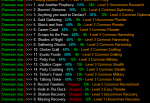
/mac overseer generalListFast

This command will walk things and show you the order the script will try the current set of quests. Depending how detailed your INI it, it can be fairly quick or take a couple minutes. Example:
1592759756918.png
 
/poke
WE !
Hey guys over here, an EQDEV ! Get HIM

@GoldenFrog Another optimization you could make, if character level >= 110 and want mercenary experience then character experience with a mercenary active is better than the mercenary experience reward. No idea at which level this begins to happen, somewhere after 106.


Okay few things. Did *I* say we? It sounds like me and no, I ain't no EQ Dev (though that sounds fun).

Separately are you kidding?! Does the benefit of regular exp vs. Merc exp flip flop at a certain level? That's... that's grotesque.

So asking to clarify, the following isn't graceful but a brute-force sample to verify this is the idea you are suggesting:

[General]
RewardLevelSectionLimit=110

[Rewards]
| These are the basic reward section
Index=2
1=Character Experience
2=Dodecahedrons

[Rewards_110]
| These are the rewards for <= 110
Index=2
1=Mercenary Experience
2=Dodecahedrons
 
Code:
Sub EnsureIniDefaults
    /if (${Ini[${MyIni},General].Length} == 0) {
        /ini ${MyIni} "General" "useCharacterConfigurations" "0"
    }

    /if (${Ini[${MyIni},General,useCharacterConfigurations]}) {
        /varset MyIni Overseer_${Me.CleanName}.ini
    }

    /if (${Ini[${MyIni},General].Length} == 0) {
[code]

Caught yourself a bit here, the last test for general will neve
Okay few things. Did *I* say we? It sounds like me and no, I ain't no EQ Dev (though that sounds fun).

Separately are you kidding?! Does the benefit of regular exp vs. Merc exp flip flop at a certain level? That's... that's grotesque.

So asking to clarify, the following isn't graceful but a brute-force sample to verify this is the idea you are suggesting:

[General]
RewardLevelSectionLimit=110

[Rewards]
| These are the basic reward section
Index=2
1=Character Experience
2=Dodecahedrons

[Rewards_110]
| These are the rewards for <= 110
Index=2
1=Mercenary Experience
2=Dodecahedrons
The We quote is in your code. /pulling your leg

The bruteforce looks correct. What was going though my head is. Ok see you want merc xp but the macro knows the pitfalls so let me change your selection behind your back, actually coding it into the ini would be more transparent.

Really wish I was kidding and since its being reported far and wide on DB forums probable in line to get nerfed, know they flip after 106 before or on 110 (thats my toons that I can check for levels, will keep checking as the 106 levels up). Look at the lvl 115 and be amazed or rather should I say disgusted.

Toon level:
CharacterXP
MercXP

85:
1592761715397.png
1592761731252.png
96:
1592761429094.png
1592761447415.png
106:
1592761030964.png
1592761065276.png
110:
1592761134781.png
1592761149625.png
115:
1592761189642.png
1592761206689.png
Well howdy do ! a whole 45% of a merc AA ! Whoo we going to be rich !
 
Last edited:
...since its being reported far and wide on DB forums probable in line to get nerfed,...

I initially believed they'd remove Merc AA until the most recent patch where they added text to reinforce it's existence (the text in your screen shots)

And wow that IS quite a difference. And actually it makes perfect math sense why the #'s you show are the case. 111+ are good ol' hell levels so to keep a realistic exp %, the #'s have to be higher. But Merc AA are static in size.

Regardless - how many people are <= level 110 but after Merc AA over regular AA. I'd always assumed the only reason to use Merc AA was when you are at max level. Do you not think that's true?


(And your "We" comment was funny. I just didn't remember where it was... .silly code comments. I shoulda guessed)
 

Attachments

  • 1592765078343.png
    1592765078343.png
    2.8 KB · Views: 3
Regardless - how many people are <= level 110 but after Merc AA over regular AA. I'd always assumed the only reason to use Merc AA was when you are at max level. Do you not think that's true?
Yep agree I also made that assumption at first, then someone on DB forum said something and off I went to confirm,. Only real reason I cared was I am getting my merc xp on an f2p account (110) that I use for farming. Was before f2p could now get dispensers/ts again.
 
[rant]
Feel should have had the currency and prices at 1/10 of what is currently awarded, transferring 100k though the shared bank is painfull.

Or for first prize it should have worked like the Loyalty Tokens. e.g shared across all characters
[/rant]
 
Just ran the macro and it put a low priority stealth quest over a high priority exploration Conversion|Recruitment|Exploration|Diplomacy|Military..... I dont even have stealth on the list. I am kinda confused.

Note: it was the "best chance of success" in the entire overseer, but it wasn't even on my list.

Current Settings in INI
INI:
[General]
claimRewards=0
repeatTimeMinutes=-1
minimumSuccessPercent=75
requireMercToClaimExpRewards=1
logLevel=2
useQuestPriorities=1
agentCountForConversion=2
[QuestPriority]
Priorities=Levels|Durations|Rarities|Types
Durations=6h|12h
Rarities=Elite|Rare|Uncommon|Common
Types=Conversion|Recruitment|Exploration|Diplomacy|Military
Levels=5|4|3|2|1
[QuestPriority_Unsubscribed]
Priorities=Levels|Durations|Rarities|Types
Durations=12h|6h
Rarities=Elite|Rare|Uncommon|Common
Types=Conversion|Recruitment|Exploration|Diplomacy|Military
Levels=5|4|3|2|1
[Rewards]
index=3
1=Collection Item Dispenser
2=Mercenary Experience
3=Overseer Tetradrachm
 
Ok, Last question (for now). Does it check the INI file everytime I run it or do I need to reload the macro between operations if I've changed it?
 
Also, If I don't care about the time, I more care about the type, do I just load it as

INI:
Durations=Any

If you care "more about type than time" you can switch what's looked at first:
Priorities=Levels|Rarities|Types|Durations

If you say Durations=Any then it'll pick 6h, 24, 12h with no pattern. If thats fine for you, then great. I am explicit out of habit.


When you say it picked a Stealth are you talking during a run or during a check (/mac overseer generalListFast).
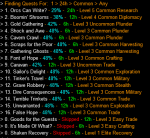
That command is way useful to see what the ACTUAL run order it's interpreting to be. I'd be curious for you to run that - and see if you dis/agree with how it sorts things:


Example for me with Levels|Durations|Rarities|Types.
1593118535207.png
 
Ok, Last question (for now). Does it check the INI file everytime I run it or do I need to reload the macro between operations if I've changed it?

My initial answer is "rerun". It wasn't designed explicitly to pick changes up on the fly. Some stuff is cached - some isn't. So without me getting to a system and explicitly testing... that's my solid guess.
 
If you care "more about type than time" you can switch what's looked at first:
Priorities=Levels|Rarities|Types|Durations

If you say Durations=Any then it'll pick 6h, 24, 12h with no pattern. If thats fine for you, then great. I am explicit out of habit.


When you say it picked a Stealth are you talking during a run or during a check (/mac overseer generalListFast).
That command is way useful to see what the ACTUAL run order it's interpreting to be. I'd be curious for you to run that - and see if you dis/agree with how it sorts things:


Example for me with Levels|Durations|Rarities|Types.
View attachment 22612

I ran it with Any as the duration and it kept missing quests. I put it back and it worked mostly. Now my issue is dealing with these 24h tasks which showed up. I don't see anything in the code to handle 24h.
 
Release Overseer Automation

Users who are viewing this thread

Back
Top
Cart