
• You've discovered RedGuides, an EverQuest multi-boxing and scripting community 🧙‍♀️⚙️. We want you to play several EQ characters at once, come join us and say hello! 👋

  • A TLP without truebox has thawed (Very Vanilla ready)
    Frostreaver

"MQNext" Framelimiter demo

Sic

Administrator
Moderator
Joined
May 5, 2016
RedCents
49,476¢
Pronouns
He/Him
I wanted to do a quick lil video to demonstrate the new built-in framelimiter functionality for MacroQuest "Next".

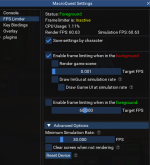
you can bring up the imgui settings panel with /mqsettings or by EQ Button -> MacroQuest -> Settings

I ended up doing a new video and guide for MQ "Next" including talking about the updates to frame limiter
> Vid HERE <
(if you want the original video you can scroll down)

1650821739335.png


Original Video and info below:
____________________________________________________________________________________________________________

Please excuse the couple of flubs in there
/framelimiter -h for the framelimiter help

Check it out:


Suggested Settings:

Save settings by character: on if you want to have diff settings per toon

Enable frame limiting when in the background: on
Target FPS 0.001

Min universal simulation rate: 30

Clear Screen: off
Render ImGui: off (unless you want to render imgui windows like boxhud or buttonmaster while in background)
Render UI at simulation rate: off (unless you want to see your UI while in background)

Updated image with the new options.
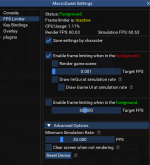
1650821733661.png


Some folks experience a "fireworks display" after coming back to a toon after it has been in the background for a while.

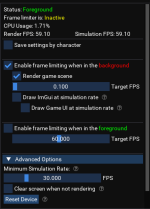
What you can do to eliminate that, and still get all the framelimiter goodness is enable "Render game scene" and keep the Target FPS at a low value, like 1.0 or .1
This allows your eq to still process some *stuff* so it doesn't get built up - in this case spell effects and other stuff that looks like "fireworks"
1674574243546.png
 
Last edited:
sorry i mean for this plugin like /bcaa //mqsettings framelimiter xxx
yes, any settings command you could broadcast with the respective /bcaa exactly like you said.


/bcaa //framelimiter enable for example has everyone on your eqbc issue a "/framelimiter enable"

you can /framelimiter -h for "help" to get a list of commands
 
The pets of other toons seems to be warping for a short time when iam moving. After a short time they stand still... this looks like warping.
I tried some different settings but none could solve this problem.
Anyone got an idea what to do against this?
 
Last edited:
The pets of other toons seems to be warping for a short time when iam moving. After a short time they stand still... this looks like warping.
I tried some different settings but none could solve this problem.
Anyone got an idea what to do against this?
no, this is eq. pet pathing is stupid. doesn't hae anything to do with framelimiter
 
I added a snippet on the main post talking about how to deal with "when i tab back my game is full of fireworks for a while"
 
Sic, can you help me understand "simulation rates" please?
Watched both videos again but don't know what it means to Draw at simulation rates vs non-simulated rates(?)

If I enable Draw Game UI at simulations rates does that not display the UI at game FPS?


I feel confused.

Thanks!

BB~
 
Sic, can you help me understand "simulation rates" please?
Watched both videos again but don't know what it means to Draw at simulation rates vs non-simulated rates(?)

If I enable Draw Game UI at simulations rates does that not display the UI at game FPS?


I feel confused.

Thanks!

BB~
If you're confused about how it works, you should just leave everything on the default and turn it on.

I've shared what settings I use but I'm also not trying to see more than one character at a time. I'm also still using my zliz and not the new interface

You don't want it to draw the UI otherwise you're losing a whole lot of the performance increases.

Simulation can be left at default.

Like I said in the other thread which now I'm talking to you in two places about the same thing which kind of sucks, the new UI that everquest is trying to implement is causing a lot of people very significant performance problems even with the frame limiter. So there may be adjustments that need to happen to frame limiter in the future or EQ needs to sort out there UI performance problems, etc
 
If you're confused about how it works, you should just leave everything on the default and turn it on.

I've shared what settings I use but I'm also not trying to see more than one character at a time. I'm also still using my zliz and not the new interface

You don't want it to draw the UI otherwise you're losing a whole lot of the performance increases.

Simulation can be left at default.

Like I said in the other thread which now I'm talking to you in two places about the same thing which kind of sucks, the new UI that everquest is trying to implement is causing a lot of people very significant performance problems even with the frame limiter. So there may be adjustments that need to happen to frame limiter in the future or EQ needs to sort out there UI performance problems, etc
Agree, my old lenovo T420 that was running 12-14 boxes without breaking a sweat is struggling with this new ui crap. Had to escale it down to 8-10
 
If you're confused about how it works, you should just leave everything on the default and turn it on.

I've shared what settings I use but I'm also not trying to see more than one character at a time. I'm also still using my zliz and not the new interface

You don't want it to draw the UI otherwise you're losing a whole lot of the performance increases.

Simulation can be left at default.

Like I said in the other thread which now I'm talking to you in two places about the same thing which kind of sucks, the new UI that everquest is trying to implement is causing a lot of people very significant performance problems even with the frame limiter. So there may be adjustments that need to happen to frame limiter in the future or EQ needs to sort out there UI performance problems, etc
Yeah, sorry man. I didn't want to keep asking non-shammy questions in the Shammy plugin thread and crowd out the relevant questions.

Not having any problems. But as with most things I'm ignorant about I see something interesting and jump on it to learn more. Like- WOW! Something shinny and new!
 
"MQNext" Framelimiter demo

Users who are viewing this thread

Back
Top
Cart