


I wanted to do a quick lil video to demonstrate the new built-in framelimiter functionality for MacroQuest "Next".
you can bring up the imgui settings panel with
I ended up doing a new video and guide for MQ "Next" including talking about the updates to frame limiter
> Vid HERE <
(if you want the original video you can scroll down)
Original Video and info below:
____________________________________________________________________________________________________________
Please excuse the couple of flubs in there
Check it out:
you can bring up the imgui settings panel with
/mqsettings or by EQ Button -> MacroQuest -> SettingsI ended up doing a new video and guide for MQ "Next" including talking about the updates to frame limiter
> Vid HERE <
(if you want the original video you can scroll down)
Original Video and info below:
____________________________________________________________________________________________________________
Please excuse the couple of flubs in there
/framelimiter -h for the framelimiter helpCheck it out:
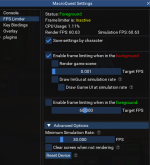
Suggested Settings:
Save settings by character: on if you want to have diff settings per toon
Enable frame limiting when in the background: on
Target FPS 0.001
Min universal simulation rate: 30
Clear Screen: off
Render ImGui: off (unless you want to render imgui windows like boxhud or buttonmaster while in background)
Render UI at simulation rate: off (unless you want to see your UI while in background)
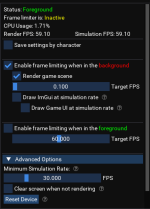
Updated image with the new options.
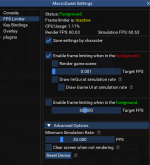
Some folks experience a "fireworks display" after coming back to a toon after it has been in the background for a while.
What you can do to eliminate that, and still get all the framelimiter goodness is enable "Render game scene" and keep the Target FPS at a low value, like 1.0 or .1
This allows your eq to still process some *stuff* so it doesn't get built up - in this case spell effects and other stuff that looks like "fireworks"
Last edited:


