• You've discovered RedGuides, an EverQuest multi-boxing and scripting community 🧙‍♀️⚙️. We want you to play several EQ characters at once, come join us and say hello! 👋

  • A TLP without truebox has thawed (Very Vanilla ready)
    Frostreaver
Resource icon

Release MQNearby (1 Viewer)

Sooo.. I clicked the Toggle Fullscreen/Click-Through, then I clicked the Edit overlay box, and the only way I was able to get my screen back to where I could see it was to unload the plugin. Is there another way out of that I missed?
 
Sooo.. I clicked the Toggle Fullscreen/Click-Through, then I clicked the Edit overlay box, and the only way I was able to get my screen back to where I could see it was to unload the plugin. Is there another way out of that I missed?
You need to grab the very bottom right hand corner when you do the overlay and edit and drag it smaller
 
Sooo.. I clicked the Toggle Fullscreen/Click-Through, then I clicked the Edit overlay box, and the only way I was able to get my screen back to where I could see it was to unload the plugin. Is there another way out of that I missed?
Also if you happen to have another monitor and you want the overlay to take up a massive portion of your screen, you -should- position it on a different monitor. Alternately, put the "edit overlay" checkbox in a location that will be available after you've resized it to the desired size.
 
Loving this btw. Can't believe you sat down with no real plan and created something this amazing!!

Any thoughts on adding a recenter button to the top bar with spawn options? Maybe also the ability to turn on/off height and the +/- adjustment? Would be cool to not have to open the sidebar as I find myself using those buttons quite often.

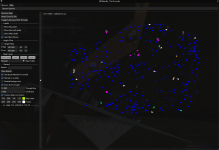
View attachment 71020

Also, ctr + shift + left click for navigation? That would be sweet!

ty!
Seconding this....CTRL+SHIFT+L CLICK for navigation would be an amazing feature addition. Would never have to open in-game map again. Also, search functioning for PoK book labels.
 
Seconding this....CTRL+SHIFT+L CLICK for navigation would be an amazing feature addition. Would never have to open in-game map again. Also, search functioning for PoK book labels.
So I can probably do that, but it wouldn't work on the overlay since you can't interact with it. But TDB on when it will happen.

Re: POK stuff - I actually have logic already to see 'switches' which is going to be all the doors, switches, elevators, etc.
However the issue with that is that there is a TON of them, and some of them are not a real thing exactly.
Example: In pok there are bookshelfs that are considered switches that when clicked do nothing.

I haven't gone through much effort beyond checking it out. But I know they exist, just haven't taken the time to determine what is what and find a way to automate identifying them. I'm sure the logic is in nav or something, but I haven't cared to look at the moment.

I did (albiet late) just fix named on overlay. I didn't realize it hadn't been working this whole time. I noticed about a week ago and have just been busy working on my finditem plugin. But I sent the fix for that after the update today. So not sure when that will come to builds.
 
So I can probably do that, but it wouldn't work on the overlay since you can't interact with it. But TDB on when it will happen.

Re: POK stuff - I actually have logic already to see 'switches' which is going to be all the doors, switches, elevators, etc.
However the issue with that is that there is a TON of them, and some of them are not a real thing exactly.
Example: In pok there are bookshelfs that are considered switches that when clicked do nothing.

I haven't gone through much effort beyond checking it out. But I know they exist, just haven't taken the time to determine what is what and find a way to automate identifying them. I'm sure the logic is in nav or something, but I haven't cared to look at the moment.

I did (albiet late) just fix named on overlay. I didn't realize it hadn't been working this whole time. I noticed about a week ago and have just been busy working on my finditem plugin. But I sent the fix for that after the update today. So not sure when that will come to builds.
Thanks for the work you do. Yeah, I wouldn't expect the 'point and click' to work on the overlay... I just curse the in-game map every time I have to open it. Looking forward to finditem.
 
Hmm, I thought I answered this question -

Define waypoints? If you're referring to the points you generate on a map within EQ - then yes. I pull in all the points and lines from the map files. I don't have a way to create new points from within MQNearby and you'd still need to use the Everquest map to do that. But I do read the file and generate the points, their labels, and all lines from the map files.

If you're talking about some other waypoint that I'm not familiar with, then no.
Wow Im not sure how I missed this reply. What Im referencing is hunter tags, quest locations stuff like that I can see on the in game map with Brewell maps but I can't see them when using brewell with nearby.
 
Wow Im not sure how I missed this reply. What Im referencing is hunter tags, quest locations stuff like that I can see on the in game map with Brewell maps but I can't see them when using brewell with nearby.
1769964509595.png

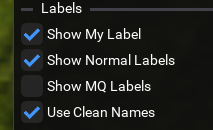
Sounds like you want "Show Normal Labels" box ticked in the options panel.
1769964546221.png
 
Thanks for the work you do. Yeah, I wouldn't expect the 'point and click' to work on the overlay... I just curse the in-game map every time I have to open it. Looking forward to finditem.
Okay, so I have a working version with the click to nav with Ctrl + Shift + LClick.

It doesn't have the options that come with MQ2Map to expand on it or w/e. Just the one option for now. Honestly, your automations chasing function should suffice for everyone else in the zone.
I also decided to add support for Spawnmaster, it'll be an option, not mandatory. So you can use our own, or you can use spawnmaster. The option to do spawnmaster is mostly targeted at EMU, but I can see other people getting some use out of it.
Took a bit of effort more than just reading the ini. I decided to essentially "watch" the spawnmaster INI for changes to it's last modification time and if it changes, we'll reload the list. There's 3 seconds between each check to keep it from doing too much checking. You can actually edit the file manually and save it, and the plugin will see it changed and re-read it.

I also took some time today to address the window flashing on and then off when you loaded the plugin. I probably load and unload it more than anyone else so may not have noticed that bit. Bout drove me up all wall while working on it though.
Finally - I address the fact that it wasn't very consistent with loading the current zones map file. Sometimes retaining the previous zones map. That should be addressed now.

Buttttttt - Those changes are not out yet. But Soon(tm).
 
ChatWithThisName updated MQNearby with a new update entry:

02/01/2026

- Add missing logic to show the named list on the overlay
- Fix for Nearby windows closing after zoning - not meant to work that way
- Map should update to new zone after zoning most reliably now.
- - Normal labels should appear in the overlay without needing to open nearby window.
- Ctrl + Shift + LClick to nav
- Use spawnmaster for named

Read the rest of this update entry...
 
Okay, so I have a working version with the click to nav with Ctrl + Shift + LClick.

It doesn't have the options that come with MQ2Map to expand on it or w/e. Just the one option for now. Honestly, your automations chasing function should suffice for everyone else in the zone.
I also decided to add support for Spawnmaster, it'll be an option, not mandatory. So you can use our own, or you can use spawnmaster. The option to do spawnmaster is mostly targeted at EMU, but I can see other people getting some use out of it.
Took a bit of effort more than just reading the ini. I decided to essentially "watch" the spawnmaster INI for changes to it's last modification time and if it changes, we'll reload the list. There's 3 seconds between each check to keep it from doing too much checking. You can actually edit the file manually and save it, and the plugin will see it changed and re-read it.

I also took some time today to address the window flashing on and then off when you loaded the plugin. I probably load and unload it more than anyone else so may not have noticed that bit. Bout drove me up all wall while working on it though.
Finally - I address the fact that it wasn't very consistent with loading the current zones map file. Sometimes retaining the previous zones map. That should be addressed now.

Buttttttt - Those changes are not out yet. But Soon(tm).
Works amazing! Thank you! EDIT: Any plans to add the 'pathing line' to 'nav to' and 'ctrl shift click'? I might be missing a setting because I've seen it (the line) on some things. Really nice addition- thanks again.
 
Works amazing! Thank you! EDIT: Any plans to add the 'pathing line' to 'nav to' and 'ctrl shift click'? I might be missing a setting because I've seen it (the line) on some things. Really nice addition- thanks again.
I discussed it with brain briefly. Technically that's nav drawing the line on MQ2Map, not MQ2Map getting the line from Nav. So I'll need to create an API to allow him to draw lines and then create a PR to get it into nav. So it'll be up to me to do it, and him to accept it.
 
Since this recent update nearby is causing me to crash. Wish I could give more info, but it happens as soon as I load into the game. When I disable nearby I load in just fine. As soon as I enable nearby I crash. This is happening on Live and Emu. Test loads in just fine with nearby enabled.


Code:
---------------------------
EverQuest Crash Detected
---------------------------
MacroQuest caught a crash:

Process ID: 24200
Version: 3.1.1.3604
Location: RaiseException+0 (C:\WINDOWS\System32\KERNELBASE.dll+00000000000CA780)

CrashID: 30d97065-b9d3-4e47-acb2-0af4ffc523ef

You can either:
 * [RETRY] Continue execution and hope for the best.
 * [CANCEL] Write a crash dump and terminate EverQuest.

Copy the contents of this dialog to your clipboard by pressing Ctrl+C

---------------------------
Retry   Cancel   
---------------------------
 
So changes for the crash were put in place -> I was checking that the MQ2SpawnMaster.ini existed when comparing the last edited time but neglected to do that when initializing it when doing the plugin setup. My bad -x.

Just spotted another issue - the checkbox to use the custom line color for drawing the map was being saved as one thing, but read as another, so while I was both reading and storing the state, it was to/from different places. My bad :-x
 
The custom map lines worked for me for about a day. Now it will not use the color I had set and just make the boarders dark grey/black and really hard to see.

** Fixed it by Unloading Nearby deleteing my Ini file for that toon and reloading Nearby**
1770252347486.png
 
Last edited:
The custom map lines worked for me for about a day. Now it will not use the color I had set and just make the boarders dark grey/black and really hard to see.

** Fixed it by Unloading Nearby deleteing my Ini file for that toon and reloading Nearby**
View attachment 74989
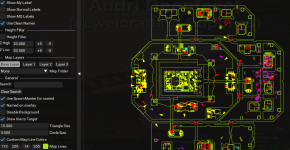
If I had to guess, you set the alpha down. I see the lines, but it's like the alpha was turned way down.
The last number is alpha R, G, B, Alpha - yours was set to 12 out of 255

Here I've replicated your color, and my last number is 255 - results in a non-faded line.


Don't panic, it's an emu toon/server
1770434540807.png
 
If I had to guess, you set the alpha down. I see the lines, but it's like the alpha was turned way down.
The last number is alpha R, G, B, Alpha - yours was set to 12 out of 255

Here I've replicated your color, and my last number is 255 - results in a non-faded line.


Don't panic, it's an emu toon/server
View attachment 75079
Thanks. I'll remember that. Yup that the color I have. Love this plugin BTW awesome work.
 
How do I set this up to only open on my main toon? I like to have just his map open on a second monitor. It used to only open on the one character, but recently it opens on all characters.
 
How do I set this up to only open on my main toon? I like to have just his map open on a second monitor. It used to only open on the one character, but recently it opens on all characters.
put a line in each <class>.cfg that you DON'T want MQNearby to run on
/plugin nearby unload noauto
 
put a line in each <class>.cfg that you DON'T want MQNearby to run on
Where is this located? I see a bunch of MQ2Nearby files in the release/config folder. Each of those files have a specific character name: for instance:

MQ2Nearby_Jimmi_firiona.cfg

Do I need to add this to every single Mq2Nearby_name_server.cfg file? I don't see any .cfg files in the release/config folder for any class or general settings.
 
I don't know if there's a better way but I just have "/nearby hide" in my ingame.cfg file. Admittedly, you would need to "/nearby show" on your main character if you want it open all the time (I don't).
 
to my understanding, if macroquest.ini doesn't have the plugin loaded (that is, it is set to zero), and you only load each time with the noauto argument on the toon you want Nearby on, MQ will not remember window positioning. because it is loaded, and not saved. If you wanna do the drag and position thing each time, then have at it, otherwise my original advice stands
 
to my understanding, if macroquest.ini doesn't have the plugin loaded (that is, it is set to zero), and you only load each time with the noauto argument on the toon you want Nearby on, MQ will not remember window positioning. because it is loaded, and not saved. If you wanna do the drag and position thing each time, then have at it, otherwise my original advice stands
No, that is not correct (on the positioning)

Macroquest.ini just handles "load this plugin or not", macroquest_overlay.ini would store any information from any overlay window (imgui in this case) depending on how the window is labelled in the code creating it.

The overlay in doesn't have anything to do with the macroquest.ini
 
No, that is not correct (on the positioning)

Macroquest.ini just handles "load this plugin or not", macroquest_overlay.ini would store any information from any overlay window (imgui in this case) depending on how the window is labelled in the code creating it.

The overlay in doesn't have anything to do with the macroquest.ini
my experience , especially with the CWTN plugins UI window placement is different. ymmv
 
my experience , especially with the CWTN plugins is different. ymmv
That reeks to me of potential save collisions with other PCs and the overlay ini... while it may be happening to you, i feel like what you are proposing may just be a workaround for that. There are people tinkering with that stuff atm, and thats headed into tagental territory, but basically, I always generally try to set imgui stuff up with just one character running.

Edit: Ofc, I could be smoking something. LMK.
 
single pc, common EQ directory, common MQ directory, single eqclient.ini, single macroquest.ini, single macroquest_overlay.ini - 16 clients running.

not tinkering, reference install

maybe just maybe something changed when things when from HTML windows to IMGUI. this is what my cleric.cfg looks like for example
Code:
/log off
/plugin mq2bard unload noauto
/plugin mq2berzerker unload noauto
/plugin mq2bst unload noauto
;/plugin mq2cleric unload noauto
/plugin mq2enchanter unload noauto
/plugin mq2eskay unload noauto
/plugin mq2mage unload noauto
/plugin mq2monk unload noauto
/plugin mq2necro unload noauto
/plugin mq2rogue unload noauto
/plugin mq2shaman unload noauto
/plugin mq2war unload noauto
/plugin mq2wizard unload noauto
/plugin mq2farmtest unload noauto
/plugin mq2autoforage unload noauto
/plugin mq2cast unload noauto
/plugin mq2melee unload noauto
/plugin mq2groundspawns unload noauto
/plugin mq2twist unload noauto
/plugin mq2autoaccept unload noauto
/plugin mq2exchange unload noauto

/squelch /if (!${Bool[${Plugin[MQ2Cleric]}]}) /plugin mq2cleric load

/squelch /lua run lem
 
single pc, common EQ directory, common MQ directory, single eqclient.ini, single macroquest.ini, single macroquest_overlay.ini - 16 clients running.

not tinkering, reference install
There are people tinkering with making the overlay file character specific.
 
single pc, common EQ directory, common MQ directory, single eqclient.ini, single macroquest.ini, single macroquest_overlay.ini - 16 clients running.

not tinkering, reference install

maybe just maybe something changed when things when from HTML windows to IMGUI. this is what my cleric.cfg looks like for example
Code:
/log off
/plugin mq2bard unload noauto
/plugin mq2berzerker unload noauto
/plugin mq2bst unload noauto
;/plugin mq2cleric unload noauto
/plugin mq2enchanter unload noauto
/plugin mq2eskay unload noauto
/plugin mq2mage unload noauto
/plugin mq2monk unload noauto
/plugin mq2necro unload noauto
/plugin mq2rogue unload noauto
/plugin mq2shaman unload noauto
/plugin mq2war unload noauto
/plugin mq2wizard unload noauto
/plugin mq2farmtest unload noauto
/plugin mq2autoforage unload noauto
/plugin mq2cast unload noauto
/plugin mq2melee unload noauto
/plugin mq2groundspawns unload noauto
/plugin mq2twist unload noauto
/plugin mq2autoaccept unload noauto
/plugin mq2exchange unload noauto

/squelch /if (!${Bool[${Plugin[MQ2Cleric]}]}) /plugin mq2cleric load

/squelch /lua run lem

We don't share naming with the windows, they're plugin and name specific.

So other than something clobbering your file, those individual positions for those windows are unique in the file itself.

None of the things you listed would be making entries in that file (or even doing anything)
 
Just a quick question here. I used to use this mainly for showing the named mobs up in zone currently and for some reason within the last few days it has disappeared. I do have the named on overlay activated but for some reason nothing is showing up. Is there something i'm doing wrong or should i try to reinstall? Thank you!
 
Just a quick question here. I used to use this mainly for showing the named mobs up in zone currently and for some reason within the last few days it has disappeared. I do have the named on overlay activated but for some reason nothing is showing up. Is there something i'm doing wrong or should i try to reinstall? Thank you!
"reinstall" isn't really a thing - that's not how things work --- you could unload the plugin, delete your settings file for it and then reload it, but "reinstall" isn't really a thing

can you show your settings
 
I'm afraid I had to remove your screenshot because names were visible through the map window.

I can look at this. The overlay to be clear is the pop out overlay - The named would show at the bottom of the window on the left hand options panel if you're not using the map as an overlay.

Are you referring to the overlay or the not overlay?
 
Release MQNearby

Users who are viewing this thread

Back
Top
Cart