• You've discovered RedGuides, an EverQuest multi-boxing and scripting community 🧙‍♀️⚙️. We want you to play several EQ characters at once, come join us and say hello! 👋

  • A TLP without truebox has thawed (Very Vanilla ready)
    Frostreaver
Resource icon

Release MQCollectionManager

Joined
Jun 21, 2019
RedCents
1,614¢
Trapper submitted a new resource:

MQCollectionManager - A collections purchasing and real estate plot management for collects.

This plugin will check your characters collection achievements and then use the bazaar to purchase missing collects through the parcel system.
It also helps manage real estate plots for collection sets and clicking missing collects.
WARNING: this can generate a lot of AA, make sure you have your AA spent and AASPEND setup so you do not waste them.

  • This will spend platinum up to the amount specified when...

Read more about this resource...
 
Last edited by a moderator:

For people who have guild houses full of collects, will it interact with them if you don't own them, but have access?
Yes it should, it's based on having access to the property. you just have to be standing on the plot when you scan it.

I didn't do it with Guild houses but did test it with fellowship houses which should be the same.
 
Both the RG Launcher and the download link here are broken and dl an image of a hill giant saying hello instead of the plugin. The previews look great though! Can't wait to use it.
 

Attachments

  • image.png
    image.png
    18.2 KB · Views: 2
Both the RG Launcher and the download link here are broken and dl an image of a hill giant saying hello instead of the plugin. The previews look great though! Can't wait to use it.
yep.

until RG rebuilds, that is what you're going to see ---

obligatory "you shouldn't try and manually download/move any plugin resources - let the launcher do it"
 
obligatory "you shouldn't try and manually download/move any plugin resources - let the launcher do it"
I did let the launcher do it, it downloaded the image, and only then did I try the link here. That's why I mentioned it in my first comment. I am not complaining, just confused why it popped up in Launcher and I was not able to use it. I don't mind waiting for it.
 
I did let the launcher do it, it downloaded the image. That's why I mentioned it in my first comment. I am not complaining, just confused why it popped up and I was not able to use it. I don't mind waiting for it.
a resource has to get approved, before it can be added to the build, and then a build has to happen before it is available.

for a resource to be approved, and setup to *receive* a download, it has to have *something*, so redbot uses that coll hello

I said this a few minutes after it was approved because it is a semi-common thing whenever a new plugin is approved

1701193816143.png
 
a resource has to get approved, before it can be added to the build, and then a build has to happen before it is available.

for a resource to be approved, and setup to *receive* a download, it has to have *something*, so redbot uses that coll hello

I said this a few minutes after it was approved because it is a semi-common thing whenever a new plugin is approved

View attachment 53622
That makes perfect sense. Thanks for the info and for your time (and the polite giant)!
 
Are there any plans to incorporate using Overseer Collection Item Dispenser?
 
HELLO.
The Princess Bride Disney Plus GIF by Disney+
 
Build was just uploaded - you can download

make sure to use the redguides launcher
 
Are there any plans to incorporate using Overseer Collection Item Dispenser?
originally I was going to, but then had seen that JB321 had a gui resource for that and didn't want to step on any other developers work.
 
Never had a pluggin eat my platinum faster.
<3 it!
you can definitely blow some platinum and AA pretty fast. I tested across 15 toons, I had my max at 10,000 and blew through just under 30 million. Also blew around 60,000 AA across the 15 toons by collecting when max AA.

what I do now is I actually put like 3 million on the toon and do the buying with just that, kind of like a second control to not spend to much lol.
 
originally I was going to, but then had seen that JB321 had a gui resource for that and didn't want to step on any other developers work.
Yours scans whats needed, the JB321 needs you to mark which ones you want it to convert to.
This could evolve beyond it and be the greatest thing since sliced bread!
 
I ran through clicking 1000s of collects from real estate the last couple days across 15 toons. I have several items I need to look into.
1. there's several collects with the exact same name, so say you've already collected one from EoK but not RoF, you maybe end up with an extra EoK one in inventory that it attempted to click for the RoF.
-- I had thought about using the ID instead of name, but this introduces a problem on the bazaar side for purchasing. ( I need to think about an easy way to handle this, as it was only 2 collects so far)
2. the lag of achievement updates from the game itself, can make it report your still missing a few from the set just collected, but if you wait for a couple secs and re-scan it goes away.
3. sorting between re-scans switches back to default, but would be nice if it could keep the same sort and even possibly scroll location.

please let me know if you run into anything else.
 
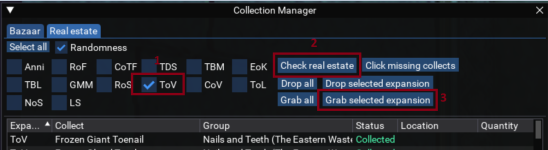
I am wondering if I am using this right. I am trying to organize my collectibles by expansion. I _should_ be able to move say all ToV collectibles from one house to another with this tool fairly easily. I open my house items and open the collectionmanager. Click real estate tab, check mark on ToV and check real estate. Then select grab selected expansions should grab just ToV correct? What is happening is it grabs all collections no matter what I select. Can this tool do it or do I need another tool?
 
I am wondering if I am using this right. I am trying to organize my collectibles by expansion. I _should_ be able to move say all ToV collectibles from one house to another with this tool fairly easily. I open my house items and open the collectionmanager. Click real estate tab, check mark on ToV and check real estate. Then select grab selected expansions should grab just ToV correct? What is happening is it grabs all collections no matter what I select. Can this tool do it or do I need another tool?
it kind of sounds like you clicked the grab all.
this is the buttons you would hit.
1701983786341.png

I did a very similar thing, I had mixed real estate. so I did a grab all to empty out the property, and then I did expansion > check real estate > Drop selected expansion. to just have 1 expansion per property.
 
Does the 'Update Traders' button in the bazaar search window matter when doing searches?
Should I not worry about pressing it every time I see it up?
1703968194549.png
 
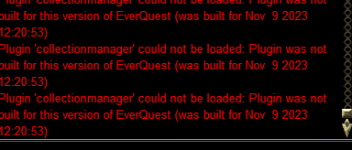
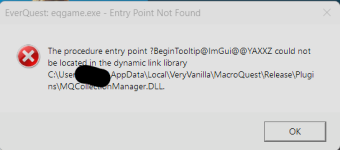
Started getting this error ~2 days ago.

1703969619407.png
I happens before login on each client I spin up via login profiles. (not saying its login profiles, just saying how i login).
Clicking ok, lets the login continue and its as if there are no issues afterwards.
Highly possible, I am doing the Dumb somewhere/somehow, just thought id bring it up.
 
Started getting this error ~2 days ago.

View attachment 55152
I happens before login on each client I spin up via login profiles. (not saying its login profiles, just saying how i login).
Clicking ok, lets the login continue and its as if there are no issues afterwards.
Highly possible, I am doing the Dumb somewhere/somehow, just thought id bring it up.
If you have already checked the RG Launcher Plugin Tab then read the following:
- The RG Launcher is unable to *delete* old files.
-- This means you will get an error box if you don't have a current plugin that matches the mq build
-- your options are:
--- a: purchase a license
--- b: delete the old .dll in your plugin folder, and/or
--- c: change your macroquest.ini to MQ2PluginName=0 under [Plugins]
 
If you have already checked the RG Launcher Plugin Tab then read the following:
- The RG Launcher is unable to *delete* old files.
-- This means you will get an error box if you don't have a current plugin that matches the mq build
-- your options are:
--- a: purchase a license
--- b: delete the old .dll in your plugin folder, and/or
--- c: change your macroquest.ini to MQ2PluginName=0 under [Plugins]
Oh Shit, didnt even see that it went pay per license.
yup, did a dumb.
Thanks Sic! and sorry to the dev, ill properly get a license ASAP.
 
some screen shots of the unlocked functionality:
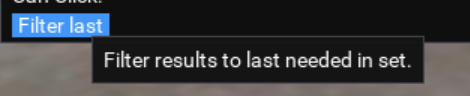
filter last - can select all, scan and then click the filter last at bottom to get a list of collection groups missing just 1. (that you might be willing to pay more for, or use right click overseer to finish)
1705261830470.png

right click -> Select overseer - this will use an overseer dispenser to collect the missing collect.
1705261839300.png
 
absolutely love it. any plans to add in a selection to toggle not searching bazaar for ground spawn collects?
 
absolutely love it. any plans to add in a selection to toggle not searching bazaar for ground spawn collects?
so for me I usually do my real estate first before searching baz, that way I hit the ground collects I've grabbed before trying to search for them.

The only difficulty of adding a filter for it is that the way its getting the collects is through the achievements window, and I don't think it's defined anywhere that they are ground drops. If I had a list of ground ones I could go through and individually define them. but it would be a ton of work so want to make sure its something that would be truly beneficial.
 
this tool is killer. One thing ive noticed is sometimes it "collects" items that havent been collected so i "finish" a collection for the cool bag and then wind up needing to reboot my system because in my character swapping somehow maybe the database gets wonky.

Im in that mode as we speak having thought i finished ROF but i might need a lot more collection pieces.

however using this tool im only down to anniversary, rof (?), some COTF, and TBM. it indicates 46 to go overall:P

Just say good bye to your plat mwuahaha
 
One thing ive noticed is sometimes it "collects" items that havent been collected so i "finish" a collection for the cool bag and then wind up needing to reboot my system because in my character swapping somehow maybe the database gets wonky.
I'm curious on what you describe here, are you saying after finishing off an entire set or expansion it displays something still needed? when you say database, there really isn't a database per se, basically its getting all your character information from the achievements window.
but I have had a lot of problems with the delay that EQ has in updating that window, sometimes it takes a second other times it will take up to 30 secs or more. I'm wondering on the big ones like full completion if its taking a long time and needing you to manually refresh the expansion?

Thanks for the info.
 
Release MQCollectionManager

Users who are viewing this thread

Back
Top
Cart