I am running a 6 box, using ISBoxer for window management.
MQ is loaded with AutoLogin enabled and configured in ISBoxer.
All toons are using Zliz (Sic/Kaen version jan 3 2022).
Was running ok last night, so no update inbetween sessions.
Went to fire up the team, all toons appear except for one.
Hmm, didnt appear to load.
Manually start the session via ISBoxer.
At server screen is states that the toon is logged in ,and will log it out.
Session does not appear.
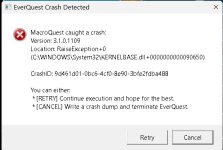
Try is a second time, but watch more carefully, session gets past the select server screen and silently crashes out when loading into zone (guild lobby in this case).
Other toons had no issue loading Guildlobby while running ISBoxer and MQ.
So, check crash dump files - nothing.
Unload MQ and ISBoxer, fire up toon - success. Log out again.
Load up MQ only, fire up toon - crashes on loading GuildLobby.
Logs for that session are here:
MacroQuest-20230210T185440.684547Z.log
Code:
D 2023-02-11 07:54:40.685736 [mq] Logging Initialized
I 2023-02-11 07:54:40.731895 [mq] Starting NamedPipeClient thread for \\.\pipe\mqpipe
I 2023-02-11 07:54:40.750202 [mq] Toggle console keybind: ctrl+`
D 2023-02-11 07:54:40.839532 [mq] Initializing module: FrameLimiter
D 2023-02-11 07:54:40.840993 [mq] Initializing module: DeveloperTools
D 2023-02-11 07:54:40.842983 [mq] Initializing module: Windows
D 2023-02-11 07:54:40.843512 [mq] Initializing module: ImGuiAPI
D 2023-02-11 07:54:40.843881 [mq] Initializing module: Spells
D 2023-02-11 07:54:40.843927 [mq] Initializing module: DataAPI
D 2023-02-11 07:54:40.844223 [mq] Initializing module: GroundSpawns
D 2023-02-11 07:54:40.844260 [mq] Initializing module: Spawns
D 2023-02-11 07:54:41.103440 [mq] Initializing module: Items
W 2023-02-11 07:54:41.279322 [mq] Tried to send a message with id 1004 on a null connection.
I 2023-02-11 07:54:43.600100 [mq] IDirect3DDevice9::EndScene: TestCooperativeLevel was successful, reacquiring device.
D 2023-02-11 07:54:43.600279 [mq] MQ2Overlay: InvalidateDeviceObjects
D 2023-02-11 07:54:43.600310 [mq] MQ2Overlay: CreateDeviceObjects
I 2023-02-11 07:55:42.969872 [mq] IDirect3DDevice9::Reset hook: device instance is the acquired device.
D 2023-02-11 07:55:42.969917 [mq] MQ2Overlay: InvalidateDeviceObjects
I 2023-02-11 07:55:51.322320 [mq] IDirect3DDevice9::EndScene: TestCooperativeLevel was successful, reacquiring device.
D 2023-02-11 07:55:51.322388 [mq] MQ2Overlay: CreateDeviceObjects
W 2023-02-11 07:55:59.430144 [mq] Tried to send a message with id 2002 on a null connection.
I 2023-02-11 07:55:59.433934 [mq] MQ2Overlay: Resetting overlay
D 2023-02-11 07:55:59.433961 [mq] MQ2Overlay: InvalidateDeviceObjects
I 2023-02-11 07:56:00.711839 [mq] IDirect3DDevice9::EndScene: TestCooperativeLevel was successful, reacquiring device.
D 2023-02-11 07:56:00.711939 [mq] MQ2Overlay: InvalidateDeviceObjects
D 2023-02-11 07:56:00.711953 [mq] MQ2Overlay: CreateDeviceObjects
I 2023-02-11 07:56:26.442192 [mq] MQ2Overlay: Resetting overlay
D 2023-02-11 07:56:26.442221 [mq] MQ2Overlay: InvalidateDeviceObjects
Also noticed this log with tha same timestamp:
MQ2Nav.log
Code:
I 2023-02-11 07:56:26.440988 [MQ2Nav] gSuccessfully loaded mesh for mguildlobbyx (C:\agent\_work\1\s\plugins\MQ2Nav\plugin\NavMeshLoader.cpp:80)
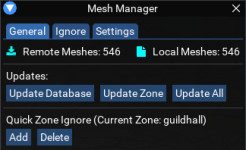
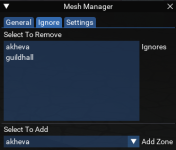
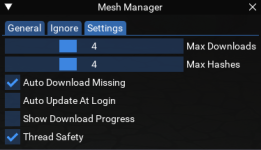
While typing this I realised that I have set up on this toon only last night MQ2MeshManager
With settings:
Code:
/mesh set missing on
/mesh set autoupdate on
/mesh set threadsafety on
To confirm its the MQ2MeshManager, just remove the dll from the
..\MacroQuest\Release\plugins folder?




 This is a very new plugin. It will be a great one, once all is ironed out. When you are amogst the first using a new tool, you should be prepared that there will be some hickups at start.