Well, Mage isn't using clickies it summons, won't blast, the only thing it WILL do is go pull a mob, Malo it, and sic the pet. I have ALL spells at lvl 130 variants, I'm a bit of a completionist when it comes to that, lol. It was seeming to work fine at 129 once I hit 130 though it just completely seemed to break.Lol.
Well I'm not sure what your issue is, but that is simply not the case. All the plugins have been updated for 130 for months.
Make sure you're not invis
(And certainly make sure you're not using the new eq UI engine)

-
 Hail, we're RedGuides. We want you to play six (yes, 6!) EverQuest characters at once. We have scripts and a friendly community to help, please join our playstyle and say hello! 👋
You are using an out of date browser. It may not display this or other websites correctly.
You should upgrade or use an alternative browser.
You should upgrade or use an alternative browser.

Plugin - MQ2Mage (1 Viewer) 3.1.52471.42
- Thread starter ChatWithThisName
- Start date

well, we're not really communicating hereWell, Mage isn't using clickies it summons, won't blast, the only thing it WILL do is go pull a mob, Malo it, and sic the pet. I have ALL spells at lvl 130 variants, I'm a bit of a completionist when it comes to that, lol. It was seeming to work fine at 129 once I hit 130 though it just completely seemed to break.
you said it doesn't have any spells or anyting post 125 - I'm telling you it does
you are now saying it does "use" them or something? I guess?
Please check out the "how to ask for help"
did you accidentally change your campradius to something really small?
at the very least please give a screensnip of your settings
Well, without being able to look under the hood, the only thing I can see that could be an issue is that I am fighting mobs that con 122 at level 130, I am currently in Laurion's Inn of the LS expansion, I know it's older content, but I don't have to be hassled by the fact 2 of my crew don't have Bane for the ToB debuff. I am fighting the Mephits and Elementals there, they con light blue at lvl 130. So maybe it is just the fact that I am not fighting at least dark blue cons?Well, Mage isn't using clickies it summons, won't blast, the only thing it WILL do is go pull a mob, Malo it, and sic the pet. I have ALL spells at lvl 130 variants, I'm a bit of a completionist when it comes to that, lol. It was seeming to work fine at 129 once I hit 130 though it just completely seemed to break.
no that's not a thing we don't care what you're fighting, grey, blue, purple, yellow, rainbow, clear, whateverWell, without being able to look under the hood, the only thing I can see that could be an issue is that I am fighting mobs that con 122 at level 130, I am currently in Laurion's Inn of the LS expansion, I know it's older content, but I don't have to be hassled by the fact 2 of my crew don't have Bane for the ToB debuff. I am fighting the Mephits and Elementals there, they con light blue at lvl 130. So maybe it is just the fact that I am not fighting at least dark blue cons?
please help me help you
Highest Chaotic line it would cast is 126, highest bolt it would cast is 123 as far as I can tell.well, we're not really communicating here
you said it doesn't have any spells or anyting post 125 - I'm telling you it does
you are now saying it does "use" them or something? I guess?
Please check out the "how to ask for help"
did you accidentally change your campradius to something really small?
at the very least please give a screensnip of your settings
no that's not a thing we don't care what you're fighting, grey, blue, purple, yellow, rainbow, clear, whatever
please help me help you
Please snip me your settings panels
please snip me your spells tab that says what spells we recognize
please confirm you are not using the new ui engine
Settings I have. Spell line up I have.Highest Chaotic line it would cast is 126, highest bolt it would cast is 123 as far as I can tell.
Attachments
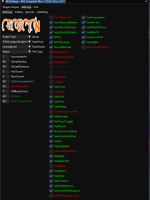
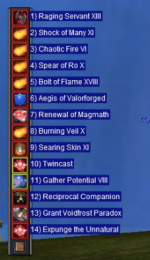

so firstly you have byos/byos-custom turned on
please do the following:
- uncheck byos
then please go to your spells & discs tab and snip me that (which is what i requested)
then, please take your "assist at 1 health" and change that to "100"
100% you are not casting spells because you have told the plugin not to engage with your spells until the mob is at 1% health or lower
Requested Snips. And I am not using New UI Engine,.Please snip me your settings panels
please snip me your spells tab that says what spells we recognize
please confirm you are not using the new ui engine
Attachments
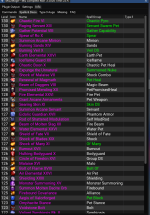
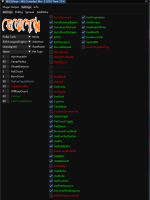
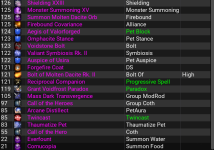
Requested Snips. And I am not using New UI Engine,.
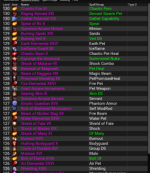
so you can see we want to use the 125-130 spells as indicated here
please:
- turn off byos
- adjust your assist at from "1" to "100"
View attachment 75954
so firstly you have byos/byos-custom turned on
please do the following:
- uncheck byos
then please go to your spells & discs tab and snip me that (which is what i requested)
then, please take your "assist at 1 health" and change that to "100"
100% you are not casting spells because you have told the plugin not to engage with your spells until the mob is at 1% hea
Alright set Assist to 100% Running test.View attachment 75958
so you can see we want to use the 125-130 spells as indicated here
please:
- turn off byos
- adjust your assist at from "1" to "100"
Okay. Well. Haha, I feel a little stupid, Mage is now working as intended it seems. I guess that Assist at 1 was the issue, not even sure how that happened. I guess maybe I was in the middle of changing it from like 98 to 100 or something and it probably went to rebuff and stole the input or something. Only thing there I can think of, or maybe I was just so tired at one point I hit 1 instead of 100.
Thank you so much for being patient with me to identify the issue. MUCH love for also being quick about your responses. I will say this, very few people who do stuff like this personally respond and give such great support! 100% recommend to anyone using MQ2 in the future.View attachment 75958
so you can see we want to use the 125-130 spells as indicated here
please:
- turn off byos
- adjust your assist at from "1" to "100"

woot! you're welcomeThank you so much for being patient with me to identify the issue. MUCH love for also being quick about your responses.
happy hunting dude

Mine currently has Searing Skin XI loaded in slot 9.which spell is usually in slot 9? my lvl 130 mage in assist/chase mode is leaving it empty for some reason
yes, depending on what things you toggle on/off this is possible.which spell is usually in slot 9? my lvl 130 mage in assist/chase mode is leaving it empty for some reason
you've posted in a couple of places - some folks have this idea that "empty gem means bad things" which is not necessarily the case - some classes don't have something usable to slap in a slot if they're choosing not to do other stuff.
some folks like the flexibility it offers to turn something off and then having a "flex gem" so they dont have to byos/byos-custom (pre-gem 14 that is).
but yeah if you turn off the defaulted on "UseSkinDS" then we don't put skin ds in gem 9, and it remains empty

diazepam
Well-known member
yeah i didn't mean to spam, but i just didn't remember them ever being empty before today and was wondering if i had something going on with my pluginyes, depending on what things you toggle on/off this is possible.
you've posted in a couple of places - some folks have this idea that "empty gem means bad things" which is not necessarily the case - some classes don't have something usable to slap in a slot if they're choosing not to do other stuff.
some folks like the flexibility it offers to turn something off and then having a "flex gem" so they dont have to byos/byos-custom (pre-gem 14 that is).
but yeah if you turn off the defaulted on "UseSkinDS" then we don't put skin ds in gem 9, and it remains empty


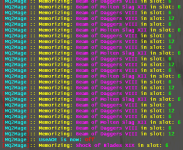
thanks let me take a lookRan into a something a little silly today when I turned enabled useaoe. They both really wanted to be in slot 6
View attachment 76235

- Commits
- 191
- Seller
- #2,221
ChatWithThisName updated MQ2Mage with a new update entry:
03/20/2026
Read the rest of this update entry...
03/20/2026
- fixed issue with spell memorization fight
- - Thanks gohast
Read the rest of this update entry...
I have the main plugin window and, it has some cwtn pop up window overlayed on it and. I can now not move them and they are glitched out. The windows keep flashing and cannot move them just purchased this plugin mage plugin. Tried to find command to close that pop up window with no luck frustrating problem lol.
sorry about that - there were some permission issues with the cwtn section - but i got that fixed and moved your post there since you're asking about the cwtn window for mage (realisticly this is actually a general imgui question) that that is totally alright.
it sounds like you docked your imgui windows
you can grab the little arrow in the left and drag it off to undock

you can also always do a
I encourage you to go to your /mqsettings and click "Require Shift to Dock" as that'll help prevent accidental docking
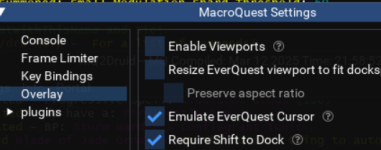
it sounds like you docked your imgui windows
you can grab the little arrow in the left and drag it off to undock
you can also always do a
/mqoverlay reload to completely reset all your imgui windows to default settings and locationsI encourage you to go to your /mqsettings and click "Require Shift to Dock" as that'll help prevent accidental docking
Saulty_Dawg1992
Member
Not sure if this has been asked elsewhere or not, but I cannot find it.
When MQ2Mage is in "Tank" mode, it snaps to face the target. Is there a way to stop that from happening?
Thanks in advance
When MQ2Mage is in "Tank" mode, it snaps to face the target. Is there a way to stop that from happening?
Thanks in advance
Saulty_Dawg1992
Member
Just stop snapping to a target to face it when it gets into camp.Don't think so but it's kind of like asking if there's a way to stop your car from moving when you put it in drive.
What are you trying to get it to do?
No. We're not going to stop doing thatJust stop snapping to a target to face it when it gets into camp.
Saulty_Dawg1992
Member
Roger that. tyNo. We're not going to stop doing that


Hello All,
This is likely the wrong place to post this question, so apologies in advance. I have an active CWTN licence for my mage until 2027. I downloaded the plugin (again) and I am watching it. When I autoload my group I can’t get the mage plugin to load. Tried /plugin mq2mage load and I get this:
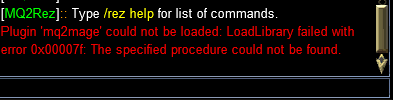
Appreciate your help in what I need to do next.
This is likely the wrong place to post this question, so apologies in advance. I have an active CWTN licence for my mage until 2027. I downloaded the plugin (again) and I am watching it. When I autoload my group I can’t get the mage plugin to load. Tried /plugin mq2mage load and I get this:
Appreciate your help in what I need to do next.
Saulty_Dawg1992
Member
Repatch RedfetchHello All,
This is likely the wrong place to post this question, so apologies in advance. I have an active CWTN licence for my mage until 2027. I downloaded the plugin (again) and I am watching it. When I autoload my group I can’t get the mage plugin to load. Tried /plugin mq2mage load and I get this:
View attachment 76523
Appreciate your help in what I need to do next.
you are running 3783 for mq, and downloaded 3783 for mq2mage.Hello All,
This is likely the wrong place to post this question, so apologies in advance. I have an active CWTN licence for my mage until 2027. I downloaded the plugin (again) and I am watching it. When I autoload my group I can’t get the mage plugin to load. Tried /plugin mq2mage load and I get this:
View attachment 76523
Appreciate your help in what I need to do next.
i'd double check you don't have antivirus false positive and holding mq2mage hostage.
I already gave you the only real possibility - other than if you were moving around old files manually :pHey Sic.
SK, cleric, and chanter CWTN plugins work fine. Not sure why it would pick on mage and bard plugins.
So start there.
Antivirus sometimes false positive flags mq because it *is* hacking software afterall
- Commits
- 191
- Seller
- #2,235
This suggests it can't find the file.Hey Sic.
SK, cleric, and chanter CWTN plugins work fine. Not sure why it would pick on mage and bard plugins.
If the file is with all the rest of the plugins and is definitely present then delete it and rerun patcher. Sometimes a download gets corrupted and that is the fix.
Best to log out, close EQ and MQ entirely when trying this.
Please let us know if any suggestions fix your issue so we don't send a search party.
hell yeah dude! hope you have a happy holiday weekend (if you and yours celebrate any of them)Worked like a dream. Thanks Sic and Chat!
> Please read my short summary on changes here <Hey Sic, not sure if this was mentioned earlier but I cannot purchase this script, any reason for this?
Users who are viewing this thread
Total: 2 (members: 0, guests: 2)
Share: