• You've discovered RedGuides, an EverQuest multi-boxing and scripting community 🧙‍♀️⚙️. We want you to play several EQ characters at once, come join us and say hello! 👋

  • A TLP without truebox has thawed (Very Vanilla ready)
    Frostreaver
MQ2GroupInfo

Release MQ2GroupInfo

Hey all, I have a question about "Mimic". I'm trying to get away from all thing EQBCS and only use Dannet. So I closed out EQBCS last night and found my Mimic button didn't work.

So, my question is (prolly something simple) how do I integrate the Mimic button with Dannet so as not to have it using EQBCS? Or is it even possible?

Also, ideas for other Dannet uses over EQBCS would be cool.


Thanks all,

BB~
The default now is actually dannet.

If you don't want to edit your mq2groupinfo.ininyou could delete it and let the plugin remake it
 
Re-reading through the post I found this -

Code:
/noparse /dgge /docommand /timed ${Math.Rand[20,80]} /say


I'm wondering if this creates a random delay for EACH toon that is using the Mimic or does it create a single random delay and all the other toons mimic /say at the same time? If that is the case is there a way to make the random /say different for each toon?

And curious whats the difference, if any, between the command /timed and /delay in the above line.


Thanks guys,

BB~
 
Re-reading through the post I found this -

Code:
/noparse /dgge /docommand /timed ${Math.Rand[20,80]} /say


I'm wondering if this creates a random delay for EACH toon that is using the Mimic or does it create a single random delay and all the other toons mimic /say at the same time? If that is the case is there a way to make the random /say different for each toon?

And curious whats the difference, if any, between the command /timed and /delay in the above line.


Thanks guys,

BB~
Syntax/delay <#>[s | m] [<condition to end early>]
DescriptionWhen used in a macro, fully pauses the macro for the amount of time specified, or until condition is met.
Time can be specified in 10ths of a second (a number by itself) or in seconds (number followed by an "s") or minutes (number followed by "m").


Syntax/timed <#> <command>
DescriptionExecutes command after a specified duration, given in deciseconds.

Notes[edit]​

  • This does not pause successive commands.


Delay is stop until something happens (just stops your script not necessarily other MQ things.

Timed is do this after this time, while doing other things.
 
Re-reading through the post I found this -

Code:
/noparse /dgge /docommand /timed ${Math.Rand[20,80]} /say


I'm wondering if this creates a random delay for EACH toon that is using the Mimic or does it create a single random delay and all the other toons mimic /say at the same time? If that is the case is there a way to make the random /say different for each toon?

And curious whats the difference, if any, between the command /timed and /delay in the above line.


Thanks guys,

BB~
I use that math.rand and since it is a /noparse in the beginning it makes every toon using the /say at a different random between 2 and 8 seconds
 
So i'm another returning player and hoping somebody can help me. I use a self modded version of delta x with a fixed size group window and no border/title bars. I've made hotkeys to perform all the functions of groupinfo as i do not want the buttons in my group window. I can disable the buttons and they do vanish as advertised. My issue is that my group window changes to resizable with accompaning bottom and side bars which i don't want to be there. My biggest heartbreak about abadoning groupinfo would be the lose of mimic. Thx in advance!
 
Hi Folks,

Got 6 toons loaded with the best plugins from CWTN and Sic so all cool except my main toon doesnt have the member distance in green writing like the others - telling how far they are etc.

Did a basic check to see what I'm missing but cant see it - anyone can help here - learnt long ago its faster to ask folks that know than trying to work it out myself lol

Thanks and Seasons greets to all
 
Wrong forum
Since the patch came live, i lost the follow/Mimic/Come to me under group window in UI. Anyone know the commands to make my own untill fixed?
 
Is mq2groupinfo loaded
Are you in a group?

Does your UI support it?
- are you using the old UI engine (this should be yes)

They did change the group window to the new UI, so you'll want to make sure you're not on the new UI engine
 
Wrong forum
Sooo I have to ask a dumb question, how do I get my Follow ME, Mimic ME and Come to Me buttons back? They disappeared after patch. Everything says to unload/load mqgroupinfo but that didn't work. Sorry to bother.
 
I had a similar thing happen. Somehow, the “Use New UI Engine” box got checked for me after patch. Go to EQ options, and uncheck it in graphics/display tab. Re-log and it will be fixed.
 
Wrong forum
Hello,

I am missing the "follow me" and "Come to me" buttons below the group window.

This was working before the 3-13-2026 patch. I can see the toons connected in the EQBCS window.

Thanks
 
that would be the groupinfo pluguin, make sure its loaded with /plugin groupinfo

then use the /groupinfo command to ensure they are turned on
 
Wrong forum
I've just returned after a bit of a break and it was driving me crazy that I couldn't remember where the buttons were for these that were always there by detault. After a bit of searching i've realised that they were usually on the group window, however none of them appear there now.

Anyone have some advice on where/why they disappeared and how to get them back!
 
that would be the groupinfo pluguin, make sure its loaded with /plugin groupinfo

then use the /groupinfo command to ensure they are turned on
Interesting, the commands work, buttons still missing, I can create a macro and get it to work like that. Thanks for the help
 
I've just returned after a bit of a break and it was driving me crazy that I couldn't remember where the buttons were for these that were always there by detault. After a bit of searching i've realised that they were usually on the group window, however none of them appear there now.

Anyone have some advice on where/why they disappeared and how to get them back!
I could swear there was another post about this a few minutes ago? MQ2GroupInfo.
 
Interesting, the commands work, buttons still missing, I can create a macro and get it to work like that. Thanks for the help
Turn off the new UI.

 
I've just tried this, it's already loaded but still no buttons visible!
Turn off the new UI

 
Turn off the new UI

You are my hero, not even joking, this was driving me round the bend :)
 
Wrong forum
Hi,
Since latest patch my follow / come to me buttons are missing from group window. Any idea why?
 
Wrong forum
hi all cant seem to get these buttons to appear. anyone know what i need to do, tried reinstalling and still not working
 
hi thanks, i just tried adding it restarted eq and still no buttons. anything else that might cause it? amazing how useful they are and how bad you miss them when they are gone lol
 
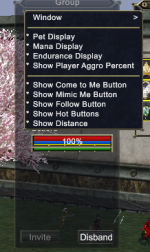
Returning player following your set up guide to get up and rolling again. I get to step 7 and having issues with MQ2GroupInfo not displaying the new hotkeys. The plugin is loaded as i can type /groupinfo cometome and they all do just that. I've reloaded the game, checked the ini, when I right click in the group window it shows the 'show' options as enabled. I have no idea where these buttons went off too tho. This is a fresh install of everything using redfetch to install.

1774132111381.png
 
Returning player following your set up guide to get up and rolling again. I get to step 7 and having issues with MQ2GroupInfo not displaying the new hotkeys. The plugin is loaded as i can type /groupinfo cometome and they all do just that. I've reloaded the game, checked the ini, when I right click in the group window it shows the 'show' options as enabled. I have no idea where these buttons went off too tho. This is a fresh install of everything using redfetch to install.

View attachment 76261
Disable the New UI option in your eq settings
 
Release MQ2GroupInfo

Users who are viewing this thread

Back
Top
Cart