• You've discovered RedGuides, an EverQuest multi-boxing and scripting community 🧙‍♀️⚙️. We want you to play several EQ characters at once, come join us and say hello! 👋

  • A TLP without truebox has thawed (Very Vanilla ready)
    Frostreaver
MQ2GroundSpawns

Release MQ2GroundSpawns

Long-time listener, first-time caller.
Since event shinies are not labelled as "Glowing Orb," is there a method to autocollect them like "/ground active on" works? Each spawn has a random sequence at the end of its name, so they can't be collected with a specific name command. Or can they?
I hope this question makes sense.
Each resource on RG has an Overview / Discussion Thread and either a link to their wiki or tabs with FAQ, Commands, Etc.
Please make sure to post in the respective discussion thread, and check the FAQ/Commands/Wiki for information before posting.


2 posts up in this thread someone asked a similar question.

if you check the link above you'll see it
 
You're right, i should have deleted the message instead of saying disregard. :)
I asked a question I then saw someone else ask in another way that still answered my question overall which was "you don't support it, and wont" so I just edited and deleted.
 
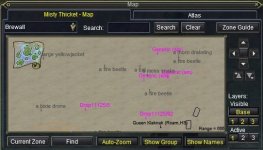
Q. Some items are weird names, like Drop11125/123?
A. you can just /ground add 11125 and it would find any of the weird entries for "Drop11125/123"

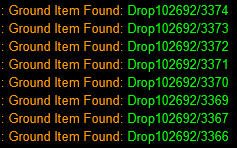
The new items in Grater Fay are called Drop102692, I tried "/ground add 102692" and "/ground add drop102692" but only "/ground add 102692/3369" would work.
 

Attachments

  • Screenshot 2024-03-03 221445.png
    Screenshot 2024-03-03 221445.png
    5.3 KB · Views: 0
only "/ground add 102692/3369" would work.
that's not how it works tho.

it is "/ground add 102692"

for it to work in your screenshot you would have had to have added

"/ground add 102692/3374"
"/ground add 102692/3373"
"/ground add 102692/3371"
"/ground add 102692/3370"
"/ground add 102692/3369"
"/ground add 102692/3367"
"/ground add 102692/3368"

since you have 3367 and 3366, and said you added /3368, it leads me to believe the "/ground add 102692" worked
 
Q. Some items are weird names, like Drop11125/123?
A. you can just /ground add 11125 and it would find any of the weird entries for "Drop11125/123"

The new items in Grater Fay are called Drop102692, I tried "/ground add 102692" and "/ground add drop102692" but only "/ground add 102692/3369" would work.
based on your screenshot, it seems that you adding /ground add 102692 works as intended since it's listing them all.
We parse the information to remove "drop" and cut off the end starting with the "/" so as to only look at the initial number. Which is the ID for the ground item, removing the need to type "drop" or add each copy of it with the /#
Which the item in question appears to continue to follow the designed convention of Drop#/#, so it should parse the information the same as all the other drops that appear the same way.
 
Not sure why it wasn't working last night but after restarting and updating "/ground add 102692" is working, Thanks team. make sure its in local only, as Starhack notes it can't be in the global list.
 
Not sure why it wasn't working last night but after restarting and updating "/ground add 102692" is working, Thanks team. make sure its in local only, as Starhack notes it can't be in the global list.
So others know - I was having same issue in GFay. Had to remove it from global and make it zone only. Then it worked fine.
Yes, based on the code that is correct. I've not encountered a global item that doesn't have a name. If you have, please lemme know and the logic can be adjusted. I suppose a note should be made about that in the FAQ to ensure users are doing it for grounditem ids that only exist in the zone, that it should go into the local.

Edit: I've noted that you should not use addglobal, even though the answer provided doesn't use addglobal, just to be sure it wasn't mistaken as either/or for brevity.
 
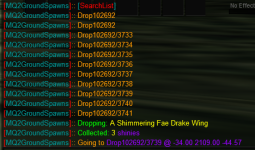
Ok I use this plugin all the time for expansion collections. I have had the hardest time trying to figure out how to do the new monthly ones.

1710012734957.png

I have tried the remove drop102692 from global.
I have tried adding it to local
only time it works is when I add the number after / as well
 
Wrong forum
Not sure what I'm doing wrong. I've used it before, but it's been a while and it always worked picking up globes. I just tried using it today and it only sometimes works. The toon usually just sits there even if he next to a globe, other times he'll nav and pick up. I don't see the Nav arrows anymore like I did before. What can I check to get this to work right?
 
Each resource on RG has an Overview / Discussion Thread and either a link to their wiki or tabs with FAQ, Commands, Etc.
Please make sure to post in the respective discussion thread, and check the FAQ/Commands/Wiki for information before posting.

.
 
I'm currently playing on EMU, and this plugin is missing on my VV EMU - literally not in the plugins folder.

Current Build / Release date of my VV EMU is 28/05/24 (or 05/28/24 for those in the USA).

Having read through the discussion here, the FAQ and the instructions it appears I need to patch the EMU client.
Is there a link to this standalone patch, or have I misunderstood?
 
I'm currently playing on EMU, and this plugin is missing on my VV EMU - literally not in the plugins folder.

Current Build / Release date of my VV EMU is 28/05/24 (or 05/28/24 for those in the USA).

Having read through the discussion here, the FAQ and the instructions it appears I need to patch the EMU client.
Is there a link to this standalone patch, or have I misunderstood?
It should be, so that's weird @Redbot thoughts?
 
It should be, so that's weird @Redbot thoughts?
We're not building any of the cwtn plugins at the moment, even though Sic and CWTN have had them ready for months! I'll work on getting emu caught up in the next couple months
 
We're not building any of the cwtn plugins at the moment, even though Sic and CWTN have had them ready for months! I'll work on getting emu caught up in the next couple months
Oh, bummer, news to me, I thought buffme and ground spawns were still in emu build
 
We're not building any of the cwtn plugins at the moment, even though Sic and CWTN have had them ready for months! I'll work on getting emu caught up in the next couple months
Looking forward to it.
Thank you Red and @Sic.
Glad it's in the pipeline.
 
Wrong forum
Did not see one in the directory, just did a mesh update. Do I need to build one and submit it or is that not a thing? TIA.

Edit: I just created a mesh, just in case and I am still having an issue, so I think it is with MQ2GroundSpawn, not the mesh.

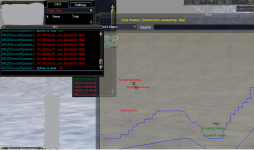
1721139118273.png

- E
 
so you originally said you didn't have a mesh, so i moved your post out of the "macro" area.

now you edited it to be a mq2groundspawn question.

please try and use the correct posting area with enough information to help you, because now not only am i trying to help you, but i'm playing whack-a-mole trying to move your post to the correct location and answering your question that is changing.

it doesnt' sound like you have a mesh.

does /nav reload say you have a mesh reloaded?

.
 
well that was an unfortunately long run for nothing :'(

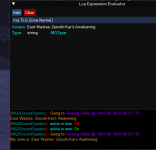
1721142535084.png

also, looks like the mesh is being sent

we send out the meshes from mqmesh.com
here are the rof meshes, which includes
755East Wastes: Zeixshi-Kar's AwakeningeastwastesshardROF
 
well that was an unfortunately long run for nothing :'(

View attachment 63290

also, looks like the mesh is being sent

we send out the meshes from mqmesh.com
here are the rof meshes, which includes
755East Wastes: Zeixshi-Kar's AwakeningeastwastesshardROF
Sorry, sic, I was not trying to send you on a goose chase.

I went back to the zone, did /nav reload and it replied:
Successfully loaded mesh for eastwastesshard.
At that point, I did /ground active on and it started working, which it did not before (as shown on screen shot above). I have no idea if I just needed to zone out or what.

In the future, I will create a new post if I make it further into figuring out what the issue is to prevent needing to move posts around. I have run a discussion forum many moons ago (nothing this size) and don't want to make your job any more difficult than it already is. Thank you for the assist and thank you for all the work you put in on the site, MQ and the plugins.

- E
 
Is it possible to set a radius for picking up ground spawns? id like my support guys to pick up stuff in the camp area I'm keeping clear of mobs, but not run across the zone.
 
Is it possible to set a radius for picking up ground spawns? id like my support guys to pick up stuff in the camp area I'm keeping clear of mobs, but not run across the zone.
Not with how it is currently built.

You can turn it on/off, add/remove global/local spawns, list spawns, reset counters/invalids.

Either this would need to be updated, another Lua built, or a module added automation.
 
Is it possible to set a radius for picking up ground spawns? id like my support guys to pick up stuff in the camp area I'm keeping clear of mobs, but not run across the zone.
Nah, but something worth considering
 
Is there a way to avoid /run on while using this plugin?

The newest collection zone for the 25th anniversary stuff is Velk's Lab! I've found the better way to navigate the icy patches is to remove all run speed buffs and /run off!

But something keeps turning Run speed back on! I'm not using any automation other than MQ2GroundSpawns and of course MQ2Nav to get around. If my characters walk at all times they do not slip off the icy paths. Of course I remove bard, druid, and shaman speed buffs but something keeps turning /run back on.

Again, I have zero combat automation running and a very basic load of plugins. I can't figure out which plugin keeps turning run speed back on. Anyone have an idea?
 
Is there a way to avoid /run on while using this plugin?

The newest collection zone for the 25th anniversary stuff is Velk's Lab! I've found the better way to navigate the icy patches is to remove all run speed buffs and /run off!

But something keeps turning Run speed back on! I'm not using any automation other than MQ2GroundSpawns and of course MQ2Nav to get around. If my characters walk at all times they do not slip off the icy paths. Of course I remove bard, druid, and shaman speed buffs but something keeps turning /run back on.

Again, I have zero combat automation running and a very basic load of plugins. I can't figure out which plugin keeps turning run speed back on. Anyone have an idea?
mq2groundspawns isn't doing anything like that specifically.
 
Is there a way to avoid /run on while using this plugin?

The newest collection zone for the 25th anniversary stuff is Velk's Lab! I've found the better way to navigate the icy patches is to remove all run speed buffs and /run off!

But something keeps turning Run speed back on! I'm not using any automation other than MQ2GroundSpawns and of course MQ2Nav to get around. If my characters walk at all times they do not slip off the icy paths. Of course I remove bard, druid, and shaman speed buffs but something keeps turning /run back on.

Again, I have zero combat automation running and a very basic load of plugins. I can't figure out which plugin keeps turning run speed back on. Anyone have an idea?
I have not had a chance to run it yet and grab some new collections, but this may help, you'll have to try it:
 
by any chance is there a mq2 that searches for ground spawns that req opening like silverspun petals in goru'kar mesa. (they are part of the Charm of Lore). you have to go to many places and open items (or mobs as they are described in ala) and u get the item, which in this case is a Sparkling Windwillow Leaf. i was hoping to use something like mq2groundspawn to do that. enter the zone do a ground spawns then go active and it goes and grabs it for me with my rogue.

Edit: just realized that misty acorn is coming up as Drop11125/## is this due to some plugin i have or is that something eq did. the reason i ask is because i have to constantly add the new number for every time a new one appears and i can not just sit and let it run around collecting acorns

misty acorn now Drop11125.jpg
 
Last edited:
by any chance is there a mq2 that searches for ground spawns that req opening like silverspun petals in goru'kar mesa. (they are part of the Charm of Lore). you have to go to many places and open items (or mobs as they are described in ala) and u get the item, which in this case is a Sparkling Windwillow Leaf. i was hoping to use something like mq2groundspawn to do that. enter the zone do a ground spawns then go active and it goes and grabs it for me with my rogue.

Edit: just realized that misty acorn is coming up as Drop11125/## is this due to some plugin i have or is that something eq did. the reason i ask is because i have to constantly add the new number for every time a new one appears and i can not just sit and let it run around collecting acorns

View attachment 66378
Please read the faq

We've handled those types of spawns since dbg put them in, in 2021


- you can now "/ground spawns" to list all the ground spawns in the zone.
-- this makes it easier to identify what the ground spawns are called for purposes of adding it to your local/global list.
-- example: in Steamfont the ground spawns that you want to collect are called "Rock"

- accept number only entries
-- Users had an issue where misty thicket acorns no longer showed up as *Green Leaf, added an option for number only entries where Drop11125/123 would allow /ground add 11125, removing the Drop and information following the '/' so that you didn't need to try and add a million entries.
 
Anyway to allow this plugin to use avoid area on the mesh? Like the big DT area ToB?
 
Anyway to allow this plugin to use avoid area on the mesh? Like the big DT area ToB?
It uses the mess that you have.

So you would need to edit your mesh that instead of a big avoid it is a can't navigate.

The reason the mesh itself is avoid and not can't navigate is because if you get in it accidentally you can navigate out of it but if it was a no navigation then you wouldn't be able to get out of it

But this brings up an awesome point of a "don't go in this, but you can get out" mesh area would be pretty amazing
 
We're not building any of the cwtn plugins at the moment, even though Sic and CWTN have had them ready for months! I'll work on getting emu caught up in the next couple months
For Redbot and @Sic , just wondering about any potential update on this, thank you muchly:
Naturesong said:
I'm currently playing on EMU, and this plugin is missing on my VV EMU - literally not in the plugins folder.
 
Release MQ2GroundSpawns

Users who are viewing this thread

Back
Top
Cart