
-
 Hail, we're RedGuides. We want you to play six (yes, 6!) EverQuest characters at once. We have scripts and a friendly community to help, please join our playstyle and say hello! 👋
You are using an out of date browser. It may not display this or other websites correctly.
You should upgrade or use an alternative browser.
You should upgrade or use an alternative browser.

Release MQ2EQBC
- Thread starter Teichou
- Start date

Duh. brain fart. Been away a little while too and just coming back. That worked. Thank you!sounds like the plugin is not loaded
/plugin MQ2eqbcs load

I notice that you said yo changed nothing. but when you re-installed windows did it give your computer the same IP address as the one it had before you re-installed. as the message that you got is one I have gotten before when I have done similar and forgotten to re-set my pcs IPs to they had before. Just a thought.Not sure where to start because I've never had an issue with EQBCS. All my toons are on the same PC. BCS is running and all toons are connected. However, commands are broken. /bct and the like do not work. Making it about impossible to control my group. I changed nothing so I'm not sure how to fix this. I've restarted my PC and router, made sure the plugin is running and toons are connected. Not much else I can do.

Smith8454
SUSPENDED
Community,
Not working;
Line1=/Bcga //HB2_keypress1
Line2=/Bcga //HB2_Keypress2
Line3=/Bcga //HB2_Keypress3
Line4=/Bcga //HB2_Keypress4
Line5=/Bcga //HB2_Keypress5
Want to keypress buttons from Hotbar 2
Working; Hotbar 1
/bcga //keypress 5 (burn)
/Bcga //keypress 7 (burn)
/Bcga //keypress 9 (burn)
Not working;
Line1=/Bcga //HB2_keypress1
Line2=/Bcga //HB2_Keypress2
Line3=/Bcga //HB2_Keypress3
Line4=/Bcga //HB2_Keypress4
Line5=/Bcga //HB2_Keypress5
Want to keypress buttons from Hotbar 2
Working; Hotbar 1
/bcga //keypress 5 (burn)
/Bcga //keypress 7 (burn)
/Bcga //keypress 9 (burn)

Isn't there a hotley to switch hotbar pages? You should be able to do something to broadcast the shift+2, then the 2, then probably shift + 1 to reset back to the hotbar 1 page 1Community,
Not working;
Line1=/Bcga //HB2_keypress1
Line2=/Bcga //HB2_Keypress2
Line3=/Bcga //HB2_Keypress3
Line4=/Bcga //HB2_Keypress4
Line5=/Bcga //HB2_Keypress5
Want to keypress buttons from Hotbar 2
Working; Hotbar 1
/bcga //keypress 5 (burn)
/Bcga //keypress 7 (burn)
/Bcga //keypress 9 (burn)
I did not see any default keypresses for activating hotbar2's buttons, but you can set that on your character in the options I am sure.
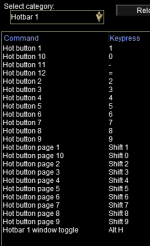
Smith8454
SUSPENDED
HUH !!!!Isn't there a hotley to switch hotbar pages? You should be able to do something to broadcast the shift+2, then the 2, then probably shift + 1 to reset back to the hotbar 1 page 1
I did not see any default keypresses for activating hotbar2's buttons, but you can set that on your character in the options I am sure.
View attachment 66102
NOT SURE WHAT U MEAN
DID NOT WANT TO SWITCH IN THE MIDDLE OF BATTLE
.
It is 2024.
Please watch your all caps usage.HUH !!!!
NOT SURE WHAT U MEAN
DID NOT WANT TO SWITCH IN THE MIDDLE OF BATTLE
It is 2024.
Do alt+o to open the EQ options page, then there is a dropdown for hotbuttons. You can assign a keypress assignment to each hotkey in that window, then use that keypress combination to send the commands.HUH !!!!
NOT SURE WHAT U MEAN
DID NOT WANT TO SWITCH IN THE MIDDLE OF BATTLE
Smith8454
SUSPENDED
I know that the above command is a hotkey. If pressed, it is supposed to fire all the hot buttons simultaneously, but I don't think it works correctly. I am getting an ERROR message; /I couldn't parse
Line1//HB2_keypress1
Line2=/Bcga //HB2_Keypress2
Line3=/Bcga //HB2_Keypress3
Line4=/Bcga //HB2_Keypress4
Line5=/Bcga //HB2_Keypress5
Line1//HB2_keypress1
Line2=/Bcga //HB2_Keypress2
Line3=/Bcga //HB2_Keypress3
Line4=/Bcga //HB2_Keypress4
Line5=/Bcga //HB2_Keypress5

craigabot4
Member
i dont use bcga , never got it to work right idk maybe im dum lol. i use /bca for all but me /bcaa all and me /bct Name //keypress 1 . always worked for me hope this helps.
those are wrong think itsd something like HB2_2 this is indicating that you want to keypress hotbutton sets 2 and the 2nd assignmentI know that the above command is a hotkey. If pressed, it is supposed to fire all the hot buttons simultaneously, but I don't think it works correctly. I am getting an ERROR message; /I couldn't parse
Line1//HB2_keypress1
Line2=/Bcga //HB2_Keypress2
Line3=/Bcga //HB2_Keypress3
Line4=/Bcga //HB2_Keypress4
Line5=/Bcga //HB2_Keypress5
i want to see if there is a command i can type for all my mages connected to my /mac kissassist to all cast gem 1 or all use a certain AA at the same time all i am able to get to work is /bct magename //cast 1 to work but only works for 1 mage i want to know commands to talk to multiple classes at same time if possible thank you

Sounds like you got some mages all connected to EQBC running kiss and want to make a button to send a command to all the mages.
Take a look at this wiki. https://www.redguides.com/docs/projects/mq2eqbc/ for more details but to send all one aa would be something like: /BCAA //alt activate 559 or whatever the id is for the aa you are trying to use.
Alternatively using dannet https://www.redguides.com/docs/projects/mq2dannet/ would be something like /dgga /alt activate 559.
Also check out buttonmaster https://www.redguides.com/community/resources/button-master.2174/field?field=faq
great for holding all the hotkeys you will make
and
Sic's hot key guide https://www.redguides.com/community/threads/sics-hotkeys.69365/
for ideas and keys you need to make.
This will get you where you want to go.
Take a look at this wiki. https://www.redguides.com/docs/projects/mq2eqbc/ for more details but to send all one aa would be something like: /BCAA //alt activate 559 or whatever the id is for the aa you are trying to use.
Alternatively using dannet https://www.redguides.com/docs/projects/mq2dannet/ would be something like /dgga /alt activate 559.
Also check out buttonmaster https://www.redguides.com/community/resources/button-master.2174/field?field=faq
great for holding all the hotkeys you will make
and
Sic's hot key guide https://www.redguides.com/community/threads/sics-hotkeys.69365/
for ideas and keys you need to make.
This will get you where you want to go.

Knightly updated MQ2EQBC with a new update entry:
03/22/2025
Read the rest of this update entry...
03/22/2025
Read the rest of this update entry...
Wrong forum
Hello guys,
I am following the guides to install the program and seen to be stuck when it tells me to run EQBS for the first time. When I click start it give me "EQBCS (EQ Box Chat Server) 1.9 Waiting for connections on port 2112... I have turned off my NordVPN and tried to give the EQBCS admin access but not seeing all the info the guides show. Is there something I am leaving out? the debug console shows... Thanks in advance
[2025-06-27 06:49:18.371] [MQ] [info] [MacroQuest.cpp:167] Console opened, only showing 20 most recent messages...
[2025-06-26 19:26:58.711] [MQ] [debug] [NamedPipes.cpp:235] Created PipeConnection: connectionId=14 pid=13796
[2025-06-26 19:26:58.711] [MQ] [info] [PostOffice.cpp:131] Got identification from 13796
[2025-06-26 19:28:07.310] [MQ] [debug] [NamedPipes.cpp:335] PipeConnection::HandleReadComplete: pipe closed. connectionId=14
[2025-06-26 19:28:07.310] [MQ] [debug] [NamedPipes.cpp:953] Closing connection. connectionId=14
[2025-06-26 19:28:07.310] [MQ] [debug] [NamedPipes.cpp:242] Destroyed PipeConnection: connectionId=14 pid=13796
[2025-06-26 19:28:07.310] [MQ] [info] [PostOffice.cpp:342] Disconnection detected, dropping ID from 13796
[2025-06-26 19:28:07.358] [MQ] [debug] [MacroQuest.cpp:1439] Process closed: 13796
[2025-06-26 20:30:40.504] [MQ] [info] [MacroQuest.cpp:1433] New process detected: 9392
[2025-06-26 20:30:40.515] [MQ] [info] [ProcessList.cpp:694] Requesting injection into process id 9392
[2025-06-26 20:30:40.515] [MQ] [debug] [ProcessList.cpp:913] Injecting MQ into eqgame.exe: pid=9392
[2025-06-26 20:30:40.542] [MQ] [debug] [ProcessList.cpp:973] eqgame.exe version: Jun 16 2025 11:09:03 pid=9392
[2025-06-26 20:30:40.554] [MQ] [info] [ProcessList.cpp:1045] Injection completed on process id 9392
[2025-06-26 20:30:43.652] [MQ] [debug] [NamedPipes.cpp:235] Created PipeConnection: connectionId=15 pid=9392
[2025-06-26 20:30:43.897] [MQ] [info] [PostOffice.cpp:131] Got identification from 9392
[2025-06-26 20:32:50.569] [MQ] [info] [PostOffice.cpp:131] Got identification from 9392
[2025-06-27 06:40:47.513] [MQ] [debug] [NamedPipes.cpp:335] PipeConnection::HandleReadComplete: pipe closed. connectionId=15
[2025-06-27 06:40:47.513] [MQ] [info] [PostOffice.cpp:342] Disconnection detected, dropping ID from 9392
[2025-06-27 06:40:47.513] [MQ] [debug] [NamedPipes.cpp:953] Closing connection. connectionId=15
[2025-06-27 06:40:47.513] [MQ] [debug] [NamedPipes.cpp:242] Destroyed PipeConnection: connectionId=15 pid=9392
[2025-06-27 06:40:47.569] [MQ] [debug] [MacroQuest.cpp:1439] Process closed: 9392
I am following the guides to install the program and seen to be stuck when it tells me to run EQBS for the first time. When I click start it give me "EQBCS (EQ Box Chat Server) 1.9 Waiting for connections on port 2112... I have turned off my NordVPN and tried to give the EQBCS admin access but not seeing all the info the guides show. Is there something I am leaving out? the debug console shows... Thanks in advance
[2025-06-27 06:49:18.371] [MQ] [info] [MacroQuest.cpp:167] Console opened, only showing 20 most recent messages...
[2025-06-26 19:26:58.711] [MQ] [debug] [NamedPipes.cpp:235] Created PipeConnection: connectionId=14 pid=13796
[2025-06-26 19:26:58.711] [MQ] [info] [PostOffice.cpp:131] Got identification from 13796
[2025-06-26 19:28:07.310] [MQ] [debug] [NamedPipes.cpp:335] PipeConnection::HandleReadComplete: pipe closed. connectionId=14
[2025-06-26 19:28:07.310] [MQ] [debug] [NamedPipes.cpp:953] Closing connection. connectionId=14
[2025-06-26 19:28:07.310] [MQ] [debug] [NamedPipes.cpp:242] Destroyed PipeConnection: connectionId=14 pid=13796
[2025-06-26 19:28:07.310] [MQ] [info] [PostOffice.cpp:342] Disconnection detected, dropping ID from 13796
[2025-06-26 19:28:07.358] [MQ] [debug] [MacroQuest.cpp:1439] Process closed: 13796
[2025-06-26 20:30:40.504] [MQ] [info] [MacroQuest.cpp:1433] New process detected: 9392
[2025-06-26 20:30:40.515] [MQ] [info] [ProcessList.cpp:694] Requesting injection into process id 9392
[2025-06-26 20:30:40.515] [MQ] [debug] [ProcessList.cpp:913] Injecting MQ into eqgame.exe: pid=9392
[2025-06-26 20:30:40.542] [MQ] [debug] [ProcessList.cpp:973] eqgame.exe version: Jun 16 2025 11:09:03 pid=9392
[2025-06-26 20:30:40.554] [MQ] [info] [ProcessList.cpp:1045] Injection completed on process id 9392
[2025-06-26 20:30:43.652] [MQ] [debug] [NamedPipes.cpp:235] Created PipeConnection: connectionId=15 pid=9392
[2025-06-26 20:30:43.897] [MQ] [info] [PostOffice.cpp:131] Got identification from 9392
[2025-06-26 20:32:50.569] [MQ] [info] [PostOffice.cpp:131] Got identification from 9392
[2025-06-27 06:40:47.513] [MQ] [debug] [NamedPipes.cpp:335] PipeConnection::HandleReadComplete: pipe closed. connectionId=15
[2025-06-27 06:40:47.513] [MQ] [info] [PostOffice.cpp:342] Disconnection detected, dropping ID from 9392
[2025-06-27 06:40:47.513] [MQ] [debug] [NamedPipes.cpp:953] Closing connection. connectionId=15
[2025-06-27 06:40:47.513] [MQ] [debug] [NamedPipes.cpp:242] Destroyed PipeConnection: connectionId=15 pid=9392
[2025-06-27 06:40:47.569] [MQ] [debug] [MacroQuest.cpp:1439] Process closed: 9392


- Commits
- 191
Kaen is correct. You'll also want to make sure that /plugin mq2eqbc load
is done in game.
EQBCS is the server
MQ2EQBC is the client that connects to the server.
So you run EQBCS and the accounts you log into must connect to it.
is done in game.
EQBCS is the server
MQ2EQBC is the client that connects to the server.
So you run EQBCS and the accounts you log into must connect to it.
Wrong forum
Saw a very similar post to my issue but did not see a solution.
I cannot use any of the buttons like....come to me, follow me. I click it and nothing happens.
I am able to use Kissassist to control my toons but I cannot broadcast commands to my boxes.
If I Type /bccmd connect.

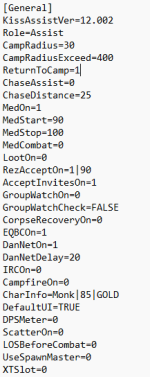
So it appears both EQBC and Dannet are set on.
Redguides launcher is updated.
I load all toons through the launcher.
Any ideas?
I cannot use any of the buttons like....come to me, follow me. I click it and nothing happens.
I am able to use Kissassist to control my toons but I cannot broadcast commands to my boxes.
If I Type /bccmd connect.
So it appears both EQBC and Dannet are set on.
Redguides launcher is updated.
I load all toons through the launcher.
Any ideas?
make sure your firewall allowed it to run/has exception for it. also check in your config folder mq2eqbc.ini looks legit
use mq2dannet temporarily to issue /dgae /plugin mq2eqbc unload -- or /plugin mq2eqbc unload
then reload plugin and do /bccmd connect again and debuf as needed
also, check out all info under the EQBC post for all discussion/overview etc see if anything you missed for getting it working
use mq2dannet temporarily to issue /dgae /plugin mq2eqbc unload -- or /plugin mq2eqbc unload
then reload plugin and do /bccmd connect again and debuf as needed
also, check out all info under the EQBC post for all discussion/overview etc see if anything you missed for getting it working
make sure your firewall allowed it to run/has exception for it. also check in your config folder mq2eqbc.ini looks legit
use mq2dannet temporarily to issue /dgae /plugin mq2eqbc unload -- or /plugin mq2eqbc unload
then reload plugin and do /bccmd connect again and debuf as needed
also, check out all info under the EQBC post for all discussion/overview etc see if anything you missed for getting it working

I ran /dgae /plugin mq2eqbc unload...above is what I get when I try /bccmd connect
you have to have eqbcs (the server) running, and have configured it for the in-game plugin "eqbc" to connect to itSaw a very similar post to my issue but did not see a solution.
I cannot use any of the buttons like....come to me, follow me. I click it and nothing happens.
I am able to use Kissassist to control my toons but I cannot broadcast commands to my boxes.
If I Type /bccmd connect.
View attachment 71166
View attachment 71167
So it appears both EQBC and Dannet are set on.
Redguides launcher is updated.
I load all toons through the launcher.
Any ideas?

Okay listen here you dumb moth
oh wait.
Just check out the guide in the resource overview

 www.redguides.com
Note that there is also a shortcut hotkey to start it in RG Launcher and Redfetch in addition to the tried and true "make a durn shortcut".
www.redguides.com
Note that there is also a shortcut hotkey to start it in RG Launcher and Redfetch in addition to the tried and true "make a durn shortcut".
oh wait.
Just check out the guide in the resource overview
Guide - EQBC Idiot's Guide
EQBC HOW TO Much of this information is available in the WIKI and Quoted here. From the wiki: Features: Allows remote commands via box chat much like mastermind does. Allows you to control any connected client anywhere (ie. someone in your...
www.redguides.com
Thank You for the reply Sic. How do I do that...You cannot possibly offend me, so tell me like I'm dumb.
Thank You for the reply Sic. How do I do that...You cannot possibly offend me, so tell me like I'm dumb.
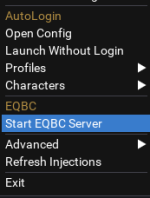
click start eqbc server here from right clicking on the mq icon in your sys tray.
it pops up a window that looks like this:
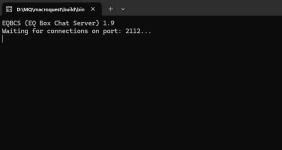
then
Utility - MQ2EQBC - Extra info
www.redguides.com
in game do both of these:
Code:
/bccmd connect 127.0.0.1 2112
/bccmd set autoconnect on
since i usually already have a bunch of toons on when i remember to launch eqbc - i use dannet to reconnect them
/dg all /bccmd reconnectI personally use dannet and eqbc which helps me manage my various groups and activities across multiple pcs

to use a plugin it has to be loaded
/plugin eqbc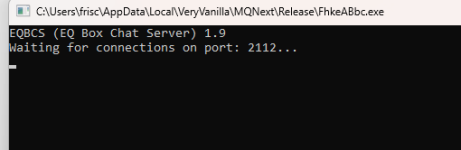
i tried to do /bccmd connect but it keeps telling me it cannot connect. im assuming this is why nothing i do will command a toon to assist me in combat
.
for eqbc you need a few things
mq2eqbc loaded on all your toons
eqbcs (this is the eqbc server) running somewhere
your eqbc configured (instruction tab)
windows needs to be allowing this connection to work
most automation that i'm aware dont rely on eqbc or dannet (which is a defaulted on plugin) to assist or broadcast for assistance.
depending on your automation you'll need to do things like:
- ensure you're telling it who to assist
- - kissassist you start with the command to start it /kissassists assist Dudebro, for example
- - for cwtn and many other things, you want your group main assist and group main tank assigned in your group window
i merged your post into the eqbcs discussion thread.i tried to do /bccmd connect but it keeps telling me it cannot connect. im assuming this is why nothing i do will command a toon to assist me in combat
for eqbc you need a few things
mq2eqbc loaded on all your toons
eqbcs (this is the eqbc server) running somewhere
your eqbc configured (instruction tab)
windows needs to be allowing this connection to work
most automation that i'm aware dont rely on eqbc or dannet (which is a defaulted on plugin) to assist or broadcast for assistance.
depending on your automation you'll need to do things like:
- ensure you're telling it who to assist
- - kissassist you start with the command to start it /kissassists assist Dudebro, for example
- - for cwtn and many other things, you want your group main assist and group main tank assigned in your group window
Knightly updated MQ2EQBC with a new update entry:
11/04/2025
Read the rest of this update entry...
11/04/2025
Commits
(13aacbe) ~brainiacC++20 fixes
- Remove SafeItoa
- char* -> const char*
- Fix deprecation warnings
Read the rest of this update entry...
Users who are viewing this thread
Total: 1 (members: 0, guests: 1)
Share: