• You've discovered RedGuides, an EverQuest multi-boxing and scripting community 🧙‍♀️⚙️. We want you to play several EQ characters at once, come join us and say hello! 👋

  • A TLP without truebox has thawed (Very Vanilla ready)
    Frostreaver
Resource icon

Release MQ2EasyFind (1 Viewer)

I dont know what plugin it is or if it is an MQ function but I used to be able to do a Ctrl + Shift and click on a zone in the find box on the map and all my toons would run to that zone.

It doesn't work since the latest update. Any idea where this function was created at and how to get it back?
that is easyfind

do you have your dannet working?

.
 
that is easyfind

do you have your dannet working?

.

I think you are on to something with DN. Im not sure what is going on tho.

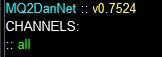
I have DN loaded on all toons:
dan 2.jpg

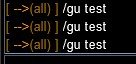
BUT!! When I test a /dgae command it ONLY executes on my main toon that I type the command on. It doesnt execute on the other boxes:

dan 1.jpg

I did /dgae /gu test on each one but they only execute on their box, not any of the others.

Any ideas on what I might have done wrong here?

Worthy of note! It has been working fine forever, it just suddenly stopped working since this last update so that is something odd too.
 
I think you are on to something with DN. Im not sure what is going on tho.

I have DN loaded on all toons:
View attachment 63539

BUT!! When I test a /dgae command it ONLY executes on my main toon that I type the command on. It doesnt execute on the other boxes:

View attachment 63540

I did /dgae /gu test on each one but they only execute on their box, not any of the others.

Any ideas on what I might have done wrong here?

Worthy of note! It has been working fine forever, it just suddenly stopped working since this last update so that is something odd too.
Did you check the Dannet instructions tab? You should and follow that info.

Also if you're using a VPN, make sure you're allowing local traffic
 
Did you check the Dannet instructions tab? You should and follow that info.

Also if you're using a VPN, make sure you're allowing local traffic

Yes, as I have said, it has been working for years with no issue. Something has just happened after this last update.
 
Yes, as I have said, it has been working for years with no issue. Something has just happened after this last update.
Windows updates frequently change stuff. Messes with permissions, resets settings, etc.
Defender flagging something changes stuff.

If nothing changed you wouldn't have an issue.

If you didn't specifically check the thing I mentioned check there and ensure you can "see" each other on the correct interface device
 
Is there an easy way to retry translocators when they don't translocate you? if i broadcaster a path and it uses a translocator, sometimes toons just sit waiting.
 
brainiac updated MQ2EasyFind with a new update entry:

10/26/2024

〰️Commits​


Add 'Override' optional functionality to allow an external YAML to enhance existing config. (#115)

Adds optional ability to load ZoneConnections_Override.yaml, should file exist.
Different than "Custom" files which 100% replace the existing ZoneConnections.yaml, this merely adds to the connections already loaded.

This allows us to have a file with our Guild Hall Clicky connections, for...

Read the rest of this update entry...
 
Here are lower aureatecovert->gildedspire and harbingerscradle->puissance


YAML:
    aureatecovert:
        -   type: ZoneConnection
            location: [35.00, 96.00, 1.99]
            targetZone: gildedspire
            script: |
                if mq.TLO.Me.Z() < 100 then
                    if (mq.TLO.Navigation.Setting('OpenDoors')()=='1') then
                        mq.cmd('/nav locyxz 40 95 2')
                        mq.cmd('/nav ini OpenDoors off')
                        mq.delay(15000, function() return not mq.TLO.Nav.Active() end)
                        mq.cmd('/doortarget id 3')
                        mq.delay(4000)
                        while (mq.TLO.Me.Z() < 111.5) do
                          mq.cmd('/click left door')
                          mq.delay(2000)
                        end
                        mq.delay(15000, function() return (mq.TLO.Me.Z() >= 111.5); end)
                        mq.cmd('/nav ini OpenDoors on')
                        mq.cmd('/face fast loc 4, 130, 112')
                        mq.cmd('/keypress forward hold')
                        mq.delay(750)
                        mq.cmd('/keypress forward')
                        mq.cmd('/nav locyxz 6 433 111')
                        mq.delay(15000, function() return not mq.TLO.Nav.Active() end)
                        mq.cmd('/doortarget id 37')
                        mq.cmd('/click left door')
                    else
                        mq.cmd('/nav locyxz 40 95 2')
                        mq.delay(16000, function() return not mq.TLO.Nav.Active() end)
                        mq.cmd('/doortarget id 3')
                        mq.delay(4000)
                        while (mq.TLO.Me.Z() < 111.5) do
                          mq.cmd('/click left door')
                          mq.delay(2000)
                        end
                        mq.cmd('/face fast loc 4, 130, 112')
                        mq.cmd('/keypress forward hold')
                        mq.delay(750)
                        mq.cmd('/keypress forward')
                        mq.cmd('/nav locyxz 6 433 111')
                        mq.delay(15000, function() return not mq.TLO.Nav.Active() end)
                        mq.cmd('/doortarget id 37')
                        mq.cmd('/click left door')
                    end
                else
                        mq.cmd('/nav locyxz 6 433 111')
                        mq.delay(16000, function() return not mq.TLO.Nav.Active() end)
                        mq.cmd('/doortarget id 37')
                        mq.cmd('/click left door')
                end
    harbingerscradle:
        -   type: ZoneConnection
            location: [-800.65, -276.63, -68.2462]
            targetZone: puissance
 
Last edited:
Can we get a /easyfind for the theater zone inside the brood architect mission? would really help get through that stupid sewer grate. If a loc or a landmark or something would help, I can get it.
 
CTRL + Click isnt working for me since the patch. Is there something new?
I had this issue as well and it was the custom UI, Sparxx in my case. Window change did it. Remove it from the custom UI folder and it will use the default =)
 
1737593842920.png
Been getting this since the patch. Happens when i zone. Ive tried deleting the plugin and reinstalling it but doesnt fix it. If i disable the plugin i dont crash anymore.
 
Dudes if you are using a custom UI did you make sure the findlocation window is up to date?

If you are using the "new UI", did you try disabling that?

Edit: The window was changed in a patch, I can't speak to whether there is an issue beyond that or not, but it seems to me some due diligence is in order.
 
Hi All,
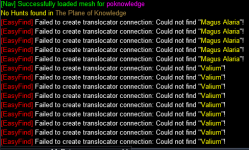
Wondering if there is a way to use multiple Yaml or some other method to address the 'spam' of not finding the NPCs from Lazurus EMU (Valium and Magus), when on another EMU?
1740521012982.png
 
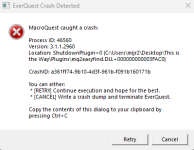
I am getting a crash when zoning out of the Brood Architect mission (this regularly ocurs on at least one toon almost every time). The crash points to the Easyfind plugin, though that may be misleading.

---------------------------
EverQuest Crash Detected
---------------------------
MacroQuest caught a crash:

Process ID: 73780
Version: 3.1.1.3224
Location: ShutdownPlugin+0 (C:\Games\MQ\Plugins\mq2easyfind.DLL+0000000000040380)

CrashID: 526b7cf2-c4e0-4d87-93e2-914ed349d2ee

You can either:
* [RETRY] Continue execution and hope for the best.
* [CANCEL] Write a crash dump and terminate EverQuest.

Copy the contents of this dialog to your clipboard by pressing Ctrl+C

---------------------------
Retry Cancel
---------------------------
 
I am getting a crash when zoning out of the Brood Architect mission (this regularly ocurs on at least one toon almost every time). The crash points to the Easyfind plugin, though that may be misleading.

---------------------------
EverQuest Crash Detected
---------------------------
MacroQuest caught a crash:

Process ID: 73780
Version: 3.1.1.3224
Location: ShutdownPlugin+0 (C:\Games\MQ\Plugins\mq2easyfind.DLL+0000000000040380)

CrashID: 526b7cf2-c4e0-4d87-93e2-914ed349d2ee

You can either:
* [RETRY] Continue execution and hope for the best.
* [CANCEL] Write a crash dump and terminate EverQuest.

Copy the contents of this dialog to your clipboard by pressing Ctrl+C

---------------------------
Retry Cancel
---------------------------
C++:
>    mq2easyfind.DLL!CFindLocationWndOverride::RemoveCustomLocations() Line 446    C++
     mq2easyfind.DLL!SetGameState(int GameState) Line 444    C++
     [Inline Frame] MQ2Main.dll!mq::PluginsSetGameState::__l2::<lambda_270b16545f4340c2a0260036ce3c99b4>::operator()(const mq::MQPlugin *) Line 1039    C++
     [Inline Frame] MQ2Main.dll!mq::ForEachPlugin(mq::PluginsSetGameState::__l2::<lambda_270b16545f4340c2a0260036ce3c99b4> &&) Line 798    C++
     MQ2Main.dll!mq::PluginsSetGameState(int GameState) Line 1034    C++
     MQ2Main.dll!mq::CEverQuestHook::SetGameState_Detour(unsigned long GameState) Line 820    C++
     [External Code]
C++:
if (findLocationList->GetItemCount() == 0)
{
    findLocationList->SetVisible(false);
    noneLabel->SetVisible(true);
}
looks like noneLabel is ???

Unhandled exception at 0x00007FF97E2DA63C (mq2easyfind.DLL) in 3ddd4.dmp: 0xC0000005: Access violation writing location 0x00000000000000C9.

just in case this saves @brainiac a download/look

@Nightmare327 are you using a customized override entry for what i guess should be Harbinger's Cradle?
 
No, I am doing the mission in TOE, Brood Architect Hazuri. This normally is happening whren I zone back out after dropping the mission. The only overrides i have are for the raid instances in Laurion Inn
 
Another case of Easyfind crashing. This is while running the mac Eplorer, doing the planes section, and 3 times when I am gating out of the Plane of Hate 3 separate ways (Throne of heroes, Stein, then Gate potion) I have crashed the character out. Only the 1 character is running, no other characters are logged in. Please let me know if I can provide any other information.

---------------------------
EverQuest Crash Detected
---------------------------
MacroQuest caught a crash:

Process ID: 63688
Version: 3.1.1.3228
Location: ShutdownPlugin+0 (C:\Games\MQ\Plugins\mq2easyfind.DLL+0000000000040380)

CrashID: baf9611a-30f2-43fa-bae6-3147616a7af7

You can either:
* [RETRY] Continue execution and hope for the best.
* [CANCEL] Write a crash dump and terminate EverQuest.

Copy the contents of this dialog to your clipboard by pressing Ctrl+C

---------------------------
Retry Cancel
---------------------------
 
Another case of Easyfind crashing. This is while running the mac Eplorer, doing the planes section, and 3 times when I am gating out of the Plane of Hate 3 separate ways (Throne of heroes, Stein, then Gate potion) I have crashed the character out. Only the 1 character is running, no other characters are logged in. Please let me know if I can provide any other information.

---------------------------
EverQuest Crash Detected
---------------------------
MacroQuest caught a crash:

Process ID: 63688
Version: 3.1.1.3228
Location: ShutdownPlugin+0 (C:\Games\MQ\Plugins\mq2easyfind.DLL+0000000000040380)

CrashID: baf9611a-30f2-43fa-bae6-3147616a7af7

You can either:
* [RETRY] Continue execution and hope for the best.
* [CANCEL] Write a crash dump and terminate EverQuest.

Copy the contents of this dialog to your clipboard by pressing Ctrl+C

---------------------------
Retry Cancel
---------------------------
@Nightmare327 are you using the new ui engine? you should disable that for a bunch of reasons - but also on that list of reasons is that is why you're crashing
 
I just double checked to make sure it had not re-enabled itself and it is still turned off in my eqclient.ini file. It is pretty consistent when it happens, every time when I zone out of plane of hate. I was going to try and take the time to unload the plugin befpre zpning out of plane of hate to see if it stopped the crashes, just havent gotten arount to doing so yet.

AcceptKickRequests=1
ClientCore8=-1
ClientCore12=-1
ClientCore13=-1
ClientCore14=-1
BrightnessBias=7.000000
UseNewUIEngine=0
UseLuclinElementals=TRUE
UseD3DTextureCompression=TRUE
 
I am still gettigng crashes pretty regulartly that seem to point to Easyfind.

---------------------------
EverQuest Crash Detected
---------------------------
MacroQuest caught a crash:

Process ID: 89784
Version: 3.1.1.3276
Location: ShutdownPlugin+0 (C:\Games\MQ\Plugins\mq2easyfind.DLL+0000000000040380)

CrashID: 49d9f023-050c-41f0-8de1-4d4e41d3a5ce

You can either:
* [RETRY] Continue execution and hope for the best.
* [CANCEL] Write a crash dump and terminate EverQuest.

Copy the contents of this dialog to your clipboard by pressing Ctrl+C

---------------------------
Retry Cancel
---------------------------
 
I just double checked to make sure it had not re-enabled itself and it is still turned off in my eqclient.ini file. It is pretty consistent when it happens, every time when I zone out of plane of hate. I was going to try and take the time to unload the plugin befpre zpning out of plane of hate to see if it stopped the crashes, just havent gotten arount to doing so yet.

AcceptKickRequests=1
ClientCore8=-1
ClientCore12=-1
ClientCore13=-1
ClientCore14=-1
BrightnessBias=7.000000
UseNewUIEngine=0
UseLuclinElementals=TRUE
UseD3DTextureCompression=TRUE
If eq has a read/write issue on launch it will load default values (like new UI engine)

The previous crash that I replied about was due to the new UI engine
 
If eq has a read/write issue on launch it will load default values (like new UI engine)

The previous crash that I replied about was due to the new UI engine
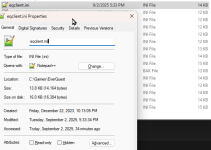
Hmmm, the eqclient.ini file was modified today, and does not show as read-only.

It is possible that it is an elevated permission issue, since I launch the batch file that then starts all of my processes as Administrator (since one of the programs requires that). Let me try without that happening to see if it solves the issue.
1756854649755.png
 
Hmmm, the eqclient.ini file was modified today, and does not show as read-only.

It is possible that it is an elevated permission issue, since I launch the batch file that then starts all of my processes as Administrator (since one of the programs requires that). Let me try without that happening to see if it solves the issue.
View attachment 71538
i wasn't saying readonly would be the issue - i was saying if there was a read/write issue - like the file was in use (AV/file syncing can cause this or multiple toons all at the same time) when eq was trying to read it and thus be unable to so it loads the default

over the past few months i've had to increase my autologin delay because of how crappy eq's performance has been, and after i put in a notification in the cwtn plugins when the new ui engine is loaded, it really illuminated how often that happens; I'm not sure if you're using those at the moment, but if it loaded it will give you a popup letting you know that the new ui engine is currently running
 
All of my toons are using the CWTN plugins, but I have not seen a popup about the new UI engine. I have that entire folder excluded from the AV system, but its worth seeing if a longer delay on autologin might also help. I will experiment later on.
 
I am still gettigng crashes pretty regulartly that seem to point to Easyfind.

---------------------------
EverQuest Crash Detected
---------------------------
MacroQuest caught a crash:

Process ID: 89784
Version: 3.1.1.3276
Location: ShutdownPlugin+0 (C:\Games\MQ\Plugins\mq2easyfind.DLL+0000000000040380)

CrashID: 49d9f023-050c-41f0-8de1-4d4e41d3a5ce

You can either:
* [RETRY] Continue execution and hope for the best.
* [CANCEL] Write a crash dump and terminate EverQuest.

Copy the contents of this dialog to your clipboard by pressing Ctrl+C

---------------------------
Retry Cancel
---------------------------


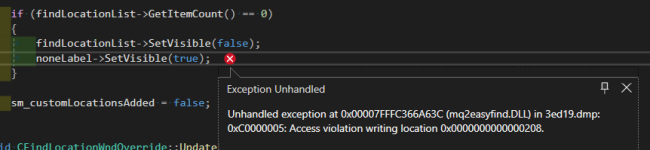
This crash is happening in this section (this is the crash id you shared today - this crash matches the same crash as the previous ones)

1756856074832.png


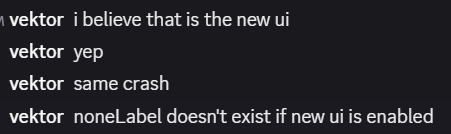
When i spoke to @brainiac about it before he said that noneLabel doesn't exist if the new ui is enabled, and seemed to point to this being the culprit

1756856315173.png

maybe brain can chime in here
 
Release MQ2EasyFind

Users who are viewing this thread

Back
Top
Cart