
-
 Hail, we're RedGuides. We want you to play six (yes, 6!) EverQuest characters at once. We have scripts and a friendly community to help, please join our playstyle and say hello! 👋
You are using an out of date browser. It may not display this or other websites correctly.
You should upgrade or use an alternative browser.
You should upgrade or use an alternative browser.
Resource icon
Release MQ2EasyFind
- Thread starter brainiac
- Start date

- Commits
- 2
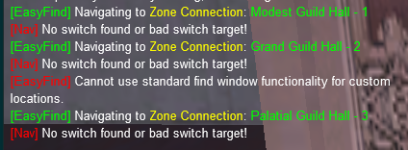
My EasyFind stopped clicking connections. 

Dragonator
Active member
Just ran into the same issue Mad...My EasyFind stopped clicking connections

- Commits
- 2
Work around, works for guild hall. Hoping this isn't the new norm of editing the zoneconnection.yaml lol
Code:
-   type: ZoneConnection
            location: [623.19, 48.73, 3.30]
            switch: 1
            targetZone: guildhalllrg
            script:
                mq.cmd('/doortarget')
                mq.delay(10)
                mq.cmd('/click left door')
            name: Neighborhood Guild Hall
            identifier: 3
this is going to break the instant the new build goes throughWork around, works for guild hall. Hoping this isn't the new norm of editing the zoneconnection.yaml lol
Code:- type: ZoneConnection location: [623.19, 48.73, 3.30] switch: 1 targetZone: guildhalllrg script: mq.cmd('/doortarget') mq.delay(10) mq.cmd('/click left door') name: Neighborhood Guild Hall identifier: 3
xxraptorxx
RG Karen
did someone get nav to Firefall in UP working have tried a few locations but still not

- Commits
- 2
Did you update today?
- Commits
- 2
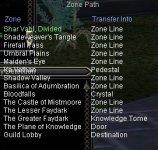

Rare Spawn
Well-known member
Added ZoneConnections to the guildhalllrg using a dummy "location" and setting "script" field to be mq.cmd('/gc zonename'}. This works, but I am not a fan of the dummy location. I tried the switch option with the name of the item used, but that didn't work. Is there a better way to set this up in the yaml file so that a dummy location is not required?
- Commits
- 2
Not sure what your doing, but I use stuff like this for portal stuff in guildhall. I added every picture, portal zone and clicky in my guildhall.Added ZoneConnections to the guildhalllrg using a dummy "location" and setting "script" field to be mq.cmd('/gc zonename'}. This works, but I am not a fan of the dummy location. I tried the switch option with the name of the item used, but that didn't work. Is there a better way to set this up in the yaml file so that a dummy location is not required?
Code:
-   type: ZoneConnection
            location: [-27.57, 16.07, 3]
            script: |
                mq.cmd('/itemtarget "Shabby Lobby Door"')
                mq.delay(2000)
                mq.cmd('/click right item')
                mq.delay(2000)
                mq.cmd('/notify "open the door" menuselect')
            targetZone: guildlobby
        -   type: ZoneConnection
            location: [-56.36, -51.67, -6.44]
            name: Cobalt Scar
            script: |
                mq.cmd('/target Teleportation Assistant')
                mq.delay(1000)
                mq.cmd('/usetarget')
                mq.delay(2000)
                mq.cmd('/portalsetter cobaltscar')
                mq.delay('10s')
                mq.cmd('/notify largedialogwindow LDW_YesButton leftmouseup')
            targetZone: cobaltscar
            expansion: Scars of Velious
-   type: ZoneConnection
            name: Valley of King Xorbb
            location: [-27.57, 16.07, 3]
            script: |
                mq.cmd('/itemtarget "Painting: Throne of Xorbb"')
                mq.delay(2000)
                mq.cmd('/click right item')
                mq.delay(2000)
                mq.cmd('/notify "Teleport to Valley of King Xorbb" menuselect')
            targetZone: xorbb
Rare Spawn
Well-known member
Not sure what your doing, but I use stuff like this for portal stuff in guildhall. I added every picture, portal zone and clicky in my guildhall.
Code:- type: ZoneConnection location: [-27.57, 16.07, 3] script: | mq.cmd('/itemtarget "Shabby Lobby Door"') mq.delay(2000) mq.cmd('/click right item') mq.delay(2000) mq.cmd('/notify "open the door" menuselect') targetZone: guildlobby - type: ZoneConnection location: [-56.36, -51.67, -6.44] name: Cobalt Scar script: | mq.cmd('/target Teleportation Assistant') mq.delay(1000) mq.cmd('/usetarget') mq.delay(2000) mq.cmd('/portalsetter cobaltscar') mq.delay('10s') mq.cmd('/notify largedialogwindow LDW_YesButton leftmouseup') targetZone: cobaltscar expansion: Scars of Velious - type: ZoneConnection name: Valley of King Xorbb location: [-27.57, 16.07, 3] script: | mq.cmd('/itemtarget "Painting: Throne of Xorbb"') mq.delay(2000) mq.cmd('/click right item') mq.delay(2000) mq.cmd('/notify "Teleport to Valley of King Xorbb" menuselect') targetZone: xorbb
I was trying to skip manually documenting all the locations for all the things, by leveraging the Lua script GuildClicky.
My thought is if we can leverage /gc, we don't need to to know the location of every clicky. We could add all the clickies to the master YAML file, #comment in/out the items available in your Guild's hall. Then the whole community could benefit.
My temp setup works just like yours, except my location is the center of the room where they put all the portals, I use the same loc for all portals.
the script part uses /gc to dynamically find the object, which is better for guild halls that have bored leadership that like to reorganize the place too often.
The problem is that it looks weird when a whole group "bounces" off a single location before using the correct portal, but it appears that the location: field is required for the script: field to work. Anyway we can remove that requirement for a location and just skip to the script: ?
brainiac updated MQ2EasyFind with a new update entry:
20230219
Read the rest of this update entry...
20230219
 Commits
Read the rest of this update entry...
- Commits
- 2
In the zone_connection.yalm add the remove: true to that zone connection.Is it possible to make easyfind not used the Paludalrtwo- 2 zone location when in shadowhaventwo?
Example:
INI:
basilica:
- type: ZoneConnection
location: [1.14, 45.53, -20.30]
switch: 1
targetZone: shadowvalley
- type: ZoneConnection
targetZone: bloodfalls
remove: true
thank you will give this a shot!In the zone_connection.yalm add the remove: true to that zone connection.
Example:
INI:
basilica:
- type: ZoneConnection
location: [1.14, 45.53, -20.30]
switch: 1
targetZone: shadowvalley
- type: ZoneConnection
targetZone: bloodfalls
remove: true

LorDeth
<<NO GIF ATTACHED>>
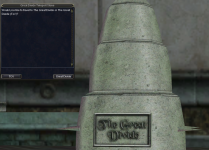
Heads up, with the patch this week on test, which I presume will also show up next week on live, the POK port stone to great divide will change.. it now behaves like the one to Feerott, and offers the low level and high level versions. See attached screenshot. I presume this will break the easyfind logic for this destination...

Gekko
Seasoned veteran member
Hi all,
I am trying to update the ZoneConnections.yaml because for some reason traveling through Blightfire Moors gives the dreaded cannot find a path error. To give a specific example, traveling from the Guild Lobby to the Moors is fine, but traveling through the Moors to the Mesa, blows-up. I wanted to add an entry in the yaml because the only entry in the yaml for the moors is Stonehive. My question is: Is there an easy way to to get the X,Y,Z coordionates of the zone line, or do I have to actually run there and send the command to check coordinates? I was hoping I could pop open the map, hover the cursor and see the XYZ coordinates but I am not seeing the numbers. Perhaps it is the UI I am using?
Any and all help is appreciated.
Be well. Happy traveling.
I am trying to update the ZoneConnections.yaml because for some reason traveling through Blightfire Moors gives the dreaded cannot find a path error. To give a specific example, traveling from the Guild Lobby to the Moors is fine, but traveling through the Moors to the Mesa, blows-up. I wanted to add an entry in the yaml because the only entry in the yaml for the moors is Stonehive. My question is: Is there an easy way to to get the X,Y,Z coordionates of the zone line, or do I have to actually run there and send the command to check coordinates? I was hoping I could pop open the map, hover the cursor and see the XYZ coordinates but I am not seeing the numbers. Perhaps it is the UI I am using?
Any and all help is appreciated.
Be well. Happy traveling.
- Commits
- 2
Can open the zone in the mesh generator and get coords or you can go in zone and open up the settings window and see what the coordinates are in there.Hi all,
I am trying to update the ZoneConnections.yaml because for some reason traveling through Blightfire Moors gives the dreaded cannot find a path error. To give a specific example, traveling from the Guild Lobby to the Moors is fine, but traveling through the Moors to the Mesa, blows-up. I wanted to add an entry in the yaml because the only entry in the yaml for the moors is Stonehive. My question is: Is there an easy way to to get the X,Y,Z coordionates of the zone line, or do I have to actually run there and send the command to check coordinates? I was hoping I could pop open the map, hover the cursor and see the XYZ coordinates but I am not seeing the numbers. Perhaps it is the UI I am using?
Any and all help is appreciated.
Be well. Happy traveling.
/easyfind ui
then click on Find Window
Then click the zone connection you want, should list the coordinates.
LorDeth
<<NO GIF ATTACHED>>
CBD,
Thank you. Will give it a try. Just curios, why the name change?
Be well. Happy gaming.
curious, are you doing this on test or on live?
I've been busy doing this exact same thing the last 4-5 days.. I've got quite a lot of zones and expacs completed.. but still alot to go.. and i'm testing that functionality.. not just clicking on the zone in the find window, but travel THROUGH a zone to an adjacent or farther one.. for linked zones..
if you're on test, and you can wait a few days, I'll drop my completed one here once I finish up.. just slow going as there's so many broken linkages right now...
Gekko
Seasoned veteran member
curious, are you doing this on test or on live?
I've been busy doing this exact same thing the last 4-5 days.. I've got quite a lot of zones and expacs completed.. but still alot to go.. and i'm testing that functionality.. not just clicking on the zone in the find window, but travel THROUGH a zone to an adjacent or farther one.. for linked zones..
if you're on test, and you can wait a few days, I'll drop my completed one here once I finish up.. just slow going as there's so many broken linkages right now...
LorDeth,
Coincidentally, this was on Test. I wanted to screw around with a Bard and a melee centric team with a Shaman healer, so I rolled a crew on Test to check it out. After Glooming Deep, to check out the converted Tutorial.mac, and /testbuffme, I wanted to hit the Moors and then the Mesa to get them up to level 40-50-ish quickly. Got to the Moors no problem but could not get home. Then I noticed I could not get to the Mesa and said Hmmmmm. Read back a few posts in this thread and said Aha, let me try my hand at editing the yaml and learning more about EasyFind and Magellan.
Be well. Happy Editing.
LorDeth
<<NO GIF ATTACHED>>
LorDeth,
Coincidentally, this was on Test. I wanted to screw around with a Bard and a melee centric team with a Shaman healer, so I rolled a crew on Test to check it out. After Glooming Deep, to check out the converted Tutorial.mac, and /testbuffme, I wanted to hit the Moors and then the Mesa to get them up to level 40-50-ish quickly. Got to the Moors no problem but could not get home. Then I noticed I could not get to the Mesa and said Hmmmmm. Read back a few posts in this thread and said Aha, let me try my hand at editing the yaml and learning more about EasyFind and Magellan.
Be well. Happy Editing.
its not coincidentally .. i has a suspicion you were on test when that happened..
cannonballdex and I have been discussing this over the last few days... and he suspects there is a bunch of the zone linkages broken in EQ itself on test.. .and thus why mq2easyfind isnt working to use the ingame links.. and why we have to manually build them in the zone connections yaml file..
pain in the butt but it will be nice n smooth when all is done...

test server has had broken connections for months and months and months - it is an eq issue with the test server.its not coincidentally .. i has a suspicion you were on test when that happened..
cannonballdex and I have been discussing this over the last few days... and he suspects there is a bunch of the zone linkages broken in EQ itself on test.. .and thus why mq2easyfind isnt working to use the ingame links.. and why we have to manually build them in the zone connections yaml file..
pain in the butt but it will be nice n smooth when all is done...
LorDeth
<<NO GIF ATTACHED>>
test server has had broken connections for months and months and months - it is an eq issue with the test server.
thanks sic.. yeah that makes sense.. its whacked..
once I get this zone connections yaml, it'll work as a temporary bypass until (IF) they fix it on test..

Shadow
Ultimate seasoned veteran member
So what is actually broken on the EQ side? If I add the zones manually in the connections file, everything works on the MQ side.thanks sic.. yeah that makes sense.. its whacked..
once I get this zone connections yaml, it'll work as a temporary bypass until (IF) they fix it on test..
Are the eq devs lazy? Don't realize what's broken? Purposefully broken?
Gekko
Seasoned veteran member
Shadow,So what is actually broken on the EQ side? If I add the zones manually in the connections file, everything works on the MQ side.
Are the eq devs lazy? Don't realize what's broken? Purposefully broken?
As I understand it, mq2easyfind and Magellan try to interact with the in-game zone guide window. Something about that window is not playing nice with the MQ side. The ZoneConnections file is like an alternate info source so if the MQ side can’t get what it needs from EQ it checks to see if there is info there that can meet its needs.
Just my impression. I might be wrong.
Be well.
LorDeth
<<NO GIF ATTACHED>>
Not sure if related too, but you know how sometimes, you click a zone connection in the find window (just EQ, no MQ involvement at this point) , and it makes that nice gold band to follow to the zoneline? And then some other times it says it cannot find a path to the zone line.. Sometimes you get a red X at the zone connection, sometimes it gives some message about npc or whatnot..
but yeah, by manually telling MQ the zone connections in those zones, we are assured it can figure a way there... nav and easyfind/magellan are awesome tools! Its just a lot more time to do that mapping out of all the connections and add them in.. (as i am finding out haha)
And just a heads up for the live patch coming today... 3 new zone additions to POK stones via existing stones..
1 - The Great Divide - now has choice of zoning to Great Divide ToV or classic Great Divide
2 - Shar Vahl - has choice of zoning to Shadeweaver's Tangle NoS or classic Shar Vahl
3 - The Overthere - has choice of zoning to Overthere RoS or classic The Overthere
Cannonballdex created the original code for Great Divide and Shar Vahl, and I just tweaked slightly and added Overthere: (this would go in your zone connections.yaml within the POK section in place of the existing Great Divide, Shar Vahl, and Overthere entries if they exist.. and if not, just added new)
Great Divide Code
and
Shadeweaver / Shar Vahl code
and lastly:
Overthere code
but yeah, by manually telling MQ the zone connections in those zones, we are assured it can figure a way there... nav and easyfind/magellan are awesome tools! Its just a lot more time to do that mapping out of all the connections and add them in.. (as i am finding out haha)
And just a heads up for the live patch coming today... 3 new zone additions to POK stones via existing stones..
1 - The Great Divide - now has choice of zoning to Great Divide ToV or classic Great Divide
2 - Shar Vahl - has choice of zoning to Shadeweaver's Tangle NoS or classic Shar Vahl
3 - The Overthere - has choice of zoning to Overthere RoS or classic The Overthere
Cannonballdex created the original code for Great Divide and Shar Vahl, and I just tweaked slightly and added Overthere: (this would go in your zone connections.yaml within the POK section in place of the existing Great Divide, Shar Vahl, and Overthere entries if they exist.. and if not, just added new)
Great Divide Code
Code:
        -   type: ZoneConnection
            targetZone: greatdividetwo
            name: 'The Great Divide'
            switch: 15
            expansion: Torment of Velious
            script: |
                -- Wait for window to open and click the button on the left
                mq.delay('5s', function() return mq.TLO.Window('LargeDialogWindow').Open() end)
                if mq.TLO.Window('LargeDialogWindow').Open() then
                    mq.TLO.Window('LargeDialogWindow/LDW_YesButton').LeftMouseUp()
                end
            expansion: Torment of Velious
        -   type: ZoneConnection
            targetZone: greatdivide
            name: 'Great Divide'
            switch: 15
            script: |
                -- FIXME: Before House of Thule opens
                -- Wait for window to open and click the button on the right
                mq.delay('5s', function() return mq.TLO.Window('LargeDialogWindow').Open() end)
                if mq.TLO.Window('LargeDialogWindow').Open() then
                    mq.TLO.Window('LargeDialogWindow/LDW_NoButton').LeftMouseUp()
                end
and
Shadeweaver / Shar Vahl code
Code:
        -   type: ZoneConnection
            targetZone: shadeweavertwo
            name: 'Shar Vahl, Divided (Night of Shadows)'
            switch: 14
            script: |
                -- Wait for window to open and click the button on the left
                mq.delay('5s', function() return mq.TLO.Window('LargeDialogWindow').Open() end)
                if mq.TLO.Window('LargeDialogWindow').Open() then
                    mq.TLO.Window('LargeDialogWindow/LDW_YesButton').LeftMouseUp()
                end
            expansion: Night of Shadows
        -   type: ZoneConnection
            targetZone: shadeweaver
            name: 'Shar Vahl'
            switch: 14
            script: |
                -- FIXME: Before House of Thule opens
                -- Wait for window to open and click the button on the right
                mq.delay('5s', function() return mq.TLO.Window('LargeDialogWindow').Open() end)
                if mq.TLO.Window('LargeDialogWindow').Open() then
                    mq.TLO.Window('LargeDialogWindow/LDW_NoButton').LeftMouseUp()
                end
and lastly:
Overthere code
Code:
        -   type: ZoneConnection
            targetZone: overtheretwo
            name: 'Overthere (Ring of Scale)'
            switch: 8
            script: |
                -- Wait for window to open and click the button on the left
                mq.delay('5s', function() return mq.TLO.Window('LargeDialogWindow').Open() end)
                if mq.TLO.Window('LargeDialogWindow').Open() then
                    mq.TLO.Window('LargeDialogWindow/LDW_YesButton').LeftMouseUp()
                end
            expansion: Ring of Scale
        -   type: ZoneConnection
            targetZone: overthere
            name: 'The Overthere'
            switch: 8
            script: |
                -- FIXME: Before House of Thule opens
                -- Wait for window to open and click the button on the right
                mq.delay('5s', function() return mq.TLO.Window('LargeDialogWindow').Open() end)
                if mq.TLO.Window('LargeDialogWindow').Open() then
                    mq.TLO.Window('LargeDialogWindow/LDW_NoButton').LeftMouseUp()
                end
Which location is it?since the patch today the command /travelto does not work like it used to says failed to generate path but i used it a million times in same location anyone else having a similiar problem
There were a couple changes in the patch like adding PoK books to Shadeweavers tangle and GD. You maybe need to just update your meshes or the meshes need updated after the changes above.
Run patcher again.yea since the patch alot of the /travelto wont connect to any locations started since the patch
Always worth double checking on patch days
- Commits
- 2
Not a name change. As You Can See HereCBD,
Thank you. Will give it a try. Just curios, why the name change?
Be well. Happy gaming.

brainiac updated MQ2EasyFind with a new update entry:
20230402
Read the rest of this update entry...
20230402
Read the rest of this update entry...
Not sure if this is the right plugin or not, but i was in PoK...i had the map open, with labels on and hit ctrl-f box was empty till i clicked labels on map off..it then populated.

Not sure if this is the right plugin or not, but i was in PoK...i had the map open, with labels on and hit ctrl-f box was empty till i clicked labels on map off..it then populated.
Known EQ bug actually. It can only handle so many windows open and so much info before it bugs out. Tap the title bar of the map or close it and the other windows will be fine.
okey thanks..didnt bother me any, but thought i'd better share..
Users who are viewing this thread
Total: 1 (members: 0, guests: 1)
Share: