• You've discovered RedGuides, an EverQuest multi-boxing and scripting community 🧙‍♀️⚙️. We want you to play several EQ characters at once, come join us and say hello! 👋

  • A TLP without truebox has thawed (Very Vanilla ready)
    Frostreaver
Resource icon

Release MQ2EasyFind (2 Viewers)

Where ?
I've checked the MQ2Dannet.ini, it is almost empty :

[General]
Command Echo=off
Full Names=off

As well for the MQ2EQBC.ini. I also checked the MQ setttings, I see nothing I could change . Could you point me in the right direction please.
the settings for easyfind would be in easyfind, not dannet

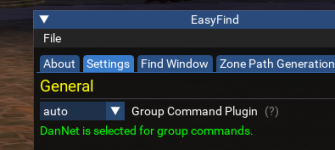
/easyfind ui opens up the easyfind UI, and then you can click on settings tab.

this allows you to have "none", "auto", "eqbc", or "dannet"
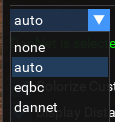
1647185348059.png

I leave mine on auto

1647185318371.png

Then of course you need to make sure that your Dannet is working > here is a post where i explain how to check <
 
the settings for easyfind would be in easyfind, not dannet

/easyfind ui opens up the easyfind UI, and then you can click on settings tab.

this allows you to have "none", "auto", "eqbc", or "dannet"
View attachment 38680

I leave mine on auto

View attachment 38679

Then of course you need to make sure that your Dannet is working > here is a post where i explain how to check <


I'm having "auto" and "DanNet selected" like you, and with that easyfind doesn't work (for group). If I select eqbc it works again. Is there any cons for staying with eqbc ?
For Dannet I will answer on the appropriate thread.
 
Using /travelto to send my group to Qeynos Hills (/travelto qeytoqrg), but the group stops short of the zone line in North Qeynos.

QeynosHills1.png

NorthQeynosLoc.png

Checked MQ2EasyFind.ini and found it didn't have an entry for this zone line. Tested to find a reliable location to use and added this:

[CODE lang="ini" title="Qeynos Hills - 1"][Qeynos2]
Qeynos Hills - 1=1410 440 4[/CODE]

but the group members still won't make it over the line. This is after completely restarting the EQ client.

I've checked the spelling of each item. The zone short name is correct. The loc is correct. I'm not sure what I'm missing here.
 
So I was having an issue to get EasyFind to work in Nek Forest. I am updated on MQ and all meshes, I can click Render Nav Mesh and I see it. I tried adding in:
Code:
Nektulos Forest]
Neriak - Foreign Quarter=1825.29 -982.57 24.13
in MQ2easyfind.ini (Next/Config/mq2easyfind.ini), I zoned out to Pok, saved the ini and rezoned into Nek Forest. Still not working. I looked through this thread and noone else seems to need a Nek Forest entry (Neriak, Pok Stone, Commonlands and Lava storm zone points). Anyone have any ideas?

1648407299329.png
 
Updated for undershore connections (illsalin and corathus do not work).

[CODE title="Undershore Zoneconnections"]
eastkorlach:
- type: ZoneConnection
location: [-1136, -1065, 270]
targetZone: corathus
identifier: 1
- type: ZoneConnection
location: [-1568, 740, 70]
targetZone: illsalin
- type: ZoneConnection
location: [553, 898, -35]
targetZone: westkorlach
identifier: 2
[/CODE]

edit: updated stoneroot falls - 2 connection to match the instance -1 connection since -2 didnt work and is suicide without levitate

Updated connection for stoneroot (westkorlach) to drachnidhive

Code:
    westkorlach:
        -   type: ZoneConnection
            location: [-1578, -794, 362]
            targetZone: drachnidhive
            identifier: 1

and finally updated connection for drachnidhive back to stoneroot

Code:
    drachnidhive:
        -   type: ZoneConnection
            location: [283, 1108, 451]
            targetZone: dreadspire
            westkorlach:
        -   type: ZoneConnection
            location: [22, 4, -6]
            targetZone: westkorlach
            identifier: 2
 
Last edited:
So I was having an issue to get EasyFind to work in Nek Forest. I am updated on MQ and all meshes, I can click Render Nav Mesh and I see it. I tried adding in:
Code:
Nektulos Forest]
Neriak - Foreign Quarter=1825.29 -982.57 24.13
in MQ2easyfind.ini (Next/Config/mq2easyfind.ini), I zoned out to Pok, saved the ini and rezoned into Nek Forest. Still not working. I looked through this thread and noone else seems to need a Nek Forest entry (Neriak, Pok Stone, Commonlands and Lava storm zone points). Anyone have any ideas?

View attachment 38983
Easyfind does not use mq2easyfind.ini for zone connections. you want ZoneConnections.yaml which is in the resources folder somewhere
 
Easyfind does not use mq2easyfind.ini for zone connections. you want ZoneConnections.yaml which is in the resources folder somewhere
Completely forgot about ZoneConnections.yaml

In that case, the qeynos2 connection to qeytoqrg should be updated to

location: [1410.50, 440.50, 4.37]
 
@brainiac looks like the RG autoupdater overwrites the zoneconnections yaml currently also. Luckily I had mine backed up and could restore it!
 
On Test server using Ctrl+Click in the find window for The Nexus runs you to the Cabilis Stone and takes you to Field of bone. /travelto (any zone that takes you through nexus from PoK) does the same and starts you in a fun zoning loop back and forth between PoK and field of bone.
 
As we are on the topic of easyfind on test, I have a few weird things happening and was wondering if I'm alone. Unsure if it's my EQ or MQ.

*There are a few missing zone connections in the find menu (example, from PoK, the guild lobby and west freeport arent there)

*Clicking on Nexus in find takes me to field of bone.

Along with a few others.
 
While this is an older post I thought it might be a place to start. Ever since I migrated over to next(? It was an update required), I can’t figure out how to get auto nav to start working again. Prior it worked pretty well as I could just find an NPC and my char would start a path to it. This function has stopped and I’d love to figure out how to get it working again.

I’m going to try following along with the above video to see if any small tweaks fix it (and hopefully learn so new tricks to customize it).

TLDR: just wondering if anyone has a quick suggestion for fixing autonav when it has stopped working.
 
Do you have updated meshes? Use the meshupdater tool in either the RG Launcher or in the RGVV folder. My guess, is you do not have them downloaded.
 
While this is an older post I thought it might be a place to start. Ever since I migrated over to next(? It was an update required), I can’t figure out how to get auto nav to start working again. Prior it worked pretty well as I could just find an NPC and my char would start a path to it. This function has stopped and I’d love to figure out how to get it working again.

I’m going to try following along with the above video to see if any small tweaks fix it (and hopefully learn so new tricks to customize it).

TLDR: just wondering if anyone has a quick suggestion for fixing autonav when it has stopped working.
There are a couple of small, yet important changes with MacroQuet vs the old MQ2 as explained > HERE <

Moving to MacroQuest mental notes:
1. mq2map click is Control+Shift+Click
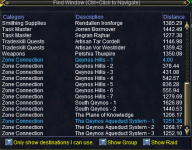
2. new easyfind self travel is Control+Click (reminder in find window title bar)
3. new easyfind group travel is Control+Shift+Click
4. If you selected a destination in your zone guide and want to activate it you /travelto activate
5. /yes and /no are now aliases
6. your ini configuration files (like for kissassist) now reside in your "Config" folder and not your "Macro" folder
 
Another edit for DoDh

[CODE title="Fix for DrachnidHive to dreadspire"] drachnidhive:
- type: ZoneConnection
switch: 4
targetZone: dreadspire
- type: ZoneConnection
location: [22, 4, -6]
targetZone: westkorlach
identifier: 2[/CODE]
 
Last edited:
Ok the above doesnt work, there are many doors with that name in the hive, is it possible to use both a location + a switch? I tried it in the ini but they just ran to the location and did not attempt to use the switch.

Figured out I could use the door # instead of name, fixed
 
Last edited:
Code:
overtheretwo:
        -   type: ZoneConnection
            switch: 6
            targetZone: charasis
        -   type: ZoneConnection
            location: [24, 2575, 21]
            targetZone: skyfire

to skyfiretwo

Code:
overtheretwo:
        -   type: ZoneConnection
            switch: 6
            targetZone: charasis
        -   type: ZoneConnection
            location: [24, 2575, 21]
            targetZone: skyfiretwo

and
Code:
sseru:
        -   type: ZoneConnection
            location: [1150.54, 425.00, 80]
            targetZone: Marus Seru
    steamfontmnts:
        -   type: ZoneConnection
            location: [-1085, -1080, -15]
            targetZone: argath
            expansion: Veil of Alaris

to steamfontmts

Code:
sseru:
        -   type: ZoneConnection
            location: [1150.54, 425.00, 80]
            targetZone: Marus Seru
    steamfontmts:
        -   type: ZoneConnection
            location: [-1084.41, -1084.49, -16.74]
            targetZone: argath
            expansion: Veil of Alaris
 
Code:
overtheretwo:
        -   type: ZoneConnection
            switch: 6
            targetZone: charasis
        -   type: ZoneConnection
            location: [24, 2575, 21]
            targetZone: skyfire

to skyfiretwo

Code:
overtheretwo:
        -   type: ZoneConnection
            switch: 6
            targetZone: charasis
        -   type: ZoneConnection
            location: [24, 2575, 21]
            targetZone: skyfiretwo

and
Code:
sseru:
        -   type: ZoneConnection
            location: [1150.54, 425.00, 80]
            targetZone: Marus Seru
    steamfontmnts:
        -   type: ZoneConnection
            location: [-1085, -1080, -15]
            targetZone: argath
            expansion: Veil of Alaris

to steamfontmts

Code:
sseru:
        -   type: ZoneConnection
            location: [1150.54, 425.00, 80]
            targetZone: Marus Seru
    steamfontmts:
        -   type: ZoneConnection
            location: [-1084.41, -1084.49, -16.74]
            targetZone: argath
            expansion: Veil of Alaris

got the first fix, but it was arleady steamfontmts in the released yaml file
 
I had to adjust the location of the zone line of westwastestwo for cobaltscartwo to get my characters to consistently zone.

[2520, 1468, 163.28]
 
North Qeynos to Qeynos Hills. Change to 1405.50 440.50 4.37.
[CODE highlight="3"]
qeynos2:
- type: ZoneConnection
location: [1405.50, 440.50, 4.37]
targetZone: qeytoqrg
identifier: 1
[/CODE]
 
I wonder if it reverted during all the patches?
It worked a little prior to patch, quit, worked again, and didn't as of my post...
 
Got strange stuff going on, decided to go to test and do some stuff and easfind kinda just went crazy on me. Having to add a bunch of connections in the yaml. Seems like most of it is skipping the pok books and running 10 zones to go 3. Not sure whats up.
 
Yeah from Crescent reach to POK...it actually took me all the way to west freeport before it found a POK book. About 8 zones instead of 1
 
I wonder if it reverted during all the patches?
It worked a little prior to patch, quit, worked again, and didn't as of my post...

Not sure. It was one of the first things I looked at post-patch (insure my changes were still there). Once someone mentioned the yaml would be overwritten by updates, I started keeping my own backup. Comparing the two, my change was there in both.
 
Yeah from Crescent reach to POK...it actually took me all the way to west freeport before it found a POK book. About 8 zones instead of 1
I ended up adding the POK book in every zone to the yaml. Something was causing the connections to ignore the pok book without it in the yaml. Nice thing from what I have seen the book has been switch 77 :)
 
North Qeynos to Qeynos Hills. Change to 1405.50 440.50 4.37.
[CODE highlight="3"]
qeynos2:
- type: ZoneConnection
location: [1405.50, 440.50, 4.37]
targetZone: qeytoqrg
identifier: 1
[/CODE]
Had to change this after 4/25 patch. It reverted to previous.
 
did a /easyfind void and ended up getting in an endless loop cycle of zoning into plane of time, then into the void, then into time, then into the void... etc. Couldnt kill the nav before it zoned again.
 
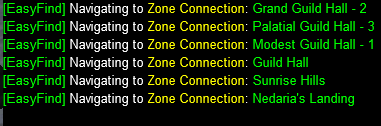
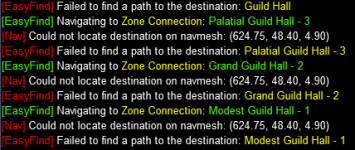
All Location from Guild Lobby to Guildhalls doesent work. Always get an error could not locate destinantion on navmesh.
Navmesh is up to date.
Its seems that the loc´s for GH are not correct, but i cant find the loc´s in ZoneConnections.yaml to edit it.
Someone knows how to fix this problem or have any hints or tips?
 
All Location from Guild Lobby to Guildhalls doesent work. Always get an error could not locate destinantion on navmesh.
Navmesh is up to date.
Its seems that the loc´s for GH are not correct, but i cant find the loc´s in ZoneConnections.yaml to edit it.
Someone knows how to fix this problem or have any hints or tips?
you sure?

all my locations for guild lobby work as expected

1656091887535.png
 
Last edited:
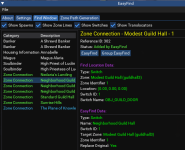
no... i didnt changed any loc right now. Cause i couldnt find the loc´s for GH... the ID is different. Dont know if this might be the problem

1656096907666.png
 

Attachments

  • 1656096870476.png
    1656096870476.png
    232 KB · Views: 1
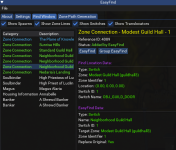
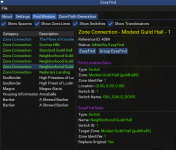
those locations look 100% identical. Problem is what the error message says: the point isn't on the mesh. either the mesh is wrong or the point is wrong. what does the mesh look like at the location its complaining about?
 
Easyfind wants to travel to 624. But when iam direct in front of GuildHall Door is only 622. So he never can reach the 624.
Is there a way to manualy set those values?
 
Easyfind wants to travel to 624. But when iam direct in front of GuildHall Door is only 622. So he never can reach the 624.
Is there a way to manualy set those values?
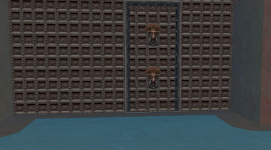
Can you /nav ui, then render the nav mesh and look where you are and where the doors are?

That is what brain (who wrote it) is pointing out
 
Release MQ2EasyFind

Users who are viewing this thread

Back
Top
Cart