• You've discovered RedGuides, an EverQuest multi-boxing and scripting community 🧙‍♀️⚙️. We want you to play several EQ characters at once, come join us and say hello! 👋

  • A TLP without truebox has thawed (Very Vanilla ready)
    Frostreaver
MQ2CWTNCommons

Utility - MQ2CWTNCommons (2 Viewers)

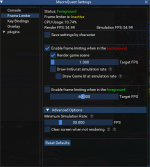
This may be waaay too high on the FPS to help with performance.

Try the settings HERE.
Yeah, I have 4 screens up and with it set at .01 in the background. It doesn't update. So I put it to 30FPS.

With that.

While in raid, there is something going on at least in Kanghammer, where the toons, won't move unless I click on the Settings tab. Not sure how to figure this out.
 
Yeah, I have 4 screens up and with it set at .01 in the background. It doesn't update. So I put it to 30FPS.

With that.

While in raid, there is something going on at least in Kanghammer, where the toons, won't move unless I click on the Settings tab. Not sure how to figure this out.
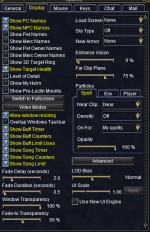
As mentioned again, this isn't something I can replicate and the single digit number of folks who have reported a similar issue get it resolved once they fixed their CPU affinity, memory usage, framelimiter, external apps limiting frames (isb, etc), AV, conflicting overlay causing focus problems, and especially the new UI engine (which coincidentally is a performance hog + framelimiter doesn't work on.

Without something more tangible to try and replicate, I'm going to have to go on the assumption that you have a background performance issue of some kind.

If you haven't already 💯 ensured you don't have conflicting overlay running, I would do that.

Clicking might be giving you "I'm doing stuff here" power due to some conflict.
 
Question:

CWTN: Hunter/Puller Mode

Is there any chance to check if a mob has been pulled or aggroed by other people aside from group or members before deciding to tag it and running to a mob thats been aggroed by another group?

Thank you
 
Question:

CWTN: Hunter/Puller Mode

Is there any chance to check if a mob has been pulled or aggroed by other people aside from group or members before deciding to tag it and running to a mob thats been aggroed by another group?

Thank you
we do that before we select it is a mob we're intending on pulling, but we don't change our mind after we've decided this is a mob we're going to get.
based on *gestures broadly* the shit-show that is baspending, i strongly recommend against hunter/auto pulling in a place where that could happen at all. it is just a bad idea.
 
we do that before we select it is a mob we're intending on pulling, but we don't change our mind after we've decided this is a mob we're going to get.
based on *gestures broadly* the shit-show that is baspending, i strongly recommend against hunter/auto pulling in a place where that could happen at all. it is just a bad idea.
yes, thanks sic. just running into issues that even on puller or hunter if a mob has a mob and its like at 80% my tank just wants to run up there and start tanking it or try to pull it. but i understand
 
yes, thanks sic. just running into issues that even on puller or hunter if a mob has a mob and its like at 80% my tank just wants to run up there and start tanking it or try to pull it. but i understand
Those checks are done. However, depending on the distance from the search location it's possible EQ doesn't give accurate information about the spawn related to their current location/health and the location of other players to some extent. You can sort of see how it lags a bit behind by using a toon with selos on them throw stone at a mob and run. The further you are from the mob the less consistent the updates on the map are for the mobs location. We do try to avoid pulling other peoples mobs, but we cannot predict the future and the user must be available and attentive to ensure they aren't an issue for other players. You should also consider keeping other players out of your pull radius to avoid these conflicts all together.
 
CWTN: RaidMode On

Aside from the primary groy ive tested this and i need to switch tabs off the UI for it to axcknlege for thenm to start chasing. primary group np, the secondry raid group just waits until thier ui is change for them to realize they are on chase. any suggestions>
 
CWTN: RaidMode On

Aside from the primary groy ive tested this and i need to switch tabs off the UI for it to axcknlege for thenm to start chasing. primary group np, the secondry raid group just waits until thier ui is change for them to realize they are on chase. any suggestions>
Check your framelimiter, new UI engine off, resources available for your toons "to do work"

Look a few posts above https://www.redguides.com/community/threads/mq2cwtncommons.71069/post-639306
 
Last edited:
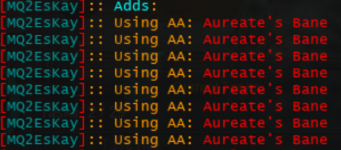
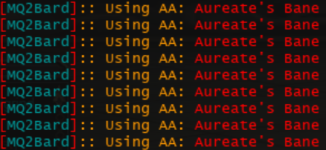
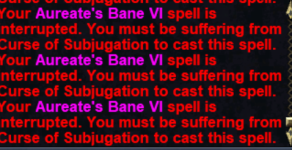
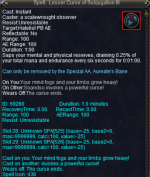
Don't know if it's technically a bug issue, but the toons I have Aureate's Bane active on are spamming it when they already have the buff on Test. Current test build, everything should be up-to-date, default UI, use new UI turned off.

1739341097415.png
1739341114943.png
1739341164125.png
 
That's pretty suspect since we only try and use it when you have the debuff
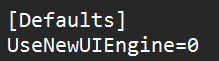
I know you said default UI and new UI turned off, but is double check that.

Our buff check would default to "yes I have this buff" if it was failing to get your buffs
 
Last edited:
k

I know there are additional changes that have been made to MQ after the build, so might be related
 
k

I know there are additional changes that have been made to MQ after the build, so might be related
after a bit more testing here is something I noticed:
1739384419215.png

Once this goes away it stops spamming the bane. The weakened effect was active even with the buff for a little bit. It disappeared after a while.

I didn't even notice it at first because I was in a grind and didn't have any downtime.
 
after a bit more testing here is something I noticed:
View attachment 68352

Once this goes away it stops spamming the bane. The weakened effect was active even with the buff for a little bit. It disappeared after a while.

I didn't even notice it at first because I was in a grind and didn't have any downtime.
What is it called?

So you're saying the aa isn't curing the effect? Sounds like an eq bug.

I'll put another check on that you don't have the benefit buff also, tho it shouldn't be possible to have the debuff that only the aa can cure, but doesn't cure it. not going to do this. this would mean that you may potentially have the debuff on you for 15 minutes, and not try and cast the AA to cure the debuff until your buff fades

can you confirm that a: you do / don't have aureate's bane buff and b: what detrimental you have
 
Last edited:
What is it called?

So you're saying the aa isn't curing the effect? Sounds like an eq bug.

I'll put another check on that you don't have the benefit buff also, tho it shouldn't be possible to have the debuff that only the aa can cure, but doesn't cure it.
The best I can tell is that the AA cure isn't removing/blocking all the components of the debuff right away when it is activated (even though the debuff is no longer showing in the short duration buff window). I don't have any other detrimental effects on my characters when it's happening. I've only had this happen in the control room grind. Once my timers are up I can try the brood architect grind to see if it also happens there.
 
The best I can tell is that the AA cure isn't removing/blocking all the components of the debuff right away when it is activated (even though the debuff is no longer showing in the short duration buff window). I don't have any other detrimental effects on my characters when it's happening. I've only had this happen in the control room grind. Once my timers are up I can try the brood architect grind to see if it also happens there.
what is the debuff called in your window specifically.
do you have the buff while this is happening.
 
ChatWithThisName updated MQ2CWTNCommons with a new update entry:

02/12/2025

- EQ Currently has a bug where Aureate's Bane doesn't immediately dispell Curse of Subjugation
- - we will now only use it when we have a curse AND don't have a buff
- - - unfortunately, this possibly means not curing a curse because you already have the buff. (you can test this manually)
- - - we will take this back out when eq fixes it

Read the rest of this update entry...
 
hi sic and cwtn,

i know you answered this question but i canr seem to locate the post.

Issue: in raid mode none of my toons are following in chase mode unless i have the cwtn window open

I know you answered this but just cant seem the post as i just bought a new computer.

thankls
 
hi sic and cwtn,

i know you answered this question but i canr seem to locate the post.

Issue: in raid mode none of my toons are following in chase mode unless i have the cwtn window open

I know you answered this but just cant seem the post as i just bought a new computer.

thankls
Do you have RA set in raid window as well as each plugin window? Do you have meshes for the raid zone? are your dudes in raid mode? Your question here is different than what you asked in discord. Trying to clarify.
 
hi sic and cwtn,

i know you answered this question but i canr seem to locate the post.

Issue: in raid mode none of my toons are following in chase mode unless i have the cwtn window open

I know you answered this but just cant seem the post as i just bought a new computer.

thankls
As mentioned again, this isn't something I can replicate and the single digit number of folks who have reported a similar issue get it resolved once they fixed their CPU affinity, memory usage, framelimiter, external apps limiting frames (isb, etc), AV, conflicting overlay causing focus problems, and especially the new UI engine (which coincidentally is a performance hog + framelimiter doesn't work on.

Without something more tangible to try and replicate, I'm going to have to go on the assumption that you have a background performance issue of some kind.

If you haven't already 💯 ensured you don't have conflicting overlay running, I would do that.

Clicking might be giving you "I'm doing stuff here" power due to some conflict.

You should use framelimiter.

Every time someone has mentioned this it is due to their background toons not getting/processing stuff until they're brought in focus (by clicking another tab).

Also, you want mainframes set to something reasonable (we actually set them to 30 if you have them set at min).

I don't have anything to offer than "use framelimiter".

I also suspect you're using the new eq UI engine, which you should disable as framelimiter and many other mq things can't work with

oour code doesn't have anything to say "only do stuff after you've clicked on the imgui window" or "only do stuff after you've displayed the imgui window", but if your background toons have some unspecified issue not having the resources they need "to do work" in the background, they most certainly can have issues - i *suspect* folks only notice it in raids cause of performance hit they're having while in raid - either due to the amount of toons they have logged on, or just the performance hit by all the logs and all the displaying of characters etc.

- ensure you have the new ui engine disabled
- ensure you're using framelimiter
- ensure you're not otherwise throttling yourself via external applications
 
oour code doesn't have anything to say "only do stuff after you've clicked on the imgui window" or "only do stuff after you've displayed the imgui window", but if your background toons have some unspecified issue not having the resources they need "to do work" in the background, they most certainly can have issues - i *suspect* folks only notice it in raids cause of performance hit they're having while in raid - either due to the amount of toons they have logged on, or just the performance hit by all the logs and all the displaying of characters etc.

- ensure you have the new ui engine disabled
- ensure you're using framelimiter
- ensure you're not otherwise throttling yourself via external applications
hi sic thx again

1739755320275.png

All toons are disabled

1739755388611.png


- ensure you're not otherwise throttling yourself via external applications (What does this mean)
 
- ensure you're not otherwise throttling yourself via external applications (What does this mean)
some folks use external programs like isboxer or wineq that does other "limit frames / cpu" you definitely dont want this.
you also want to ensure things like:
- power settings ensure you have cpu power available fulltime
- you aren't /logging on a bunch of toons
- - if you are using /log that you keep your logs rotated (small size)
- double check you're not causing yourself issues by using onedrive on your mq/eq folders (the constant syncing to changed files can and will cause you grief)
- double check if you're using antivirus that you have whitelisted your mq/eq/rg folders
- ensure you're not using potentially conflicting overlay software - examples include: nahimic, overwolf, etc
 
The situations where this happened to me, I am currently unable to recreate as my toons are on a vacation.

With that, my thoughts when I think about my experience and everything I am reading:

When I had a background toon not responding (after making sure of all the settings for ui, framelimiter, external programs, logs, etc) and I click to that toon (bring it to the foreground), it doesn't just start processing commands like the rest of the raid. My thought is, since it is in the foreground it should have all the processing it needs to do commands.

It wasn't until clicking on another tab in the imGUI ui that it started to respond and follow. I even remember once pressing movement keys to see if the toon would start responding before clicking the ui tab.

This only happened to me in the Kanghammer raid zone with caster toons. My melee group in the same zone didn't have this issue.


Just putting this out there for collective knowledge in case something is eventually found, if anything (whether plugin, imgui, windows, etc).
 
The situations where this happened to me, I am currently unable to recreate as my toons are on a vacation.

With that, my thoughts when I think about my experience and everything I am reading:

When I had a background toon not responding (after making sure of all the settings for ui, framelimiter, external programs, logs, etc) and I click to that toon (bring it to the foreground), it doesn't just start processing commands like the rest of the raid. My thought is, since it is in the foreground it should have all the processing it needs to do commands.

It wasn't until clicking on another tab in the imGUI ui that it started to respond and follow. I even remember once pressing movement keys to see if the toon would start responding before clicking the ui tab.

This only happened to me in the Kanghammer raid zone with caster toons. My melee group in the same zone didn't have this issue.


Just putting this out there for collective knowledge in case something is eventually found, if anything (whether plugin, imgui, windows, etc).
Kanghammer raid even without MQ has freezes and lockups. Bug report on EQ forums about it...
 
Question:

1739824867115.png

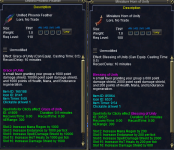
These 2 clickies share the same timer. When the Unified Phoenix Feather is clicked and I have the "Grace of Unity" Song on it spams casting Miniature Grace of Unity for "Blessing of Unity"

Seeing that the feather is at a higher stack the horn wont override the "Grace of Unity" buff. But the Horn of Unity will override the Feath Buff.

The issue that im having it it keeps spamming the horn to cast "Blessing of Unity" until "Grace of Unity" spell has timed out. Would there be any way to have these 2 items checked? if the higher version is on my buff then dont cast the horn? If the higher level is not on my buff to cast the Horn ONLY if the feather is on cooldown?


Thanks
 
Question:

View attachment 68524

These 2 clickies share the same timer. When the Unified Phoenix Feather is clicked and I have the "Grace of Unity" Song on it spams casting Miniature Grace of Unity for "Blessing of Unity"

Seeing that the feather is at a higher stack the horn wont override the "Grace of Unity" buff. But the Horn of Unity will override the Feath Buff.

The issue that im having it it keeps spamming the horn to cast "Blessing of Unity" until "Grace of Unity" spell has timed out. Would there be any way to have these 2 items checked? if the higher version is on my buff then dont cast the horn? If the higher level is not on my buff to cast the Horn ONLY if the feather is on cooldown?


Thanks
We actual do check for stacking. So it is certainly annoying.

I'd suggest using them with different values. It is what I do.
 
We actual do check for stacking. So it is certainly annoying.

I'd suggest using them with different values. It is what I do.
thanks Sic. Also can you direct/point me where in the site i can read about how the treshold works? thanks
 
thanks Sic. Also can you direct/point me where in the site i can read about how the treshold works? thanks
There's nothing to read really. Threshold is literally what it is.

Set the good one to a higher value, so it'll get used more frequently (and hopefully higher in your list)
 
thanks Sic. Also can you direct/point me where in the site i can read about how the treshold works? thanks
If they share a timer, and they share effects, one being better than the other. Then why not just disable the one that is no longer useful, place it in the bank or something similar? Perhaps I'm not understanding the reason for having both enabled?
 
If they share a timer, and they share effects, one being better than the other. Then why not just disable the one that is no longer useful, place it in the bank or something similar? Perhaps I'm not understanding the reason for having both enabled?
Hi cwtn,

the answer is because the cool down period, both are 10 minutes so was hoping it couild be utilize back to back when 1 is on cool down. also still not understanding how the threshold works as what sic suggested. is the threshold number in seconds?
 
Hi cwtn,

the answer is because the cool down period, both are 10 minutes so was hoping it couild be utilize back to back when 1 is on cool down. also still not understanding how the threshold works as what sic suggested. is the threshold number in seconds?
Looking closer I see that the Item Timer shows different values.
Threshold is for use with things that provide mana/end/health. There is an assumption made that you are using them for this purpose.
If they are in the endurance clickies and you want to use it for endurance, then you should set the threshold to the percent endurance you must drop below prior to the item being used. Replicate that reasoning to the other values for mana clickies and health clickies.

The threshold is meant to be a percentage value of the entry they are in. If you have these to assigned to other clickie types then there will be no reason, or usefulness to having a threshold. With the exception of summons, which will summon the item the clickie generates until you have the amount in the threshold.
 
Looking closer I see that the Item Timer shows different values.
Threshold is for use with things that provide mana/end/health. There is an assumption made that you are using them for this purpose.
If they are in the endurance clickies and you want to use it for endurance, then you should set the threshold to the percent endurance you must drop below prior to the item being used. Replicate that reasoning to the other values for mana clickies and health clickies.

The threshold is meant to be a percentage value of the entry they are in. If you have these to assigned to other clickie types then there will be no reason, or usefulness to having a threshold.
okay so its a % based Thankls so much i was trying to understand it. so correct me if im wrong but if the threshold is set at 80 then that means it will use it when at 80 correct?
 
thanks cwtn i thought it was on seconds but thanks
Why would threshold be seconds? That doesn't make any sense.

I specifically didn't get you a lot of information because it doesn't seem to help you.

Set the feather to like 80, and the horn to like 30.

You can also mix what add clicky groups they're used in, so there are few addclicky groups they both reside in.
 
Utility - MQ2CWTNCommons

Users who are viewing this thread

  • S
Back
Top
Cart