I use ISBoxer on a 49" monitor and have six accounts running simultaneously. When I log into the accounts, I organize the MQ and plugin windows where I like them. With this update, when I alt-tab or mouse click between windows, the plugin window goes back to a specific point on all accounts (while accounts are active). I understand having to reset the window when I log in but I would expect the windows to stay where I put them when I alt-tab.

-
 Hail, we're RedGuides. We want you to play six (yes, 6!) EverQuest characters at once. We have scripts and a friendly community to help, please join our playstyle and say hello! 👋
You are using an out of date browser. It may not display this or other websites correctly.
You should upgrade or use an alternative browser.
You should upgrade or use an alternative browser.

Utility - MQ2CWTNCommons (4 Viewers)
- Thread starter ChatWithThisName
- Start date

the imgui windows are all saved independently of one another in your macroquest_overlay.ini fileI use ISBoxer on a 49" monitor and have six accounts running simultaneously. When I log into the accounts, I organize the MQ and plugin windows where I like them. With this update, when I alt-tab or mouse click between windows, the plugin window goes back to a specific point on all accounts (while accounts are active). I understand having to reset the window when I log in but I would expect the windows to stay where I put them when I alt-tab.
you shouldn't have to reset when logging in either - I don't
are you somehow making your mq files read only?
It appears to be something screwy with my ISBoxer monitor settings on my computer with the 49" monitor. I tried another computer that uses ISBoxer too but nothing fancy in terms of monitor layout (full screen, no layout.) The plugin windows do not move when I alt-tab between characters on that computer. I also loaded two EQ windows manually, without ISBoxer/IS, on the 49" monitor computer and the plugin windows did not move.
I will play with it some more. I did not have this problem until the update this morning though so something changed there.
I will play with it some more. I did not have this problem until the update this morning though so something changed there.
well as i mentioned in pm - all imgui windows for MQ are stored in your macroquest_overlay.ini settings file - the plugins' ui works like any other imgui overlay - although we ensure each toon has their own overlay.It appears to be something screwy with my ISBoxer monitor settings on my computer with the 49" monitor. I tried another computer that uses ISBoxer too but nothing fancy in terms of monitor layout (full screen, no layout.) The plugin windows do not move when I alt-tab between characters on that computer. I also loaded two EQ windows manually, without ISBoxer/IS, on the 49" monitor computer and the plugin windows did not move.
I will play with it some more. I did not have this problem until the update this morning though so something changed there.
it not saving sounds like a file isn't being allowed to update (macroquest_overlay.ini)
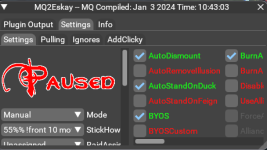
hey guys, i was wondering where to post, and told here. i just had a question about the gray background of my cwtn box now with the new update. i cant read it with this light gray background, and my friends is dark. i adjusted gamma in game but thats not working. i might have missed it in the video. thaniks

- Commits
- 191
hey guys, i was wondering where to post, and told here. i just had a question about the gray background of my cwtn box now with the new update. i cant read it with this light gray background, and my friends is dark. i adjusted gamma in game but thats not working. i might have missed it in the video. thaniks
View attachment 55408
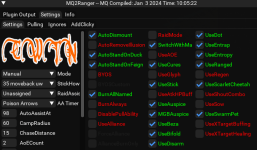
Mine is much darker. Looks like you have your gamma really high. Only thing I can think of but you mentioned you already tried so I'm not sure.
yea 47 percent gamma in game and even went down in windows itself. it was mid, and now its mid to lowView attachment 55410
Mine is much darker. Looks like you have your gamma really high. Only thing I can think of but you mentioned you already tried so I'm not sure.
interesting, i know its my computer, not you guys for sure. so, i thought to load up the other account, and its a bit darker, but no matter if i change in game gamma, advanced lighting on and off, windows gamma, and the monitor gamma and brightness. nothing is working, so not sure whats is going on. its a stretch but hoping someone else might have had this happen also, and figured out how to adjust it, darker. thank you
and loaded a second character on this pc, and its only my main character its happening to. so weird
Last edited:
This is also a problem that I have with my setup. It works fine on any character with ISBoxer with its own screen, but if you have multiple characters on one screen, and have a "swap" setup indicated, the IMGui windows will all reset to the left upper quadrant, regardless of where you put them. This only happens when you change the focus to another character on the same screen. Not sure if it's ISBoxer related, or Ultrawide related (I also play on an UW monitor). It was something I noticed with luas, but never bothered to try and dig deeper into it previously since keeping my luas in that quadrant was fine. Gonna play around with some IMGui settings today and see if I can figure out what is up,well as i mentioned in pm - all imgui windows for MQ are stored in your macroquest_overlay.ini settings file - the plugins' ui works like any other imgui overlay - although we ensure each toon has their own overlay.
it not saving sounds like a file isn't being allowed to update (macroquest_overlay.ini)
Im having this same issue on a big monitor using isboxer and for some reason my necro is spamming familiar with or without it being in the buff window lol...I use ISBoxer on a 49" monitor and have six accounts running simultaneously. When I log into the accounts, I organize the MQ and plugin windows where I like them. With this update, when I alt-tab or mouse click between windows, the plugin window goes back to a specific point on all accounts (while accounts are active). I understand having to reset the window when I log in but I would expect the windows to stay where I put them when I alt-tab.

I had this same issue months back with all imgui windows and after a week of communucation with isboxer techs, they told me there was nothing that could be done. When the windows swap in isboxer, they do reduce the resolution and when that happens, all imgui windows reset to remain on the smaller screen. When you bring it back to the forefront with larger screen size, the imgui windows do not have an anchor built into them so they move to the top left.This is also a problem that I have with my setup. It works fine on any character with ISBoxer with its own screen, but if you have multiple characters on one screen, and have a "swap" setup indicated, the IMGui windows will all reset to the left upper quadrant, regardless of where you put them. This only happens when you change the focus to another character on the same screen. Not sure if it's ISBoxer related, or Ultrawide related (I also play on an UW monitor). It was something I noticed with luas, but never bothered to try and dig deeper into it previously since keeping my luas in that quadrant was fine. Gonna play around with some IMGui settings today and see if I can figure out what is up,
End result, I stopped using isboxer and only use boxhud to manage the team and move toons between windows.
Maybe Sic/CWTN have a different solution for the new plugin's imgui's that I am not aware of, but this was the issue for me several months ago.
really appreciate this comment PsyI had this same issue months back with all imgui windows and after a week of communucation with isboxer techs, they told me there was nothing that could be done. When the windows swap in isboxer, they do reduce the resolution and when that happens, all imgui windows reset to remain on the smaller screen. When you bring it back to the forefront with larger screen size, the imgui windows do not have an anchor built into them so they move to the top left.
End result, I stopped using isboxer and only use boxhud to manage the team and move toons between windows.
Maybe Sic/CWTN have a different solution for the new plugin's imgui's that I am not aware of, but this was the issue for me several months ago.

i use ixboxer - but i don't do tiling, so no clue, but we're not doing anything "special", it isn't > us < that is causing the issue
Oh, yeah, I totally get it's not MQ. I suspect it's an ISBoxer issue with changing resolutions with tiling after messing with settings. A minor annoyance, if anything. I like the IMG version of the plugins. Adding the extra tabs for clicks, ports, etc, is really smooth. Much better quality of life.
For a while I set all my imgui windows to the top left so I could "work around" the issue, but finally gave up as most things appear to be going to imgui so this problem with isboxer was bound to persist. Give Boxhud and shot, it worked wonders for me! But definitely not a RG issue at all.Oh, yeah, I totally get it's not MQ. I suspect it's an ISBoxer issue with changing resolutions with tiling after messing with settings. A minor annoyance, if anything. I like the IMG version of the plugins. Adding the extra tabs for clicks, ports, etc, is really smooth. Much better quality of life.
I have used Boxhud for a while but didn't know it could swap like that until I just tried. TIL. I enjoy having the view of everything, though. I found a good solution by relocating some of the Luas to the main screen since that one won't have issues when it swaps. Solved it! I appreciate the tip on Boxhud though, good to know if I can ever get over my irrational need to see what all of my characters are up to at any given time.For a while I set all my imgui windows to the top left so I could "work around" the issue, but finally gave up as most things appear to be going to imgui so this problem with isboxer was bound to persist. Give Boxhud and shot, it worked wonders for me! But definitely not a RG issue at all.
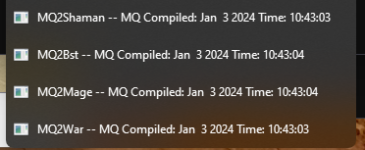
no, but you can disable the setting of window titles and then you can set it to whatever you want with /setwintitleany chance you can put the characters name on these windows so i can see what the toons name is without selecting it?
View attachment 55427
"UpdateWinTitle" is the option name.

i miss the old box
well thank you for the thorough explanation for the reasons.i miss the old box
sorry about that, the old window isn't coming back

crioulo_trick09
Member
First time logging in a 'few' weeks and i see you did some work! nice job these new windows are freaking amazing. really like the added functionality and the info tab, i don't have to tab out to the browser anymore lol
cant wait for bard, i saw ranger got released i don't have a ranger yet but now maybe with personas who knows... lol
cant wait for bard, i saw ranger got released i don't have a ranger yet but now maybe with personas who knows... lol
- Commits
- 191
ChatWithThisName updated MQ2CWTNCommons with a new update entry:
01/03/2024b
Read the rest of this update entry...
01/03/2024b
- Please see the cwtncommons discussion if you're having window location issues due to ISBoxer
-- unfortunately this is an ISBoxer issue, and not something that cwtn/sic has the ability to change/fix.
- We will now no longer try and cast a Mount, Familiar, or Illusion clicky if you have one in you "Stat" keyring slot and it doesn't match
-- this fixes some folks who are getting spam
-- this "Stat" slot makes an item cast a spell on you that the item doesn't say it casts
- Corrected spamming...
Read the rest of this update entry...

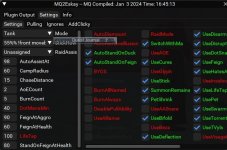


I too miss the old box , especially since I had just updated my Ui's to a more novel layout for myself, I suspect I miss the familiarity more than anything. The new can still get nestled up in the same corner for me, although it requires me to do some window tinkering as it overlaps with almost every bag slot i had opening in that corner of the screen. I also desperately miss the Pause sign being visible.
I think it looks great and I appreciate all of the hard work put in to continue to improve and upgrade Thank you
I think it looks great and I appreciate all of the hard work put in to continue to improve and upgrade Thank you
Thanks Sic.the folks posting about no pause button seem to be all be on the test server.
no idea why test server would be different - we're not doing anything different.
the button is there in the code
it looks like the method to display textures/images on the test server isn't functioning at all.

 github.com
[BUG] Images no longer display with CreateMethod like in examples/texture.lua · Issue #802 · macroquest/macroquest
MQ Version [X ] Test Images no longer appear to be loading utilizing the method in https://github.com/macroquest/macroquest/blob/master/src/plugins/lua/lua/examples/texture.lua To Reproduce Steps t...
github.com

Thanks jimmyjust wanted to say you guys are killing it. Great work!

How do we get the old window back? Lua windows are giant blobs of real estate suck which I cannot set any transparency to. I also have them break often, such as the navui window, and the only way to fix it is to close the EQ session (/reload and /loadskin don't). I'm hoping to not have similar problems with the new cwtn ui. And it sits on top of every other window, such as bags. =/
The addclicky tab is a nice bonus, however!
The addclicky tab is a nice bonus, however!
you can't, the old window is forever goneHow do we get the old window back? Lua windows are giant blobs of real estate suck which I cannot set any transparency to. I also have them break often, such as the navui window, and the only way to fix it is to close the EQ session (/reload and /loadskin don't). I'm hoping to not have similar problems with the new cwtn ui. And it sits on top of every other window, such as bags. =/
The addclicky tab is a nice bonus, however!
Any way to fix Lua windows so they can be better and not take over my UI, or require a 2nd monitor to operate?you can't, the old window is forever gone
I'm not sure how there could be an answer to your question that would answer in the way that you want.Any way to fix lua windows so they can be better and not take over my UI, or require a 2nd monitor to operate?
you sound like you're being snide.
the window is an "imgui" window - it is not a Lua window, these plugins are written in c++ not in Lua
the window is resizable - you can drag the corner
the window is "minimizable" you can hit the arrow or double click on the titlebar
I, personally, don't recommend dragging it off the window.
you can also just not use the window at all, and the output goes in your mqconsole or mq2chatwnd
I'm not being snide, just trying to find a way that this isn't a downgrade in performance or functionality. Having to play window-shuffle wasn't something I had to do previously. There was a specific spot for the CWTN class window, and it played nicely with every other window out there. That seems to have been taken away and as per your previous post will not ever be coming back. So now the options are to minimize, constantly move or drag it other places, or just not use it at all.I'm not sure how there could be an answer to your question that would answer in the way that you want.
you sound like you're being snide.
the window is resizable - you can drag the corner
the window is "minimizable" you can hit the arrow or double click on the titlebar
I, personally, don't recommend dragging it off the window.
you can also just not use the window at all, and the output goes in your mqconsole or mq2chatwnd
sorry about that, but no, it won't be coming backI'm not being snide, just trying to find a way that this isn't a downgrade in performance or functionality. Having to play window-shuffle wasn't something I had to do previously. There was a specific spot for the CWTN class window, and it played nicely with every other window out there. That seems to have been taken away and as per your previous post will not ever be coming back. So now the options are to minimize, constantly move or drag it other places, or just not use it at all.

- Commits
- 191
Honestly it seemed to be really really picky about where you could click to drag in my experience.Really stoked about being able to grab the corner and drag the UI larger when I want to read the plugin output. My eyes/hands had a bear of a time grabbing an edge before. Thank you!
Users who are viewing this thread
Total: 5 (members: 0, guests: 5)
Share: