• You've discovered RedGuides, an EverQuest multi-boxing and scripting community 🧙‍♀️⚙️. We want you to play several EQ characters at once, come join us and say hello! 👋

  • A TLP without truebox has thawed (Very Vanilla ready)
    Frostreaver
Resource icon

Release MQ2Cursor

works fine for me
just tried again on 2 different toons
---------------------------
EverQuest Crash Detected
---------------------------
MacroQuest caught a crash:

Process ID: 23776
Version: 3.1.1.3439
Location: InitPluginHandle+0 (C:\Users\dvrea\Desktop\MQNext\Plugins\mq2cursor.DLL+000000000002B7D0)

CrashID: 0ad1ce34-01fd-44c3-83e6-ff2b1f3c2908

You can either:
* [RETRY] Continue execution and hope for the best.
* [CANCEL] Write a crash dump and terminate EverQuest.

Copy the contents of this dialog to your clipboard by pressing Ctrl+C

---------------------------
Retry Cancel
---------------------------

---------------------------
EverQuest Crash Detected
---------------------------
MacroQuest caught a crash:

Process ID: 6104
Version: 3.1.1.3439
Location: InitPluginHandle+0 (C:\Users\dvrea\Desktop\MQNext\Plugins\mq2cursor.DLL+000000000002B7D0)

CrashID: 2d056a09-bb1b-48ee-945d-d9f489f11cae

You can either:
* [RETRY] Continue execution and hope for the best.
* [CANCEL] Write a crash dump and terminate EverQuest.

Copy the contents of this dialog to your clipboard by pressing Ctrl+C

---------------------------
Retry Cancel
---------------------------

Let me know if you need anything else from me
 
just tried again on 2 different toons
---------------------------
EverQuest Crash Detected
---------------------------
MacroQuest caught a crash:

Process ID: 23776
Version: 3.1.1.3439
Location: InitPluginHandle+0 (C:\Users\dvrea\Desktop\MQNext\Plugins\mq2cursor.DLL+000000000002B7D0)

CrashID: 0ad1ce34-01fd-44c3-83e6-ff2b1f3c2908

You can either:
* [RETRY] Continue execution and hope for the best.
* [CANCEL] Write a crash dump and terminate EverQuest.

Copy the contents of this dialog to your clipboard by pressing Ctrl+C

---------------------------
Retry Cancel
---------------------------

---------------------------
EverQuest Crash Detected
---------------------------
MacroQuest caught a crash:

Process ID: 6104
Version: 3.1.1.3439
Location: InitPluginHandle+0 (C:\Users\dvrea\Desktop\MQNext\Plugins\mq2cursor.DLL+000000000002B7D0)

CrashID: 2d056a09-bb1b-48ee-945d-d9f489f11cae

You can either:
* [RETRY] Continue execution and hope for the best.
* [CANCEL] Write a crash dump and terminate EverQuest.

Copy the contents of this dialog to your clipboard by pressing Ctrl+C

---------------------------
Retry Cancel
---------------------------

Let me know if you need anything else from me
thank you, thats much more useful
 
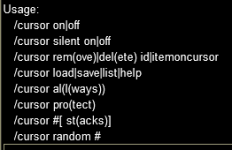
I noticed today that when I issue the command /cursor off to make sure it is not active, it acts as a toggle, so it will keep toggling it off then on when I issue the /cursor off command. I experimented, and using /cursor off, /cursor on, or /cursor auto will all act as toggles. (the auto is from the overview page, though it is no longer in the help)

1773090956548.png
 
I tried the new version in the hopes that the on and off command had been fixed, but they are still a toggle switch, so it is hard to use in a button to turn off cursor when needed. The on and off command just toggle the state, they do not explicitly set the state off or on.
 
Release MQ2Cursor

Users who are viewing this thread

Back
Top
Cart
