• Hail, we're RedGuides. We want you to play six (yes, 6!) EverQuest characters at once. We have scripts and a friendly community to help, please join our playstyle and say hello! 👋
  • We've added LLM sections to our Terms & Rules and Resource Rules, for everyone's sanity & in-game safety.
    Read more
    a. Do not replace your voice with an LLM. This goes for your posts and your scripts. Drafting and editing with a tool is fine, but don't take you out of what you share.
    b. Do not replace your EQ character's voice with an LLM. We don't want scripts that speak over /ooc, /shout or other public channels. This has been an unwritten rule that's kept casino scripts off the site for decades, but we're now compelled to make it clear: keep automated communication private.

    Why Does RG Review Scripts?
    Nearly every LLM-written Lua script we see is making your character do impossible things, and rarely in a way that's beneficial to you. We've seen heavy server hammering, /target over impossible distances when /nav spawn would passively accomplish the same thing, a spawn search that fires 20+ times per second, and other pointless actions that are likely annoying GMs.

    You are welcome to use LLMs as a tool to structure, draft, and edit your work, but please read critically before hitting /lua run

Problem - MQ2 clients crashing / PC freezing / blue screen

Dealt21

Well-known member
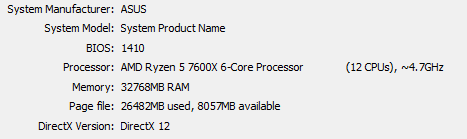
Hey all, returning player here...Just started to my group today and I am having issues with MQ2 clients crashing, PC locking up, and blue screen when I restart.

What I have tried -

Making sure that I am not using the new UI engine
Running everything in windowed mode
Lowering fps (80 FPS in background...too high??)
Reinstalled everything
Deleted cwtn plug-ins that I was not using
No administration mode
No compatibility mode

It seems worse when I run the RGMercs Lua...not sure why.

Any other thoughts?
 
Hey all, returning player here...Just started to my group today and I am having issues with MQ2 clients crashing, PC locking up, and blue screen when I restart.

What I have tried -

Making sure that I am not using the new UI engine
Running everything in windowed mode
Lowering fps (80 FPS in background...too high??)
Reinstalled everything
Deleted cwtn plug-ins that I was not using
No administration mode
No compatibility mode

It seems worse when I run the RGMercs LUA...not sure why.

Any other thoughts?
Blue Screen sounds like memory issues. If you have more than one stick, try removing all but one and try again, then try another. Rinse and repeat.
 
Hey all, returning player here...Just started to my group today and I am having issues with MQ2 clients crashing, PC locking up, and blue screen when I restart.

What I have tried -

Making sure that I am not using the new UI engine
Running everything in windowed mode
Lowering fps (80 FPS in background...too high??)
Reinstalled everything
Deleted cwtn plug-ins that I was not using
No administration mode
No compatibility mode

It seems worse when I run the RGMercs LUA...not sure why.

Any other thoughts?
Make sure you use framelimiter.

Also - ensure you're not running any potentially conflicting overlays like afterburner, Nahimic, overwolf, etc

You also want to ensure you don't have antivirus or file syncing causing you issues.
 
Thank you everyone. I will try some of these things and get back to you. I lowered my frame rates substantially and put background to min. Cpu usage and I think it is getting better. I have had issues with frame rates with my 7900 XTX graphics card in the past.
 
Thank you everyone. I will try some of these things and get back to you. I lowered my frame rates substantially and put background to min. Cpu usage and I think it is getting better. I have had issues with frame rates with my 7900 XTX graphics card in the past.
No. Don't do that.

Use framelimiter.

Putting background frames to min says "I don't want to do shit in the background, please make my too lns fall of ledges and act weird".

Frame limiter not only fixes your background frames, but bypasses the EQ bullshittery with max bg frames set to min.
 
No. Don't do that.

Use framelimiter.

Putting background frames to min says "I don't want to do shit in the background, please make my too lns fall of ledges and act weird".

Frame limiter not only fixes your background frames, but bypasses the EQ bullshittery with max bg frames set to min.

Okay thanks. I'll do this instead!

Oh and my shaman got stuck in some rocks earlier....pretty sure it's the fps thing lmao
 
Problem - MQ2 clients crashing / PC freezing / blue screen

Users who are viewing this thread

Back
Top
Cart