• You've discovered RedGuides, an EverQuest multi-boxing and scripting community 🧙‍♀️⚙️. We want you to play several EQ characters at once, come join us and say hello! 👋

  • A TLP without truebox has thawed (Very Vanilla ready)
    Frostreaver

Problem - MQ2 clients crashing / PC freezing / blue screen

Joined
Nov 1, 2021
RedCents
269¢
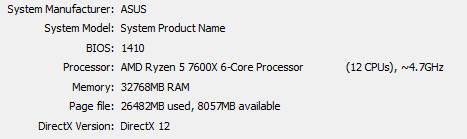
Hey all, returning player here...Just started to my group today and I am having issues with MQ2 clients crashing, PC locking up, and blue screen when I restart.

What I have tried -

Making sure that I am not using the new UI engine
Running everything in windowed mode
Lowering fps (80 FPS in background...too high??)
Reinstalled everything
Deleted cwtn plug-ins that I was not using
No administration mode
No compatibility mode

It seems worse when I run the RGMercs Lua...not sure why.

Any other thoughts?
 
Hey all, returning player here...Just started to my group today and I am having issues with MQ2 clients crashing, PC locking up, and blue screen when I restart.

What I have tried -

Making sure that I am not using the new UI engine
Running everything in windowed mode
Lowering fps (80 FPS in background...too high??)
Reinstalled everything
Deleted cwtn plug-ins that I was not using
No administration mode
No compatibility mode

It seems worse when I run the RGMercs LUA...not sure why.

Any other thoughts?
Blue Screen sounds like memory issues. If you have more than one stick, try removing all but one and try again, then try another. Rinse and repeat.
 
Hey all, returning player here...Just started to my group today and I am having issues with MQ2 clients crashing, PC locking up, and blue screen when I restart.

What I have tried -

Making sure that I am not using the new UI engine
Running everything in windowed mode
Lowering fps (80 FPS in background...too high??)
Reinstalled everything
Deleted cwtn plug-ins that I was not using
No administration mode
No compatibility mode

It seems worse when I run the RGMercs LUA...not sure why.

Any other thoughts?
Make sure you use framelimiter.

Also - ensure you're not running any potentially conflicting overlays like afterburner, Nahimic, overwolf, etc

You also want to ensure you don't have antivirus or file syncing causing you issues.
 
Thank you everyone. I will try some of these things and get back to you. I lowered my frame rates substantially and put background to min. Cpu usage and I think it is getting better. I have had issues with frame rates with my 7900 XTX graphics card in the past.
 
Thank you everyone. I will try some of these things and get back to you. I lowered my frame rates substantially and put background to min. Cpu usage and I think it is getting better. I have had issues with frame rates with my 7900 XTX graphics card in the past.
No. Don't do that.

Use framelimiter.

Putting background frames to min says "I don't want to do shit in the background, please make my too lns fall of ledges and act weird".

Frame limiter not only fixes your background frames, but bypasses the EQ bullshittery with max bg frames set to min.
 
No. Don't do that.

Use framelimiter.

Putting background frames to min says "I don't want to do shit in the background, please make my too lns fall of ledges and act weird".

Frame limiter not only fixes your background frames, but bypasses the EQ bullshittery with max bg frames set to min.

Okay thanks. I'll do this instead!

Oh and my shaman got stuck in some rocks earlier....pretty sure it's the fps thing lmao
 
Regular software cannot cause BSOD alone. This is the result of failing hardware or driver bugs. Given recent history it’s more likely hardware. Knowing the BSOD error message is also very useful
 
Problem - MQ2 clients crashing / PC freezing / blue screen

Users who are viewing this thread

Back
Top
Cart