jjt
Member
Yes all good Thanks againnice, did that sort you out?


Yes all good Thanks againnice, did that sort you out?
you don't have to, but unless you plan on starting from scratch, and doing a few things manually, migrate is a good ideaok sorry did not notice that, do you have to migrate or can you just install a fresh copy of next
might need to be a smidge more specific than that.ok so i keep getting a message saying it cant find some files
and when i unzip the it the only thing in the folder is the powershell toolmight need to be a smidge more specific than that.
that is all the message says when i try to migrate to mq2 next
created a folder on my desktop named it and then pointed towards it and i get that message
ok when i do a search for mqnext all i see is the reg launcher. how do i know i have the correct 1?

If you were shooting for super vague, then you nailed it.ok so i keep getting a message saying it cant find some files
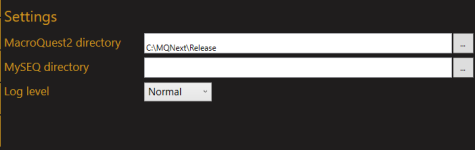
All zones so far! And awesome, I'll see if I can fix that.What zone? Your settings are also wrong in the updater. That’s the wrong folder.
Which folder should I have it in?What zone? Your settings are also wrong in the updater. That’s the wrong folder.
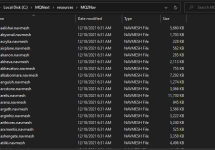
Looks like you have MQNext/Release as your folder where mqnext is installed, and MQNext/Resources/MQ2Nav as the folder where meshes are.I've gotten everything to work but nav in the transition to Next, it's in its old folder, I have Launcher set to the Next directory, all of the meshes are in the resources > MQ2Nav folder, and it's working on live in the same place. I've done the migration, all of the macros were able to move over, and the mesh files moved, but it's not pulling them in game, despite having tried to reload multiple times.
Is there anything I'm missing?
That was it! Thank you thank you thank you!!!!Looks like you have MQNext/Release as your folder where mqnext is installed, and MQNext/Resources/MQ2Nav as the folder where meshes are.
The resources folder should be inside of the folder where MQNext is installed (you should see a resources folder there already as well), so move your MQNext/resources into MQNext/Release/resources instead.
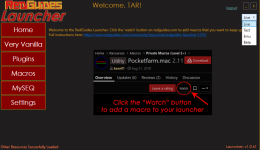
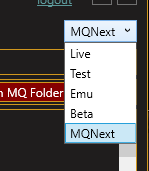
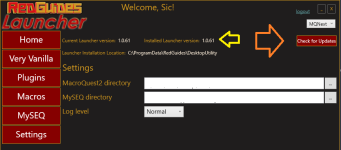
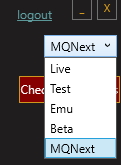
I did, but its not there. On my drop down I have Live, Test, Emu and Beta only
Did you ever figure this out? On one of my computer I do not have a Next listed as well and can't figure out how to get it. I have reinstalled the launcher and still nothing.
One thing I noticed in Mqnext (apart from the awesome speed increases) is that I lost my ‘come to me’ etc buttons from the group window
Easy to replace by macro I imagine, is that related to eqbcs?
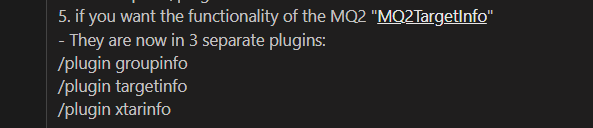
/plugin groupinfo5. if you want the functionality of the MQ2 "MQ2TargetInfo" - They are now in 3 separate plugins:
Apologies bud, I didn’t know that was what those settings were called - for some reason I thought they were called something different - I thought they were to do with actual target info like “115 Human Bard” but in those windows/plugin groupinfo
/plugin targetinfo
/plugin xtarinfo
means you blew past step 5 in the 5 step guide
View attachment 36083

I reinstalled it in a different location. Seems to be working for me nowDid you ever figure this out? On one of my computer I do not have a Next listed as well and can't figure out how to get it. I have reinstalled the launcher and still nothing.
Any guidance on how to get MQ2Mesh to work on this? I have no option for "Mesh updater" on MQNext

 www.redguides.com

My man, you're too quick. Thank you!Tech - - No Meshes?! CWTN Doesn't Work?! No Movement in ToL?!
Howdy All, With this newest expansion from everquest, there are new zones. With new zones, you need navigation meshes for mq2nav, easyfind, and anything else that uses mq2nav to move around to be able to do all the navigation stuff that you're used to. This includes the cwtn plugins for modes...
the migration is just migrating your files from one MQ2 install to another MQ "next" install. so yeah should work find @Knightly no gotchas right?Can this be used to go from Next(test) to Next(live)? or MQ2Test to Next(live)?
Mainly wanting to get the Autologin Profiles set so I can log in accounts to do test copy more efficiently. Wasn't sure if the migration from test to live would throw a bunch of stuff off or not.
you're going to have to be more specificHow do i find the MQnext file so i can use MacroQuest Migrator please


Yes. See below:Are there any CTWN plugins for Next yet? I looked at other threads/posts today and well, with all the Evan Williams egg nog people have been pushing on me the past few days.....I'm not in scholar mode. If not, logic tells me fuzzily that I should just keep running as am using 115 spells and running the CTWN as it was until its available on Next, before I migrate yada yada? Other than wizard, ranger and pally everything is CTWN and dont want to fk my crews by migrating and not having the CTWN plugins then not work anymore. Thoughts / advice?
there have been next CWTN plugins for months and months and months and months and months and months and months and months and months and months.Are there any CTWN plugins for Next yet? I looked at other threads/posts today and well, with all the Evan Williams egg nog people have been pushing on me the past few days.....I'm not in scholar mode. If not, logic tells me fuzzily that I should just keep running as am using 115 spells and running the CTWN as it was until its available on Next, before I migrate yada yada? Other than wizard, ranger and pally everything is CTWN and dont want to fk my crews by migrating and not having the CTWN plugins then not work anymore. Thoughts / advice?