
-
 Hail, we're RedGuides. We want you to play six (yes, 6!) EverQuest characters at once. We have scripts and a friendly community to help, please join our playstyle and say hello! 👋
You are using an out of date browser. It may not display this or other websites correctly.
You should upgrade or use an alternative browser.
You should upgrade or use an alternative browser.
MQ "Next" Migration, Functions, and Features - Oh My! (Now known just as "MacroQuest")
- Thread starter Sic
- Start date

step 1 in bold orangeAhh sh*t.... I done F'd up....
Me cave man, saw new shiny toy, and hit install without reading.... over old MQ2 folder.....
Good thing not much personalized settings in the old version. Guess am uninstalling and re-installing with a clean slate...


asplinteredcell
Member
I migrated over to Next yesterday and immediately discovered that my toons would not auto run to a location when I used CTRL-F. I made sure my mesh was copied over via the migrator like Sic talked about in his video. I also made sure it was updated. Is that an issue on my end where I did something wrong in migration?
Also, when I was using MQ2 legacy, I always had MQ2EQWire running to optimize my GPU/CPU usage. My comp is a few years old, and running several clients can be taxing. With Next, I notice that Wire is not compatible (I think). Is that because there is some similar program included under the hood with Next? If not, what should I be running that is comparable?
Sorry if these are stupid questions or if I posted in the wrong place! I am fairly new to the boxing community and trying to muddle my way through the tech side of it!
Also, when I was using MQ2 legacy, I always had MQ2EQWire running to optimize my GPU/CPU usage. My comp is a few years old, and running several clients can be taxing. With Next, I notice that Wire is not compatible (I think). Is that because there is some similar program included under the hood with Next? If not, what should I be running that is comparable?
Sorry if these are stupid questions or if I posted in the wrong place! I am fairly new to the boxing community and trying to muddle my way through the tech side of it!

Robban
Ultimate seasoned veteran member
well, check the video in the first post in the very thread you are postingI migrated over to Next yesterday and immediately discovered that my toons would not auto run to a location when I used CTRL-F. I made sure my mesh was copied over via the migrator like Sic talked about in his video. I also made sure it was updated. Is that an issue on my end where I did something wrong in migration?
Also, when I was using MQ2 legacy, I always had MQ2EQWire running to optimize my GPU/CPU usage. My comp is a few years old, and running several clients can be taxing. With Next, I notice that Wire is not compatible (I think). Is that because there is some similar program included under the hood with Next? If not, what should I be running that is comparable?
Sorry if these are stupid questions or if I posted in the wrong place! I am fairly new to the boxing community and trying to muddle my way through the tech side of it!
I migrated over to Next yesterday and immediately discovered that my toons would not auto run to a location when I used CTRL-F. I made sure my mesh was copied over via the migrator like Sic talked about in his video. I also made sure it was updated. Is that an issue on my end where I did something wrong in migration?
Also, when I was using MQ2 legacy, I always had MQ2EQWire running to optimize my GPU/CPU usage. My comp is a few years old, and running several clients can be taxing. With Next, I notice that Wire is not compatible (I think). Is that because there is some similar program included under the hood with Next? If not, what should I be running that is comparable?
Sorry if these are stupid questions or if I posted in the wrong place! I am fairly new to the boxing community and trying to muddle my way through the tech side of
No worries! As a previous poster said, please go too the first page and watch the videos. They're setup for a complete walk through! If any troubles from there ask away! I, too find myself having issues also lol.I migrated over to Next yesterday and immediately discovered that my toons would not auto run to a location when I used CTRL-F. I made sure my mesh was copied over via the migrator like Sic talked about in his video. I also made sure it was updated. Is that an issue on my end where I did something wrong in migration?
Also, when I was using MQ2 legacy, I always had MQ2EQWire running to optimize my GPU/CPU usage. My comp is a few years old, and running several clients can be taxing. With Next, I notice that Wire is not compatible (I think). Is that because there is some similar program included under the hood with Next? If not, what should I be running that is comparable?
Sorry if these are stupid questions or if I posted in the wrong place! I am fairly new to the boxing community and trying to muddle my way through the tech side of it!

Step 1 - uninstall the previous install done without following the instructionsstep 1 in bold orange
Step 2 - read the instructions
Step 3 - install
Boom...customer serviced

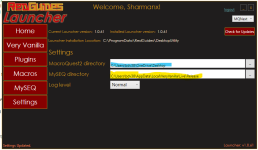
ok Noob question here. I am trying to load MQNext and after watching your video I am going to save it to my desktop.. seemed like a good place. But in your video you have theMacroQuest2 directory that you saved to and then your MySEQ directory is blank. Do i need to leave it blank or keep the directory as it is so my files are located?
asplinteredcell
Member
Step 1 - uninstall the previous install done without following the instructions
Step 2 - read the instructions
Step 3 - install
Boom...customer serviced
I did watch the video. And then came here to figure out looking for help on where I messed up / deviated.well, check the video in the first post in the very thread you are posting

Thanks, man. I am not very tech savvy and trying to muddle my way through. I'll watch the video again and see if I can figure out where I messed up. I might take an extra dose of my ADD meds first though... that could be part of my problem lolNo worries! As a previous poster said, please go too the first page and watch the videos. They're setup for a complete walk through! If any troubles from there ask away! I, too find myself having issues also lol.
Hey everyone haven't posted in a while as I kept getting in trouble for posting in wrong spots ... I am 95% sure this is right spot for these questions: Guessing I must finally move from MQ2 to MQNext but being that I do not understand computer stuff and do not want to install incorrectly. How do I make new directory for MQNext ? I am trying but failing to find the path to my MQ2 directory and not sure if MQNext needs to be close to MQ2 but not in if that makes any sense and someone has patience to help me.

Sum1
Warriors are inferior (read: crybaby) tanks
Was there ever a solution to losing MQ2EasyFind? I LOVED being able to click on a the zone connection on a map and have my team run off for the zone line... or click on the "start path" on a route search and have my team run off. Was there a pseudo-replacement for that, yet?
Brainiacs easyfind has been on next for probably 3-4 months now or longer and works great. Plugin is still called easyfind. Sic has 1 or more videos on it too.Was there ever a solution to losing MQ2EasyFind? I LOVED being able to click on a the zone connection on a map and have my team run off for the zone line... or click on the "start path" on a route search and have my team run off. Was there a pseudo-replacement for that, yet?
ToeJamSamy
Seasoned veteran member
The problem with this comparison I keep seeing, is I absolutely despise 10 lol.yup, "next" is just the next major version think of it like windows 98 -> windows 10.
you can currently already do MQ Next on the Red Guides Launcher
View attachment 34776
soonthe "stable" version of MacroQuest that redguides offers will be MacroQuest "Next"
That said, I have not done the switch yet. I installed on computers that run the launcher, immediately had issues and the right click menu was entirely different, and hadn't even migrated anything, so I pushed it aside and went back to the old for now.
My main computer will not install the launcher so it has to be done manually and until I get the gist of Next on one with the launcher, I'm not even messing with that. No biggie on that machine since it is only used for tradeskill, forage, or fishing macros, not in my normal play.
Will play around with it on my airlocked machine that has just babies on it. I couldn't even get that one to connect to the server when I tried actually using one for once, but I can't even remember if that was mq2 or next anymore. Probably procrastinate this changeover until there's a cutoff date since I don't depend on it for normal play anyway.
ok.The problem with this comparison I keep seeing, is I absolutely despise 10 lol.
That said, I have not done the switch yet. I installed on computers that run the launcher, immediately had issues and the right click menu was entirely different, and hadn't even migrated anything, so I pushed it aside and went back to the old for now.
My main computer will not install the launcher so it has to be done manually and until I get the gist of Next on one with the launcher, I'm not even messing with that. No biggie on that machine since it is only used for tradeskill, forage, or fishing macros, not in my normal play.
Will play around with it on my airlocked machine that has just babies on it. I couldn't even get that one to connect to the server when I tried actually using one for once, but I can't even remember if that was mq2 or next anymore. Probably procrastinate this changeover until there's a cutoff date since I don't depend on it for normal play anyway.
then you're using bare feet walking in the snow instead of snow shoes
ToeJamSamy
Seasoned veteran member
What part of this? Not switching to Next? Or not using mq on everyone and everything?ok.
then you're using bare feet walking in the snow instead of snow shoes
Way I feel is that in your comparison I'm using boots or snowshoes and you use skis, or I'm using snowshoes and you're using a snowmobile lol. Barefoot would be taking a heroic on a bronze acct to 120 without subbing ever for AA even, and then trying to raid with 250aa, no augs, and 2yrold t1 gear.

Medicare
New member
I have watched Sic's video several times and he says he would put the link to the launcher in the discription. I know that computers are the bane of my existence but i can usually follow directions well. I am just not seeing a link for the launcher (assuming it is PowerShell) Any ideas? Thanks
you use the redguides launcher for downloading next.I have watched Sic's video several times and he says he would put the link to the launcher in the discription. I know that computers are the bane of my existence but i can usually follow directions well. I am just not seeing a link for the launcher (assuming it is PowerShell) Any ideas? Thanks
I know you mentioned that you watched, but > here < i show it
the RedGuide's Launcher is the thing in this image here:
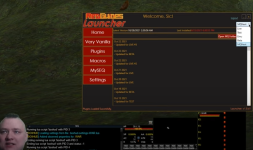
Easy way to go from Legacy -> Next?
1. download next via the RG launcher
(make sure you're installing to a new directory, NO NOT install OVER your mq2 directory)
2. hit the migrator tool (will move any configs/macros etc from old install) ---> https://www.redguides.com/community/resources/macroquest-migrator.2156/
3. setup framelimiter https://www.redguides.com/community/threads/mqnext-framelimiter-demo.78448/
according to your download history, you appear to have actually downloaded everything appropriately yesterday, which would mean that you used the launcher.
if somehow you deleted your redguides launcher between yesterday and today you can download it > here <
Last edited:
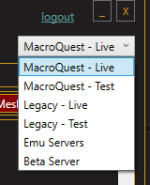
I just downloaded the launcher....it alerted me that I was still running the live version....so I was going to install MQ Next.....hit the drop down version and MQ Next isn't in the drop down...Live ,Legacy, Test, Legacy Test, EMU and Beta servers listed...but no MQ Next....now what...
I just downloaded the launcher....it alerted me that I was still running the live version....so I was going to install MQ Next.....hit the drop down version and MQ Next isn't in the drop down...Live ,Legacy, Test, Legacy Test, EMU and Beta servers listed...but no MQ Next....now what...

IRL - - MacroQuest release party!
RedGuides is proud to announce the official release of MacroQuest, which we're now using as the base for Very Vanilla. Instructions on downloading the new MacroQuest are here, and migration to the new MQ is discussed here. A few years ago, the most experienced developers in our community got...
 www.redguides.com
MacroQuest - Live is the appropriate one.
U
userjds
I've migrated from Legacy - Live to MacroQuest - Live.
Everything went smooth. Logged one of the toons in to get the feel before running a group.
I noticed entering the game that the MuleAssist window is no longer there and the MQ2Mule is also no longer in the plugin Manager.
I feel like I've looked through Forums, but I can't seem to locate a post if this was intentionally removed and or a replacement tool is provided.
I had used the very vanilla before but got spoiled on the muleassist feature.
If there is a post somewhere about this if someone could kindly point that out.
Thanks in advance
Everything went smooth. Logged one of the toons in to get the feel before running a group.
I noticed entering the game that the MuleAssist window is no longer there and the MQ2Mule is also no longer in the plugin Manager.
I feel like I've looked through Forums, but I can't seem to locate a post if this was intentionally removed and or a replacement tool is provided.
I had used the very vanilla before but got spoiled on the muleassist feature.
If there is a post somewhere about this if someone could kindly point that out.
Thanks in advance
howdy userjds,I've migrated from Legacy - Live to MacroQuest - Live.
Everything went smooth. Logged one of the toons in to get the feel before running a group.
I noticed entering the game that the MuleAssist window is no longer there and the MQ2Mule is also no longer in the plugin Manager.
I feel like I've looked through Forums, but I can't seem to locate a post if this was intentionally removed and or a replacement tool is provided.
I had used the very vanilla before but got spoiled on the muleassist feature.
If there is a post somewhere about this if someone could kindly point that out.
Thanks in advance
Unfortunately, the original author of mq2mule didn't want to move it to next, but good news!
there is >>> MAUI <<< by @aquietone
U
userjds
Nice! got it and downloaded - extracted...going to go have funhowdy userjds,
Unfortunately, the original author of mq2mule didn't want to move it to next, but good news!
there is >>> MAUI <<< by @aquietone
sorry if this has been answered already. i migrated a couple weeks ago and didn't notice any problems. however, updating my old bard muleassist ini doesn't affect the next muleassist ini... the problem is, i cant seem to find the next version of the bard muleassist ini. where do i find the duped version (assuming there is one) that was created in my next directory during the migration? cheers
Your ini go in your config folder for macroquest rather than your macro foldersorry if this has been answered already. i migrated a couple weeks ago and didn't notice any problems. however, updating my old bard muleassist ini doesn't affect the next muleassist ini... the problem is, i cant seem to find the next version of the bard muleassist ini. where do i find the duped version (assuming there is one) that was created in my next directory during the migration? cheers
no, if you have nothing to migrate, you wouldn't use the migration utility. the migration utility is for migrating settings, configurations, meshes, and other resources from their old mq2 legacy location to the new macroquest locationJust for clarification is using the migrator tools required on a fresh install of everything, including next? I feel like there is nothing to migrate over. Let me know if I should do it even though I've never used MQ on this install.
I installed Macroquest (Next) to a new folder, but when I click Migrate to MacroQuest it tells me 'We could not find an installation of MQ2 for Live Servers in the folder selected in settings. Please verify that MQ2 is installed and the correct location is selected on the settings page.' I'm able to launch Next by going to Very Vanilla and clicking launch MQ so it can find the exe to launch (just not migrate). I can also click in the top right, select Legacy - Live, and launch my old version of Macroquest too. It's just migrate that doesn't work. It's launcher version 1.0.74. I noticed the migrate button only appears when it's set to 'Macroquest - Live', when it's on Legacy - Live it has the text about 'If you would like to migrate your MQ2 data please use the button below' but there is no button there.
Edit: I found and used the migrator script that uses powershell. MQ2Discord doesn't appear to work anymore, but everything else seems to have transferred over - the ini files definitely transferred, but when you try to load it you just get a bunch of 'Error channel id, error invalid token, etc'.
Edit 2: Discord kept crashing the client when I was trying to set it up until I went into config folder, and deleted 'MQ2Discord.yaml' - the next time it said it was importing my old configuration files, and it started working after that.
Edit: I found and used the migrator script that uses powershell. MQ2Discord doesn't appear to work anymore, but everything else seems to have transferred over - the ini files definitely transferred, but when you try to load it you just get a bunch of 'Error channel id, error invalid token, etc'.
Edit 2: Discord kept crashing the client when I was trying to set it up until I went into config folder, and deleted 'MQ2Discord.yaml' - the next time it said it was importing my old configuration files, and it started working after that.
Last edited:

Awesome job on MQNext - looks very promising(especially Lua).
Migration works splendidly on Windows 10. Thumbs up!
Windows 8 - has a problem with NuGet based Migration tool.
Microsoft at some point changed requirement for TLS to 1.2 which fails on older Windows.
Solution: Download Migrator manually from: https://www.redguides.com/community/threads/macroquest-migrator.78104/
Then open Powershell in administrator and navigate to wherever you extracted Migrator script (I have it C:\scripts) and set TLS requirement manually -(One could also add this to the .ps1 script)
Powershell
Thanks: https://stackoverflow.com/questions...uget-provider-for-powershell-on-a-unconnected
Windows 7 migration is even worse -
You have to do the Windows 8 workaround above then you get the dreaded missing .dll message:
DLL ERROR
I tried installing official VC redistributables from 2015 onwards with no luck.
Finally gave up and got the non-official .dll from https://www.dll-files.com/api-ms-win-core-path-l1-1-0.dll.html (safety not guaranteed, but they have been around for a long time)
It is 32bit dll, apparently we need to copy it into two places at once on 64bit Windows
Copied api-ms-win-core-path-l1-1-0.dll into -
After much Shaving of the Yak MQNext is now running on Windows 7- but I lost option to migrate mq2autologin Profiles...
Any way to manually trigger Profile transfer for mq2autologin?
EDIT: I ended up doing manual autologin profile Export then Import as an interim solution.
Migration works splendidly on Windows 10. Thumbs up!
Windows 8 - has a problem with NuGet based Migration tool.
Microsoft at some point changed requirement for TLS to 1.2 which fails on older Windows.
Solution: Download Migrator manually from: https://www.redguides.com/community/threads/macroquest-migrator.78104/
Then open Powershell in administrator and navigate to wherever you extracted Migrator script (I have it C:\scripts) and set TLS requirement manually -(One could also add this to the .ps1 script)
Powershell
Code:
PS C:\scripts> [Net.ServicePointManager]::SecurityProtocol = [Net.SecurityProtocolType]::Tls12
PS C:\scripts Install-PackageProvider NuGet -Force
PS C:\scripts> .\MacroQuestMigrator.ps1
Thanks: https://stackoverflow.com/questions...uget-provider-for-powershell-on-a-unconnected
Windows 7 migration is even worse -
You have to do the Windows 8 workaround above then you get the dreaded missing .dll message:
DLL ERROR
Code:
---------------------------
AutoLogin Profile Import/Export: MacroQuest.exe - System Error
---------------------------
The program can't start because api-ms-win-core-path-l1-1-0.dll is missing from your computer. Try reinstalling the program to fix this problem.
---------------------------
OK
---------------------------
I tried installing official VC redistributables from 2015 onwards with no luck.
Finally gave up and got the non-official .dll from https://www.dll-files.com/api-ms-win-core-path-l1-1-0.dll.html (safety not guaranteed, but they have been around for a long time)
It is 32bit dll, apparently we need to copy it into two places at once on 64bit Windows
Copied api-ms-win-core-path-l1-1-0.dll into -
Code:
 C:\Windows\SysWOW64
 C:\Windows\System32
After much Shaving of the Yak MQNext is now running on Windows 7- but I lost option to migrate mq2autologin Profiles...
Any way to manually trigger Profile transfer for mq2autologin?
EDIT: I ended up doing manual autologin profile Export then Import as an interim solution.
Last edited:
So MQNext is now happily running on my Windows 7 machine.
Without trying to start a flame war:
I try to be pragmatic with Windows versions. I use Windows 10/11 at work and home but my EQ computers are a mixture of Win 7,8 and 10.
If it is not broken why fix it
I am yet to find something about Windows 10/11 UI/feature set that is a big improvement over Windows 7. (Forced telemetry and forced updates are a minus in my book..even though I understand the justification).
Guess this is just a matter of few months. When EQ migrates to 64 bit client I fear Windows 7 support will go away as well.
Without trying to start a flame war:
I try to be pragmatic with Windows versions. I use Windows 10/11 at work and home but my EQ computers are a mixture of Win 7,8 and 10.
If it is not broken why fix it
I am yet to find something about Windows 10/11 UI/feature set that is a big improvement over Windows 7. (Forced telemetry and forced updates are a minus in my book..even though I understand the justification).
Guess this is just a matter of few months. When EQ migrates to 64 bit client I fear Windows 7 support will go away as well.
Got an issue with migrating using patcher (as well as trying to use the powershell download) as well as running in general
Running in general i get a very fast popup shell screen full of red text that i am waaay too slow to read/get a shot of to read, and it hangs or crashes out, or does nothing at all (seems to just decide randomly on that) - i also get a few api wanring messages, but after i replaced the lack of the api in the next directory, it started working
Now tho, if i try to run the migrator, it just says it cannot find the powershell migrater.ps1 file - the zip is inside the launcher directory, but it is zipped up, and i cannot unzip itto the directory, and nor can i copy it into there so the migration will run it from the launcher
Running the migrator program from the desktop (following sic's very simple guide on how to do it!) i get another window full of red text, again, super fast, that looks to be the one i was getting before, and that's it - i am stuck, as i cannot go any further with migration
Anyone got any suggestions ?
Running in general i get a very fast popup shell screen full of red text that i am waaay too slow to read/get a shot of to read, and it hangs or crashes out, or does nothing at all (seems to just decide randomly on that) - i also get a few api wanring messages, but after i replaced the lack of the api in the next directory, it started working
Now tho, if i try to run the migrator, it just says it cannot find the powershell migrater.ps1 file - the zip is inside the launcher directory, but it is zipped up, and i cannot unzip itto the directory, and nor can i copy it into there so the migration will run it from the launcher
Running the migrator program from the desktop (following sic's very simple guide on how to do it!) i get another window full of red text, again, super fast, that looks to be the one i was getting before, and that's it - i am stuck, as i cannot go any further with migration
Anyone got any suggestions ?
really some more information on *what* the red error is - that likely holds all the answers.Got an issue with migrating using patcher (as well as trying to use the powershell download) as well as running in general
Running in general i get a very fast popup shell screen full of red text that i am waaay too slow to read/get a shot of to read, and it hangs or crashes out, or does nothing at all (seems to just decide randomly on that) - i also get a few api wanring messages, but after i replaced the lack of the api in the next directory, it started working
Now tho, if i try to run the migrator, it just says it cannot find the powershell migrater.ps1 file - the zip is inside the launcher directory, but it is zipped up, and i cannot unzip itto the directory, and nor can i copy it into there so the migration will run it from the launcher
Running the migrator program from the desktop (following sic's very simple guide on how to do it!) i get another window full of red text, again, super fast, that looks to be the one i was getting before, and that's it - i am stuck, as i cannot go any further with migration
Anyone got any suggestions ?
Well, tried reinstalling to see what teh crack is, just in case i borked it up somehow - now it wants to migrate as a fresh new install, without the red text window, from the launcher!! (getting there!) - however it says that it cannot as it says that access to the Path - ' :\ProgramData\RedGuides\DesktopUtility\downloads\MacroQuestMigrator.ps1' - is deniedreally some more information on *what* the red error is - that likely holds all the answers.
I think this is all i need to get it sorted now (if i can get it to read from that directory
 )
)

In the last 19 days there were 28 vulnerabilities discovered for Windows 7 on top of the hundreds of unpatched vulnerabilities that already exist.darn - been fine till next =/ guess imma boned - thanks for the reply anyhoo Sic - keep up the awesome work for peeps who can still benefit from it =)
There are currently several vulnerabilities that will allow someone to access your computer without your knowledge. Several more that allow them to connect without even knowing your password. And still several more that allow them to execute as if they were an administrator. All attacks which can originate by just browsing a web page.
Outside of the December patches which Microsoft considered to be emergencies so epic that they decided to patch regardless of their policy of no support…Windows 7 doesn’t get security patches anymore. So those other vulnerabilities will likely remain open and exploitable.
It’s perfectly fine to want to use Windows 7 forever, but if you do you should never connect that computer to the internet.

but if it aint broke? .... oh waitIn the last 19 days there were 28 vulnerabilities discovered for Windows 7 on top of the hundreds of unpatched vulnerabilities that already exist.
There are currently several vulnerabilities that will allow someone to access your computer without your knowledge. Several more that allow them to connect without even knowing your password. And still several more that allow them to execute as if they were an administrator. All attacks which can originate by just browsing a web page.
Outside of the December patches which Microsoft considered to be emergencies so epic that they decided to patch regardless of their policy of no support…Windows 7 doesn’t get security patches anymore. So those other vulnerabilities will likely remain open and exploitable.
It’s perfectly fine to want to use Windows 7 forever, but if you do you should never connect that computer to the internet.
Well, you definitely don't want to be installing inside existing locations.Just went from Win 7 to 10 and did the migration. I have a MQ2 folder and in it I now have folders MacroQuest, Next and Release. Do I need to get rid of the MacroQuest or the Next folder?
This sounds like you didn't install to fresh new directory location, and could possibly cause you issue in the future, mainly confusion.
Did you follow the guide below for the migration, particularly the step 1 part? (Not the mental notes, but the steps in the guide)
It is OFFICIAL! MacroQuest is the version of MacroQuest that we offer here at RedGuides.
You will see this with "MacroQuest - Live" in the RG Launcher.
Please, check out this link: >>> Functions & Features Demo + Migration to the new MacroQuest<<<
mental notes:
1. mq2map click is Control+Shift+Click
2. new easyfind self travel is Control+Click (reminder in find window title bar)
3. new easyfind group travel is Control+Shift+Click
4. If you selected a destination in your zone guide and want to activate it you /travelto activate
5. /yes and /no are now aliases, there is no mq2yes plugin
Users who are viewing this thread
Total: 1 (members: 0, guests: 1)
Share: