• Hail, we're RedGuides. We want you to play six (yes, 6!) EverQuest characters at once. We have scripts and a friendly community to help, please join our playstyle and say hello! 👋
  • We've added LLM sections to our Terms & Rules and Resource Rules, for everyone's sanity & in-game safety.
    Read more
    a. Do not replace your voice with an LLM. This goes for your posts and your scripts. Drafting and editing with a tool is fine, but don't take you out of what you share.
    b. Do not replace your EQ character's voice with an LLM. We don't want scripts that speak over /ooc, /shout or other public channels. This has been an unwritten rule that's kept casino scripts off the site for decades, but we're now compelled to make it clear: keep automated communication private.

    Why Does RG Review Scripts?
    Nearly every LLM-written Lua script we see is making your character do impossible things, and rarely in a way that's beneficial to you. We've seen heavy server hammering, /target over impossible distances when /nav spawn would passively accomplish the same thing, a spawn search that fires 20+ times per second, and other pointless actions that are likely annoying GMs.

    You are welcome to use LLMs as a tool to structure, draft, and edit your work, but please read critically before hitting /lua run

Tech - Motherboard Specs

Warl0ck45

Well-known member
Kiddo is asking me to look over specs for a pre-build PC he is looking to buy off of New Egg or Tiger Direct.

I am used to them listing more specs (or at least say part make and model so you can look them up) and there is a distinct lack of information on some areas. Looks like they are "helping" the customer some more /sigh

My build is going on 10 years old, the MB uses tri-channel with a limit of 24g, and I got a 90 page users manual when looking to purchase!

--takes his walker to go yell at kids on his lawn--

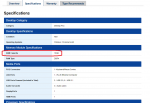
Anyways, one of the things baffling me is "RAM capacity" being so effing low. Either things are working backwards, or they are trying to say that is the limit per slot... but I can't seem to readily confirm what they are actually meaning.

Thought I would ask if someone can enlighten me on this new advertisement jargon, since all I can find are explanation on how ram works... how there are limits both in over capacity and per slot capacity and in what the OS can handle (already knew this) but not if what is being advertised is a total RAM limit or per slot limit... especially since the preview pics are showing 4 slots. (we are back to 2G and 4G sticks?!?)
1583634595498.png
 
Either that, or it is simply stating that the memory that comes with the system is DDR4 at a total of 16GB

If you look at some other listing, they have a RAM capacity and also a max memory supported listed and the RAM capacity it the amount listed in the item description
 
I'm a bit blown away by the ps/2 port....haven't seen a keyboard/mouse use that port in ages.

1583666150840.png

Also, don't be so quick to assume it's meant to be per slot. Here is a current example motherboard showing a max of 16gb and it too has a ps/2 slot for keyboard/mouse.

1583666367158.png

With that said, this is a DDR3 system. If PCPartPicker is to be believed, there are no motherboards that have both 16gigs max capacity and DDR4 as an option. If you wanted to be sure though, you'd need to contact newegg.
 
I would look for some budget gaming pc videos on youtube and pick one in your price range. Everytime I go to upgrade my pc I find that buying the parts individually gets you way more pc for your buck. You also get to decide things like if I spend $20 more on a power supply for instance it can make the difference from being able to upgrade later vs having to junk everything. I tend to use things like power supplies and cases for multiple builds. The ready to go pcs are specified to a price point with little thought into maximizing your money or head room for future upgrades. If you are thinking of a monitor I love my Samsung curved 4k tv as a pc monitor. I don't know what your budget is though. EQ runs fine on a 4k monitor if you right click the exe and uncheck the let program manage resolution box. If not everything is microscopic on a modern monitor and video card.
 
Glad my thinking was not out of line that there might be something odd with the listing then. I am used to seeing more like what CWTN is showing that clearly states the information, instead of "improving" things for customers. (It is like being at work, the more help I get, the harder my job gets...)

I also prefer building my rigs so I know exactly what I am getting and what their capabilities are, but the kiddos have little patience for that. Usually when someone asks me to help with a purchase, I prefer a brick and mortar store so I have the ability to speak with someone who is not reading from a script, and is actually motivated to answer questions. But, times are changing...

Thanks for the help =D
 
Tech - Motherboard Specs

Users who are viewing this thread

Back
Top
Cart