• Hail, we're RedGuides. We want you to play six (yes, 6!) EverQuest characters at once. We have scripts and a friendly community to help, please join our playstyle and say hello! 👋
  • We've added LLM sections to our Terms & Rules and Resource Rules, for everyone's sanity & in-game safety.
    Read more
    a. Do not replace your voice with an LLM. This goes for your posts and your scripts. Drafting and editing with a tool is fine, but don't take you out of what you share.
    b. Do not replace your EQ character's voice with an LLM. We don't want scripts that speak over /ooc, /shout or other public channels. This has been an unwritten rule that's kept casino scripts off the site for decades, but we're now compelled to make it clear: keep automated communication private.

    Why Does RG Review Scripts?
    Nearly every LLM-written Lua script we see is making your character do impossible things, and rarely in a way that's beneficial to you. We've seen heavy server hammering, /target over impossible distances when /nav spawn would passively accomplish the same thing, a spawn search that fires 20+ times per second, and other pointless actions that are likely annoying GMs.

    You are welcome to use LLMs as a tool to structure, draft, and edit your work, but please read critically before hitting /lua run

Problem - Mesh Updater not working

Sulli

Member
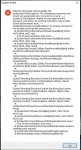
Just got mq2 and I am slowly familiaring myself with it. Been on it for a few days do, and want to work on incorporating meshes. Problem is I get an error (pic attached) when trying to use it, which severly hampers ones ability to fully streamline the process. Anyone have an idea on a fix, because I am not really sure about how to make them myself, and for the amount of zones EQ has, that would be quite the challenge.
 

Attachments

  • MQ2_Mesh.JPG
    MQ2_Mesh.JPG
    108.7 KB · Views: 26
SSL is failing to establish a secure connection. Either your .NET is out of date (Before January 2021), or something on your PC or some middleware is messing with the secure connection.

Just checked, and .net is up to date. I have tried reinstalling, and running in admin mode, and still nothing. Do you know offhand what settings I can check for the cause? I am sort of an idiot with these things.
 
TBH last time I never figured out what it was. I wound up completely reinstalling .net for him via remote connection. I still think certain antivirus software causes it, or firewalls blocking the connection, in MOST cases. I'm going to completely rewrite the updater in C++ with no .net needed soon. Until then, the same files from the updater are always available at https://mqmesh.com
 
Last edited:
TBH last time I never figured out what it was. I wound up completely reinstalling .net for him via remote connection. I still think certain antivirus software causes it, or firewalls blocking the connection, in MOST cases. I'm going to completely rewrite the updater in C++ with no .net needed soon. Until then, the same files from the updater are always available at https://mqmesh.com
Some one a while back was telling me to get a hold of you about updated navmesh files, I just really never got around to it haha. I was fortunate enough to spend a lot of time learning the generator and updating a fair share of mesh files. For this is the only reason I do not use the updater. But with that being said, you have done a great job with the whole navmesh file and updater system. Grats.
 
Another possibility I've seen actually is something messes (malware/spyware/or whatever) with the .net http library dll. and Antivirus just wipes it out. Most of the time windows just forces edge on you instead of using their .net library so if you never use it you'd never get infected and antivirus just deletes it. .Net repair tool HAS worked for a couple people I'm told on discord by someone seeing this.
 
Problem - Mesh Updater not working

Users who are viewing this thread

Back
Top
Cart