• You've discovered RedGuides, an EverQuest multi-boxing and scripting community 🧙‍♀️⚙️. We want you to play several EQ characters at once, come join us and say hello! 👋

  • A TLP without truebox has thawed (Very Vanilla ready)
    Frostreaver
Resource icon

Release MAUI (MuleAssist UI) 03/26/2024

No permission to download
It allowed you to downgrade to any spell in the same category. The issue i'm running into right now is on my cleric. I have a level 115 .ini and i'm trying my best to downgrade the heals. I just loaded new 111 spells and they aren't showing up in the UI. Do I have to somehow manually add these?
The the list of spells from the book populates once up front when MAUI starts. You'd have to /lua stop ma/start, then /lua start ma/start again.
 
So I did the MAUI update today and two of my characters are missing the MQ box and Say Detection box now. The MAUI UI is there but the macro's don't work. Any idea what caused this or how to fix it?
 
So I did the MAUI update today and two of my characters are missing the MQ box and Say Detection box now. The MAUI UI is there but the macro's don't work. Any idea what caused this or how to fix it?
I'm not really sure how those things could be related.

You could try /plugin say unload and /plugin say load.
For the MQ box, is that the normal eq ui looking mq chat window? that one is mq2chatwnd plugin, but the new MQ console is better. Stuff in the Lua folder shouldn't have anything to do with either of those.
 
Not sure what’s going on, the only thing I did was replace the ma file.

Now two of my toons seem to have everything unloaded.

it’s just two of them missing everything. They have the MAUI UI but something happened with the MQ chat box and the Say Detection box. Don’t know how to get them back.
 
Not sure what’s going on, the only thing I did was replace the ma file.

Now two of my toons seem to have everything unloaded.

it’s just two of them missing everything. They have the MAUI UI but something happened with the MQ chat box and the Say Detection box. Don’t know how to get them back.
Should remove the screenshots since they've got toonnames. windows key + shift + s also lets you take a screenshot of just a portion of your screen, a lot nicer than taking a picture of the screen.
 
Did you /unload on the toons that are missing the windows? Try going to the MQ icon in your taskbar and right click > refresh injections.
 
aquietone updated MAUI (MuleAssist UI) with a new update entry:

Spell downgrades

- Adds a downgrade option for spells. If the INI includes a spell that you don't have, the downgrade button will look for the next best matching spell that you do have.
- While testing the downgrade, I noticed there are probably more cases where the upgrade/downgrade does not pick the right spell than there are that do. YMMV.
- Spell dropdown lists will now update when memorizing new spells.
- Added /maui stop command in addition to the previously added show and hide commands...

Read the rest of this update entry...
 
You probably already have this on your to-do list, but it would be awesome if we could get the right-click menu updated to include items so that we can add potions and clicky items from inventory. Thank you for converting this and updating, btw. MAUI is working great!
 
Literally just set this up and overall seems to function very well. Only thing I notice is the tank is kinda "twitchy" and bounces around a lot. Other classes seem to be fine. Working well so far.

Edit -
Few things I noticed while using tonight and I will be 100% honest, some (or all) of these could be user error, as I haven't had time to thoroughly read the documentation.
1) Overall, I think it's a good start a core functionality is there.
2) I like the fact that it imports your MuleAssist INI files, very nice.
3) Buffs (mostly rebuffs) seem to be hit or miss, particularly with clickies. My MT had several instances where his buffs did not redo (illusions and other vanity items, shrink clicky also did not work).
4) The macro did not want to function unless MQ2Melee was loaded and active, this is not required for MuleAssist and actually can conflict with MA. These types of conflicts seemed present with MAUI
5) Mem Spells button - if it's there, I couldn't find it. This is (to me) a pretty important feature from MA, particularly since I port with my wizard. Would be very nice to have it added back in.
6) Tank still seemed twitchy.
7) I like the UI and the setup. On the INI section, it would be a "nice to have" for it to be broken out like MA is, makes it faster and easier to find what section you want to edit, but not a critical thing.
8) I REALLY like that you can resize the window, very, very nice.

Overall, I like the way this is setup and it seems to be a really good start. Not sure i'll be switching from MuleAssist in the immediate future, but I will be keeping an eye on this and am very interested in how this tool continues to progress!
Good work!
 
Last edited:
there a reason "Items" and the spell line "Heal > Resurrection" was left off the right click gem when adding spells or items?.
No reason, I just haven't added items to that menu so far. What you should be able to do is pickup the item and left click that button with the item on the cursor instead of right clicking.

rezitem.gif
 
No reason, I just haven't added items to that menu so far. What you should be able to do is pickup the item and left click that button with the item on the cursor instead of right clicking.

View attachment 35692
Ahh i was trying to pick up the item slot and move it, didnt think about picking the whole item up. thank you. also i noticed there are other buffs spells not listed. is there anything i could do to help get these in the menus?
 
Ahh i was trying to pick up the item slot and move it, didnt think about picking the whole item up. thank you. also i noticed there are other buffs spells not listed. is there anything i could do to help get these in the menus?
So, due to just how large the lists are for spells, didn't feel like covering the whole screen in dropdown menus, I truncated the list to only include spells from current level - 30.
I realize this could leave out some older utility spells like shrink or coth. There's no way to get those to show up currently, but if you wanted to, you could edit ma/start.Lua line 113
Code:
if spell.Level() >= globals.MyLevel-30 then

Just change the 30 to 120 or something, or completely remove that if condition and the matching end, if you're comfortable editing that.
 
So, due to just how large the lists are for spells, didn't feel like covering the whole screen in dropdown menus, I truncated the list to only include spells from current level - 30.
I realize this could leave out some older utility spells like shrink or coth. There's no way to get those to show up currently, but if you wanted to, you could edit ma/start.lua line 113
Code:
if spell.Level() >= globals.MyLevel-30 then

Just change the 30 to 120 or something, or completely remove that if condition and the matching end, if you're comfortable editing that.
Well i made the change doesnt appeare to have given me more menus like rez. I probably done it wrong. after saving it i did try to unload and reload and restart it.
 
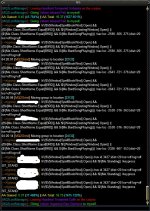
Since upgrading to Next and finding this wonderful GUI replacement for MuleAssist, my Bard has been spewing out quite a bit of info into the MQ window, especially during /grind sessions. See attached photo for what it looks like between kills in the Restless Assault mission grind.

Is there a way to eliminate this from happening? I don't recall changing any core settings when I upgraded and none of my other toons do this as they are all running CWTN plugins.

I've attached my Bards INI just in case it could be of help.

Thanks in advance for any help and for creating MAUI !
 

Attachments

Since upgrading to Next and finding this wonderful GUI replacement for MuleAssist, my Bard has been spewing out quite a bit of info into the MQ window, especially during /grind sessions. See attached photo for what it looks like between kills in the Restless Assault mission grind.

Is there a way to eliminate this from happening? I don't recall changing any core settings when I upgraded and none of my other toons do this as they are all running CWTN plugins.

I've attached my Bards INI just in case it could be of help.

Thanks in advance for any help and for creating MAUI !
Maybe /dnet localecho off?
 
Since upgrading to Next and finding this wonderful GUI replacement for MuleAssist, my Bard has been spewing out quite a bit of info into the MQ window, especially during /grind sessions. See attached photo for what it looks like between kills in the Restless Assault mission grind.

Is there a way to eliminate this from happening? I don't recall changing any core settings when I upgraded and none of my other toons do this as they are all running CWTN plugins.

I've attached my Bards INI just in case it could be of help.

Thanks in advance for any help and for creating MAUI !

That is Grind related but what you are seeing is the dannet local echo. Run: /dnet localecho off
 
Feature Request (may be obvious or already planned, so sorry for any duplicate suggestions):
- Do not make MAUI always on top. Even when minimized, you cannot position it near anywhere that would have something "pop up" to mouse over or click on. As an example, I run mine close to my EQ button. If I check achievements, previously it would just pop out over top of the mq2mule window. Now it's popping behind MAUI and I can't click on things until I move my MAUI window or minimize it.
- Start Macro button to show "end" or "pause" after starting so it's clear that the macro is running without having to look in the MQ console.
- Rather than having a free form text field for the macro start command, have just a dropdown to pick the role you wish to run.
 
- Do not make MAUI always on top. Even when minimized, you cannot position it near anywhere that would have something "pop up" to mouse over or click on. As an example, I run mine close to my EQ button. If I check achievements, previously it would just pop out over top of the mq2mule window. Now it's popping behind MAUI and I can't click on things until I move my MAUI window or minimize it.

MAUI takes advantage of the ImGui overlay tech, which always appears on top of the game
 
Feature Request (may be obvious or already planned, so sorry for any duplicate suggestions):
- Do not make MAUI always on top. Even when minimized, you cannot position it near anywhere that would have something "pop up" to mouse over or click on. As an example, I run mine close to my EQ button. If I check achievements, previously it would just pop out over top of the mq2mule window. Now it's popping behind MAUI and I can't click on things until I move my MAUI window or minimize it.
- Start Macro button to show "end" or "pause" after starting so it's clear that the macro is running without having to look in the MQ console.
- Rather than having a free form text field for the macro start command, have just a dropdown to pick the role you wish to run.
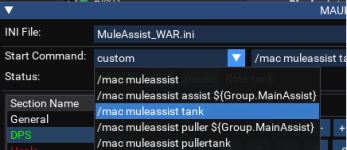
Could do something like this...

1641013558999.png

Start Command changes from 1 input text to a dropdown menu + input text, so that you can select from some preconfigured options, but also edit it to your own start command.
The start command that you enter there also saves once you start the macro, so you already aren't having to go retype it every time you start MAUI.
The status, start/end/pause buttons and role would all be dynamic based on the status of the macro. However, it would become reliant on the name of the macro being muleassist.mac if I make this change, as that would be the macro status that its looking for.


1641013571408.png

And these would be the available options.. could add more or less.
 
Could do something like this...

View attachment 36419

Start Command changes from 1 input text to a dropdown menu + input text, so that you can select from some preconfigured options, but also edit it to your own start command.
The start command that you enter there also saves once you start the macro, so you already aren't having to go retype it every time you start MAUI.
The status, start/end/pause buttons and role would all be dynamic based on the status of the macro. However, it would become reliant on the name of the macro being muleassist.mac if I make this change, as that would be the macro status that its looking for.


View attachment 36420

And these would be the available options.. could add more or less.
Cool, I like it!
 
MAUI takes advantage of the ImGui overlay tech, which always appears on top of the game
So translate this to someone who wasn't involved in the development of mqnext: does this mean "live with it, cause it can't or won't change" or are you saying this is a feature request that belongs somewhere else? The MAUI window and the functionality it brings (which is amazing btw) requires quite a bit of real-estate. I personally liked being able to see the window almost all the time as I'm constantly double checking status, priorities, configuration, etc across all my tunes.

I could change the positioning of my UI elements, which sounds like I may have to do that, but I'm sure we all understand that there's such a thing as "muscle memory" in terms of UI layouts/interaction and change requires a bit of retraining.

Another potential solution is to change the minimize functionality of the window so that it not only shrinks up, but sideways and perhaps to the bottom most section of your screen (though I know that could get pretty complex/messy to actually change the position of the bar when minimized vs not). This would at least make it so I can have it pretty wide, but also when minimized it would use an absolutely least amount of space as it's "always on top".
 
So translate this to someone who wasn't involved in the development of mqnext: does this mean "live with it, cause it can't or won't change" or are you saying this is a feature request that belongs somewhere else? The MAUI window and the functionality it brings (which is amazing btw) requires quite a bit of real-estate. I personally liked being able to see the window almost all the time as I'm constantly double checking status, priorities, configuration, etc across all my tunes.

I could change the positioning of my UI elements, which sounds like I may have to do that, but I'm sure we all understand that there's such a thing as "muscle memory" in terms of UI layouts/interaction and change requires a bit of retraining.

Another potential solution is to change the minimize functionality of the window so that it not only shrinks up, but sideways and perhaps to the bottom most section of your screen (though I know that could get pretty complex/messy to actually change the position of the bar when minimized vs not). This would at least make it so I can have it pretty wide, but also when minimized it would use an absolutely least amount of space as it's "always on top".
AFAIK it can't change. ImGui is an overlay and will 100% of the time be on top of EQ UI. However, you can also drag it completely outside the EQ window. You can resize the window however you like. I'm not aware of it having any fixed width or height when expanded, and the minimized size is just based on how wide it was when it was expanded. Different people probably prioritize different parts of their UI and can't really say that for every person, they would want it minimized down to the bottom of their screen somewhere.

There are also the /maui show|hide commands like the plugin ui had, or just X the window and /maui show again when you want it.
 
AFAIK it can't change. ImGui is an overlay and will 100% of the time be on top of EQ UI. However, you can also drag it completely outside the EQ window. You can resize the window however you like. I'm not aware of it having any fixed width or height when expanded, and the minimized size is just based on how wide it was when it was expanded. Different people probably prioritize different parts of their UI and can't really say that for every person, they would want it minimized down to the bottom of their screen somewhere.

There are also the /maui show|hide commands like the plugin ui had, or just X the window and /maui show again when you want it.
Makes sense. I'll probably just change my layout a bit so MAUI can just be in it's own place without anything in game potentially being in the same space. Great work and thanks a ton for your folks' contribution to all this stuff!
 
aquietone updated MAUI (MuleAssist UI) with a new update entry:

Start command options

- Add dropdown menu of common macro start commands. After selecting one, it is still possible to go and customize it further as well.
- Display macro status and role, and update start/end/pause buttons according to status. The status is hardcoded to check muleassist.mac. If you rename your macro to something else for your own personal edits or anything like that, you will need to update the value in start.lua.

View attachment 36459

View attachment 36460

Read the rest of this update entry...
 
So, I have a question. (Not sure if it should be posted here or somewhere else, but it pertains to MAUI so, please move if not.) I'm using MAUI in Next and for the most part it works awesome; however, sometimes it loses the info on my cleric and my chanter. This doesn't seem to happen to my melee toons though. All of the sudden they stop working so I open their tabs and see that all of their spells are gone. All of their heals, buffs, etc are turned off and I then have to spend time putting it all back in again. It's so very random too. At first I just thought maybe it couldn't find the ini in the next folder because I hit reload ini and it does nothing. I checked the config folder where I put next and everything is still in those ini files but it doesn't load them. I have to put them back in manually and I know when I'm doing that I'm totally forgetting things I probably need. lol I'm running it all on brand new baby toons, around 35'ish now, and haven't imported any ini's from RG yet. I've looked around the forums for a couple of days to see if anyone else has mentioned this, but I'm not finding it. I aslo could be blind. :) Any thoughts on why this would happen, or what I might do to fix it? I'm not amazing at coding, especially this new Lua, but know just enough to get myself into trouble......so I probably did somewhere. Anyway.....thanks for any info. Loving Next so far!

I just hit the "watch" button on the page and it put it in my Lua folder on my launcher....hadn't done that before...maybe that was my problem. I was running it without actually installing it to the launcher. I don't know, but I'm going to try using it later this evening and see if it makes a difference. Who knows, it may not happen again and it was just a fluke thing.
 
is this also a KA replacement or just the interface for updating the INIs?

So, I have a question. (Not sure if it should be posted here or somewhere else, but it pertains to MAUI so, please move if not.) I'm using MAUI in Next and for the most part it works awesome; however, sometimes it loses the info on my cleric and my chanter. This doesn't seem to happen to my melee toons though. All of the sudden they stop working so I open their tabs and see that all of their spells are gone. All of their heals, buffs, etc are turned off and I then have to spend time putting it all back in again. It's so very random too. At first I just thought maybe it couldn't find the ini in the next folder because I hit reload ini and it does nothing. I checked the config folder where I put next and everything is still in those ini files but it doesn't load them. I have to put them back in manually and I know when I'm doing that I'm totally forgetting things I probably need. lol I'm running it all on brand new baby toons, around 35'ish now, and haven't imported any ini's from RG yet. I've looked around the forums for a couple of days to see if anyone else has mentioned this, but I'm not finding it. I aslo could be blind. :) Any thoughts on why this would happen, or what I might do to fix it? I'm not amazing at coding, especially this new Lua, but know just enough to get myself into trouble......so I probably did somewhere. Anyway.....thanks for any info. Loving Next so far!

I just hit the "watch" button on the page and it put it in my Lua folder on my launcher....hadn't done that before...maybe that was my problem. I was running it without actually installing it to the launcher. I don't know, but I'm going to try using it later this evening and see if it makes a difference. Who knows, it may not happen again and it was just a fluke thing.

I've not seen it wipe out an INI since pretty early on when it was new. Since your toons are low level, are they leveling up and generating new INI file names? You mention everything is still there in the INI files when you look in the folder but they are not being loaded, so that sounds like the INI you're loading into MAUI isn't the INI file you're looking at in the folder.
The file name at the top of MAUI is the INI file which i it loading. The MuleAssist macro will also log what INI file it loads when the macro starts. Between the file name shown in MAUI, the file name logged by the macro, and the files present in your config folder, you should be able to track down where the mismatch is.
 
It's possible that it happened when it updated the new levels. I wasn't paying any attention to that at the time, I just noticed everything was gone. I will make a note of the files and their locations as it loads and compare it to what I'm seeing in the files I'm looking at in the config folder to see if they are the same. It's possilbe that it is finding it where I'm not looking since I have next on my D drive and the original ini files are on my C drive. It wouldn't surprise me if it is something I'm overlooking or got crossed when I migrated.
 
I've not seen it wipe out an INI since pretty early on when it was new. Since your toons are low level, are they leveling up and generating new INI file names? You mention everything is still there in the INI files when you look in the folder but they are not being loaded, so that sounds like the INI you're loading into MAUI isn't the INI file you're looking at in the folder.
The file name at the top of MAUI is the INI file which i it loading. The MuleAssist macro will also log what INI file it loads when the macro starts. Between the file name shown in MAUI, the file name logged by the macro, and the files present in your config folder, you should be able to track down where the mismatch is.
So, I think you are absolutely correct!! It hasn't happened again but I did check the file in MAUI against the config folder. It would seem I have multiple INI files for each toon and it was using the main one, not the one with the level in the name, which had nothing in it. I think I just need to clean out that folder every so often and keep it updated. Thank you so much for the help! I really appreciate it! :)
 
I've not seen it wipe out an INI since pretty early on when it was new. Since your toons are low level, are they leveling up and generating new INI file names? You mention everything is still there in the INI files when you look in the folder but they are not being loaded, so that sounds like the INI you're loading into MAUI isn't the INI file you're looking at in the folder.
The file name at the top of MAUI is the INI file which i it loading. The MuleAssist macro will also log what INI file it loads when the macro starts. Between the file name shown in MAUI, the file name logged by the macro, and the files present in your config folder, you should be able to track down where the mismatch is.
You quoted me, then didnt say anything about it. Not sure if Im missing something.
 
Release MAUI (MuleAssist UI)

Users who are viewing this thread

Back
Top
Cart