• Hail, we're RedGuides. We want you to play six (yes, 6!) EverQuest characters at once. We have scripts and a friendly community to help, please join our playstyle and say hello! 👋
Resource icon

Release Map (core plugin) (3 Viewers)

Hi, I have a question about MQ2Map

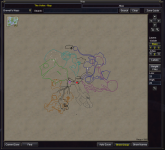
Why are there sometimes some labels missing like in the top right part of this screenshot?

View attachment 75388

How can I fix this problem?
Thanks
You can use nearby. The issue is you have run out of labels. Eq can only handle so much text on screen at once. Nearby solves this as it’s Lua not eq.

Sometimes you get similar when you have all your bags open, or the map in PoK.
 
Wrong forum
When I go into a zone I have to type /mapshow npc in order to see the npc's on my map. I also have to do this in order to see respawns. I don't recall ever having to do this in the past. Did something change, did I possibly screw up a setting?
 
When I go into a zone I have to type /mapshow npc in order to see the npc's on my map. I also have to do this in order to see respawns. I don't recall ever having to do this in the past. Did something change, did I possibly screw up a setting?
click your EQ button, go to macroquest, and click the maps option in the window that pops up. Is NPCs selected?
 
my maps on three accounts on one computer are showing no regular mobs
I have tried reset and my map settings show all
I have another computer with 2 accounts working fine.

I tried logging off the problem one all accounts starting MQ over
I can't find a solution.

It shows PC
 

Attachments

  • map.png
    map.png
    500.3 KB · Views: 0
Merging to the mq2map thread.
Thank you I thought I read through this thread, but the answer is right above, this worked.
/mapshow npc
I am not sure why all three changed settings but this did bring the npc back up.

Merging to the mq2map thread.

Show your /mqsettings -> plugins -> map

You probably turned on named
Thank you I did try reset and all I also checked the settings which seem to list everything as show.
Hope I don't do it again!!
 
Hey, i have a weird thing that happened when i updated to most recent. On the map i am only seeing named, collections, PCs group members etc, but not regular mobs

i've tried /mapshow reset and a few other things, any ideas?

sorry for newb question
 
Hey, i have a weird thing that happened when i updated to most recent. On the map i am only seeing named, collections, PCs group members etc, but not regular mobs

i've tried /mapshow reset and a few other things, any ideas?

sorry for newb question
if you have "named" turned on, this makes it so you dont see all regular mobs

/mapfilter named

or

you can just click it off in the map settings panel

/mqsettings -> plugins -> map

click this off
1778039802076.png
 
I've noticed since my last update of MQ that the roaming storms are no longer showing up on the map in the group mission, did something change with that? I've played a little with the INI settings, but to no avail...
 
My sincere apologies! For some reason, the tank in my current crew had map settings for height filter set to 25 both high and low... increasing them to 50 has brought the moving storms back onto the map.
 
I always really liked the built in spawn tracking in SEQ. I know there are a ton of spawn tracking plugins, but they all seem to be list or notification based. It seems like this works for most people, so it's very likely my proposal is silly, but it was recommended I post it here for feedback.

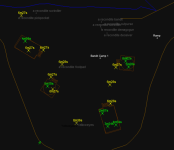
I have an existing prototype working, it basically works the same way as SEQ and looks something like this: 1794598238457.png


Yellow points are when it has learned the timer, but hasn't seen a death yet, so it can't have a live countdown. Green is the live countdown.

This is very much a work in progress.

What it does​

  • Learns spawn points. When an NPC spawns after you zone in, its location becomes a spawn point. NPCs that were already standing when you zoned in are only matched to points it already knows, so it doesn't mark wherever a mob happened to wander.
  • Learns respawn timers. When a mob on a known point dies and something respawns there, it records the gap. Two gaps in a row that agree within 3 seconds confirm a timer. A confirmed timer survives one odd gap, and two disagreeing gaps in a row drop it, so it can adjust if a timer changes. Gaps under 10 seconds are ignored.
  • Shows countdowns on the map. After a kill, a point with a known timer shows a live countdown (green). Once it's past due it shows "overdue" (red). Hovering a point shows the names of the mobs seen there and the timer.
  • Shares data between your characters. Data is saved per zone in Config/MQ2Map/<server>/<zone>.json. Every client in that zone merges into the same file, so a kill seen by one character counts for all of them. In testing, two clients in the same zone learned identical timers.
  • Keeps mobs clickable. Spawn point labels are moved behind other map labels, so clicking a mob standing on a point still targets the mob.

New map filters​

These work the same way as other /mapfilter commands.
FilterDefaultWhat it shows
SpawnoffSpawn point markers (grey by default)
SpawnTimeroffTimers and countdowns on those points (yellow when a timer is known but no kill is pending). Requires Spawn to be on.


The marker size can be set with Spawn-Size under [Marker Filters] in the INI.

New command: /mapdebug​

  • /mapdebug list: shows a summary for the zone (points, how many have timers, how many are unconfirmed) and the points.
  • /mapdebug all: lists every point.
  • /mapdebug reset: clears this zone's data. Other clients in the zone pick up the reset within a few seconds.
  • /mapdebug on|off: turns detailed logging to Logs/MQ2Map_DBG.log on or off. Errors are always logged there.

I don't love this, it was mainly just for debugging while developing, but the /mapdebug reset seems valuable. Should probably be behind a different slash command though.

Caveats​

  • It's always learning. Right now there's no off switch. The Spawn and SpawnTimer filters only control what's drawn. Anyone using MQ2Map gets the zone files and the periodic sync even if they never turn the filters on. At worst I think this would be a couple of mb, but it's extra cruft in the mq files. Currently it's just keeping state in json. I'd be open to other persistence mechanisms. This is the main open question (see below).
  • It skips dynamic zones (DZs). DZs don't respawn, and since instance numbers aren't part of the file name, DZ spawns would otherwise end up in the open zone's file. The client doesn't give a clean "you are in a DZ" signal (members show as Online even inside the DZ), so the rule is: in an instance and in an expedition. /pick copies are still tracked and share the normal zone file. The known miss: a /pick copy you visit while you're in an expedition isn't tracked. That only loses data and never puts bad data in a file.
  • It only learns from what your characters see. A kill it doesn't see (out of range, or while you're out of zone) isn't counted, so quiet zones take a while to learn. Busy zones with other people killing learn fastest.
  • New dependency. It uses nlohmann-json, pulled in through vcpkg. I'm not sure if this is allowed or ideal. As mentioned before, I'm open to saving persistence another way.
  • Labels depend on client behaviour. Keeping mobs clickable relies on how the client orders overlapping map labels. It worked on live, but that's still an assumption about the client.
  • This is a big addition to MQ2Map. I would like to not ruin brainiac's day reading my chickenscratch C++.

Unknowns and things I haven't tested​

  • Spawn points that share a spawn group. When several points draw from one group, the respawn may not appear at the same point as the kill. This is the most likely real-world source of wrong timers, and I haven't tested it yet.
  • Emu/Win32 builds. Tested on live x64 only.
  • Rare spawns and placeholders, and timers with a lot of built-in variance. The two-matching-gaps rule should handle most of these. A point whose real timer varies by more than 3 seconds may never get marked as confirmed.

What I'd like feedback on​

  1. Would you use this?
  2. How should learning be switched on and off, and should it be on by default? The options I'm considering:
    • A separate /mapfilter SpawnLearn, on by default. I'm not attached to it being behind /mapfilter. Data builds up in the background, so the map already has points the first time you turn on Spawn. Anyone who doesn't want it can turn it off, and /mapfilter stays the only interface. The downside is that people who never use it still pay the small cost of json files being written until they turn it off. (SpawnLearn is a working name.)
    • /mapfilter Spawn as the only switch, off by default. Simpler and fully opt-in, but nothing is learned until you turn it on, and you have to show markers to learn.
  3. Is there a reliable "in a dynamic zone" signal I've missed? If there's one, the DZ check could be exact instead of a heuristic, and it might be worth exposing through ${DynamicZone}.
 
I always really liked the built in spawn tracking in SEQ. I know there are a ton of spawn tracking plugins, but they all seem to be list or notification based. It seems like this works for most people, so it's very likely my proposal is silly, but it was recommended I post it here for feedback.

I have an existing prototype working, it basically works the same way as SEQ and looks something like this: View attachment 79472


Yellow points are when it has learned the timer, but hasn't seen a death yet, so it can't have a live countdown. Green is the live countdown.

This is very much a work in progress.

What it does​

  • Learns spawn points. When an NPC spawns after you zone in, its location becomes a spawn point. NPCs that were already standing when you zoned in are only matched to points it already knows, so it doesn't mark wherever a mob happened to wander.
  • Learns respawn timers. When a mob on a known point dies and something respawns there, it records the gap. Two gaps in a row that agree within 3 seconds confirm a timer. A confirmed timer survives one odd gap, and two disagreeing gaps in a row drop it, so it can adjust if a timer changes. Gaps under 10 seconds are ignored.
  • Shows countdowns on the map. After a kill, a point with a known timer shows a live countdown (green). Once it's past due it shows "overdue" (red). Hovering a point shows the names of the mobs seen there and the timer.
  • Shares data between your characters. Data is saved per zone in Config/MQ2Map/<server>/<zone>.json. Every client in that zone merges into the same file, so a kill seen by one character counts for all of them. In testing, two clients in the same zone learned identical timers.
  • Keeps mobs clickable. Spawn point labels are moved behind other map labels, so clicking a mob standing on a point still targets the mob.

New map filters​

These work the same way as other /mapfilter commands.
FilterDefaultWhat it shows
SpawnoffSpawn point markers (grey by default)
SpawnTimeroffTimers and countdowns on those points (yellow when a timer is known but no kill is pending). Requires Spawn to be on.


The marker size can be set with Spawn-Size under [Marker Filters] in the INI.

New command: /mapdebug​

  • /mapdebug list: shows a summary for the zone (points, how many have timers, how many are unconfirmed) and the points.
  • /mapdebug all: lists every point.
  • /mapdebug reset: clears this zone's data. Other clients in the zone pick up the reset within a few seconds.
  • /mapdebug on|off: turns detailed logging to Logs/MQ2Map_DBG.log on or off. Errors are always logged there.

I don't love this, it was mainly just for debugging while developing, but the /mapdebug reset seems valuable. Should probably be behind a different slash command though.

Caveats​

  • It's always learning. Right now there's no off switch. The Spawn and SpawnTimer filters only control what's drawn. Anyone using MQ2Map gets the zone files and the periodic sync even if they never turn the filters on. At worst I think this would be a couple of mb, but it's extra cruft in the mq files. Currently it's just keeping state in json. I'd be open to other persistence mechanisms. This is the main open question (see below).
  • It skips dynamic zones (DZs). DZs don't respawn, and since instance numbers aren't part of the file name, DZ spawns would otherwise end up in the open zone's file. The client doesn't give a clean "you are in a DZ" signal (members show as Online even inside the DZ), so the rule is: in an instance and in an expedition. /pick copies are still tracked and share the normal zone file. The known miss: a /pick copy you visit while you're in an expedition isn't tracked. That only loses data and never puts bad data in a file.
  • It only learns from what your characters see. A kill it doesn't see (out of range, or while you're out of zone) isn't counted, so quiet zones take a while to learn. Busy zones with other people killing learn fastest.
  • New dependency. It uses nlohmann-json, pulled in through vcpkg. I'm not sure if this is allowed or ideal. As mentioned before, I'm open to saving persistence another way.
  • Labels depend on client behaviour. Keeping mobs clickable relies on how the client orders overlapping map labels. It worked on live, but that's still an assumption about the client.
  • This is a big addition to MQ2Map. I would like to not ruin brainiac's day reading my chickenscratch C++.

Unknowns and things I haven't tested​

  • Spawn points that share a spawn group. When several points draw from one group, the respawn may not appear at the same point as the kill. This is the most likely real-world source of wrong timers, and I haven't tested it yet.
  • Emu/Win32 builds. Tested on live x64 only.
  • Rare spawns and placeholders, and timers with a lot of built-in variance. The two-matching-gaps rule should handle most of these. A point whose real timer varies by more than 3 seconds may never get marked as confirmed.

What I'd like feedback on​

  1. Would you use this?
  2. How should learning be switched on and off, and should it be on by default?The options I'm considering:
    • A separate /mapfilter SpawnLearn, on by default. I'm not attached to it being behind /mapfilter. Data builds up in the background, so the map already has points the first time you turn on Spawn. Anyone who doesn't want it can turn it off, and /mapfilter stays the only interface. The downside is that people who never use it still pay the small cost of json files being written until they turn it off. (SpawnLearn is a working name.)
    • /mapfilter Spawn as the only switch, off by default. Simpler and fully opt-in, but nothing is learned until you turn it on, and you have to show markers to learn.
  3. Is there a reliable "in a dynamic zone" signal I've missed? If there's one, the DZ check could be exact instead of a heuristic, and it might be worth exposing through ${DynamicZone}.

1. no, but some would. well before MQ i'd use myseq to keep a camp on lockdown by watching spawn timers, im sure some folks still do similar
2. default off
3 there is a way to tell
this is in MQ2CharacterType
C++:
case CharacterMembers::InInstance:
    Dest.Set(HIWORD(pLocalPlayer->GetZoneID()) != 0);
    Dest.Type = pBoolType;
    return true;

case CharacterMembers::Instance:
    Dest.DWord = HIWORD(pLocalPlayer->GetZoneID());
    Dest.Type = pIntType;
    return true;
so you could use something like
C++:
bool InInstance() {
    return pLocalPlayer && HIWORD(pLocalPlayer->GetZoneID()) != 0;
}
 
the Map plugin isn't a good place to do spawn tracking because the Map UI is heavily constrained by the EQUI system (including limits on the number of lines/text that can be drawn).

So, its a cool idea, I just don't think the in-game map is going to work well for it.
 
The idea seems cool, but I concur with Brain. Unless the EQUI issue is dealt with, I don't think I would be able to use this in very many zones. I already have to either close the map or set a pretty limited height filter to see my text.

On that note - I really, really hate the map without labels. I don't know what it is, but those little tick marks just don't do it for me. Is there a way to modify the map plugin to either truncate the spawn name to a specified number of characters, or even better truncate each word of the spawn name to a maximum length? For example, 'a recondite bandit' -> 'a reco' or 'a rec ban'? Would probably resolve the text issue in a lot of zones if it's simply a function of text drawn.
 
the Map plugin isn't a good place to do spawn tracking because the Map UI is heavily constrained by the EQUI system (including limits on the number of lines/text that can be drawn).

So, its a cool idea, I just don't think the in-game map is going to work well for it.
heard, thank you very much.
 
Release Map (core plugin)

Users who are viewing this thread

  • N
Back
Top
Cart