
-
 Hail, we're RedGuides. We want you to play several EverQuest characters at once. We have scripts and a friendly community to help, please join our playstyle and say hello! 👋
You are using an out of date browser. It may not display this or other websites correctly.
You should upgrade or use an alternative browser.
You should upgrade or use an alternative browser.
Resource icon
Release Map (core plugin)
- Thread starter Teichou
- Start date


- Commits
- 191
For some reason on one of my computer (my main), mobs are not showing on the map. I have /mapfilter npc set to on, have switched it back and fourth, have reset the mapfilter. I have tried all toggles on the EQ map for the layers and nothing. I'm fairly sure it is something with EQ, but why did it start with the new expansion and only on one computer? All my MQ settings are the same on both computers.
Any ideas?
Thanks
Any ideas?
Thanks


Redbot updated MQ2Map with a new update entry:
campradius and pullradius
Read the rest of this update entry...
campradius and pullradius
- Added two new /mapfilter options for CampRadius and PullRadius.
- They add two new circles that work like SpellRadius except it's stationary where set.
- Type /mapfilter for help.
Read the rest of this update entry...

- Commits
- 191
to be clear, using the radius won't redrawn new spawns for some reason. So while it will show spawns in a radius around you, repops won't appear.
I am now using the commandto be clear, using the radius won't redrawn new spawns for some reason. So while it will show spawns in a radius around you, repops won't appear.
/mapfilter custom npc radius 1000 to also show PC. However IT IS updating repops just fine @ChatWithThisName
- Commits
- 191
Hrm, interesting. It's never updated spawns when I've used a radius.

did you adjust your map filters?having an issue as all spawns went away on one of my characters and I cannot make them come back. even setting it back to default just killed the macro and it wont turn back on
/mapfilter npc
you also need layer2 visible on your map

I did. now Its only showing.... I guess named mobs? More like quest npcs and stuff in this zone Im in.did you adjust your map filters?
/mapfilter npc
you also need layer2 visible on your map
View attachment 23254
when i look at the settings, they all appear normal. Everything I can tell is set to show.
Last edited:
go through your /mapfilter settingsI did. now Its only showing.... I guess named mobs? More like quest npcs and stuff in this zone Im in.
when i look at the settings, they all appear normal. Everything I can tell is set to show.
if you just now see named it might be /mapfilter npc is on
you can do a /mapfilter all also to toggle all on/off
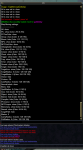
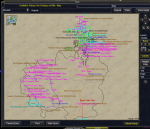

craggyisland
Unwise Decision Designator
Try hiding all the ground stuff, may have to much text on screen and bugging out. Try /mapfilter ground hide
Sorry, didn't work. The only thing I could see was ground stuff. I eventually had to reinstall it to get it fixed.Try hiding all the ground stuff, may have to much text on screen and bugging out. Try /mapfilter ground hide
I had the same issue, thanks for the tip about toggling named to fix it.
Here's my question - is there an easy way to normally hide NPC names, and then use /highlight to show the ones you want? I feel like it should be feasible but when I try it doesn't work for me, telling me there's no valid spawns with that name, unless I have all NPCs visible (which is obviously kind of nightmarish to parse visually in crowded zones).
Here's my question - is there an easy way to normally hide NPC names, and then use /highlight to show the ones you want? I feel like it should be feasible but when I try it doesn't work for me, telling me there's no valid spawns with that name, unless I have all NPCs visible (which is obviously kind of nightmarish to parse visually in crowded zones).
Question if anyone can help me out. My map keeps losing the con colors, and I CANNOT get them back unless I delete the maps ini file, and reinstall everything. Then at some random time, I'll lose them again and no matter what combination of show/hide, NPCConColor etc I try, I can only ever get standard black/grey names, or highlight specific ones.
Edit: scratch that. now even deleting and reinstalling doesn't bring it back. /mapshow NPCConColor does nothing. /mapfilter NPCConColor says NPC must be enabled. what am I doing wrong?
Edit: scratch that. now even deleting and reinstalling doesn't bring it back. /mapshow NPCConColor does nothing. /mapfilter NPCConColor says NPC must be enabled. what am I doing wrong?
Last edited:
i think your map labels are based on the sizing inside the map file - i don't believe you can adjust them otherwiseAnyway to increase font size on the names on the map? Or increase as you zoom in?
Thanks for the info.i think your map labels are based on the sizing inside the map file - i don't believe you can adjust them otherwise

- Commits
- 2
My guess is Mapfilter is permanent setting, mapshow and maphide are temporary. Just a guess. 

I wasn't getting NPCs to show, no matter what I tried. Running "/mapfilter custom npc radius 1000 " fixed it for me.Is there any way to only show NPC mobs in a certain radius? I have issues with text disappearing from text boxes when all npcs are shown? Thank you!
@kaen01 thank for the solution/mapfilter custom npc radius 1000

Now I can set the radius larger to show all NPCs.
It added "Custom=1" to my MQ2Map.ini file.
/mac map didn't do anything except change my custom colors.
I typed "/custom 0" and it restored full map functionality and /slash commands that weren't working previously. Odd because there was no "Custom=" line in my .ini before. The above post combined with the map.mac hinted at me needing that line in there.
Last edited:

ok my map shows only my group and other groups but not the mobs in the zone. Can yoiu please help me
/mapfilter npc showat the top of this resource has a commands tab with all the options you can configure
do you have your layers hidden?I know its probably something silly, but i've watched the videos on youtube as well as looked at ini files. I couldnt see if something is different but my main chars map doesnt work like the others its just standard map. Any pointers?
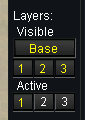
and or did you change your
/mapfilter settings?Evening all. I’m having an issue with my maps. Everything is up to date through the launcher.
I know EQ has issues with the map where chat boxes are blank and such because of code limitations.
i pretty much always have my map open and would close it on those rare times where it was a problem. This mostly occurred when i would open a vendor window. It’s now happening more frequently and most annoyingly, with my chat windows. I used to be able to have maps open and toggle between my main group chat and guild chat with no problems. Now it’s blank and I have to close the map to make it show up. Another challenge I am having is that not all the spots on the map have tags. I can see little dots where mobs are and such but some of them don’t have labels.
At least with the chat I can close maps and see it, but I haven’t figured out a way to make all the labels show.
any assistance is appreciated.
thanks
I know EQ has issues with the map where chat boxes are blank and such because of code limitations.
i pretty much always have my map open and would close it on those rare times where it was a problem. This mostly occurred when i would open a vendor window. It’s now happening more frequently and most annoyingly, with my chat windows. I used to be able to have maps open and toggle between my main group chat and guild chat with no problems. Now it’s blank and I have to close the map to make it show up. Another challenge I am having is that not all the spots on the map have tags. I can see little dots where mobs are and such but some of them don’t have labels.
At least with the chat I can close maps and see it, but I haven’t figured out a way to make all the labels show.
any assistance is appreciated.
thanks

SomeTester
Well-known member
Evening all. I’m having an issue with my maps. Everything is up to date through the launcher.
I know EQ has issues with the map where chat boxes are blank and such because of code limitations.
i pretty much always have my map open and would close it on those rare times where it was a problem. This mostly occurred when i would open a vendor window. It’s now happening more frequently and most annoyingly, with my chat windows. I used to be able to have maps open and toggle between my main group chat and guild chat with no problems. Now it’s blank and I have to close the map to make it show up. Another challenge I am having is that not all the spots on the map have tags. I can see little dots where mobs are and such but some of them don’t have labels.
At least with the chat I can close maps and see it, but I haven’t figured out a way to make all the labels show.
any assistance is appreciated.
thanks
For the blank maps with no “spots” you’ll probably want to download a map pack. I use brewall’s maps.
But the big fix if you always have the map up is to use MySEQ. If you have a second monitor it works best. It is a standalone program that shows the map, spawns and other info all in a separate window so you don’t hit the memory limit in EQ that blanks the chat and stuff.
I have Brewall. It’s never been an issue before. It just started 2 days ago. I do have a second monitor. I’ll look into MySEQ.For the blank maps with no “spots” you’ll probably want to download a map pack. I use brewall’s maps.
But the big fix if you always have the map up is to use MySEQ. If you have a second monitor it works best. It is a standalone program that shows the map, spawns and other info all in a separate window so you don’t hit the memory limit in EQ that blanks the chat and stuff.
thanks!
pancakeninjadad
Member
So, I let my lvl 2 access run out, and noticed the fact when I stopped seeing everyone in the zone on the maps. I used redcents to regain lvl 2 access, but maps still don't show what they did last week. I think I am missing something obvious, but I am oblivious. can someone point me in the right direction please?
lvl 2 or otherwise wouldn't change the stuff that is happening in game.So, I let my lvl 2 access run out, and noticed the fact when I stopped seeing everyone in the zone on the maps. I used redcents to regain lvl 2 access, but maps still don't show what they did last week. I think I am missing something obvious, but I am oblivious. can someone point me in the right direction please?
you will want to make sure macroquest is loaded and running, that you have mq2map loaded
/plugin mq2map load and you will want to check your visible map layers (and possibly your map filters)pancakeninjadad
Member
Thank you! After posting, I realized that I needed to update , and then launch - before starting EQ. It is pretty cool how explaining what is wrong in a manner that someone else will understand it enables the mind to figure out what is wrong.
Not sure if this has been posted yet, but if it has, here is a refresher.
Go into your mq2map.ini file, change the bottom section to
What this will do is the following things.
left Alt Click on map moves current character to where you click
ctrl Click on map moves EVERYONE to where you click
Shift Click will move just the melee (not tanks)
Ctrl Shift Click will move Casters
right alt click will move just the priests.
NOTE: You need to have mq2dannet loaded.
Go into your mq2map.ini file, change the bottom section to
[Left Click]
KeyCombo1=/dgexe melee /multiline ;  /nav locyx %y %x |log=off
KeyCombo2=/dgzaexe /multiline ;  /nav locyx %y %x |log=off
KeyCombo3=/dgexe caster /nav locyx %y %x |log=off
KeyCombo4=/nav locyx %y %x |log=off
KeyCombo8=/dgexe priest /nav locyx %y %x |log=off
What this will do is the following things.
left Alt Click on map moves current character to where you click
ctrl Click on map moves EVERYONE to where you click
Shift Click will move just the melee (not tanks)
Ctrl Shift Click will move Casters
right alt click will move just the priests.
NOTE: You need to have mq2dannet loaded.
To expound upon this tip, as I could not find this documented with the MQ2Map commands.
From the documentation you can set a command to be performed when the right mouse button is clicked in the map via the command line, e.g.
/mapclick shift /echo shift
This will put an entry in the [Right Click] section of your MQ2map.ini file (in the release folder with the DLL not the macros folder). However the key value on the file will be 'KeyCombo1' rather than 'shift'. So for the above command the entry would be:
[Right Click]
KeyCombo1=/echo shift
Strangely, however, I could not get this to work using Right Click. If I put the same command in a section titled [Left Click] I get the expected output in my MQ2 window.
As for the key combos - the following values are assigned to each key:
Shift=1
Ctrl=2
Left Alt=4
Right Alt=8
These values can be combined by simply adding (bitwise OR'ing) the key numbers. So Shift+Ctrl = 1+2 = 3. So you would use 'KeyCombo3' in the INI file.
So, as an example, to make all group members navigate to the point on the map where you click with the Shift key pressed (using EQBCS):
[Left Click]
KeyCombo1=/bcga //nav locyxz %y %x %z
Note that MQ2map already installs a command for the Left Alt key to navigate to the location (not in the INI file), so I wouldn't suggest using that key.
From the documentation you can set a command to be performed when the right mouse button is clicked in the map via the command line, e.g.
/mapclick shift /echo shift
This will put an entry in the [Right Click] section of your MQ2map.ini file (in the release folder with the DLL not the macros folder). However the key value on the file will be 'KeyCombo1' rather than 'shift'. So for the above command the entry would be:
[Right Click]
KeyCombo1=/echo shift
Strangely, however, I could not get this to work using Right Click. If I put the same command in a section titled [Left Click] I get the expected output in my MQ2 window.
As for the key combos - the following values are assigned to each key:
Shift=1
Ctrl=2
Left Alt=4
Right Alt=8
These values can be combined by simply adding (bitwise OR'ing) the key numbers. So Shift+Ctrl = 1+2 = 3. So you would use 'KeyCombo3' in the INI file.
So, as an example, to make all group members navigate to the point on the map where you click with the Shift key pressed (using EQBCS):
[Left Click]
KeyCombo1=/bcga //nav locyxz %y %x %z
Note that MQ2map already installs a command for the Left Alt key to navigate to the location (not in the INI file), so I wouldn't suggest using that key.
Users who are viewing this thread
Total: 1 (members: 0, guests: 1)
Share: