Where do I find these map update files atJust so folks know, this is not an issue with Magellan. This is broken zone connections. Also note, when you are editing your zone_connection.yaml file you will need to keep a backup, this file gets overwritten every time you update through the launcher.

-
 Hail, we're RedGuides. We want you to play six (yes, 6!) EverQuest characters at once. We have scripts and a friendly community to help, please join our playstyle and say hello! 👋
You are using an out of date browser. It may not display this or other websites correctly.
You should upgrade or use an alternative browser.
You should upgrade or use an alternative browser.

Release Magellan - Travel Utility 12-04-2025
- Thread starter Coldblooded
- Start date

Boring
Well-known member
I have Magellan set as "watch" but the program doesn't show up on the launcher for me?The whole idea of the Redguides loader is to make this easy. I'm at a loss if there is something actually wrong here or just an operator error.

LorDeth
<<NO GIF ATTACHED>>
You're watching the "overview" tab of this Lua? and then when you open your launcher, under the Lua section, you click refresh (bottom right button) and no change?I have Magellan set as "watch" but the program doesn't show up on the launcher for me?
Trying to create a new waypoint but it doesnt save it

I have Magellan set as "watch" but the program doesn't show up on the launcher for me?
As lordeth says, make sure you're watching the overview and not the discussionYou're watching the "overview" tab of this lua? and then when you open your launcher, under the lua section, you click refresh (bottom right button) and no change?
I have magellan overview set as watchedAs lordeth says, make sure you're watching the overview and not the discussion
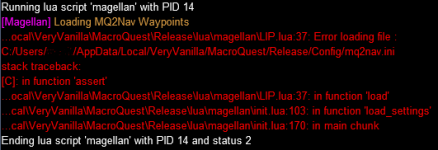

in game make sure to do /plugin mq2nav to make sure the nav plugin is loaded.
then you can do /nav ui, and change your behavior on stopping nav to key interrupt or whatever the box says, then close the nav ui window
that should now have created the mq2nav.ini that magellan is looking for.
That did the trick! Thank you so much for the help!in game make sure to do /plugin mq2nav to make sure the nav plugin is loaded.
then you can do /nav ui, and change your behavior on stopping nav to key interrupt or whatever the box says, then close the nav ui window
that should now have created the mq2nav.ini that magellan is looking for.

- Commits
- 192
I should load those in the script .... puts it on the list of things to do today...

- Commits
- 191
I too did not realize that there are people who did not use Nav.I should load those in the script .... puts it on the list of things to do today...

BlueBug
Seasoned veteran member
I have suggestion / request. Is there a way to add a cancel / delete button the search zone box? As in when we type in a zone name to search by expansion. It's a very minor suggestion that would only really be helpful to folks like me that go all over the place so don;t want to have a HUGE favorites list.
Attaching a pic of where / what I mean-
Super awesome resource by the way!
BB~
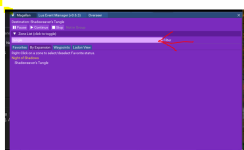
Attaching a pic of where / what I mean-
Super awesome resource by the way!
BB~
- Commits
- 192
Coldblooded updated Magellan - Travel Utility with a new update entry:
Adds clear button to search bar
Read the rest of this update entry...
Adds clear button to search bar
Adds the ability to clear the search text by clicking a "Clear" button
Read the rest of this update entry...
BlueBug
Seasoned veteran member
Holy shit man! That was fast!Coldblooded updated Magellan - Travel Utility with a new update entry:
Adds clear button to search bar
Read the rest of this update entry...
Thanks a bunch. Very cool of you.
BB~
Any chance you will add the function to take advantage of druid and/or wizards ports when doing routes?
- Commits
- 192
Coldblooded updated Magellan - Travel Utility with a new update entry:
Gracefully handles no mq2nav.ini file
Read the rest of this update entry...
Gracefully handles no mq2nav.ini file
Will check for the existence of the mq2nav.ini file before attempting to load it.
Read the rest of this update entry...
- Commits
- 192
Probably not. Magellan is just a Lua UI around the underlying /easyfind command.Any chance you will add the function to take advantage of druid and/or wizards ports when doing routes?
Yes, just got it after updating RG launcher and going back into game.Module 'lib zones' not found
No field package preload "lib zones"
anyone getting this error with magellan since the update?
- Commits
- 192
Sorry guys, somehow an older version got caught up in the workflow. I've pushed a new update to the repo, should update soon (I hope...)
Quick update, just downloaded the resource, and changes are there.
Quick update, just downloaded the resource, and changes are there.
Working like a charm again! Thank you!Sorry guys, somehow an older version got caught up in the workflow. I've pushed a new update to the repo, should update soon (I hope...)
Quick update, just downloaded the resource, and changes are there.
- Commits
- 192
Thank you for the quick feedback! Glad that fixed it!Working like a charm again! Thank you!
Interesting side effect today.
/Lua run magellan
Opens Magellan window and you get:
[Magellan] Loading MQ2Nav Waypoints
[Magellan]Loading Group Settings
Then if I close the Magellan UI window by Xing out I get
[Magellan] Loading MQ2Nav Waypoints
[Magellan]Loading Group Settings
Cannont create event MQNav Waypoint Recorded, it is already defined
and the Magellan UI window pops back open.
If I X out again. it closes as normal
Ending Lua script 'magellan' with PID 9 and status 0
/Lua run magellan
Opens Magellan window and you get:
[Magellan] Loading MQ2Nav Waypoints
[Magellan]Loading Group Settings
Then if I close the Magellan UI window by Xing out I get
[Magellan] Loading MQ2Nav Waypoints
[Magellan]Loading Group Settings
Cannont create event MQNav Waypoint Recorded, it is already defined
and the Magellan UI window pops back open.
If I X out again. it closes as normal
Ending Lua script 'magellan' with PID 9 and status 0
BlueBug
Seasoned veteran member
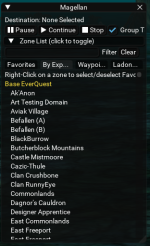
Bumping this.Is it just me or did the "Clear" button by the "Filter" button disappear with the last update?
BB~
BB~
- Commits
- 6
Looks like there's a copy/paste duplication of the main window method ("draw_main_window") and the only difference is the removal of "Clear".Bumping this.
Easiest way to temporarily fix this is to add the missing Clear button to line 263/264 (copied from lines 675/676)

- Commits
- 192
Coldblooded updated Magellan - Travel Utility with a new update entry:
11/22/2023
Read the rest of this update entry...
11/22/2023
Features
- Adds Themes
(43ef29e)...- Added theme module imTheme
- Added themes file
- Provided new help function: `/lua run magellan help`
The theme to use is passed in on the command line. Using the help
as shown above will provide a list of avaiable themes.
- BlackDevil
- Moonlight
- Sonic
- EnemyMouse
- Default (Purple)
- Steam
- System (ImGui Default)
Read the rest of this update entry...
- Commits
- 192
Coldblooded updated Magellan - Travel Utility with a new update entry:
Now With Themes
Read the rest of this update entry...
Now With Themes
Added the ability to change themes.
Right now this is done from the command line. I'll update the UI at some point, but another button/dropdown would just make it look cluttered.
where the theme is one of the following out of the box:Code:/lua run magellan <theme name>
- BlackDevil
- Moonlight
- Sonic
- EnemyMouse
- Default (Purple)
- Steam
- System (ImGui Default)
will provide the list if you forgetCode:/lua run magellan help
Read the rest of this update entry...
Deth Theme
Lua:
   Deth = {
      Text = {1.00, 1.00, 1.00, 1.00},
      TextDisabled = {0.50, 0.50, 0.50, 1.00},
      WindowBg = {0.05, 0.05, 0.05, 0.75},
      ChildBg = {0.00, 0.00, 0.00, 0.00},
      PopupBg = {0.19, 0.19, 0.19, 0.92},
      Border = {0.20, 0.20, 0.20, 0.30},
      BorderShadow = {0.00, 0.00, 0.00, 0.85},
      FrameBg = {0.05, 0.05, 0.05, 0.54},
      FrameBgHovered = {0.19, 0.19, 0.19, 0.54},
      FrameBgActive = {0.20, 0.22, 0.23, 1.00},
      TitleBg = {0.00, 0.00, 0.00, 0.65},
      TitleBgActive = {0.06, 0.06, 0.06, 1.00},
      TitleBgCollapsed = {0.00, 0.00, 0.00, 0.65},
      MenuBarBg = {0.14, 0.14, 0.14, 1.00},
      ScrollbarBg = {0.05, 0.05, 0.05, 0.54},
      ScrollbarGrab = {0.34, 0.34, 0.34, 0.54},
      ScrollbarGrabHovered = {0.40, 0.40, 0.40, 0.54},
      ScrollbarGrabActive = {0.56, 0.56, 0.56, 0.54},
      CheckMark = {0.33, 0.67, 0.86, 1.00},
      SliderGrab = {0.34, 0.34, 0.34, 0.54},
      SliderGrabActive = {0.56, 0.56, 0.56, 0.54},
      Button = {0.05, 0.05, 0.05, 1.0},
      ButtonHovered = {0.19, 0.19, 0.19, 0.54},
      ButtonActive = {0.20, 0.22, 0.23, 1.00},
      Header = {0.00, 0.00, 0.00, 0.52},
      HeaderHovered = {0.00, 0.00, 0.00, 0.36},
      HeaderActive = {0.20, 0.22, 0.23, 0.33},
      Separator = {0.28, 0.28, 0.28, 0.29},
      SeparatorHovered = {0.44, 0.44, 0.44, 0.29},
      SeparatorActive = {0.40, 0.44, 0.47, 1.00},
      ResizeGrip = {0.28, 0.28, 0.28, 0.29},
      ResizeGripHovered = {0.44, 0.44, 0.44, 0.29},
      ResizeGripActive = {0.40, 0.44, 0.47, 1.00},
      Tab = {0.00, 0.00, 0.00, 0.52},
      TabHovered = {0.14, 0.14, 0.14, 1.00},
      TabActive = {0.20, 0.20, 0.20, 0.36},
      TabUnfocused = {0.00, 0.00, 0.00, 0.52},
      TabUnfocusedActive = {0.14, 0.14, 0.14, 1.00},
      DockingPreview = {0.33, 0.67, 0.86, 1.00},
      DockingEmptyBg = {1.00, 0.00, 0.00, 1.00},
      PlotLines = {1.00, 0.00, 0.00, 1.00},
      PlotLinesHovered = {1.00, 0.00, 0.00, 1.00},
      PlotHistogram = {1.00, 0.00, 0.00, 1.00},
      PlotHistogramHovered = {1.00, 0.00, 0.00, 1.00},
      TableHeaderBg = {0.00, 0.00, 0.00, 0.52},
      TableBorderStrong = {0.00, 0.00, 0.00, 0.52},
      TableBorderLight = {0.28, 0.28, 0.28, 0.29},
      TableRowBg = {0.00, 0.00, 0.00, 0.00},
      TableRowBgAlt = {1.00, 1.00, 1.00, 0.06},
      TextSelectedBg = {0.20, 0.22, 0.23, 1.00},
      DragDropTarget = {0.33, 0.67, 0.86, 1.00},
      NavHighlight = {1.00, 0.00, 0.00, 1.00},
      NavWindowingHighlight = {1.00, 0.00, 0.00, 0.70},
      NavWindowingDimBg = {1.00, 0.00, 0.00, 0.20},
      ModalWindowDimBg = {1.00, 0.00, 0.00, 0.35}
   }
Last edited:
- Commits
- 192
Sure, I can do that.That was fast Coldblooded!!
If I post a theme here can you include it?
- Commits
- 192
That logic is maintained in the resources/EasyFind/ZoneConnections.yaml file. That's part of EasyFind, not Magellan.Should it choose/know to choose which zone to choose when pathing from Plane of knowledge to any old Luclin zone? There is a pop up menu when using the luclin stone (shar val?) asking for classic or NoS Shar Val, so the pathing stalls waiting on prompt.
For example, here is the entry in POK that takes you to "Feerott: The Dream" where you are similarly prompted for which zone.
YAML:
type: ZoneConnection
            targetZone: feerrott2
            name: 'Feerrott: The Dream'
            switch: POKOGPORT500
            script: |
                -- Wait for window to open and click the button on the left
                mq.delay('5s', function() return mq.TLO.Window('LargeDialogWindow').Open() end)
                if mq.TLO.Window('LargeDialogWindow').Open() then
                    mq.TLO.Window('LargeDialogWindow/LDW_YesButton').LeftMouseUp()
                end
expansion: House of Thule- Commits
- 192
Coldblooded updated Magellan - Travel Utility with a new update entry:
11/22/2023
Read the rest of this update entry...
11/22/2023
Read the rest of this update entry...

- Commits
- 2
Nothing to do with Magellan. This is EasyFind your looking for.For some reason Magellan won't recognize the Magus in the Guild Lobby. It always did before. Anyone else having the same issue?
[imTheme] Theme Default not found in the theme file.
Attempting to use default theme.
[imTheme] Theme enemymouse not found in the theme file.
Attempting to use default theme.
[imTheme] Theme deth not found in the theme file.
Attempting to use default theme.
Same message for all except Sonic. Sonic works
Attempting to use default theme.
[imTheme] Theme enemymouse not found in the theme file.
Attempting to use default theme.
[imTheme] Theme deth not found in the theme file.
Attempting to use default theme.
Same message for all except Sonic. Sonic works
- Commits
- 2
Everything but sonic is in uppercase. try using Deth, EnemyMouse or /Lua magellan help[imTheme] Theme Default not found in the theme file.
Attempting to use default theme.
[imTheme] Theme enemymouse not found in the theme file.
Attempting to use default theme.
[imTheme] Theme deth not found in the theme file.
Attempting to use default theme.
Same message for all except Sonic. Sonic works
Code:
cannon = {
      WindowBg = {.15, .15, .15, 1},
      TitleBgActive = {.00, .00, .00, 1},
      FrameBg = {.00, .00, .01, 1},
      Button = {.05, .05, .00, .50},
      ButtonHovered = {.00, .00, .00, 1},
      Tab = {.05, .05, .00, .50},
      TabActive = {.00, .00, .00, 1},
      TabHovered = {.00, .00, .00, 1},
      ChildBg = {.00, .00, .01, 1},
      Header = {.05, .05, .00, .50},
      HeaderHovered = {.45, .30, .20, 1},
      HeaderActive = {.23, .035, .12, .10}
},Thanks LoneWolf, that worked great!Everything but sonic is in uppercase. try using Deth, EnemyMouse or /lua magellan help
Users who are viewing this thread
Total: 1 (members: 0, guests: 1)
Share: