
-
 Hail, we're RedGuides. We want you to play six (yes, 6!) EverQuest characters at once. We have scripts and a friendly community to help, please join our playstyle and say hello! 👋
You are using an out of date browser. It may not display this or other websites correctly.
You should upgrade or use an alternative browser.
You should upgrade or use an alternative browser.

Release Magellan - Travel Utility (1 Viewer) 12-04-2025
- Thread starter Coldblooded
- Start date

- Commits
- 192
I'm not sure Aaly, I don't have access to either of those. Magellan is just a UI that sends commands to /travelto (EasyFind).Is it just me, but with selecting GGH i will zone into the GGH then zone back out, run through the Houses and continue the cycle. Same with Modest Guild Hall as well.
Looking into this, I find that GGH entry in the zones.Lua file I use points to guildhallsml
zones.lua
Lua:
guildhallsml = 'Greater Guild Hall'But the zones_connections.ini for eznav does not have a corresponding entry for 'guidlhallsml'
I'm not sure if this is the issue or not. Hopefully, others with more knowledge can weigh in.
I think the behavior @Heimdall is encountering is an issue with trying to use
/travelto with one of the versions of the GGH/PGH/whatever, but it's not the correct version for where the character is actually going. So, selecting GGH when you're actually zoning into PGH bounces you back and forth from the neighborhood where the halli is located and the hall itself.
Cold,
I have a group running to an xp spot, and I loaded another character to help with out of group buffs, but that character cannot use Magellan because the window shows 'Not in Group' so it will not do anything. Is there a way to make it run more than the group I opened it with? If I had two groups loaded or multiple solo characters. I am really enjoying the ease that this provides with the UI.
I have a group running to an xp spot, and I loaded another character to help with out of group buffs, but that character cannot use Magellan because the window shows 'Not in Group' so it will not do anything. Is there a way to make it run more than the group I opened it with? If I had two groups loaded or multiple solo characters. I am really enjoying the ease that this provides with the UI.
- Commits
- 192
Yes. Not sure that *everyone* would want to use this, but right now the group function uses a combination of /travelto and dannet. The code in question looks like this.Cold,
I have a group running to an xp spot, and I loaded another character to help with out of group buffs, but that character cannot use Magellan because the window shows 'Not in Group' so it will not do anything. Is there a way to make it run more than the group I opened it with? If I had two groups loaded or multiple solo characters. I am really enjoying the ease that this provides with the UI.
Group Travel Example
Lua:
--- Correctly makes the call to /travelto based on action desired and group settings
---@param s string destination/action (e.g. zone or stop/pause)
---@param b boolean in_group?
local function travel(s, b)
   if b and mq.TLO.Group.Leader.ID() then
      if s == 'stop' then
         mq.cmdf('/dgae /travelto %s', s)
      else
         mq.cmdf('/travelto group %s', s)
      end
   else
      mq.cmdf('/travelto %s', s)
   end
end
You could change the code that controls the Dannet command to all travel to and stop as directed.
So either
- /dgaexecute <group> <command> -- executes a command on all clients in a group (including own)
- /dgzaexecute <command> -- executes a command on all clients in your current in-game zone (including own)
/dgae and /dgzaeSticking with idea that you're going to create and have your characters join a Dannet group, you could modify this section; the code would look like this:
Group Travel Example
Lua:
--- Correctly makes the call to /travelto based on action desired and group settings
---@param s string destination/action (e.g. zone or stop/pause)
---@param b boolean in_group?
local function travel(s, b)
   if b and mq.TLO.Group.Leader.ID() then
     mq.cmdf('/dgae yourgroupnamehere /travelto %s', s)
   else
      mq.cmdf('/travelto %s', s)
   end
end
- Commits
- 192
That's actually a great idea!Now if you can add a Favorites tab, then add a clickable star to the right of each location, and these would show up on the favorites tab
I'm working on waypoints next, the ability to set and name them, as well as a tab for them. But I really like this idea about favorites.
- Commits
- 192
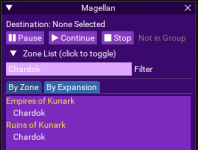
Also, is there a way to tell the difference between old version and the new versions of the zones with the same exact names?
Do you mean like this? Here we have the zone "Chardok" and show that it existed in the Ruins of Kunark (Old) and Empires of Kunark (New)
- Commits
- 192
Coldblooded updated Magellan - Travel Utility with a new update entry:
Introducing "Ladon View" - An advanced data-centric view
Read the rest of this update entry...
Introducing "Ladon View" - An advanced data-centric view
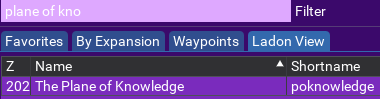
After much whining, begging and, promises of sexual favors by Ladon I've added another tab to display some inner secrets about zones (namely the Zone ID, and short name) in a beautiful, sortable, and selectable table view, all in the gorgeous purple-, violet- and lavender-hued theme!
View attachment 38712
In addition, some small performance improvements were implemented; namely the ListClipper pattern on the Zone and Ladon views.
Read the rest of this update entry...
Wow, thank you.
Last wish list, I promise, lol.
Any way to show the starting zone to be in?
For example, if I am located in GH, and wanted to go to blood falls, the program doesn't know how to use the portal.
Because I am an idiot with zones, I have to look up what portal I need to get first. In this case, I need to go to Greater Faydark.
Can this show me that I need to go to Greater Faydark, maybe it pops under the blood falls listing?
Last wish list, I promise, lol.
Any way to show the starting zone to be in?
For example, if I am located in GH, and wanted to go to blood falls, the program doesn't know how to use the portal.
Because I am an idiot with zones, I have to look up what portal I need to get first. In this case, I need to go to Greater Faydark.
Can this show me that I need to go to Greater Faydark, maybe it pops under the blood falls listing?

- Commits
- 192
Coldblooded updated Magellan - Travel Utility with a new update entry:
Now with FAVORITES!
Read the rest of this update entry...
Now with FAVORITES!
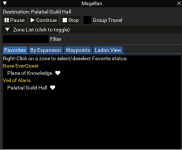
- You are now able to right-click on a zone and make it a favorite, which will then make it show up in the favorite tab. Favorites are indicated by a
Favorites can be filtered just like any other list (just in case you have a metric ton of favorites). Favorites not enabled for the "Ladon View" yet.
- Say goodbye to the flat list of zones. I've removed it as feedback seemed to indicate that the zones by expansion were more useful.
- Fixed a bug where you couldn't filter on...
Read the rest of this update entry...
everquestmann
Member
@Coldblooded Keep up the good work bud!
- Commits
- 192
Coldblooded updated Magellan - Travel Utility with a new update entry:
Introducing "Waypoints" Functionality
Read the rest of this update entry...
Introducing "Waypoints" Functionality
Provides the ability to use your existing MQ2Nav Waypoints and add new waypoints to MQ2Nav from the Interface. Waypoints are fully functional, but still a work in progress, as I plan to add functionality to allow you to remove MQ2Nav waypoints through the UI at a later date.
Cleaned up a small bug with Ladon View that did not display the Destination zone correctly, or allow you to pause/continue your route.
Added a Map Icon to the Application Header. If nothing else, this feature alone...
Read the rest of this update entry...
I used this nice tool to get around for the anniversary. Only in the Landon-tab I could see any zones in the list. The other two tabs have been blank.
Nevertheless it worked well for me and I like it. The background color doesn't fit my UI.
Is there a way to change background color and/or opacity?
Nevertheless it worked well for me and I like it. The background color doesn't fit my UI.
Is there a way to change background color and/or opacity?
- Commits
- 192
The lists being blank is interesting. Did you install with installer or by hand? The non-landon lists require a file in the lib directory that the installer does for you. zones.LuaI used this nice tool to get around for the anniversary. Only in the Landon-tab I could see any zones in the list. The other two tabs have been blank.
Nevertheless it worked well for me and I like it. The background color doesn't fit my UI.
Is there a way to change background color and/or opacity?
installer activating "Watch"
- Commits
- 192
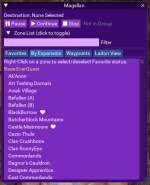
@Dragonslayer - want to confirm you see the 4 tabs listed above. "Favorites, By Expansion, Waypoints, Ladon View" - they might be in a different order as they are movable, but you should see these 4 tabs with the latest build. I removed the flat list a while ago, which makes me think something is wrong with your installed files.
Launched it some 30 minutes ago for my evening session, now all looks like I would expect it. By Expansion shows the tree view like yyour screenshot above, ladon view like your screenshot at the top.
Maybe just some kind of hickup on first launch?
Maybe just some kind of hickup on first launch?
I noticed while trying to get to
- Dragon Necropolis (Scars of Velious) from the Guild Hall it take you to the wrong Dragon Necropolis, whereas if you try to get to it from PoK you arrive at the proper destination.

The Lua window oddly keeps placing my cursor in the beginning of the line whenever I type a letter, which means when I type 'c-a-b' it puts it into the search as 'bac'. Any ideas?
Doing a /reload fixed it, but... just odd.
Doing a /reload fixed it, but... just odd.

Dragonator
Active member
I need some help. When I am in PoK and choose to go to Fungus Grove I end up in Shadow Haven with a message cannot path to echo caverns-3.
Could someone tell me what file to update to use echo caverns-1 instead of 3 ?
The loc for echo 1 is 358.23 1800.74 -54.57
The loc for echo 3 (I think) is -638.80 192.52 -162.53
Could someone tell me what file to update to use echo caverns-1 instead of 3 ?
The loc for echo 1 is 358.23 1800.74 -54.57
The loc for echo 3 (I think) is -638.80 192.52 -162.53
From PoK, could not choose Katta, nor my end destination, Zhisza. Showed me this error:
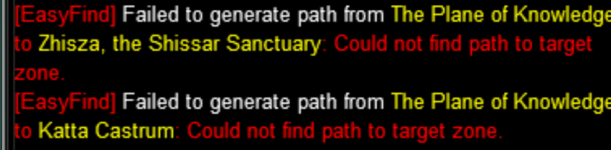
Since its been forevor...I had to use the zone tool and actually see I needed Tox to get there.. :P so I saved it if it helps you any to get it. I know the error could be a weird random thing on my end, but if its not, now you know GI Joe !
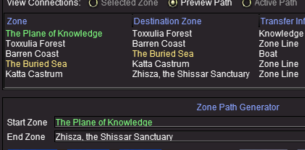
Since its been forevor...I had to use the zone tool and actually see I needed Tox to get there.. :P so I saved it if it helps you any to get it. I know the error could be a weird random thing on my end, but if its not, now you know GI Joe !

- Commits
- 2
Cause nav doesn't support getting on the boat.From PoK, could not choose Katta, nor my end destination, Zhisza. Showed me this error:
View attachment 41509
Since its been forevor...I had to use the zone tool and actually see I needed Tox to get there.. :P so I saved it if it helps you any to get it. I know the error could be a weird random thing on my end, but if its not, now you know GI Joe !
View attachment 41508
- Commits
- 2
Small thing I noticed when Trying to use the filter for Guild Hall. Didn't find my guidhall
Great Job with the script. Awesome Script. I love it.
Code:
guildhalllrg = {
         'Palatial Guidhall',
         'Grand Guild Hall'
      }
Great Job with the script. Awesome Script. I love it.

Thank you Cannon for pointing that out. I just set guidhall to favorites and I am a happy traveler now. I always zoned into the lobby and manually moved to my guidhallSmall thing I noticed when Trying to use the filter for Guild Hall. Didn't find my guidhall

Just wanted to say thank you for this @Coldblooded Very much enjoying the easy of this Lua for travels!
-Taz
-Taz
- Commits
- 192
What? You don't live in a GUID hall? lolSmall thing I noticed when Trying to use the filter for Guild Hall. Didn't find my guidhall
Code:guildhalllrg = { 'Palatial Guidhall', 'Grand Guild Hall' }
Great Job with the script. Awesome Script. I love it.
Thanks for the catch, I'll get an update out.
- Commits
- 192
Coldblooded updated Magellan - Travel Utility with a new update entry:
Fixes Incorrect Spelling of Palatial Guildhall
Read the rest of this update entry...
Fixes Incorrect Spelling of Palatial Guildhall
Happy Traveling!
Read the rest of this update entry...
- Commits
- 2
Any way to get the Waypoints to load in guildhalllrg_intColdblooded updated Magellan - Travel Utility with a new update entry:
Fixes Incorrect Spelling of Palatial Guildhall
Read the rest of this update entry...
Edit: Quick fix is I copied my waypoints guildhalllrg in the mq2nav ini and pasted it renaming guildhalllrg to guildhalllrg_int
Last edited:

- Commits
- 2
That is most likely a navmesh issue. This script just sends the command to easyfind and there is where the issue lies for this problem. Could not find path to destination (-724.25, 17.25, -445.05)Found an issue - when in Tower of Solusek Ro and trying to go to PoK, it gives an error referring to PoFire..
View attachment 42343
View attachment 42344
-Taz
Edit: Apparently there is no zone out if you don't have a key to get through the tower to pofire.
Last edited:
- Commits
- 2
- Commits
- 192
You're not the only one. It's on a back burnerThe more I use it the more I love it. Nothing against the purple, but seems to give me an eye sore. Just a wish list thing. Be nice to have options for the color scheme.

- Commits
- 2
Still baffled at why the Palatial Guild Hall won't stay in my favorites list, I added several times and ended up with an ini file like this but it still doesn't show in the favorites. Thought it might have had something to do with toons sharing an ini file, but I set it up to create Magellan_ToonName.Config.ini for each toon but still no go.
Edit: Must have something to do with pulling zone names from the zone file. This was the bugger
Code:
[Favorites]
1=Plane of Knowledge
2=Palatial Guild Hall
3=The Guild Lobby
4=Palatial Guild Hall
5=Palatial Guild Hall

[Magellan]
group=false
Edit: Must have something to do with pulling zone names from the zone file. This was the bugger
Code:
 guildhalllrg = {
         'Palatial Guild Hall',
         'Grand Guild Hall'
      }
Last edited:
- Commits
- 192
I do...
Normally a zone short name is associated with a more human readable long name. So things like:
But, in the case of those fancy guild halls, both are associated with same short name like this:
So in this case guidhallrg is associated with a table that has two values, not a string value.
In the code for the Favorites tab, we compare the name of the zone and see if it's in the Favorites from your settings file here:
We're expecting zone.name to be a string, and in the case of these fancy Guild Halls, it's a table. So I need to change the comparison to take into account it could be a table and search thru the values in the table.
Normally a zone short name is associated with a more human readable long name. So things like:
Code:
thuledream = 'Fear Itself'But, in the case of those fancy guild halls, both are associated with same short name like this:
Lua:
      guildhalllrg = {
         'Palatial Guildhall',
         'Grand Guild Hall'
      }
So in this case guidhallrg is associated with a table that has two values, not a string value.
In the code for the Favorites tab, we compare the name of the zone and see if it's in the Favorites from your settings file here:
Lua:
if ((#search_term > 2 and string.find(zone.name:lower(), search_term:lower())) and zone.favorite) or #search_term < 1 and zone.favorite thenUsers who are viewing this thread
Total: 2 (members: 0, guests: 2)
Share: